
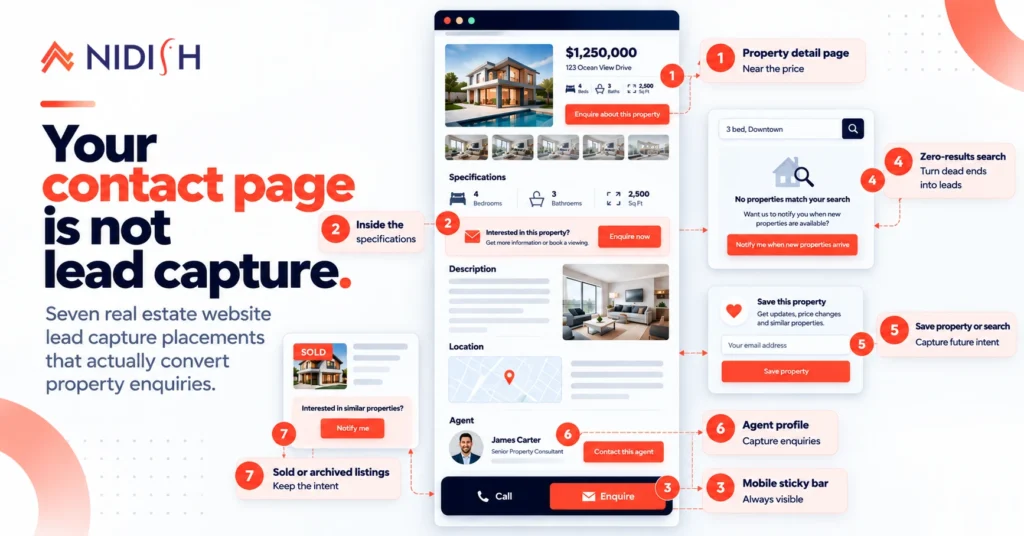
Most real estate websites have one enquiry form, sitting on a contact page, asking for a name, an email, a phone number and a message.
That form is not real estate website lead capture. It is a mailbox. It catches the small number of visitors already determined enough to go looking for it, and it misses everyone else, including the person who spent eleven minutes on a single property and then left.
Property enquiries are not like other B2B leads. The intent is high, the window is narrow, and the buying cycle can run for a year. That combination means placement matters more than copy, and it means the moments worth capturing are not the ones most sites capture.
Here are seven that work, four that quietly lose you leads, and what to do with the data once it arrives.
Table of Contents
1. On the property detail page, before the specifications
The highest-intent moment on any property website is someone looking at one specific property.
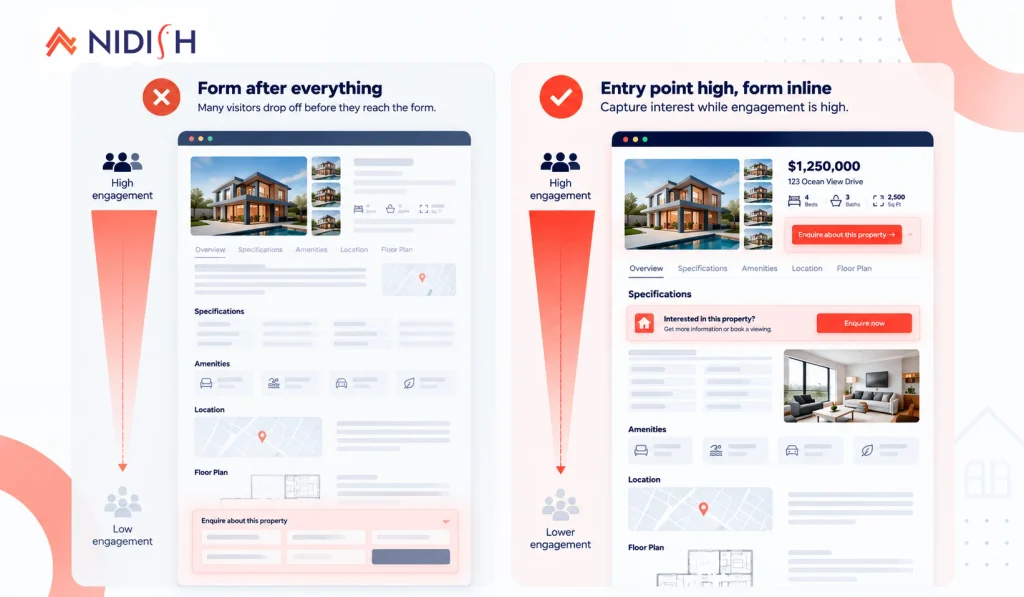
Almost everyone puts the enquiry form at the bottom of that page, after the gallery, the specs, the amenities, the map and the description. By then a substantial share of visitors have left, and the ones who remain have already decided.
Put a compact enquiry option high on the page, near the price and the agent. Not a full form, a single clear action: “Enquire about this property” or “Book a viewing.”
The full form can live further down. The entry point should be visible without scrolling.
2. Inline within the specifications, not after them
People read property specs. They scroll the gallery, check the bedroom count, look at the square footage, scan the amenities.
They do not reliably scroll past that block. Content placed after the specs is content a lot of visitors never see.
A single inline prompt sitting between the specifications and the description converts noticeably better than the same prompt below both, because it sits inside the thing people are actually reading.
3. A sticky contact bar on mobile
Most property browsing happens on a phone. On mobile, a form at the bottom of a long property page is effectively hidden.
A slim sticky bar at the bottom of the viewport with one or two actions, call and enquire, solves this. It occupies almost no space and it is permanently available.
Two rules: keep it to a maximum of two actions, and make the phone number tap-to-call. A real estate enquiry from a mobile visitor who has to copy a number into their dialler is a lead you had and lost.
4. The zero-results state on property search
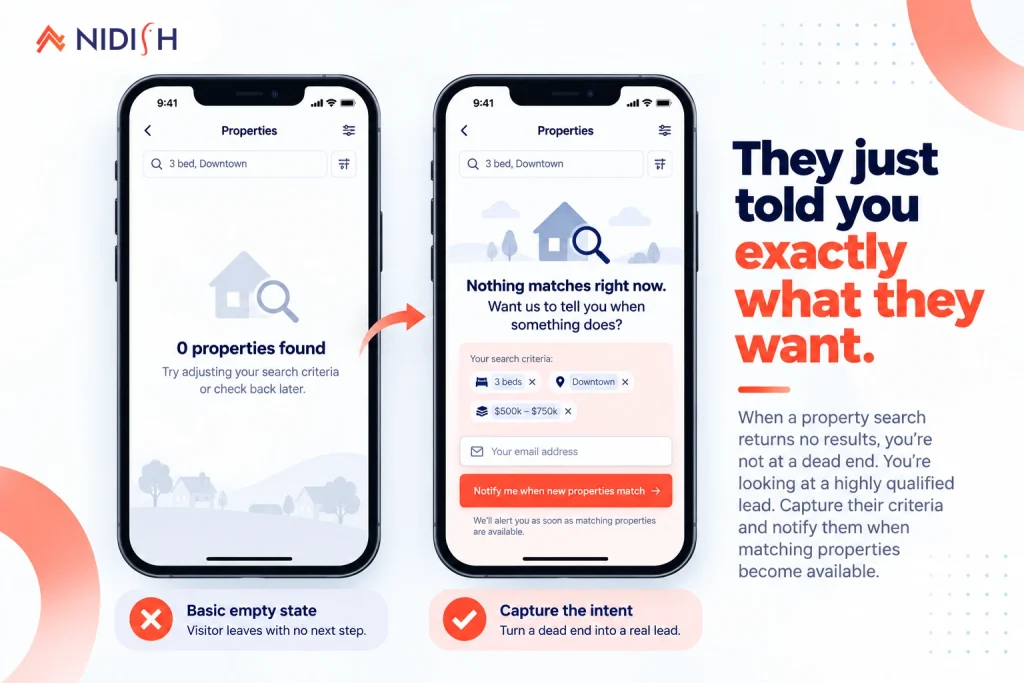
This is the single most wasted moment on real estate websites, and almost nobody does anything with it.
Someone used your search. They set filters, they had specific requirements, they hit enter, and you showed them nothing. That person told you exactly what they want and received a dead end.
What should happen: acknowledge the gap, offer to notify them, and pre-fill the form with the criteria they already entered. “Nothing matches right now. Want us to tell you when something does?” with the filters carried into the form.
That is a higher-quality lead than almost anything on the site, because it arrives with the requirements attached. Treat an empty search result as a capture opportunity rather than an error state. Property search behaviour at scale covers the mechanics of building the search itself.
5. Saved properties and search alerts
Real estate has a long buying cycle. A visitor browsing today may transact in eight months. A form that only captures people ready to act now ignores most of your audience.
Saved properties and saved searches solve this, and they are genuinely wanted rather than tolerated. Someone saving a property is doing it for themselves, not for you. The email capture is incidental to the value.
This is the highest-volume capture mechanism on a well-built property site, and it produces a list segmented by stated preference, which is considerably more useful than a general newsletter list.
6. Agent profile pages
Underrated and consistently under-optimised.
A visitor on an agent’s profile page has moved past “which property” to “which person”. That is a different and often warmer intent. They are evaluating whether to deal with this human.
Give every agent profile a direct enquiry path and a direct phone number. Not a generic site form, a form that routes to that agent and records which agent it came from.
Agents also share their own profile links constantly, so these pages get traffic from outside your site that never touches your homepage or your search.
7. Sold and archived property pages
Most sites delete sold listings or leave them to 404. Both are mistakes, for two reasons.
Those pages have been live longest, so they carry the most accumulated links and often keep receiving traffic for months or years. And the person landing on a sold property is self-selecting as interested in exactly that kind of property in exactly that area.
Keep the page. Mark it clearly as sold, because pretending otherwise is dishonest and it damages trust. Then offer the obvious next step: “This property sold in March. Want to know when similar properties in the area come up?”
That is a warm lead arriving on a page most firms treat as waste.
Four placements that quietly lose you leads
Gating property details behind a form
Some sites hide the address, the full gallery, or the price behind a registration wall. It increases form fills and reduces enquiries, because the people who matter most leave rather than register. Portals can get away with this because they have inventory you cannot get elsewhere. Your website cannot.
Exit-intent popups on property pages
An exit-intent popup on a blog post is mildly annoying. On a property page it interrupts someone mid-consideration on a high-value decision, and it reads as desperate. Use them on content pages if you must. Keep them off listings.
Requiring a phone number on first contact
Every required field costs you submissions, and phone number costs more than most, because people know what it means. Make it optional. An email enquiry you can respond to beats a phone field that stopped someone submitting.
One generic “contact us” form for everything
If a property enquiry arrives through the same form as a careers question and a supplier query, your agents are triaging a shared inbox. Property enquiries need their own path, routed to the right agent, recording which property prompted them.
What makes this work better on HubSpot
Placement is most of the job. Where the data lands is the rest.
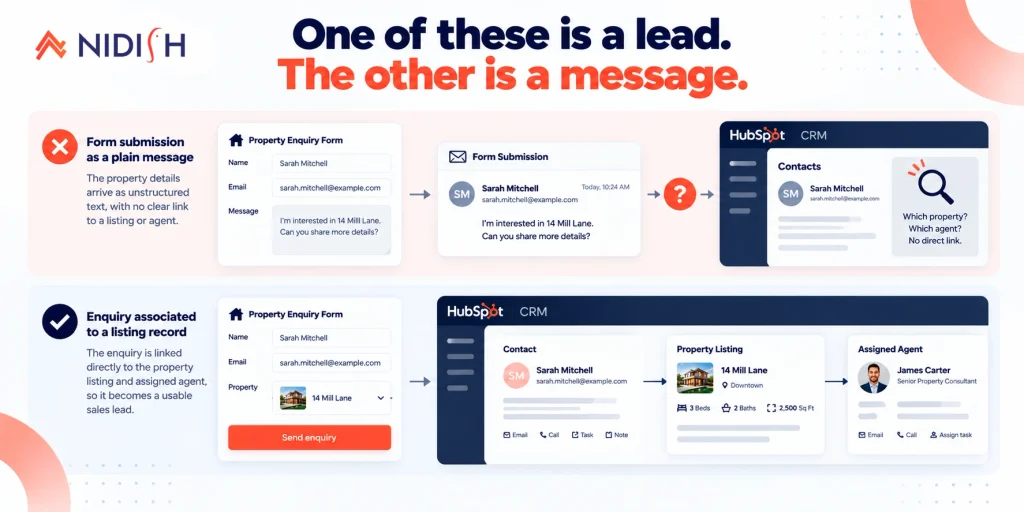
On a typical real estate site, an enquiry arrives as a form submission with the property address typed into a message field. The agent reads an address and searches for it manually.
When properties are CRM records in HubSpot’s Listing object, the enquiry can associate to the specific listing. The agent opens the contact and sees the property. That association is what turns a form submission into usable sales data, and it is the difference between lead capture and lead management.
Three things follow from it:
Routing becomes automatic
The enquiry goes to the listing’s assigned agent without anyone forwarding an email.
Follow-up can be timed
A task with an SLA, created the moment the enquiry lands. Property enquiries decay fast and response time is the most controllable variable you have.
Saved search alerts become workflows
Someone asked for three-bedroom houses under $500,000 in a specific area. When a matching listing is created, they can be notified automatically, because both the preference and the listing are CRM data.
What to measure
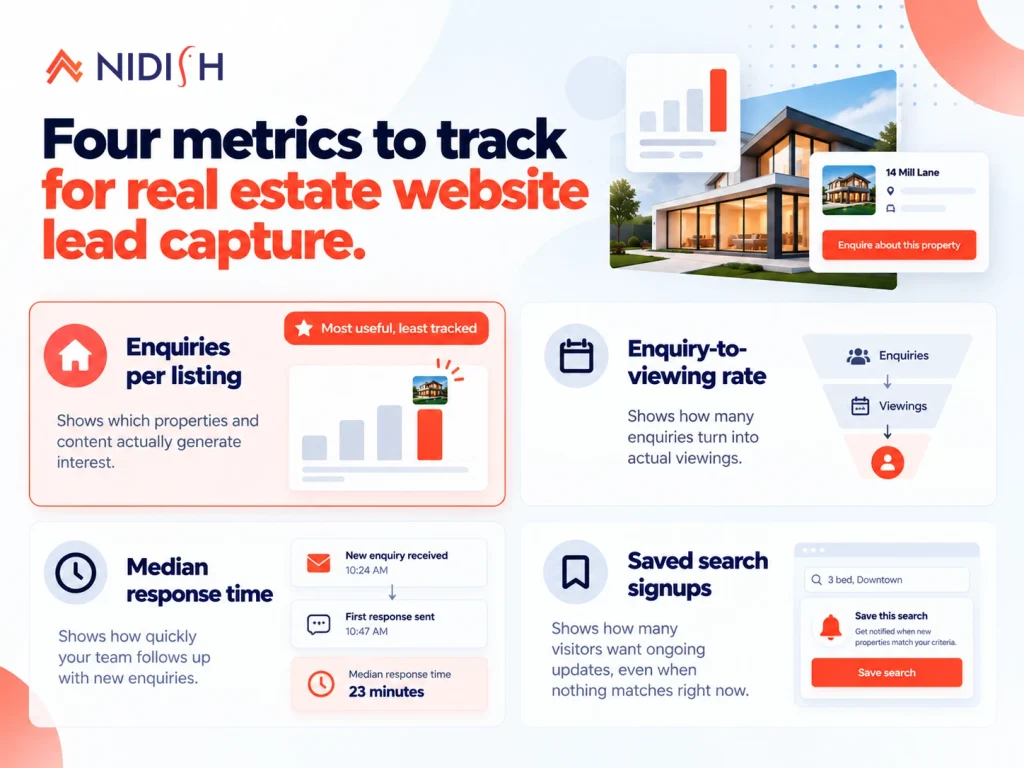
Four numbers. Most real estate sites track none of them.
| Metric | Why it matters |
| Enquiries per listing | Identifies properties getting traffic but no enquiries, which is usually a pricing or photography problem rather than a website problem |
| Enquiry-to-viewing rate | Measures follow-up quality, not website quality |
| Median response time | The most controllable variable in the whole funnel |
| Saved search signups | Your pipeline for the next six to twelve months |
The first one is the most useful and the least tracked. A property with high page views and zero enquiries is telling you something specific, and it is rarely about the form.
Where this fits in a build
None of this requires custom development if your theme is built for property businesses. Enquiry placement across listing pages, detail pages and agent pages is a structural decision made when the theme is built, not a plugin you add afterwards.
Estate Pro ships with enquiry blocks positioned across those page types and agent profile layouts with their own contact paths, built on the Listing object so enquiries associate to properties. It is currently $1 rather than $499.
If you are weighing themes generally, our nine questions on buying a HubSpot theme is the more useful starting point. If you are moving an existing property site across, that is WordPress to HubSpot for real estate.
For saved search alerts and custom routing logic beyond what a theme provides, that is HubSpot development work.
Frequently asked questions
Where should enquiry forms go on a real estate website?
The highest-converting placements are a compact enquiry entry point high on each property detail page near the price, an inline prompt within the specifications block, a sticky contact bar on mobile, the zero-results state of property search, saved property and saved search capture, agent profile pages, and sold or archived property pages. A single form on a contact page captures only visitors already determined enough to look for it.
Why is my real estate website not generating leads?
The most common causes are placement rather than copy. Enquiry forms sitting below the fold on property pages, no capture on the zero-results search state, no saved search option for visitors who are not ready yet, generic contact forms instead of property-specific enquiries, and required phone number fields that suppress submissions. Check enquiries per listing before changing form copy.
Should I gate property details behind a form?
Generally no. Gating addresses, galleries or prices increases form fills and decreases real enquiries, because serious buyers leave rather than register. Property portals can gate because they hold inventory you cannot find elsewhere. An individual agency website does not have that leverage.
What is the best way to capture leads who are not ready to buy?
Saved properties and saved search alerts. Real estate buying cycles often run six to twelve months, so a site that only captures people ready to act today misses most of its audience. Saved searches also produce a list segmented by stated preference, which is more actionable than a general mailing list.
Should sold properties stay on a real estate website?
Yes. Sold property pages have usually been live longest, so they carry the most accumulated backlinks and continue receiving traffic. Mark the property clearly as sold, then offer to notify the visitor when similar properties become available. Deleting these pages loses both the link equity and a warm, self-selecting audience.
Do I need a phone number field on property enquiry forms?
Make it optional rather than required. Every required field reduces submissions and phone number suppresses more than most, because people understand what providing it means. An email enquiry you can answer within the hour is worth more than a phone field that prevented a submission.
How quickly should you respond to a property enquiry?
As fast as you can sustain, because response time is the most controllable variable in the funnel and property intent decays quickly. The practical approach is an automated task with an SLA created the moment the enquiry lands, assigned to the agent attached to that listing.
The short version
Real estate website lead capture is mostly a placement problem rather than a copy problem. Seven placements worth having:
- High on the property detail page, before the specs
- Inline within the specifications block
- Sticky contact bar on mobile
- The zero-results search state
- Saved properties and saved search alerts
- Agent profile pages
- Sold and archived property pages
Then make sure the enquiry associates to the property, because a form submission that does not identify what it is about is a message rather than a lead.
If you want someone to look at where your current enquiry paths sit, book a 30 minute call. Bring your enquiries-per-listing numbers if you have them, and if you do not, that is usually the first thing to fix.


 Blog
Blog Case Studies
 Career