
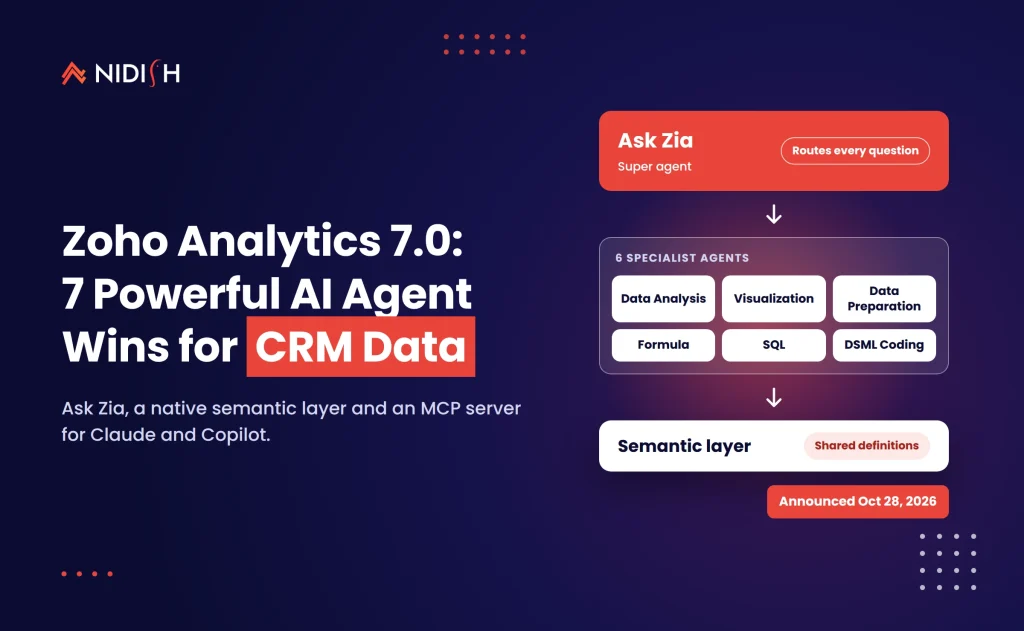
Most AI dashboards fail for a boring reason. Ask the model for revenue, and it has to guess which of your three definitions you meant. On October 28, 2026, Zoho shipped Zoho Analytics 7.0 and rebuilt the product around that exact problem. It is now pitched as an agentic analytics platform, with a super agent, six specialist agents, a native semantic layer and an MCP server that lets Claude and Microsoft Copilot query your data.
That matters if your CRM, ERP and billing data live in different systems. It matters even more if your leadership team already asks an AI assistant for numbers. This guide covers what changed, which parts are live today, where the real gotchas are, and seven practical wins for HubSpot, Salesforce, Zoho CRM and NetSuite teams.
Table of Contents
Key takeaways
- Zoho announced Zoho Analytics 7.0 on October 28, 2026. Ask Zia now acts as a super agent that coordinates six specialist Zoho Analytics AI agents.
- The biggest change is not the agents. It is the native ontology, semantic layer and scoping, which give every agent the same business definitions.
- A Zoho Analytics MCP server, hosted or self-managed, lets outside assistants such as Claude and Microsoft Copilot work with your analytics data.
- Zoho says pricing is unchanged. Every plan now includes monthly Zoho LLM credits plus a one-time pool for external models.
- Features are rolling out gradually by region. Some previews take four to eight weeks, and the on-premise edition follows in Q1 2027.
What Zoho Analytics 7.0 actually changed
Zoho Analytics 7.0 turns a self-service BI tool into an agentic analytics platform. Instead of building every report by hand, you ask Ask Zia a business question, and it routes the work to specialist agents that prepare data, write formulas, build charts or run models. Zoho listed two press releases about the launch on its press page dated October 28, 2026.
The release has four parts. First, a multi-agent layer led by Ask Zia. Second, a trusted business context layer made of an ontology, a semantic layer and scoping rules. Third, an MCP server, a CLI and a Claude plug-in for working outside the Zoho interface. Fourth, governance tools such as a data catalog, a sandbox, data policies and AI observability.
Zoho’s own Zoho Analytics 7.0 what’s-new page describes the product as “now an Agentic Analytics Platform.” It also lists Code Studio, Jupyter notebooks, pixel-perfect reports, scenario analysis and anomaly detection.
Connectors grew as well. Coverage by Elets CIO on October 31, 2026 reports more than 30 new connectors on top of the 500-plus already supported, including SAP S/4HANA, PayPal and Twilio.
Ask Zia and the six Zoho Analytics AI agents
Ask Zia is now a super agent. It takes your question, decides which specialist should handle each step, and returns one answer. Zoho’s pricing page lists the same lineup under “AI Agents (Ask Zia).”
Here is what each agent does, based on Zoho’s materials and the Elets CIO report:
- Data Analysis Agent answers business questions with descriptive, diagnostic and prescriptive insights.
- Visualization Agent builds charts and dashboards from a prompt.
- Data Preparation Agent cleans, joins and reshapes data before analysis.
- Formula Agent writes calculated metrics and formulas.
- SQL Agent writes and runs SQL queries against your tables.
- DSML Coding Agent trains and runs classification, regression and forecasting models in Python inside Code Studio.
You can also build custom agents. Admins choose a model vendor per agent: Zoho’s own LLM, OpenAI models, or your own API key.
The design is sensible. One general chatbot that tries to do everything tends to guess. Specialists that hand work to each other are easier to test, and easier to audit when an answer looks wrong.
But be clear about what an agent can’t fix. If your HubSpot deal stages mean one thing to sales and another to finance, the agent will report the confusion faster. It won’t resolve it.
The semantic layer: why it matters more than Ask Zia
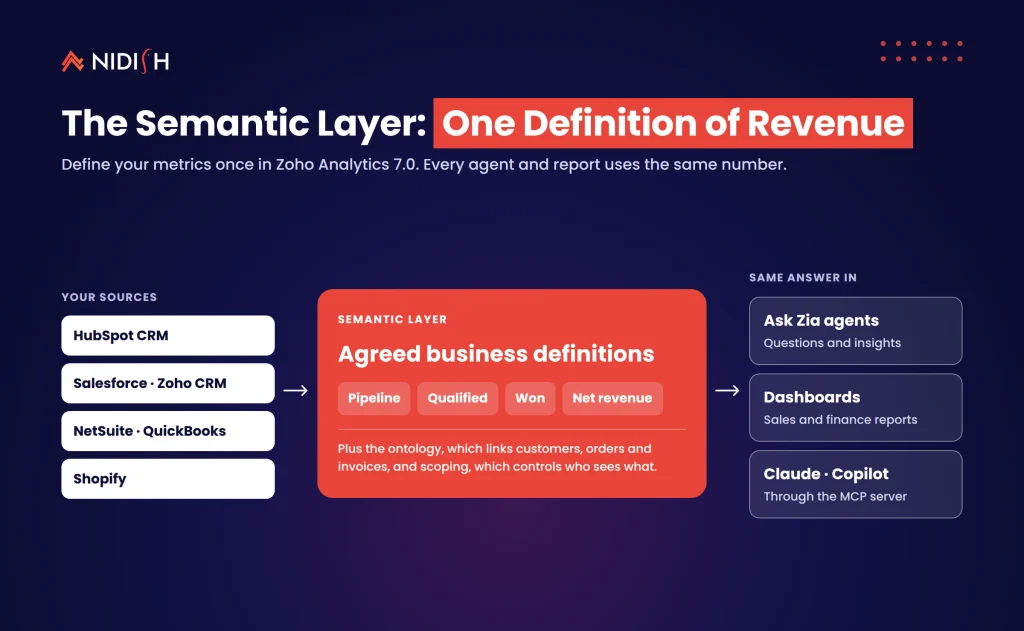
The semantic layer is the most important part of Zoho Analytics 7.0 for CRM and ERP teams. It is a shared business glossary that every agent and every report uses. That means “qualified pipeline” or “net revenue” gets one definition, written once, instead of a dozen versions buried in a dozen reports.
Zoho pairs it with two other controls. The ontology maps how entities such as customers, orders and vendors relate to each other. Scoping limits an agent to the data and dashboards a given team should see. According to Elets CIO, both the ontology and semantic layer are now native, so you don’t need a separate data warehouse to define them.
The mistake we see constantly is teams buying AI reporting before they agree on definitions. The AI then gives three confident answers to the same question, and leadership stops trusting all of them.
If you have ever had sales and finance argue about last quarter’s revenue, this layer is where that argument ends. It is also the work that takes the longest, because it is a business decision, not a software setting.
Zoho Analytics MCP server: Claude, Copilot and your CRM
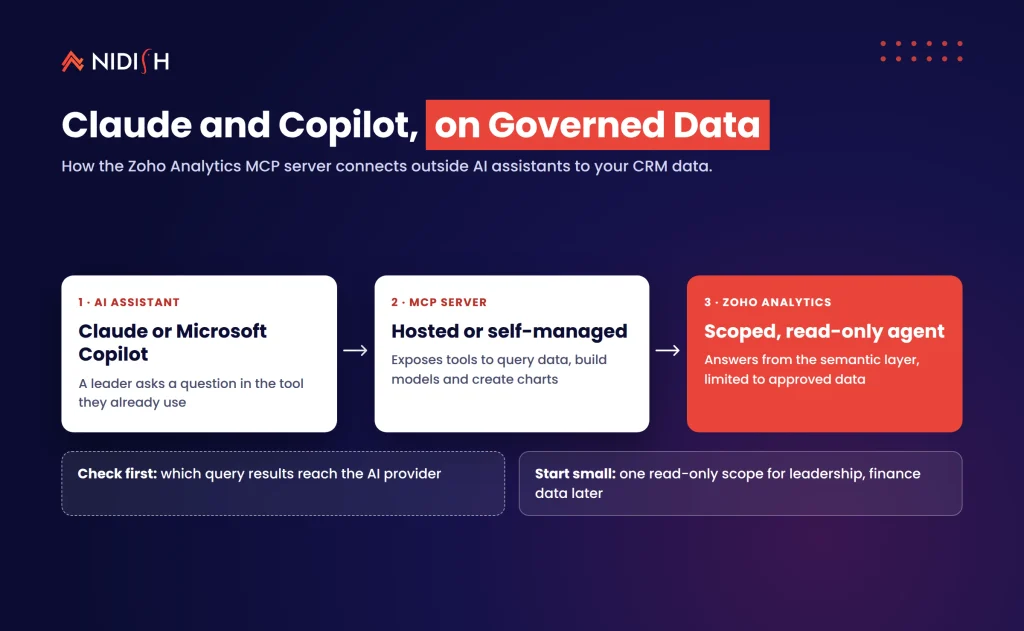
The Zoho Analytics MCP server lets outside AI assistants use your analytics data through the Model Context Protocol. The Model Context Protocol is described by its maintainers as “an open-source standard for connecting AI applications to external systems.”
Zoho says the server exposes tools to manage data, build data models, create visualizations and access semantic models. It comes as a hosted remote server or an on-premise setup. Zoho also offers a connector for Claude Desktop and a plug-in for the Claude CLI, and says the server works with other compatible clients such as Microsoft Copilot.
This is the feature most teams will underestimate. Your COO might already ask Claude to summarize the week. With MCP, Claude can pull a governed number from Zoho Analytics instead of guessing from a pasted spreadsheet.
There is a catch, and Techweez flagged it on November 2, 2026. Connecting an outside service such as Claude may share relevant query results with that provider. Zoho says customer data is not used to train its own AI models. Third-party providers set their own terms, so review them before you connect anything to finance data.
7 powerful wins for CRM and ERP data
These are the seven places we expect Zoho Analytics 7.0 to pay off first for revenue teams. Each one depends on clean source data and agreed definitions, so treat the order as a roadmap, not a menu.
Win 1: One pipeline definition across HubSpot and Zoho CRM
Many mid-market teams run more than one CRM after an acquisition or a regional split. Zoho Analytics lists both HubSpot CRM and Salesforce CRM among its sales connectors, alongside Zoho CRM.
The win: define “pipeline,” “qualified” and “won” once in the semantic layer. Then every agent and dashboard reports the same number, whichever CRM a deal came from.
Win 2: Lead-to-cash reporting with NetSuite and QuickBooks
Zoho’s pricing page lists Oracle NetSuite under premium ERP connectors and QuickBooks under finance connectors. That makes a joined view of CRM deals and ERP invoices possible without a separate warehouse.
The win: use the ontology to link a CRM deal to its sales order and invoice. Ask Zia can then answer “Which closed-won deals from Q3 still have no invoice?” We cover the wider pattern in our guide to unifying CRM, ERP and marketing automation for revenue.
Win 3: Claude and Copilot answers through the Zoho Analytics MCP server
Executives rarely open BI tools. They ask an assistant. The Zoho Analytics MCP server puts governed numbers inside the tools they already use.
The win: scope a read-only agent for leadership. Point Claude or Copilot at it through MCP, and limit it to approved dashboards. Leaders get answers in their assistant, and analysts stop fielding the same five questions every Monday.
Win 4: Forecasts from Zoho Analytics AI agents, no data scientist needed
The DSML Coding Agent trains classification, regression and forecasting models in Python inside Code Studio. For a sales team, that could mean a churn-risk score or a deal-close forecast built from your own history.
The win: start with one model, such as renewal risk, and compare its output against what actually happened last quarter. Keep a human review in the loop until it earns trust.
Win 5: Safer AI with scoping and data policies
Scoping, data policies and AI observability are the controls that let you say yes to AI reporting without a security review stalling it for months. They limit what each of the Zoho Analytics AI agents sees and record what it did.
The win: create separate scopes for sales, finance and HR before anyone gets agent access. Law firms and healthcare teams should do this first, as we explain in our post on AI governance for law firms.
Win 6: Shopify and ecommerce data next to CRM data
Shopify sits among the listed ecommerce connectors. Joining order data with CRM lifecycle stages answers questions that neither tool answers alone.
The win: ask which campaigns produced repeat buyers, not just first orders. That single view often changes where the marketing budget goes.
Win 7: Fewer one-off spreadsheet requests
The Formula Agent and SQL Agent in Zoho Analytics 7.0 handle the requests that eat analyst time: a new margin calculation, a filtered export, a quick cohort cut.
The win: let business users self-serve the simple asks through Ask Zia. Your analysts then spend their week on the semantic layer and data quality, which is where the real value is.
If you are weighing this for your own stack, the hard part is the data model and integrations, not the AI. Talk to our integration team about connecting HubSpot, Zoho CRM or NetSuite data the right way before you switch on agents.
Zoho Analytics 7.0 vs building your own AI BI stack
Zoho Analytics 7.0 is a strong fit for teams that want agentic analytics without running a data warehouse. It is a weaker fit for teams that already have a mature warehouse and a dedicated data team. The table below shows how we would decide.
| Situation | Better choice | Why |
|---|---|---|
| Already on Zoho One or CRM Plus | Zoho Analytics 7.0 | Zoho says the agentic features are included in those bundles |
| Mixed CRMs, no data warehouse, small data team | Zoho Analytics 7.0 | Native semantic layer and 500-plus connectors cut setup work |
| Mature warehouse with dbt or a similar semantic model | Keep your stack, test MCP access | Two semantic layers create two sources of truth |
| Strict EU or UK data residency | Test carefully, plan for BYOK | Zoho lists OpenAI access via its key system as BYOK-only in the EU and UK |
| Heavy on-premise requirements | Wait for Q1 2027 | Zoho says the on-premise edition gets 7.0 features in Q1 2027 |
| HubSpot-only team with simple reports | HubSpot reporting may be enough | Adding a BI tool adds sync and cost overhead |
If you are still deciding between building and buying more broadly, our post on composable CRM and AI-ready stacks walks through the trade-offs.
What Zoho Analytics 7.0 costs and how long it takes
Zoho says pricing for Zoho Analytics is unchanged with this release. According to Zoho’s pricing page, every plan includes monthly Zoho LLM credits for Ask Zia and its agents, plus a one-time credit pool for external models. Add-on credits are available for heavier use. Check current plan prices with Zoho at the time of purchase, because they vary by region and billing cycle.
The software is the cheap part. From the projects we work on, these effort ranges are typical. Your numbers will depend on how clean your source data is.
- Connect one CRM and build core dashboards: one to two weeks.
- Join CRM with ERP data (NetSuite or QuickBooks): two to four weeks, mostly mapping and reconciliation.
- Define the semantic layer for revenue metrics: two to six weeks, because it needs sales, finance and leadership sign-off.
- MCP access for Claude or Copilot with scoping: a few days once the semantic layer exists, longer if security review is involved.
Plan for the Zoho Analytics 7.0 rollout timing as well. Elets CIO reports that previews of the ontology, semantic model and pixel-perfect reporting will reach users globally over four to eight weeks. If a feature isn’t in your account yet, that is likely the reason.
Common mistakes to avoid
Switching on Zoho Analytics AI agents before cleaning the data
An agent working on duplicate accounts produces duplicate answers, only faster. Run a cleanup first, using a list like our CRM data migration checklist.
Skipping the semantic layer
Teams want the chat demo, not the glossary. Without agreed definitions, Ask Zia will give technically correct answers to the wrong question.
Giving every agent access to everything
Use scoping from day one. It is much harder to take access away than to grant it later.
Connecting Claude to finance data without a review
The Zoho Analytics MCP server is powerful, and query results may reach the AI provider. Decide which scopes are allowed outside Zoho, and write it down.
Ignoring regional AI limits
Zoho lists OpenAI access through its key system in the US, India, Australia, Japan, Canada and Singapore. EU, UK and Saudi Arabia customers need their own key, and China has no AI vendor access.
Running two semantic layers
If you already define metrics in a warehouse, don’t redefine them in Zoho without a plan for which one wins.
How Nidish approaches this
We start with the definitions, not the dashboards. We sit sales, finance and operations in one room, agree on six to ten revenue metrics, and write them into the semantic layer. Then we connect the source systems, reconcile one quarter of data against the books, and only then switch on Ask Zia and Zoho Analytics MCP server access with tight scopes. Our Zoho consulting vs DIY guide explains when you need help and when you don’t. For mixed stacks, our HubSpot integration services cover the CRM side of the sync.
Frequently asked questions
What is new in Zoho Analytics 7.0?
Zoho Analytics 7.0 adds Ask Zia as a super agent that coordinates six specialist agents, a native ontology and semantic layer, scoping controls, and an MCP server. Zoho announced it on October 28, 2026. It also adds a data catalog, sandbox, AI observability, a CLI, a Claude plug-in and more than 30 new connectors.
Does Zoho Analytics 7.0 cost more?
No, according to Zoho. Zoho says pricing is unchanged, and every plan now includes monthly Zoho LLM credits for Ask Zia and its agents. Plans also include a one-time credit pool for external models, with add-on credits for heavier use. Confirm current plan prices with Zoho before you buy.
Can I use Zoho Analytics with Claude?
Yes. Zoho offers a connector for Claude Desktop and a plug-in for the Claude CLI, both built on its Zoho Analytics MCP server. The same server works with other compatible clients such as Microsoft Copilot. Review the AI provider’s data terms first, because query results may be shared with that provider.
Does Zoho Analytics connect to HubSpot and NetSuite?
Yes. Zoho’s pricing page lists HubSpot CRM and Salesforce CRM among its sales connectors, Oracle NetSuite among premium ERP connectors, and QuickBooks among finance connectors. How often data refreshes depends on your plan, so check the refresh rate for your tier before you build time-sensitive reports.
When will Zoho Analytics 7.0 features reach my account?
Features are rolling out gradually across data centers and users. Elets CIO reports that previews of the ontology, semantic model and pixel-perfect reporting will reach users globally over four to eight weeks. Zoho says the on-premise edition gets the 7.0 capabilities in Q1 2027.
Are the agentic features included in Zoho One and CRM Plus?
Yes. Zoho’s what’s-new page says the new agentic features are available in Zoho bundles such as Zoho One and CRM Plus. Availability can still vary by feature, configuration, plan and data center, so check your account settings and AI settings to see which agents are switched on.
Where to start
Start your Zoho Analytics 7.0 rollout with a one-page list of the revenue metrics your leadership argues about most. Agree on each definition, then connect the CRM and ERP systems that feed them. Switch on Ask Zia and MCP access only after one quarter of data reconciles. That order keeps the AI honest.
If you want a second opinion, book a 30 minute call. We’ll tell you honestly whether you need Zoho Analytics 7.0, a tidy-up of your current CRM reporting, or nothing at all.


 Blog
 Case Studies
 Career