
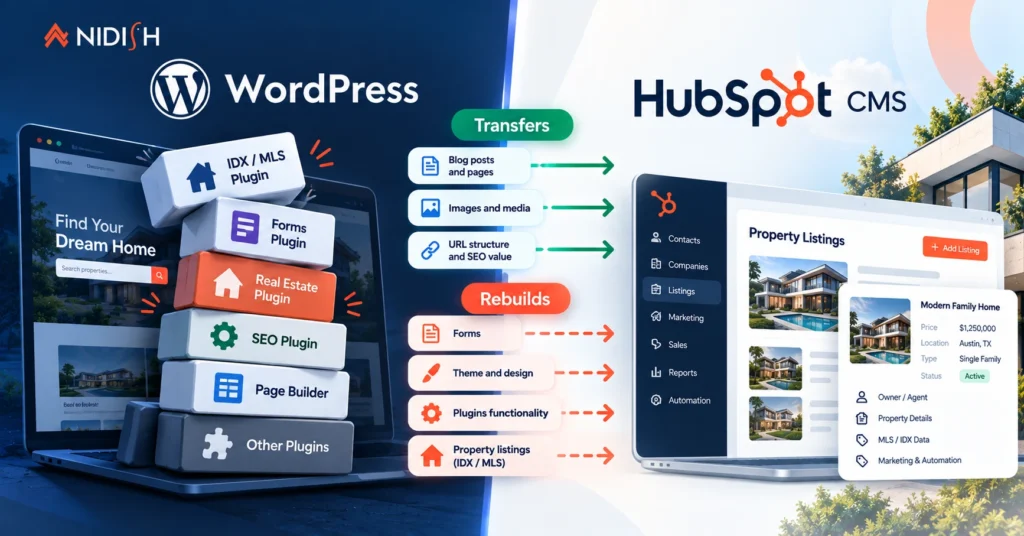
Most real estate firms that end up on HubSpot CMS arrive from WordPress. The WordPress to HubSpot real estate move is usually triggered by the same frustration: the website and the CRM are two separate systems, held together by a plugin, a form integration, and somebody manually checking that enquiries made it across.
The move solves that. It also breaks things, and the breakages are predictable enough that you should know them before you commit rather than discover them in week three.
This post covers what transfers cleanly, what has to be rebuilt, the one question that decides whether you should move at all, and what the sequence actually looks like.
Table of Contents
The short version
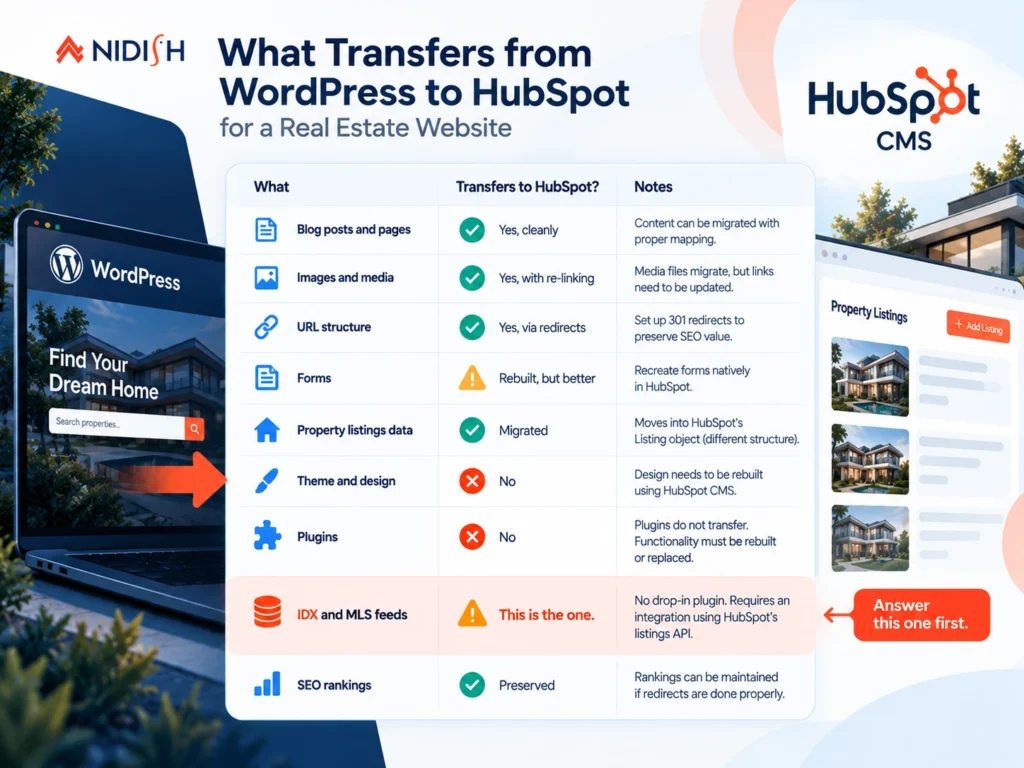
| What | Transfers? |
| Blog posts and pages | Yes, cleanly |
| Images and media | Yes, with re-linking |
| URL structure | Yes, via redirects. Do not skip this |
| Forms | Rebuilt, but better |
| Property listings data | Migrated, but into a different structure |
| Theme and design | No. Rebuilt |
| Plugins | No. Nothing transfers |
| IDX and MLS feeds | This is the one. See below |
| SEO rankings | Preserved if redirects are done properly |
Start here: the IDX question
Before anything else, answer this. It decides whether the rest of the conversation is worth having.
Where do your property listings come from?
If you enter them by hand, the WordPress to HubSpot for real estate move is straightforward and the rest of this post applies cleanly.
If they arrive from an MLS feed through an IDX plugin, stop and plan properly.
IDX is how brokers display MLS listings on their own websites, and access is governed by MLS membership and rules rather than by your web host. WordPress has a mature ecosystem of IDX plugins and services built for exactly this. HubSpot does not have an equivalent plugin ecosystem, because HubSpot does not work that way. There is no drop-in IDX plugin you install on HubSpot CMS the way you do on WordPress.
What exists instead is a route: HubSpot’s listings API supports create, update, and batch upsert operations, so a feed can be synced into the Listing object on a schedule. That is a real and workable architecture, and it produces a better result than a plugin does, because your listings end up as CRM records rather than website content.
But it is an integration project rather than a plugin install. Budget for it, or the migration stalls precisely where it matters most.
Practical advice: talk to your MLS about feed access and formats before you scope the website work, not after. And check current IDX options rather than assuming, because this part of the market moves.
What transfers cleanly
Blog posts and pages: Content migrates well. HubSpot has import tooling for WordPress content, and the structural mapping between a WordPress post and a HubSpot blog post is close enough that this rarely causes trouble.
Images and media: Files move into HubSpot’s file manager. Re-linking is the work, particularly for images embedded in post bodies with absolute URLs pointing at your old domain. Plan a find-and-replace pass.
URL structure: You can keep your existing URLs, and for a real estate site you usually should. This is a redirect exercise rather than a transfer, which brings us to the part that gets skipped.
The part everyone underestimates: redirects
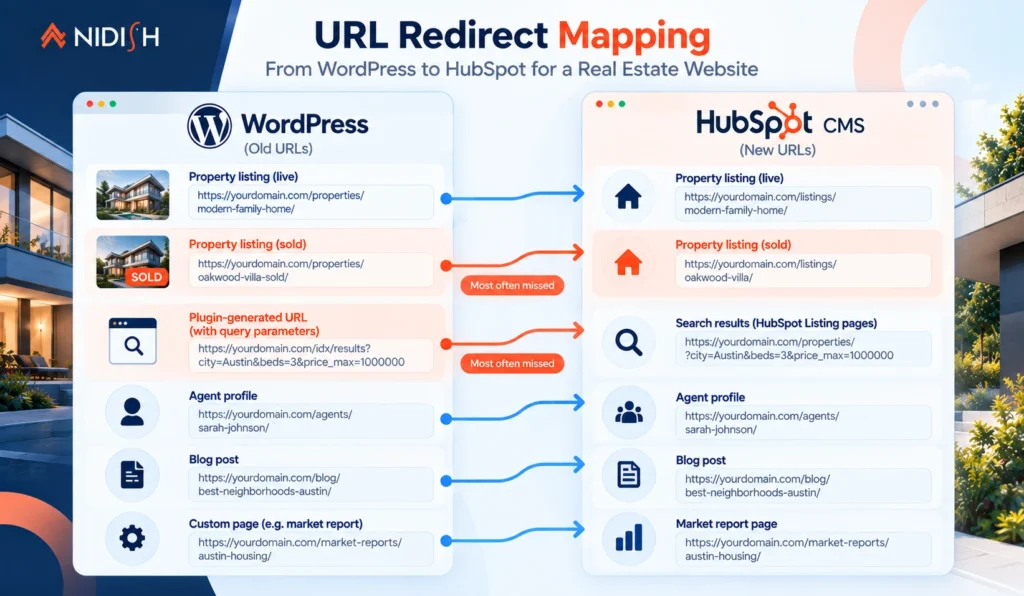
Property URLs accumulate backlinks. Portals link to them, local press links to them, agents share them, aggregators index them. A property page that has been live for three years is carrying link equity you cannot rebuild.
Every one of those URLs needs a 301 redirect to its new equivalent. Not to the homepage, not to a generic listings page, to the actual corresponding page.
Three specific traps on real estate sites:
Sold and archived properties: Teams routinely redirect only live listings and let sold ones 404. Those sold pages often carry the most accumulated links, because they have been live longest. Redirect them to the relevant category or a sold-properties archive rather than deleting them.
Plugin-generated URL patterns: IDX and property plugins generate their own URL structures, frequently with query parameters or nested paths that have no natural equivalent on HubSpot. Map these deliberately. This is usually the largest single chunk of redirect work.
Agent profile pages: Often overlooked and often well-linked, because agents share their own profile links constantly.
Our CRM data migration checklist covers the general discipline. For real estate specifically, the redirect map is the deliverable that determines whether you keep your rankings.
What has to be rebuilt
Be clear-eyed about this. Three categories rebuild entirely.
Your theme: WordPress themes do not port to HubSpot in any form. HubSpot themes are built with HubL, HubSpot’s templating language, against a different template and module architecture. You are choosing a new theme or building one.
Every plugin: HubSpot has no plugin system in the WordPress sense. Anything a plugin did for you, property search, listing display, agent directories, mortgage calculators, map integrations, is either native HubSpot functionality, a theme feature, a marketplace module, or custom development. Inventory your active plugins early and assign each one to a category. That list is usually the single most useful scoping document in the project.
Your forms: Rebuilt as HubSpot forms. This one is a genuine upgrade rather than a loss: submissions land directly on contact records, associate to the property enquired about, and can trigger workflows immediately. No plugin, no connector, no sync.
What changes for the better
Worth stating plainly, because the rebuild list above reads like a tax.
Property data becomes CRM data
On WordPress, listings live in a custom post type. They are website content, invisible to your sales process. On HubSpot they become records in the Listing object, which means an enquiry associates to the specific property, workflows can fire on price and status changes, and listing performance shows up in CRM reporting.
The website and the CRM stop being two systems
This is the reason most firms move. No connector to maintain, no sync to debug.
Hosting, security, and updates stop being your problem
No plugin update breaking your listings page on a Friday.
Performance becomes predictable
A typical WordPress real estate site runs a page builder, an IDX plugin, a slider plugin, a forms plugin, and a caching plugin to compensate for the other four.
The migration sequence
Roughly what this looks like when it goes well.
- Audit. Inventory every plugin, every template, every URL. Identify where property data comes from and in what format.
- Answer the IDX question. Scope the feed integration before anything else if one exists.
- Design the Listing object structure. Numeric fields numeric, dropdowns rather than free text for anything filterable, status separate from visibility, and a unique slug property created before import. This is the decision you cannot easily reverse. A2 covers it in detail.
- Choose the theme. Before content migration, because the theme’s module set shapes how content is rebuilt. Our nine questions on buying a HubSpot theme apply here.
- Migrate content. Blog posts, pages, media, with re-linking.
- Rebuild templates and pages against the new theme.
- Import listings into the Listing object.
- Build the redirect map and implement it. Every URL, including sold properties.
- Test property search and filtering against real data volume rather than a handful of test records. Property search behaves differently at scale.
- Launch, then monitor rankings and 404s weekly for the first month.
Steps 2, 3, and 8 are where projects fail. The rest is execution.
One subscription check before you plan anything
Property listing pages on HubSpot are dynamic pages, and HubSpot makes dynamic pages available on Content Hub Professional and Enterprise. If your migration plan assumes a lower tier, the property listing pages will not generate.
Worth confirming in your own portal early, because it affects budget rather than just build.
Should you actually move?
The honest answer is not always.
Stay on WordPress if
your IDX integration is working well, your site performs, and your team is comfortable maintaining it. A functioning WordPress real estate site is not a problem that needs solving. Moving costs real money and buys you integration you may not need.
Move to HubSpot if
you are already running HubSpot as your CRM and maintaining a bridge between it and your website, or you want property enquiries to associate to property records without custom work, or you are spending meaningful time on plugin maintenance and security.
The clearest case:
you already pay for HubSpot, your listings live somewhere else, and somebody on your team manually reconciles the two. That is the situation this move is designed for.
What it costs
The theme is the smallest line item, and right now it is close to zero. Estate Pro is currently $1 rather than $499, which removes theme cost from the equation entirely for anyone planning this move in the near term.
The real cost sits in three places: the IDX or feed integration if you need one, the redirect mapping, and rebuilding whatever your plugins were doing. Those scale with the size and complexity of your existing site rather than with the theme you choose.
If you want that scoped properly rather than guessed at, our HubSpot migration team does this work, and custom integration sits under HubSpot development. If the honest answer after looking at your setup is that you should stay on WordPress, we will say so.
Frequently asked questions
Can you migrate a WordPress site to HubSpot?
Yes. Blog posts, pages, and media transfer with import tooling. URLs are preserved through 301 redirects. Themes, plugins, and forms do not transfer and are rebuilt on HubSpot. For real estate sites specifically, property listings are migrated into HubSpot’s Listing object rather than a custom post type, which changes them from website content into CRM records.
Do WordPress plugins work on HubSpot?
No. HubSpot has no plugin system comparable to WordPress. Anything a plugin provided is replaced by native HubSpot functionality, theme features, marketplace modules, or custom development. Inventorying your active plugins and assigning each to one of those categories is the most useful early scoping step in a WordPress to HubSpot migration.
What happens to IDX and MLS listings when moving to HubSpot?
There is no drop-in IDX plugin for HubSpot CMS in the way WordPress has. Instead, MLS feed data is synced into HubSpot’s Listing object through the listings API, which supports batch create and upsert operations.
This produces a better architecture, because listings become CRM records, but it is an integration project rather than a plugin install. Confirm feed access and format with your MLS before scoping the website work.
Will I lose my SEO rankings moving from WordPress to HubSpot?
Not if redirects are done properly. Every existing URL needs a 301 to its specific new equivalent rather than to the homepage. On real estate sites, the commonly missed cases are sold and archived property pages, plugin-generated URL patterns, and agent profile pages. Rankings are lost through skipped redirects, not through the platform change itself.
How long does a WordPress to HubSpot real estate migration take?
It varies with site size and whether a feed integration is required. The three phases that drive the timeline are the IDX or feed integration, the Listing object structure design, and the redirect mapping. Content migration and template rebuilding are comparatively predictable.
Do I need Content Hub Professional to migrate a real estate site to HubSpot?
For dynamic property listing pages, yes. HubSpot makes dynamic pages available on Content Hub Professional and Enterprise. Confirm your subscription supports the pages your migration plan assumes before budgeting the build.
Is it worth moving a real estate website from WordPress to HubSpot?
It depends on whether you are already running HubSpot as your CRM. If you are, and your website and CRM are held together by a bridge somebody maintains, the move removes that entirely. If your WordPress site works well, your IDX integration is stable, and you are not running HubSpot, there is no strong argument for moving.
Before you commit
The WordPress to HubSpot real estate move is worth it for firms already running HubSpot as their CRM, and questionable for firms that are not. That is the whole decision in a sentence.
If you are going ahead, the three things that determine whether it goes well are the IDX answer, the Listing object structure, and the redirect map. Everything else is execution.
If you want a second opinion on your setup first, book a 30 minute call. If your WordPress site is working, we will tell you to keep it.



 Blog
Blog Case Studies
 Career