
NetSuite AI Units do not send you a surprise bill. They do something worse. When your account’s pool runs out, Oracle lets in-progress tasks finish and then restricts further AI use until you buy more.
No overage invoice, no grace month. Ask Oracle, Text Enhance and every SuiteApp that calls NetSuite’s generative AI simply stop answering.
That matters more this month than it did in the summer. On 13 November 2026, Oracle extended AI Unit entitlements to 11 more NetSuite license types.
More people now hold units. More people can now spend them. And most finance teams heading into year-end close have never opened the usage dashboard.
This guide explains what NetSuite AI Units are, what each license grants, and which features burn them. Then it gives seven practical ways to keep AI running through close, audit season and your next renewal.
Key takeaways
- NetSuite AI Units are an account-level pool, provisioned up front for your whole term. They do not reset monthly, and unused units expire when the term ends.
- A General Access user license adds 1,000 units per month of term. A 36-month term with 10 such users holds 360,000 units.
- Ask Oracle costs about 10 units for a simple question and up to 200 for a research question. Effort level changes the bill.
- The NetSuite AI Connector (the MCP route to outside models) does not consume AI Units. Neither do Bill Capture, EPM or Data Intelligence.
- Running out does not trigger overage charges. It blocks AI features until someone buys a 10k or 25k add-on pack.
Table of Contents
What are NetSuite AI Units?
NetSuite AI Units are the meter Oracle uses to track consumption of NetSuite’s built-in AI features. Every request to Ask Oracle, every Case Summary and every generative call from SuiteScript draws a number of units from one shared pool on your account.
Oracle’s AI Units FAQ is explicit that units are calculated from the AI processing a request needs. That can vary by feature, model and provider. Oracle also warns that you should not assume one unit equals a fixed number of tokens. So you cannot convert a token budget into units with a spreadsheet formula.
Three properties shape every budgeting decision:
- Pooled, not personal. Licenses add units to a single customer AI Unit Pool. A heavy user can drain what a quiet colleague contributed.
- Term-based, not monthly. Units are provisioned up front for the full licensing term. A busy quarter can borrow from next year’s allowance without anyone noticing.
- Expiring at term end. Unused units do not roll into a new term. Saving them “for later” only works inside the current contract.
If you have read our breakdown of HubSpot credits pricing, the pattern will look familiar. The difference is the failure mode. HubSpot lets you pay more. NetSuite makes you stop.
How many NetSuite AI Units does your license include?
An eligible General Access Cloud Service User license includes 1,000 AI Units per month of term, provisioned up front into the pool. The table below lists the core grants in Oracle’s FAQ. The November expansion, covered in the next section, adds 11 more license types.
| License type | AI Units granted | Notes |
|---|---|---|
| General Access Cloud Service User | 1,000 per month of term | Provisioned up front into the customer pool |
| Social Impact Cloud Service User | 1,000 per month of term | Same treatment as General Access |
| Social Impact Donation for SuiteSuccess 3-User Bundle | 3,000 per month of term | Bundle-level grant |
| Sandbox | Separate pool equal to production | Tracked separately; resets each term |
| Development | Separate pool of 10,000 per month of term | Tracked separately; resets each term |
Oracle’s own example is a useful sanity check. A customer on a 36-month term with 10 General Access users receives 360,000 AI Units on day one. That is the whole allowance until renewal or a top-up.
Two details trip people up. First, sandbox consumption survives a sandbox refresh, so a test sprint can eat into that separate pool for the rest of the term. Second, the per-user grant is arithmetic, not an allocation. No user has a personal balance you can cap through licensing alone.
Which features consume AI Units, and which don’t?
Ask Oracle, Case Summary, Narrative Insights, Prompt Studio, Text Enhance, the Transaction Matching Assistant and the SuiteScript 2.1 N/llm module all consume units. Oracle publishes estimates per feature, with a clear warning that complex requests can land outside these ranges.
| Feature | Estimated AI Units per use | What drives the cost |
|---|---|---|
| Ask Oracle, simple question | About 10 | “How do I create a vendor credit?” style lookups |
| Ask Oracle, analysis question | 10 to 50 | Questions that pull and compare your data |
| Ask Oracle, research question | 50 to 200 | Multi-step investigation across records |
| Narrative Insights | 5 to 200 | Size of the record being summarized |
| Case Summary | 5 to 75 | Length of the support case history |
| SuiteScript N/llm | 5 to 25 per call | Prompt and response size in your scripts |
| Prompt Studio test | 5 to 10 | Each test run of a prompt action |
| Text Enhance | 5 to 10 | Short rewrite requests |
| Transaction Matching Assistant | 5 to 10 | Bank matching suggestions |
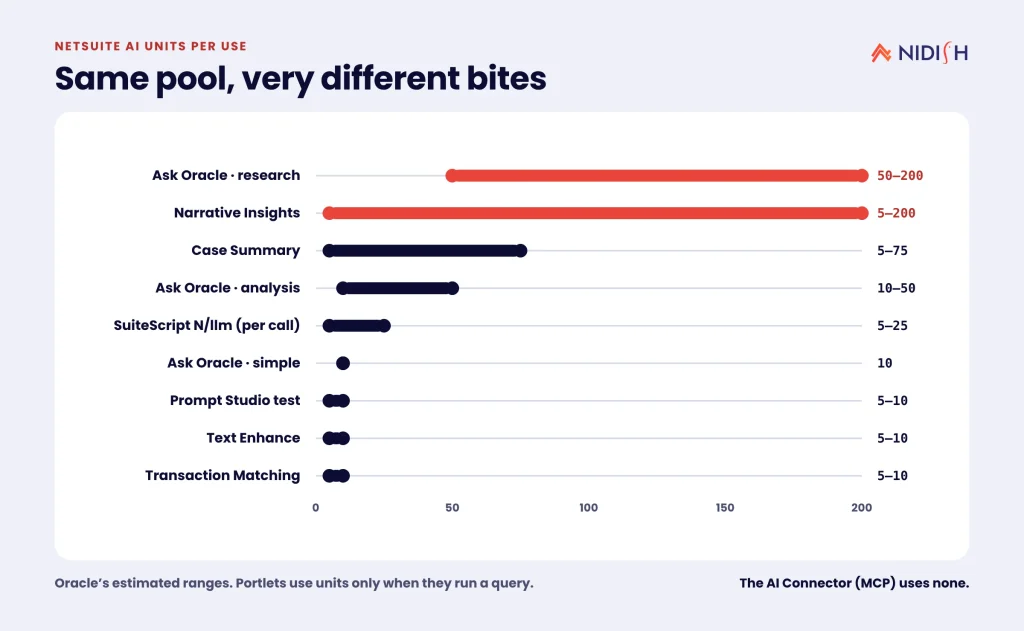
AI Portlets also consume units, but only when they actually run a query. That means the initial run, a click on Refresh, or a new query after someone changes the prompt or filters. Cached views are free. Any SuiteApp that uses NetSuite’s generative AI capabilities draws from the same pool.
What does not touch the pool
The NetSuite AI Connector does not consume AI Units. This is the Model Context Protocol (MCP) route that lets an outside assistant read and act on NetSuite data. Add-on modules with their own AI, namely NetSuite Bill Capture, NetSuite EPM and NetSuite Data Intelligence, are also excluded. One constraint runs the other way: you cannot bring your own model or provider to power NetSuite’s native AI features.
What changed in November 2026?
On 13 November 2026, NetSuite extended AI Units to 11 more user-license types at no extra cost. Oracle’s community announcement lists them by item number. Nine are single-user licenses that add 1,000 units per month of term. Two are five-user packs that add 5,000.
The newly eligible licenses include:
- SuiteProjects Pro and BPO Cloud Service user licenses.
- Specialized CRM, Specialized WMS, Specialized Site Operator and Specialized Project Manager users.
- Specialized View and Approve 5-packs and Specialized Manufacturing Operator 5-packs.
Existing customers do not need to act. Oracle says the units are added automatically for the months remaining on each eligible license and pooled with the account’s existing allocation. The same post carries a warning worth repeating: usage varies by customer, so the included allocation may not cover your needs for the full term.
The practical takeaway is simple. Warehouse, manufacturing and CRM users may now get conversational AI in their NetSuite Next experience. Those are high-volume, repetitive roles. Their questions add up quickly.
What happens when your AI Unit pool runs out?
When your NetSuite AI Units hit zero, AI tasks already in progress are allowed to finish. After that, NetSuite restricts further use of AI capabilities until more units are purchased. Oracle states that it does not bill overage charges for AI Units.
On paper, no overage sounds friendly. In practice it moves the risk from finance to operations.
Picture day three of year-end close. The controller is asking NetSuite’s assistant to explain a variance. A custom SuiteScript is generating vendor email drafts through N/llm. Then both stop at once, and the only fix is a purchase that runs through your Oracle account team.
Additional units come as pooled add-on items. Oracle lists a NetSuite AI Units (10k Pooled AI Units) add-on and a 25,000-unit pooled add-on. Pricing is not published in the documentation, so confirm current rates with your account manager before you need them.
A worked budget: how fast can one team drain the pool?
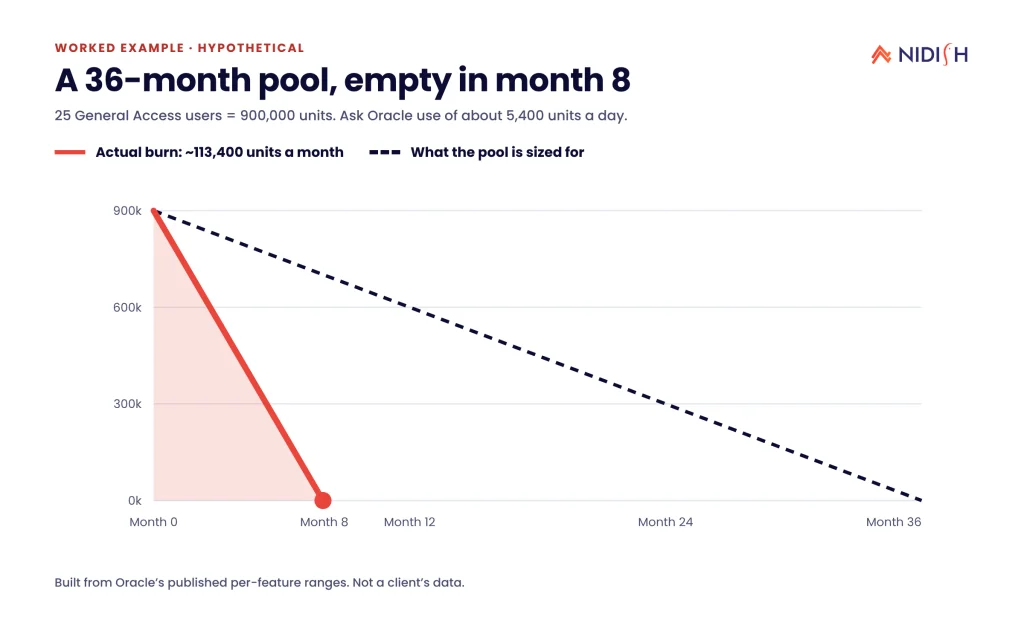
Here is a hypothetical, built only from Oracle’s published ranges, to show the scale. It is not a client result.
Take an account with 25 General Access users on a 36-month term. The pool starts at 900,000 NetSuite AI Units. Now switch on the assistant for 12 people in finance and operations. Each asks 15 analysis questions per working day, at roughly 30 units each, the midpoint of Oracle’s 10 to 50 range.
That is 5,400 units a day. Over 21 working days, it comes to about 113,400 units a month. At that pace, a pool meant to last 36 months is gone in about eight. Switch half those questions to research mode and it drains faster still.
The point is not that Ask Oracle is expensive. The point is that NetSuite AI Units are sized for the whole term, while usage arrives in bursts. Without monitoring, a good adoption story turns into a lockout story.
7 proven ways to avoid a NetSuite AI Units lockout
These are the steps we would put in place before rolling native AI or AI-enabled SuiteApps out to a wider team. They are ordered by effort, cheapest first.
1. Find your real pool size today
Go to Setup > Company > View Billing Information to see units used in the current month. Then open the AI Units usage dashboard under Setup > Company for a breakdown by date, user name and feature. In NetSuite Next, Oracle points admins to Setup > Agent Management for AI Unit Usage and Agent Monitoring. Oracle intends this view for account administrators, so make sure your admin actually checks it.
2. Convert the term grant into a monthly burn limit
Divide the remaining pool by the months left in your term. That number, not the 1,000-per-user headline, is your sustainable monthly spend. Put it in the same report as license costs so finance sees it every month.
3. Set effort levels deliberately
Ask Oracle defaults to an Auto effort level, and Oracle lets users pick an effort level to manage consumption. Train people to use lighter effort for lookups and reserve research-grade questions for work that needs them. A simple question at 10 units and a research question at 200 are a 20x difference.
4. Roll out by role, not by company
NetSuite Next access is granted per role, so phase it in. Start with one finance role, watch the dashboard for two weeks, then extend. The newly eligible warehouse and manufacturing roles deserve their own pilot because their question volume is different.
5. Audit every SuiteScript that calls N/llm
Custom scripts are the quiet drain. A scheduled script calling N/llm on every new transaction at 5 to 25 units per call can outspend all your human users. List each script, its trigger and its expected volume. Add batching or a daily cap where the business case is thin.
6. Move heavy, repeatable jobs to the NetSuite AI Connector
The NetSuite AI Connector does not consume AI Units. For high-volume, structured work, such as nightly reconciliation summaries, an outside model connected through MCP may cost less overall. You pay that provider instead, so compare both bills before switching.
7. Pre-approve a top-up before close
Agree in advance who can order a 10k or 25k pooled add-on and how fast procurement can move. Do it in November, not on day three of close. A pre-approved purchase order costs nothing if you never use it.
If you are weighing how AI in NetSuite should connect to your CRM and the rest of your stack, we design these integrations every week. See how we approach HubSpot and NetSuite integration →
Ask Oracle vs the NetSuite AI Connector: which route fits which job?
Ask Oracle is the better default for interactive questions inside NetSuite. The NetSuite AI Connector is often the better fit for automated, high-volume or cross-system work. Most mid-market accounts end up using both.
| Criteria | Ask Oracle (native) | NetSuite AI Connector (MCP) |
|---|---|---|
| Consumes NetSuite AI Units | Yes | No |
| Who pays for model usage | Your AI Unit pool | Your external AI provider |
| Best for | Ad hoc questions, explanations, in-app analysis | Scheduled jobs, cross-system agents, custom tooling |
| Permissions | Runs within each user’s role and permissions | Requires role-level MCP and OAuth 2.0 permissions |
| Choice of model | Oracle-managed, no bring-your-own model | The external assistant you connect |
| Setup effort | Low, enabled per role | Moderate, needs SuiteCloud configuration |
The trade-off is control versus convenience. Ask Oracle stays inside NetSuite’s governance and needs almost no setup. The connector gives you model choice and avoids the pool, but someone has to own the integration. If you already route NetSuite data into HubSpot, our comparison of REST API vs native HubSpot–NetSuite integration covers the same build-or-buy question.
Common mistakes to avoid
Treating the per-user grant as a per-user cap
It is not. One power user can spend the whole department’s share. Watch the dashboard by name.
Forgetting the term clock
Units provisioned for 36 months can be spent in eight. Track burn against months remaining, not against this month.
Testing heavily in sandbox
Sandbox has its own pool, and consumption survives a refresh. A careless load test can leave your developers without AI for the rest of the term.
Assuming no overage means no cost
The cost is downtime at the worst moment. Budget for a top-up the way you budget for extra storage.
Ignoring integrations
AI-enabled SuiteApps draw from the same pool. Before installing one, ask the vendor how many units a typical action uses. Our guide to NetSuite implementation challenges covers the wider governance habits that prevent this.
How Nidish approaches this
We start with the usage dashboard and the contract, not the feature list. In a typical NetSuite engagement we map every AI touchpoint: assistant-enabled roles, scripts calling N/llm, SuiteApps and any MCP connections. Then we set a monthly burn target your controller can read.
Where AI work crosses into HubSpot or another CRM, we design the integration so data moves once and AI runs where it costs least. Our HubSpot–NetSuite lead-to-cash case study shows the kind of integration groundwork this sits on.
Frequently asked questions
Do NetSuite AI Units reset every month?
No. NetSuite AI Units are provisioned up front for your whole licensing term and sit in one account-level pool. The 1,000-per-month figure is how the grant is calculated, not a monthly reset. Unused units expire when your term ends.
What happens when NetSuite AI Units run out?
Tasks already in progress finish, then NetSuite restricts further AI use until you buy more units. Oracle does not bill overage charges for AI Units. You restore access by purchasing a pooled add-on, such as the 10k or 25,000-unit packs, through your Oracle NetSuite account team.
How many AI Units does Ask Oracle use?
Oracle estimates about 10 units for a simple question, 10 to 50 for an analysis question and 50 to 200 for a research question. Ask Oracle defaults to an Auto effort level, and users can choose a lower effort level to manage consumption. Complex requests can exceed these estimates.
Does the NetSuite AI Connector consume AI Units?
No. Oracle states that the NetSuite AI Connector does not consume AI Units. It lets outside AI assistants work with NetSuite data through the Model Context Protocol. Model usage is billed by the external provider you connect, so you still pay for the AI, just not from your NetSuite pool.
Which NetSuite licenses include AI Units?
Oracle’s FAQ lists General Access and Social Impact users at 1,000 units per month of term, the Social Impact SuiteSuccess 3-User Bundle at 3,000, plus separate sandbox and development pools. Oracle added 11 more eligible license types on 13 November 2026, including specialized CRM, WMS and manufacturing roles. Confirm your entitlement in your account.
Where can I check NetSuite AI Unit usage?
Go to Setup > Company > View Billing Information for units used in the current month. For detail, open the AI Units usage dashboard under Setup > Company, which breaks consumption down by date, user name and AI feature. Oracle intends this information for account administrators.
Where to start
Open the usage dashboard this week. Write down your remaining pool and divide it by the months left in your term. If that number looks thin against your close calendar, pre-approve a top-up and pilot AI access by role before expanding. For background on NetSuite’s broader AI roadmap, see our SuiteWorld 2026 analysis of the NetSuite Autonomous Suite.
Book a 30 minute call. We’ll tell you honestly whether you need more NetSuite AI Units, a smarter rollout, an MCP connection, or nothing at all.


 Blog
 Case Studies
 Career