
If you have ever sat in a planning meeting where someone asks “can’t we just connect HubSpot and NetSuite with an app from the marketplace,” you already know how this conversation usually goes. Someone says yes, it will take a week. Three months later, the team is still untangling broken field mappings and duplicate contact records.
The truth is that the REST API vs native integration decision is rarely about which option is “better.” It is about which option fits your data volume, your budget, your real time requirements, and your team’s appetite for ongoing maintenance. Get this decision wrong and you either overpay for a marketplace app that cannot handle your edge cases, or you sink weeks into a custom build that a $50 a month connector could have replaced.
This article breaks down both approaches in plain language, gives you a decision framework you can actually use, and walks through a real integration case study so you can see how the tradeoffs play out outside of a spreadsheet.
Table of Contents
Quick answer: Choose a native integration when your data volume is low to moderate, your workflow is standard, and you need something running fast with no engineering team. Choose a custom REST API integration when you have complex business logic, high data volume, real time requirements, or have already outgrown a marketplace app’s limitations. Most businesses should start native and move to custom only once a specific, measurable limitation shows up.
REST API vs Native Integration: What Is the Difference?
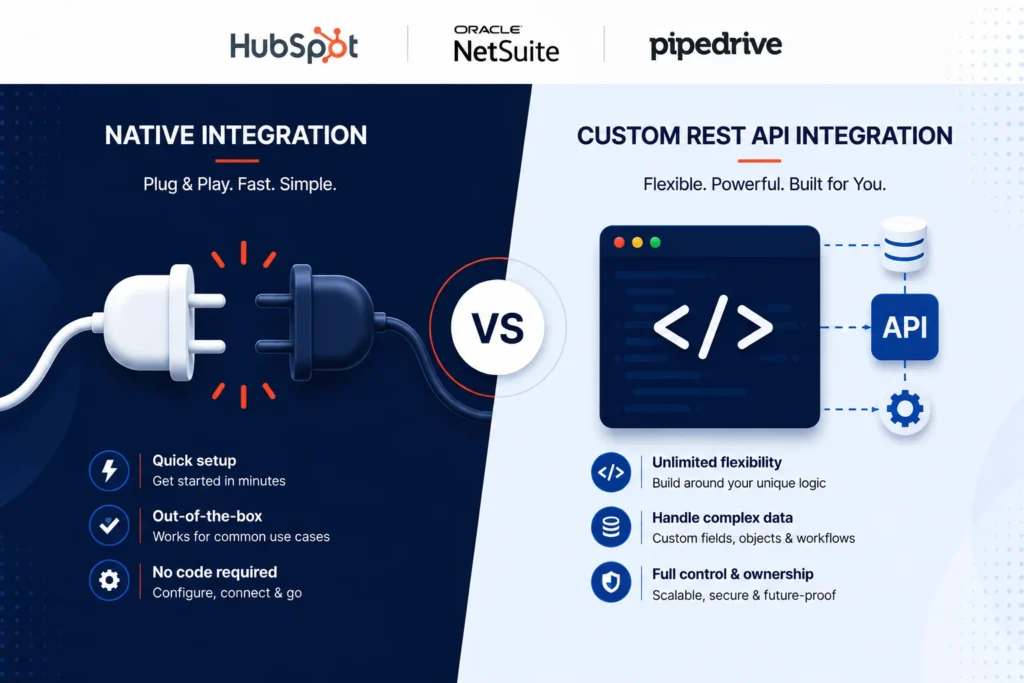
A native integration is a pre-built connector you install and configure through a setup wizard, with no code required. A custom REST API integration is software your team or an agency builds from scratch to talk directly to each platform’s API, giving you full control over the logic, timing, and data handling involved. The tradeoff is speed and simplicity versus flexibility and ownership.
What Native Integrations Actually Are
A native integration, sometimes called a pre-built connector or marketplace app, is software that someone else has already written to move data between two systems. Think of the HubSpot App Marketplace, NetSuite’s SuiteApp directory, or Pipedrive’s Marketplace. You install it, authenticate both accounts, map a handful of fields, and you are usually syncing data within an hour.
These tools work because the vendor has already solved the boring, repetitive parts of integration: authentication handling, rate limit management, retry logic when an API call fails, and a user interface for choosing what gets synced where. You are buying someone else’s engineering time, packaged as a subscription.
Native integrations tend to shine when:
- Your data needs are standard (contacts, deals, invoices, basic custom fields)
- You do not need exotic business logic during the sync
- You want something running this week, not next quarter
- Your internal team has no engineering bandwidth to maintain custom code
The tradeoff is flexibility. Native integrations are built to serve thousands of customers with different needs, so they tend to support the most common 80 percent of use cases and leave the remaining 20 percent unsupported. If your workflow depends on that last 20 percent, you will hit a wall fast.
What a Custom REST API Integration Actually Involves
A REST API integration means your team (or an agency) writes code that talks directly to HubSpot’s, NetSuite’s, or Pipedrive’s API endpoints. Instead of clicking through a setup wizard, you are deciding exactly what data moves, when it moves, what transformations happen along the way, and how errors get handled.
This is not just “more work for the same result.” A well built custom integration can do things no marketplace app will ever offer, like:
- Triggering NetSuite sales order creation the moment a HubSpot deal hits a specific stage, with custom validation logic in between
- Syncing only the exact subset of fields you care about, formatted exactly the way your downstream systems expect
- Handling complex object relationships, like multi-currency line items or tiered pricing rules that a generic connector was never designed to understand
- Building bidirectional sync with conflict resolution rules specific to your business (for example, NetSuite always wins on inventory counts, HubSpot always wins on contact ownership)
The cost of this flexibility is that you now own the maintenance. APIs change. Rate limits get hit during high volume periods. Authentication tokens expire and need refreshing. Someone on your team (or a vendor you pay) needs to be responsible for keeping that integration healthy long after launch.
The Decision Framework: Four Questions That Actually Matter
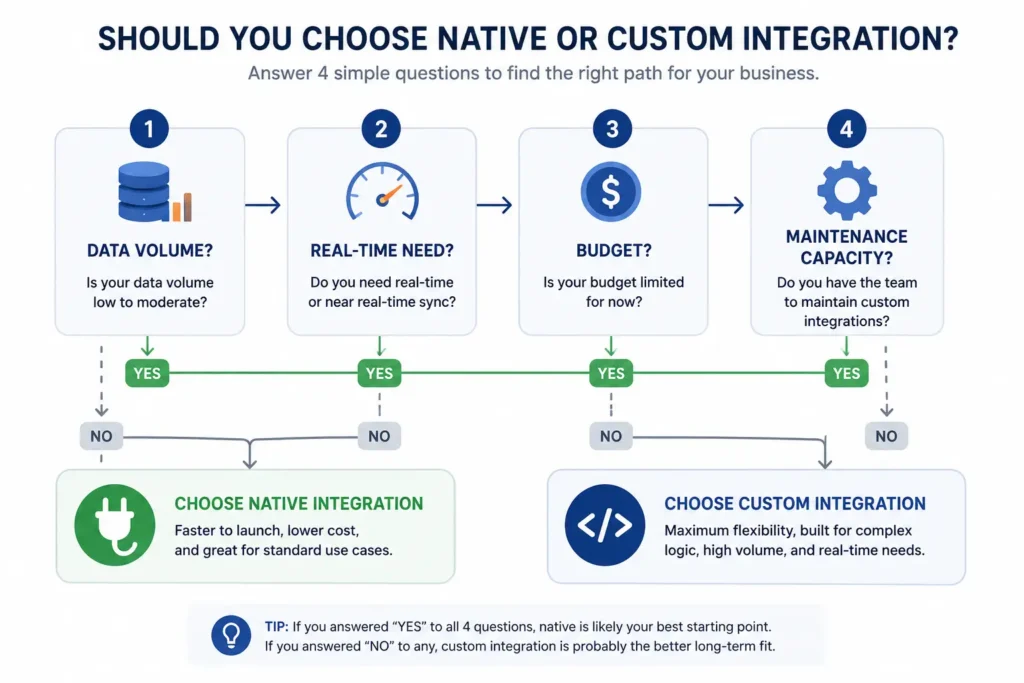
Most teams overthink the REST API vs native integration decision by debating tools before they have answered the questions that actually determine the right answer. Here is the order that matters.
1. How much data are you moving, and how often?
If you are syncing a few hundred records a day, almost any native integration will handle it without issue. But once you are pushing tens of thousands of records, processing large product catalogs, or handling high frequency order updates between NetSuite and HubSpot, marketplace apps often start hitting API rate limits or processing delays that create a backlog. Custom integrations let you build smarter batching, queuing, and retry logic specifically tuned to your volume.
2. Do you genuinely need real time data, or is near real time good enough?
This is where teams overestimate their own requirements. Real time usually means data needs to update within seconds, which matters for things like inventory availability during checkout or live deal status for a sales floor display. Near real time, where data syncs every 5 to 15 minutes, is good enough for the vast majority of marketing and sales workflows.
Native integrations typically sync on a schedule (every 15 minutes, hourly, or on a webhook trigger if the vendor supports it). If your use case can tolerate that lag, you have just removed one of the strongest arguments for going custom.
3. What is your actual budget, not just for build, but for the next two years?
A native integration might cost $50 to $500 a month depending on the platform and data volume. A custom REST API integration built by an agency can range from $8,000 to $40,000+ depending on complexity, plus ongoing maintenance that typically runs 15 to 20 percent of the original build cost annually.
The mistake most teams make here is comparing the upfront cost only. A $15,000 custom build that needs no further investment for three years can be cheaper than a $300 a month native tool once you add up 36 months of subscription fees. Run both numbers across a 24 to 36 month window before deciding.
4. Do you have the internal capacity to maintain it, or a reliable partner who will?
This is the question teams skip most often, and it is usually the one that determines whether a custom integration becomes an asset or a liability. APIs change versions. HubSpot, NetSuite’s REST API, and Pipedrive all push updates that can quietly break field mappings or deprecate endpoints. If nobody owns monitoring and fixing that integration, it will fail silently, usually right when you need it most, like during a high volume sales period.
If you do not have an internal developer who can own this, factor in either a maintenance retainer with whoever builds it, or lean toward a native integration where the vendor carries that burden instead.
Cost and Time Tradeoffs at a Glance
Here is the REST API vs native integration tradeoff broken down side by side, so you can weigh both options against your own timeline and budget.
| Factor | Native Integration | Custom REST API Integration |
| Time to launch | Days to 2 weeks | 4 to 12 weeks |
| Upfront cost | Low (subscription based) | Moderate to high (one time build) |
| Ongoing cost | Predictable monthly fee | Maintenance, monitoring, occasional fixes |
| Flexibility | Limited to vendor’s supported fields and logic | Unlimited, built around your exact workflow |
| Handles complex logic | Rarely | Yes, this is its main strength |
| Risk if vendor shuts down | App may disappear or stop updating | You own the code, no third party dependency |
| Best for | Standard workflows, smaller teams, fast timelines | High volume, complex logic, long term strategic systems |
A Real Case Study: HubSpot to NetSuite for a Mid Market Distributor
One integration project we worked on involved a mid sized distribution company running HubSpot for marketing and sales, with NetSuite handling inventory, order management, and finance. They had started with a native connector from the marketplace, and for about a year it worked fine for basic contact and company syncing.
The cracks started showing once their sales team began closing deals with custom pricing tiers and multi-location inventory allocation. The native connector synced deal data, but it had no concept of NetSuite’s saved searches or custom inventory logic, so the finance team was manually re-entering order details from HubSpot into NetSuite every single day. That manual step was costing roughly 12 hours a week across two people, and it was a constant source of pricing errors.
We rebuilt the integration as a custom REST API connection. The new system pulled deal data from HubSpot the moment a deal hit “Closed Won,” ran it through validation logic that checked inventory availability and applied the correct pricing tier, then created a properly formatted sales order directly in NetSuite. Errors that used to require manual correction were now caught and flagged automatically before an order was ever created.
The build took about 7 weeks, including testing against their specific NetSuite customizations. Within the first month, the manual data entry time dropped from 12 hours a week to under 1 hour a week, almost entirely spent on exception handling for unusual orders. That alone justified the build cost within the first two quarters, and it kept paying off every month after.
This is the pattern worth noticing: the native integration was not a bad choice when they started. It was the right choice for their early stage needs. The custom build became worth it only once their complexity and volume outgrew what a generic connector could reasonably support.
Common Mistakes Teams Make With This Decision
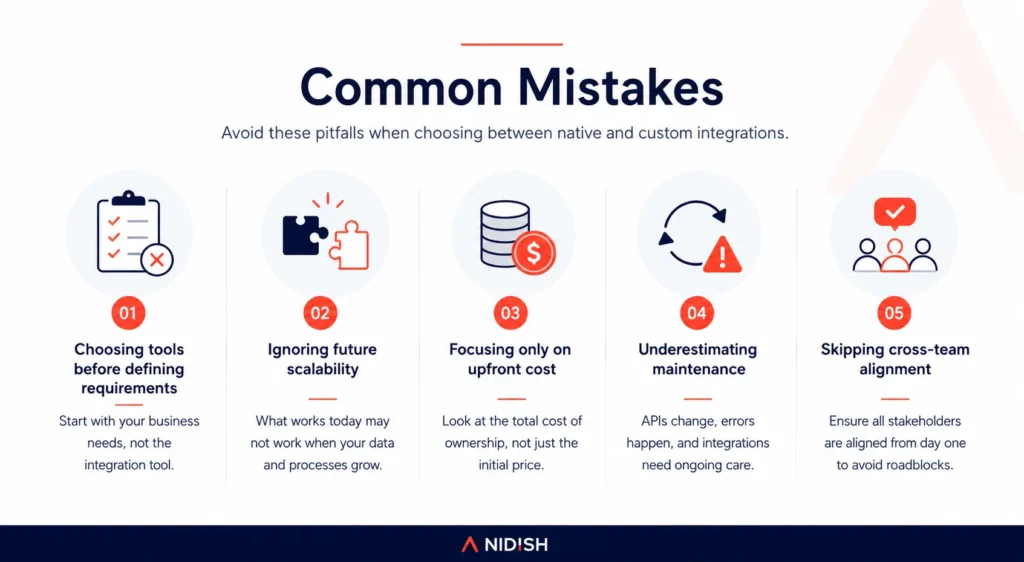
Most REST API vs native integration mistakes come from skipping the framework above and going with gut feeling instead. Here are the ones we see most often.
Choosing custom because it feels more “serious.” A lot of teams assume custom automatically means better, when in reality a well configured native integration handles most standard B2B workflows just fine. Building custom for a simple contact sync is usually wasted budget.
Choosing native and ignoring the warning signs of outgrowing it. Teams often stick with a native connector long after it has started creating manual workarounds, because switching feels disruptive. Those manual workarounds are usually a bigger hidden cost than the integration project itself.
Underestimating maintenance. Teams budget for the build and forget that APIs change. HubSpot, NetSuite, and Pipedrive all release API version updates that can break custom integrations if nobody is watching for it.
Skipping a proper field mapping audit before building. Whether native or custom, the single most common cause of integration failure is not technical, it is mismatched assumptions about what a field means in each system. A “Company” field in HubSpot and a “Customer” record in NetSuite are not automatically the same thing, and assuming they are leads to messy data down the line.
Not planning for error handling and edge cases upfront. What happens when a sync fails halfway through? What happens when a record exists in NetSuite but was deleted in HubSpot? These questions need answers before launch, not after the first data conflict shows up in a client’s account.
Recommendation Matrix
Use this REST API vs native integration matrix as a quick gut check, not a final answer. Your specific business logic always matters more than any general rule.
| Your Situation | Recommended Approach |
| Standard contact, company, and deal sync with no custom logic | Native integration |
| Small team, no internal developer, fast timeline needed | Native integration |
| Low to moderate data volume (under a few thousand records/day) | Native integration |
| Complex pricing, multi-system business logic, or conditional workflows | Custom REST API integration |
| High data volume with frequent updates throughout the day | Custom REST API integration |
| Real time sync requirements (seconds, not minutes) | Custom REST API integration |
| You already have a developer or agency relationship for maintenance | Custom REST API integration |
| Budget is tight and the workflow is genuinely simple | Native integration |
| You have outgrown a native integration and are creating manual workarounds | Custom REST API integration |
Final Thoughts
The REST API vs native integration question is not really about technology preference. It is about matching the integration approach to where your business actually is right now, not where you hope to be in three years. Start native when your needs are standard. Move to custom REST API integration when the complexity, volume, or business logic genuinely demands it, and make sure you have a real plan for ongoing maintenance before you commit to that path.
If you are not sure which category your situation falls into, the safest move is to map out your actual data flow and edge cases before choosing a direction. That single exercise prevents more wasted integration budget than any tool comparison ever will. If you are also mid-project on the marketing side, our guide on HubSpot theme updates and maintenance covers the same “build it right the first time” thinking, and Siloh Pro is worth a look if you need a HubSpot theme that is built to scale alongside these kinds of integrations.
Frequently Asked Questions
Is a native integration or custom REST API integration better for HubSpot and NetSuite?
Neither is universally better. Native integrations are better for standard contact, deal, and order syncing with low to moderate volume. Custom REST API integrations are better when you have complex pricing logic, high data volume, or real time requirements that a marketplace app cannot support.
How much does a custom HubSpot to NetSuite integration cost?
A custom REST API integration typically costs between $8,000 and $40,000 depending on complexity, plus ongoing maintenance of roughly 15 to 20 percent of the build cost per year. Native integrations usually cost $50 to $500 a month instead of a one time build fee.
How long does it take to build a custom API integration?
Most custom REST API integrations between HubSpot, NetSuite, or Pipedrive take 4 to 12 weeks to build and test, depending on how many custom fields, validation rules, and edge cases need to be handled.
Can a native integration be upgraded to a custom one later?
Yes. Many businesses start with a native integration and migrate to a custom REST API integration once their data volume or business logic outgrows what the marketplace app supports. This is a common and often cost-effective path rather than starting custom from day one.
Do custom integrations require ongoing maintenance?
Yes. APIs change versions, authentication tokens expire, and rate limits shift over time. A custom integration needs a developer or agency to monitor and maintain it, while native integrations shift that responsibility to the app vendor.
What is the biggest mistake businesses make when choosing between the two?
The most common mistake is choosing based on which option feels more advanced rather than what the actual data volume, budget, and business logic require. A simple contact sync rarely needs a custom build, while complex multi-system workflows rarely fit inside a generic connector.


 Blog
Blog Case Studies
 Career