
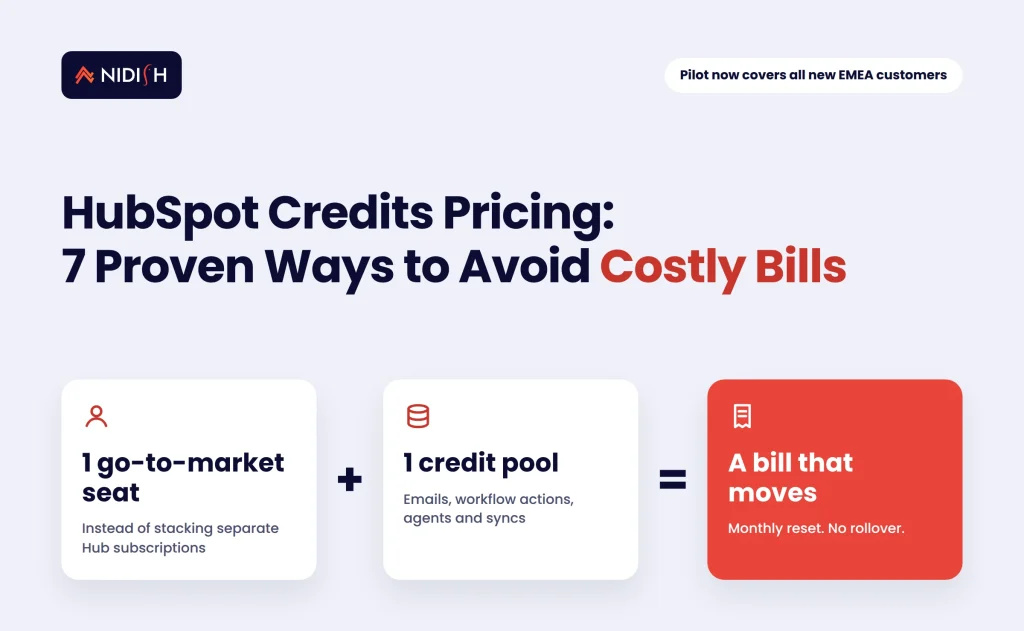
HubSpot credits pricing is starting to decide your HubSpot bill more than your seat count does. On November 4, 2026, HubSpot told investors that its hybrid “seats and credits” model now covers every new customer in Europe, the Middle East and Africa. The pilot had run in the Nordics since April and Benelux since June. Existing customers aren’t being moved yet, but the direction is clear, and the companies that get surprised by it will be the ones who never looked at what their workflows, agents and emails actually consume.
This guide explains what changed, how HubSpot credits work today, who is affected, and seven practical steps to keep usage-based spend predictable before it reaches your renewal.
Key takeaways
- HubSpot is piloting HubSpot credits pricing for new customers only: one go-to-market seat, a smaller Starter-to-Pro jump on some hubs, and a single shared credit pool for usage-based features.
- The pilot expanded to all new EMEA customers in Q4 2026. HubSpot says there is no migration timeline for existing customers and will share learnings in February 2027.
- Credits reset monthly and don’t roll over. When they run out, credit-based features pause unless you’ve bought capacity packs or enabled overages.
- Every workflow action except branches, delays and go-to actions consumes credits, so automation design is now a cost decision.
- Usage alerts, feature-level caps and a quarterly usage review are the simplest ways to avoid bill shock.
Table of Contents
What changed in HubSpot credits pricing in November 2026
HubSpot reported Q3 2026 revenue of $947.6 million, up 17%, and 311,704 customers in its Q3 2026 earnings release on November 4, 2026. The pricing news came on the earnings call. It’s the part that matters to anyone who runs a HubSpot portal.
According to PPC Land’s detailed write-up of the call, the pilot of a “hybrid model of seats and credits” has three parts:
- One go-to-market seat. New customers buy a seat rather than stacking separate Hub subscriptions.
- A smaller price jump from Starter to Pro for Marketing Hub, Content Hub and Data Hub.
- One credit pool. Usage-based features (emails sent, tickets resolved, data enriched, API-driven actions) draw from a single bank of HubSpot credits.
The rollout started in the Nordics in April 2026, reached Benelux in June 2026, and was extended to all new EMEA customers in Q4 2026. At the time of the call, the EMEA expansion was about four weeks old.
Two other details stood out. First, management said credit usage in pilot regions runs two to three times higher than outside them, with a lower average selling price. Second, HubSpot’s quarterly filing flagged that credit spend may substitute for, rather than add to, seat and hub spend, as PPC Land reported. In plain terms, HubSpot is still learning how this model behaves, and so are its customers.
How HubSpot credits work under seats and credits pricing
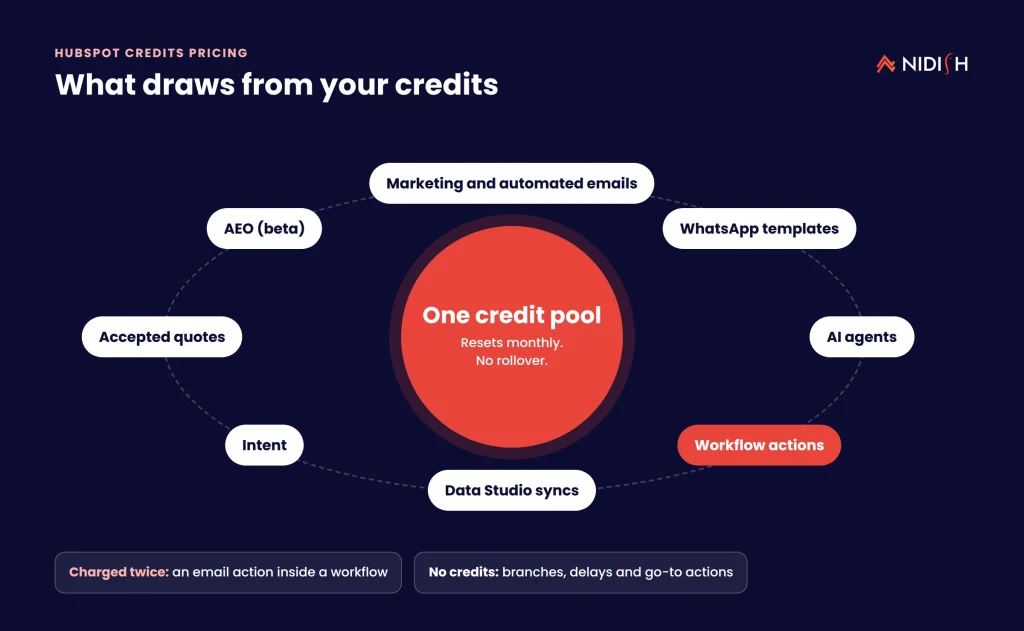
HubSpot credits are a usage currency, explained in HubSpot’s help article Understand how to use HubSpot Credits (Flexible Seats-and-Credits Pricing), last updated October 28, 2026. Credits power features that “perform tasks for you across the platform like automation, messaging, and AI tools” and are used only when those actions run.
Under the flexible model, the help article lists these credit consumers:
- Email sends from HubSpot: marketing, transactional, automated, meeting reminders and surveys. One-to-one emails from a connected inbox don’t count.
- WhatsApp template messages.
- AI agents, including the Customer agent, Prospecting agent and Data agent, plus several beta agents and custom agents.
- Workflow actions. All actions except branches, delays and go-to actions.
- Other usage features such as intent, Data Studio syncs, accepted quotes and AEO (beta).
One line in that article deserves attention from every admin. A workflow email action “results in two separate credit charges – one for the email send and one for the workflow execution.” Most portals we audit have dozens of workflows built before anyone counted actions. That habit now has a price.
Monthly reset, no rollover
Credits reset every month and don’t roll over. HubSpot’s Manage HubSpot Credits page, updated September 16, 2026, states that unused credits “expire at the end of each usage period.” So a quiet August doesn’t fund a busy November.
What happens when you run out
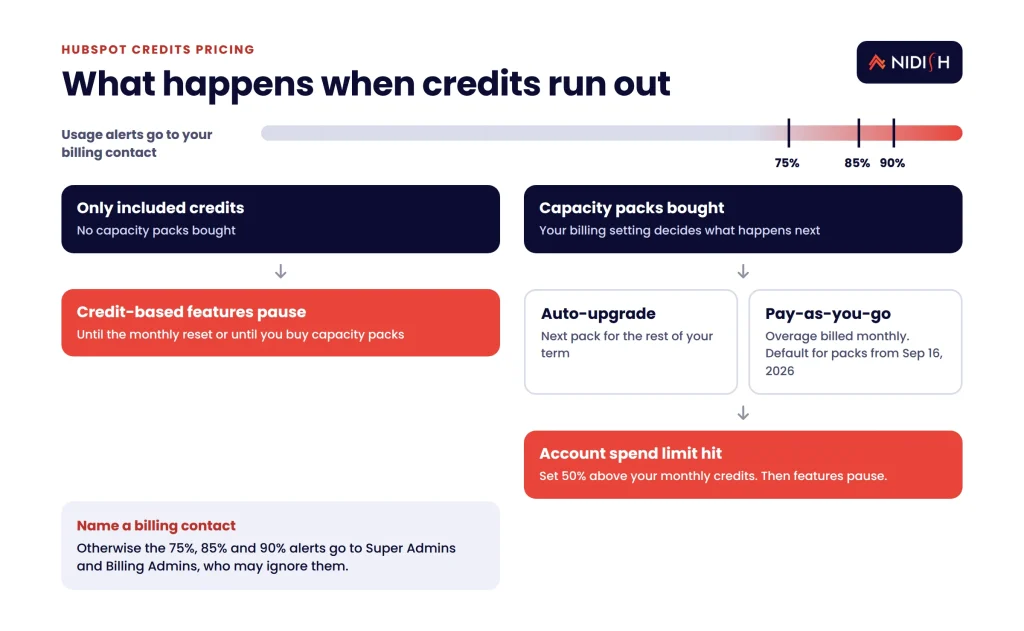
If you only have included credits, credit-based features pause until the next reset or until you buy capacity packs. If you have packs, exceeding the limit triggers either an automatic upgrade to the next pack or pay-as-you-go overages, depending on your billing setting. For packs bought on or after September 16, 2026, pay-as-you-go is the default.
There is also an account-level spend limit, set automatically at 50% above your total monthly credits after you buy packs. Hit it and features pause. That’s a safety net, but it can also stop a customer-facing agent mid-month.
Included credit amounts vary by edition and are listed in HubSpot’s pricing supplement, so confirm your own figure in your account before you model anything.
Who the HubSpot pricing pilot affects, and who it doesn’t
The short answer: new HubSpot customers in EMEA are on the hybrid model now, and everyone else should plan for it. Existing customers aren’t in the pilot, and HubSpot said on the call that there is no migration timeline for them.
Here is how we’d read the impact by situation:
- New EMEA buyers. You’ll buy a go-to-market seat and draw usage from one pool. The lower Starter-to-Pro gap may make Professional features easier to justify.
- Existing customers anywhere. Your contract stays as it is for now. But credits already apply to agents, Data Studio syncs and other usage features, so the consumption habits you build today will carry into any future model.
- US and APAC prospects. Nothing changes yet. HubSpot plans to share what it learned in EMEA when it reports Q4 results in February 2027.
- Heavy automation users. Portals with high email volume, many workflow actions or active AI agents carry the most cost risk under HubSpot credits pricing.
What we see constantly: credits turn every workflow into a line item. The portals that struggle aren’t the big ones. They’re the ones nobody has cleaned up in three years.
7 proven ways to avoid costly HubSpot credit bills
These steps work for new EMEA customers on the hybrid model and for existing customers who want to be ready. Do them in order.
1. Find out what you actually consume
Open Account & Billing and go to the HubSpot Credits or Usage & Limits tab. You’ll see your monthly allocation, current usage, history and a breakdown by feature. Export three months if you can. Most teams have never looked at this screen, and the breakdown is often surprising.
2. Turn on alerts and name an owner
Billing contacts get emails at 75%, 85% and 90% of credits used. If no billing contact is set, those alerts go to Super Admins and Billing Admins, who may ignore them. Set a named billing contact in RevOps or finance, not a former admin’s inbox.
3. Set feature-level credit limits
HubSpot lets you set optional caps at the account, feature and (for some features) action level. They aren’t on by default. Cap experimental features, such as a beta agent or a new Data Studio sync, so one test can’t drain the pool your customer agent depends on.
4. Audit workflows for wasted actions
Since most workflow actions now cost credits, review every active workflow. Look for:
- Workflows that re-enroll the same records every day.
- Chains of “set property” actions that could be one action or a calculated property.
- Email actions inside workflows, which incur two charges.
- Old workflows nobody owns but which still run.
Our HubSpot Operations Hub guide covers the data-quality patterns that cut needless actions. For heavier logic, one custom coded workflow action can replace a long chain of standard steps.
5. Decide where AI agents earn their credits
Agents can become a large credit consumer quickly. HubSpot said on the call that 20% of Pro-and-above customers now use its agents. Before you switch one on, define the job, the success measure and a monthly credit cap. Our guide to HubSpot AI agents for lead qualification shows how to scope that first agent so the spend maps to pipeline.
6. Choose your overage setting on purpose
Auto-upgrade adds the next capacity pack for the rest of your commitment term, and you can only step down at the end of the term. Pay-as-you-go bills overage monthly in arrears. Neither is wrong. But the default depends on when you bought packs, so check which one you’re on and pick the one that matches your cash-flow tolerance.
7. Review usage every quarter, not at renewal
Put a 30-minute HubSpot credits pricing review on the RevOps calendar each quarter. Compare usage to pipeline and support outcomes. Trim what doesn’t pay back. Doing this at renewal is too late, because capacity packs can only be reduced at the end of the contract term.
If you’d like a second pair of eyes on your portal’s usage, our HubSpot consulting team runs this kind of review as a fixed-scope engagement. We’ll show you where the credits go and what to cut.
How to estimate your monthly HubSpot credits budget
You can build a usable estimate in an afternoon, without waiting for HubSpot to publish more pilot data. The method is simple: count the activities that consume credits, multiply by the current rate for each, and add a buffer for growth.
- List your credit-consuming activities. Pull last month’s marketing email volume, active workflows with their enrollment counts, agent conversations and any Data Studio syncs.
- Look up the rate for each. HubSpot publishes per-feature rates in its HubSpot Credits rate sheet, linked from the help articles. Rates can change, so record the date you checked.
- Separate fixed from variable usage. Recurring syncs and scheduled workflows are predictable. Campaign sends and agent conversations swing with demand.
- Add a buffer. Size included credits plus packs for a normal month, then use the account spend limit and feature caps to absorb spikes.
- Compare against outcomes. Put the estimate next to pipeline created and tickets resolved. If a feature costs more than the work it replaces, redesign it.
Keep the estimate in a shared sheet and update it every quarter. It becomes the baseline for every HubSpot credits pricing conversation with your account manager, and it turns renewal talks from guesswork into a discussion about real numbers.
One caution: don’t copy another company’s figures. Usage depends on how your portal is built, how many records re-enroll, and how many integrations write back into HubSpot. Two companies on the same edition can consume very different amounts.
Seats and hubs vs seats and credits: a side-by-side comparison
The table below compares the classic HubSpot model with the hybrid pilot, based on what HubSpot has said publicly as of November 2026.
| Factor | Classic seats and hubs | Hybrid seats and credits (pilot) |
|---|---|---|
| Who it applies to | Existing customers worldwide; new customers outside pilot regions | New customers in the Nordics, Benelux and wider EMEA |
| How you buy | Separate Hub subscriptions plus seats | One go-to-market seat |
| Starter-to-Pro jump | Standard tier gaps | Smaller jump for Marketing, Content and Data Hub |
| Usage-based features | Credits for agents and some usage features | One credit pool for emails, tickets, enrichment and API actions |
| Biggest cost risk | Paying for unused hubs and seats | Unplanned usage spikes from automation and agents |
| What to manage | Seat assignments and hub tiers | Credit alerts, feature caps and workflow design |
Neither model is cheaper by default. A lean team with modest automation may pay less under the hybrid model. A portal with heavy email programs and several agents may pay more. The only way to know is to measure your own usage.
What HubSpot credits pricing means for your integrations
Under HubSpot credits pricing, integrations are where hidden spend tends to live. HubSpot’s pilot description includes API-driven actions in the shared pool, and Data Studio syncs already consume credits under the current rules.
That changes some integration decisions:
- Sync frequency. A sync that runs every five minutes “just in case” now has a real cost. Event-driven syncs that run only when records change are usually cheaper.
- Where logic runs. Logic that lives in HubSpot workflows consumes credits. The same logic in middleware, such as an iPaaS or a small Node.js service, may not. Our comparison of native vs custom HubSpot integrations walks through that trade-off.
- Enrichment loops. If an ERP sync and a HubSpot workflow both update the same record, you can trigger enrichment or workflow actions twice for one change.
We’ve found that the cleanest portals treat credits like cloud spend: every recurring job has an owner, a purpose and a budget. If your CRM, ERP and billing tools leak data between them, a RevOps audit of lead-to-cash leakage is a good first step.
Common mistakes with HubSpot credits
Assuming HubSpot credits pricing behaves like seat pricing
Seats are a fixed cost. Credits scale with activity, so a successful campaign can raise your bill.
Leaving beta features uncapped
HubSpot’s billing page notes that beta features may begin consuming credits and that rates may change. Cap them before you test.
Ignoring the double charge on workflow emails
Two charges per email action add up fast on large nurture programs.
Letting alerts go to nobody
If the billing contact left the company, nobody sees the 90% warning.
Waiting for HubSpot to migrate you
HubSpot hasn’t set a date to move existing customers. But usage habits take months to change, so start now.
Many of these overlap with the broader HubSpot CRM mistakes growing companies make, especially unowned workflows and messy data.
How Nidish approaches HubSpot credit reviews
We start a HubSpot credits pricing review with your usage data, not with a sales pitch for more HubSpot. First, we map every credit-consuming feature to the business outcome it supports. Then we flag workflows and syncs that burn credits without a clear purpose, and set alerts and caps so the next month is predictable. Where logic belongs outside HubSpot, we say so, even if it means less HubSpot spend, because the goal is a portal where every credit has a reason.
Frequently asked questions
What is HubSpot credits pricing?
HubSpot credits pricing is a usage-based model where features like workflow actions, marketing emails, AI agents and data syncs draw from a monthly pool of credits. In the hybrid pilot, new customers buy one go-to-market seat and use a single credit pool for all usage-based features instead of separate hub limits.
Does the seats and credits model apply to existing HubSpot customers?
Not yet. HubSpot said on its November 4, 2026 earnings call that the pilot applies to new customers in the Nordics, Benelux and wider EMEA, and that there is no migration timeline for existing customers. HubSpot plans to share pilot learnings in February 2027.
Do unused HubSpot credits roll over?
No. HubSpot’s help documentation says credits reset every month and unused credits expire at the end of each usage period. That means you should size capacity packs for a typical month, not for your busiest month, and use caps for spikes.
What happens when HubSpot credits run out?
If you only have included credits, credit-based features pause until the next monthly reset or until you buy capacity packs. With packs, going over triggers either an automatic upgrade to the next pack or pay-as-you-go overages, depending on your billing setting.
Which HubSpot features use credits?
HubSpot lists email sends from HubSpot, WhatsApp template messages, AI agents such as the Customer, Prospecting and Data agents, most workflow actions, intent, Data Studio syncs and accepted quotes, among others. Branches, delays and go-to actions in workflows don’t consume credits.
How can I monitor HubSpot credit usage?
Go to Account & Billing and open the HubSpot Credits or Usage & Limits tab. You can view monthly allocation, historical usage and usage by feature. Set a billing contact for alerts at 75%, 85% and 90%, and add feature-level caps for anything experimental.
Where to start
HubSpot credits pricing rewards teams that know what their portal does every day. If you’re a new EMEA customer, you’re already on it. If you’re an existing customer, you have time, but not unlimited time. Run the seven steps above, starting with the usage dashboard, and you’ll go into your next renewal with real numbers instead of guesses.
Book a 30 minute call. We’ll tell you honestly whether you need a credit review, a workflow cleanup, or nothing at all.


 Blog
 Case Studies
 Career