
HubSpot custom coded workflow actions explained for operations and RevOps teams
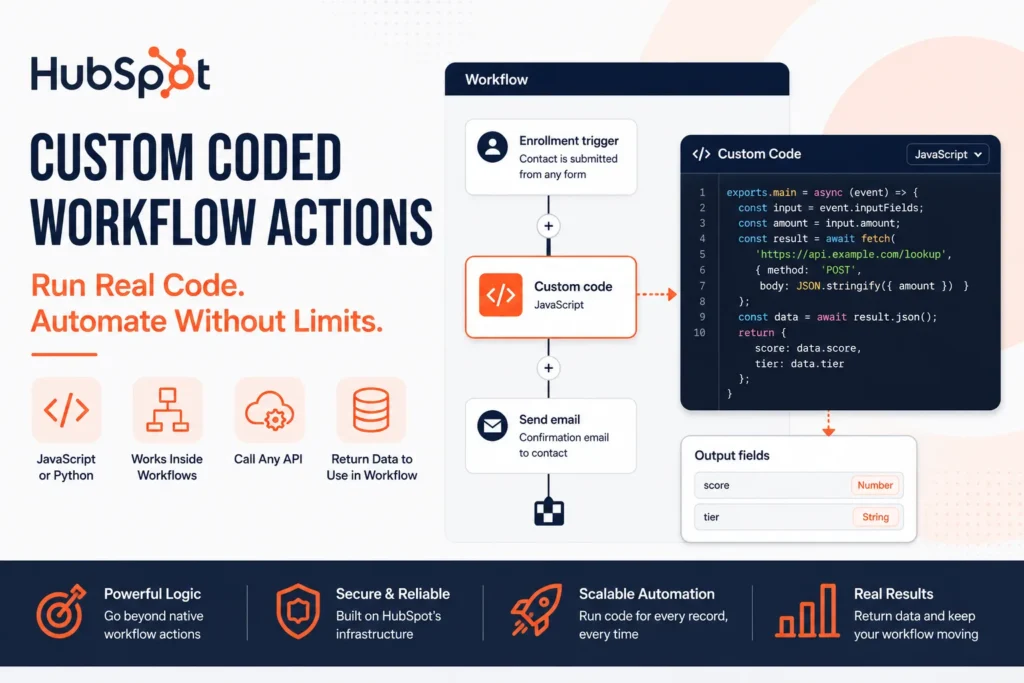
A HubSpot custom coded workflow action is a small serverless function, JavaScript or Python, that runs inside a workflow when a record hits that step. This is the exact feature this guide covers end to end. It receives the enrolled record’s data, can call any API, HubSpot’s or an external one, and returns output fields the rest of the workflow can use. It is not a native workflow action you configure through dropdowns. It is code you write, and HubSpot runs it for every record that reaches it.
Most HubSpot accounts we open have never used one. Teams hit a wall, a calculation native actions can’t express, a lookup against a system HubSpot doesn’t natively talk to, a rule too conditional for if/then branching, and either give up on the automation or route it through a third-party tool that adds another point of failure. Custom coded actions solve that specific problem, and they are also where automations quietly break in production, because the execution environment has real limits most teams discover the hard way.
This post covers what a HubSpot custom coded workflow action actually is, how to add one, what the execution environment actually allows, and what breaks when teams treat it like an unlimited backend instead of what it actually is.
We build and maintain HubSpot custom coded workflow actions in client accounts regularly. Everything below is what that work has actually taught us, including the failures.
Table of Contents
What Is a HubSpot Custom Coded Workflow Action?
Inside any HubSpot workflow, alongside the standard set of native actions, there is a Custom code action. Add it to a workflow, choose JavaScript or Python, and write the logic yourself. When a record enrolls and reaches that step, HubSpot executes your code against that record’s data.
That is the entire point. Native workflow actions cover a wide range of cases through configuration. The moment your logic needs a calculation, an external lookup, or conditional branching too complex for the visual builder, custom code is the escape hatch, not a workaround bolted on top of HubSpot, a supported part of it.
Where HubSpot Custom Coded Workflow Actions Sit in the Automation Model
This is worth being precise about, because three different things get called “custom” inside HubSpot and they are not the same feature.
HubSpot custom coded workflow actions
The subject of this post, live inside a single workflow. You write the code directly in the workflow editor. It runs for that workflow only.
Reusable custom workflow actions
Built through the Automation API, are different. These require a HubSpot Developer Account, get built as an app, and once installed, appear as a selectable action across multiple workflows, the way a native action does. Covered further down.
Custom objects and custom properties
These are structural, they define what data exists. Custom coded actions are behavioral, they define what happens to that data. Different layer entirely.
Access to HubSpot custom coded workflow actions and webhook triggers requires Operations Hub Professional or Enterprise. If the Custom code action isn’t showing up in your workflow editor, that is the first thing to check, not your code.
How to Add a HubSpot Custom Coded Workflow Action
- Open the workflow and click the plus icon where you want the action to run.
- Search for and select Custom code.
- Choose your language, JavaScript or Python, in the editor panel.
- Define the properties from the enrolled record you want passed into the code as input.
- Write your code. Preloaded libraries are available without an install step, more on this below.
- Define output fields, the values your code returns that later actions in the workflow can reference.
- Test the action against a sample record before turning the workflow on for live enrollment.
That structure, inputs in, code runs, outputs available downstream, is the entire mental model behind every HubSpot custom coded workflow action. Everything else is detail.
JavaScript or Python: What Actually Differs in a HubSpot Custom Coded Workflow Action
HubSpot custom coded workflow actions support JavaScript on the Node.js runtime or Python, and the choice matters more than it first appears.
| JavaScript | Python | |
|---|---|---|
| Runtime | Node.js | Python (beta) |
| Official SDK | @hubspot/api-client, actively documented | HubSpot Python SDK, documentation and examples lag noticeably behind Node |
| Preloaded libraries | axios plus the HubSpot client | requests plus the HubSpot client |
| Community-reported reliability | Treated as the default, first-class path | Workable, but experienced builders increasingly skip the SDK and call HubSpot’s REST APIs directly with requests instead |
The practical pattern we and other experienced HubSpot builders have converged on for Python custom coded workflow actions specifically: pull your private app token from Secrets, then call HubSpot’s documented REST endpoints directly with requests rather than leaning on the SDK for newer API surfaces. It keeps your code matching what is actually documented instead of whatever the SDK happens to expose at a given moment. JavaScript does not have this problem to the same degree, its SDK and documentation stay closer in sync.
The Execution Environment Behind Every HubSpot Custom Coded Workflow Action
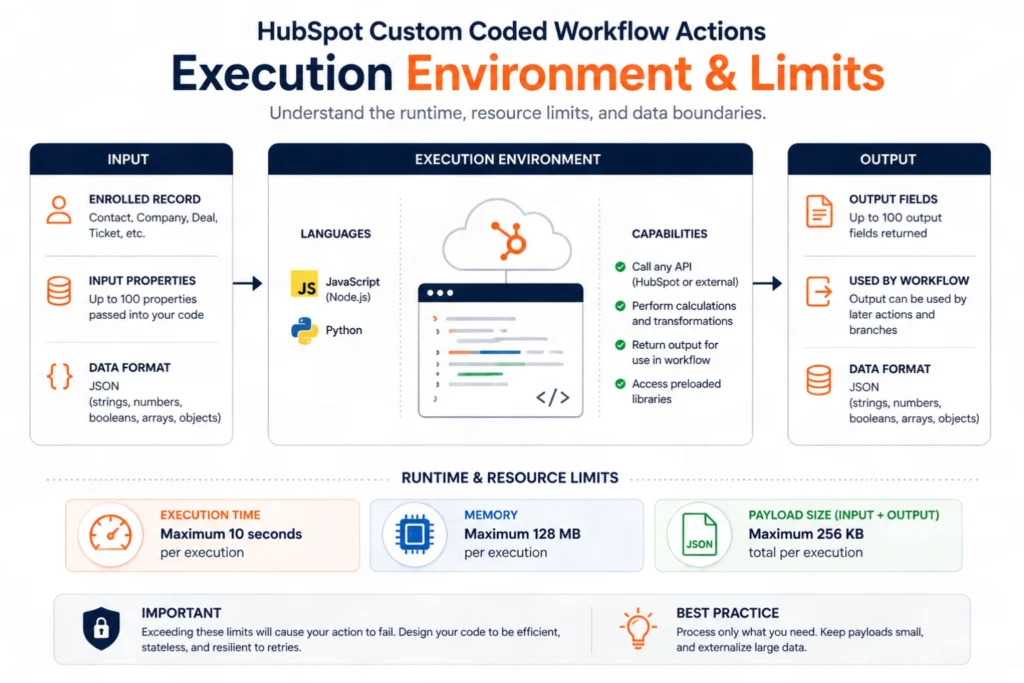
Custom coded workflow actions run as a serverless function, compute managed by HubSpot through AWS Lambda. That gives you real code execution without managing infrastructure, and it comes with real constraints.
| Constraint | Limit |
|---|---|
| Memory | Capped at 128 MB per action |
| HubSpot properties accessible per action | Up to 50 |
| String output length | 65,000 characters |
| Execution time | Tight enough that sequential external API calls routinely exceed it, one slow endpoint in a chain of three is enough |
| State between runs | None. No global variables, no local files, nothing persists |
| Package installation | Not permitted. You work with the preloaded library set only |
None of these are unreasonable for a HubSpot custom coded workflow action. They are guardrails, and they explain nearly every “it worked in testing and broke in production” story we’ve been called in to fix. A HubSpot custom coded workflow action that calls three external endpoints in sequence tests fine against one record and starts timing out the moment a connected API is slow or the workflow is processing enrollment in bulk.
Rule 1 for Every HubSpot Custom Coded Workflow Action: Design for Statelessness
Nothing persists between executions. No variable set in one run exists in the next, even for the same record re-entering the workflow later. If your logic needs to remember something, a count, a prior value, a flag, that state has to live somewhere durable: a HubSpot property on the record, or an external system your code reads from and writes back to.
Teams that assume some form of memory between runs in a HubSpot custom coded workflow action, because that is how most application code behaves, build logic that silently breaks the first time a record re-enrolls.
Rule 2: Respect the Limits of a HubSpot Custom Coded Workflow Action Before Production Does
The 128 MB memory cap and the property-per-action limit rarely bite teams. The execution time limit does, specifically when a custom action chains multiple external API calls sequentially instead of in parallel, or when it processes a large payload it was never scoped to handle.
The fix for a struggling HubSpot custom coded workflow action is almost always architectural, not clever code: keep a single HubSpot custom coded workflow action doing one focused job, parallelize independent external calls instead of chaining them, and if a process genuinely needs multiple slow steps, split it across separate workflow actions rather than one HubSpot custom coded workflow action trying to do everything.
Rule 3: Handle Retries Deliberately in Every HubSpot Custom Coded Workflow Action]
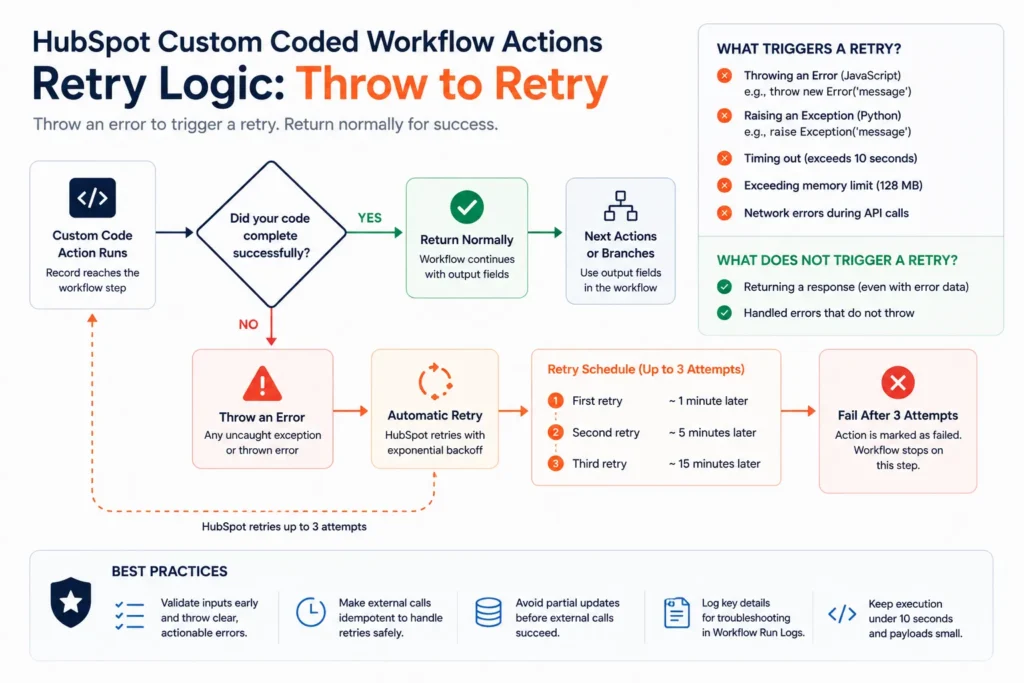
HubSpot has real retry behavior built in, but only if your code cooperates with it. If your code throws an error on a rate limit response (429) or a server error (5xx), HubSpot automatically retries the action, starting about a minute after the failure and backing off with increasing intervals up to a maximum eight-hour gap, for as long as three days.
The part teams miss when building a HubSpot custom coded workflow action: this retry only triggers if you actually throw or raise the error. In JavaScript, that means throwing inside the catch block rather than swallowing it. In Python, raising inside the except block rather than logging and moving on. Code that catches an error and quietly continues never gets retried, it just silently fails and the workflow moves on as if nothing happened.
Authentication and Secrets for a HubSpot Custom Coded Workflow Action
Custom code needs credentials to call anything meaningful, and HubSpot’s Secrets feature exists specifically so those credentials never sit in plain text inside your code. Store an API key or token as a secret, then reference it by name inside the action, HubSpot injects the value at execution time.
For calling HubSpot’s own API from within a custom coded workflow action, a private app access token covers single-account use. For a reusable action meant to be installed across multiple HubSpot portals, OAuth 2.0 is the correct model instead.
What You Can Automate With a HubSpot Custom Coded Workflow Action
| Scenario | What the HubSpot custom coded workflow action does |
|---|---|
| Complex lead scoring | Calculates a weighted score from multiple properties using logic branching too deep for native scoring tools |
| External pricing lookup | Calls a connected ERP or pricing API mid-workflow and writes the returned price back to the deal |
| Multi-condition lead routing | Evaluates several properties together to assign an owner, beyond what native rotation logic supports |
| Data enrichment | Calls a third-party enrichment API and populates contact properties automatically on creation |
| Cross-object calculation | Pulls associated record data (a company’s full deal history, for example) and writes a summary value back to the contact |
| Custom notification formatting | Builds a dynamically formatted message and sends it to Slack or another external tool through its API |
This is the actual payoff of a HubSpot custom coded workflow action. Once code can run inside a workflow, “HubSpot doesn’t natively support that” stops being the end of the conversation.
Turning a HubSpot Custom Coded Workflow Action Into a Reusable Automation API Action
A single custom code action lives inside one workflow. If the same logic needs to be available as a selectable action across many workflows, the way a native HubSpot action is, that requires building it differently, as a reusable custom workflow action through HubSpot’s Automation API.
This path requires a HubSpot Developer Account, gets built and registered as an app, and once installed into a Professional or Enterprise portal, shows up in the workflow action picker like any built-in action. It’s a genuinely different build than dropping code into a single workflow, closer to building a small internal app than writing a script, and it’s the right call when the same custom logic needs to be reused consistently rather than maintained separately inside five different workflows.
What a HubSpot Custom Coded Workflow Action Does Not Do
Honest limits, because a post that only lists capability is not useful.
They are not a general-purpose backend
No persistent storage, no scheduled jobs outside a workflow trigger, no long-running processes. State lives in CRM properties or an external system, never in the action itself.
They do not replace a real integration platform
For a handful of calls inside one automation, custom code is the right tool. For keeping two or more systems continuously synchronized with monitoring, retries, and error visibility across the whole data flow, a dedicated integration layer is the correct architecture, not a growing collection of custom code actions each handling one piece of the sync independently.
They require Operations Hub Professional or Enterprise
There is a real cost floor here. Teams on Starter or below do not have access to this feature at all, regardless of how the workflow is built.
They cannot install arbitrary packages
You work within HubSpot’s preloaded library set. If a project genuinely needs a package outside that set, the logic likely belongs in an external service the custom code action calls, not inside the action itself.
Debugging happens after the fact, not live
There is no real-time debugger attached to a running action. Testing against sample records before activating the workflow, and logging meaningfully inside the code itself, is how you catch problems before production does.
HubSpot Custom Coded Workflow Actions or a Dedicated Integration Platform? The Short Version
| Custom Coded Workflow Action | Dedicated Integration Platform (e.g. Celigo) | |
|---|---|---|
| Best for | One-off logic inside a single workflow | Continuous, monitored sync between multiple systems |
| Setup effort | Low, write code directly in the workflow | Higher, proper architecture and mapping |
| Error visibility | Limited to workflow history and your own logging | Centralized monitoring, retries, and alerting |
| Reusability | Single workflow, unless built via the Automation API | Built for reuse across the entire data flow |
| Ongoing maintenance | Falls on whoever maintains that specific workflow | Managed as a system, not a scattered set of scripts |
| Good for | A calculation, a lookup, a routing rule | ERP sync, multi-system data consistency, high-volume flows |
For property data flowing between two or three systems continuously, we generally steer clients toward a proper integration layer over stacking multiple HubSpot custom coded workflow actions. For a specific calculation or a single external lookup inside one automation, custom code is exactly the right, lightweight tool for the job.
Where Breeze AI Fits Into HubSpot Custom Coded Workflow Actions Now
As of the May 2026 update, HubSpot’s Breeze Assistant can build an entire workflow from a plain description, and for Data Hub Professional and Enterprise accounts, it can generate a HubSpot custom coded workflow action itself when no standard action fits the described behavior. You describe the intended logic, specify which properties are inputs and what output you expect, and Breeze writes the action, JavaScript by default.
Breeze does not remove the need to understand the execution limits of a HubSpot custom coded workflow action described above. Breeze-generated code runs inside the exact same constrained environment as code you write by hand, the same memory cap, the same statelessness, the same retry behavior. It lowers the barrier to writing the code. It does not change what that code is allowed to do once it’s running.
Frequently Asked Questions
What is a HubSpot custom coded workflow action?
A HubSpot custom coded workflow action is a workflow step that runs JavaScript or Python you write, executed as a serverless function against each enrolled record. It can call any API and return output fields for later actions in the workflow to use.
Do I need Operations Hub Professional to use custom coded workflow actions?
Yes. Custom code actions and webhook triggers require Operations Hub Professional or Enterprise. They are not available on Starter or the free tier.
Should I use JavaScript or Python for a custom coded workflow action?
Both work. JavaScript’s SDK and documentation stay more consistently in sync with HubSpot’s platform. For Python, many experienced builders call HubSpot’s REST API directly with the requests library rather than relying heavily on the SDK, particularly for newer API surfaces.
Can a custom coded workflow action call an external API?
Yes, that is one of its primary uses, pricing lookups, data enrichment, notifications to external tools, or writes to a connected system like an ERP.
What happens if my custom code action fails?
If your code throws on a rate limit (429) or server error (5xx), HubSpot automatically retries for up to three days with increasing backoff, up to an eight-hour maximum gap. If your code catches the error without throwing it, no retry happens, the failure is silent.
Can I reuse the same custom code action across multiple workflows?
Not directly by copy-pasting into each workflow. For true reuse across multiple workflows, it needs to be built as a reusable custom workflow action through HubSpot’s Automation API, which requires a Developer Account and app installation.
Do custom coded workflow actions replace the need for an integration platform?
Sometimes, for a single calculation or lookup. For continuous, monitored synchronization between multiple systems, a dedicated integration platform is the more reliable architecture, not a growing set of individually maintained custom code actions.
Where This Goes Next
HubSpot custom coded workflow actions remain the tool most Operations Hub accounts have access to and never use, usually because nobody on the team codes, or because the execution limits above weren’t documented anywhere obvious until something broke. Used deliberately, inside their real constraints, they remove an entire category of “HubSpot can’t do that” from the conversation.
If you’re weighing whether a specific automation belongs in a HubSpot custom coded workflow action or needs a proper integration layer instead, that’s exactly the kind of architecture question worth working through before you build either one. Our Operations Hub guide covers that broader decision, and our Celigo integration services cover what the dedicated-platform side of that comparison actually looks like in practice. If you want a second opinion on a workflow that keeps breaking in production, book a 30 minute call. We’ll tell you if it’s a five-line fix or a real architecture problem.


 Blog
Blog Case Studies
 Career