
Prices are list prices at time of writing; confirm with Google before you budget.
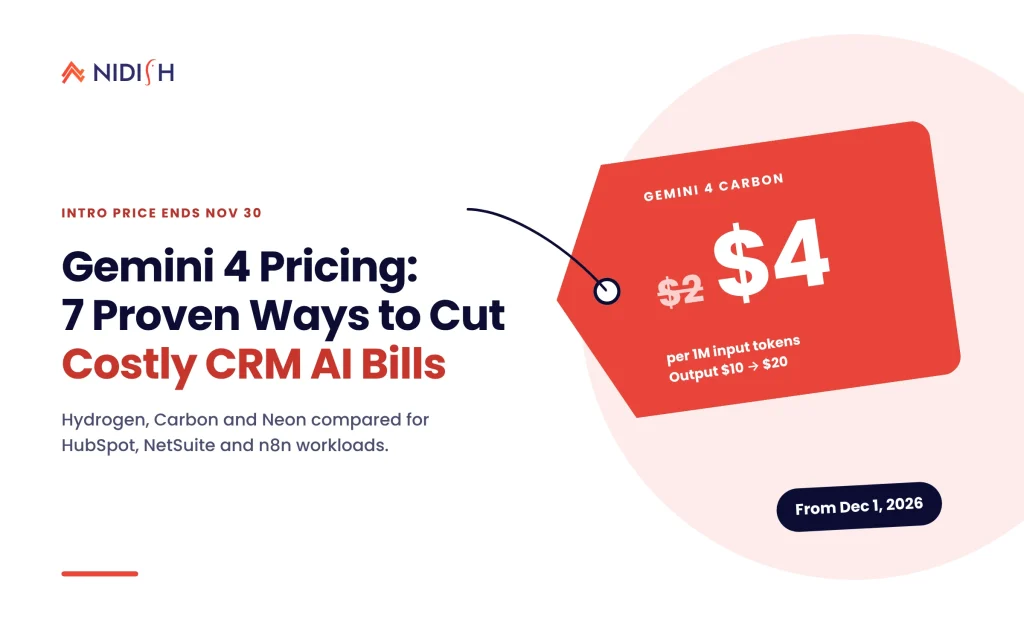
On November 30, 2026, one of Google’s newest models gets twice as expensive. If your CRM or ERP automations call it, nobody will email you about it. Your invoice will just change.
Gemini 4 pricing moved fast this month. Google made Gemini 4 Carbon generally available on November 10 at an introductory rate that expires on November 30. It shipped Gemini 4 Hydrogen on November 12 and Gemini 4 Neon on November 18, each at a different price point.
If you run HubSpot workflows, n8n flows, NetSuite scripts or Apps Script automations that call the Gemini API, you now have three new models, three price points and one deadline. This guide shows what each model costs, which CRM and ERP jobs belong on which model, and seven practical steps to keep the bill under control.
Key takeaways
- Gemini 4 Carbon doubles in price after November 30, 2026, from $2 to $4 per million input tokens and from $10 to $20 per million output tokens.
- Gemini 4 Hydrogen is the low-cost option at $1.50 input and $7.50 output per million tokens, flat across its 1 million-token context window.
- Gemini 4 Neon sits in the middle at $3 input and $15 output, with cached input at $0.15 per million tokens.
- After November 30, Carbon costs more per token than Neon at list price. Re-check any workload you moved to Carbon this month.
- Most CRM and ERP AI spend comes from volume, not model choice. Routing, batching and output limits usually save more than switching models.
Table of Contents
What changed with Gemini 4 pricing in November 2026
Gemini 4 pricing changed in three steps between November 10 and November 18, and one more change is coming on November 30. Here is the sequence, using Google’s own announcements.
Google made Gemini 4 Argon generally available on October 13, 2026, according to the Google AI Studio changelog. Then, on November 10, Carbon reached general availability. Google set it “at the same introductory price as Gemini 4 Argon ($2 per million input tokens and $10 per million output tokens).” Google’s footnote says that after the introductory period ends on November 30, 2026, a price of $4 per million input tokens and $20 per million output tokens applies.
On November 12, Google released Gemini 4 Hydrogen. Its Gemini 4 pricing is flat across the full 1 million-token context window: $1.50 input and $7.50 output per million tokens. Google calls it “a major standalone upgrade for teams migrating from Gemini 3.8 Flash.”
On November 18, Google released Gemini 4 Neon at $3 input and $15 output per million tokens, with a 1 million-token context window and cached input at $0.15 per million.
The Gemini Enterprise Agent Platform release notes add two details that matter for cost. On November 16, a Deferred tier became generally available at 50% off Standard pay-as-you-go pricing for supported models. And for Neon, cache writes will be billed at 1.25x the standard input token price by default, starting January 12, 2027.
Gemini 4 Hydrogen vs Carbon vs Neon: the numbers side by side
The short answer: Hydrogen is cheapest per token, Neon is mid-priced, and Carbon is mid-priced only until November 30. The table below uses list prices per million tokens as published by Google in November 2026.
| Model | Released (GA) | Input, per 1M tokens | Output, per 1M tokens | Context window | Notes |
|---|---|---|---|---|---|
| Gemini 4 Hydrogen | Nov 12, 2026 | $1.50 | $7.50 | 1M tokens | Flat price across the full context window |
| Gemini 4 Carbon (intro) | Nov 10, 2026 | $2.00 | $10.00 | 1,048,576 tokens | Intro rate ends Nov 30, 2026 |
| Gemini 4 Carbon (from Dec 1) | — | $4.00 | $20.00 | 1,048,576 tokens | Standard rate after intro period |
| Gemini 4 Neon | Nov 18, 2026 | $3.00 | $15.00 | 1M tokens | Cached input $0.15 per 1M |
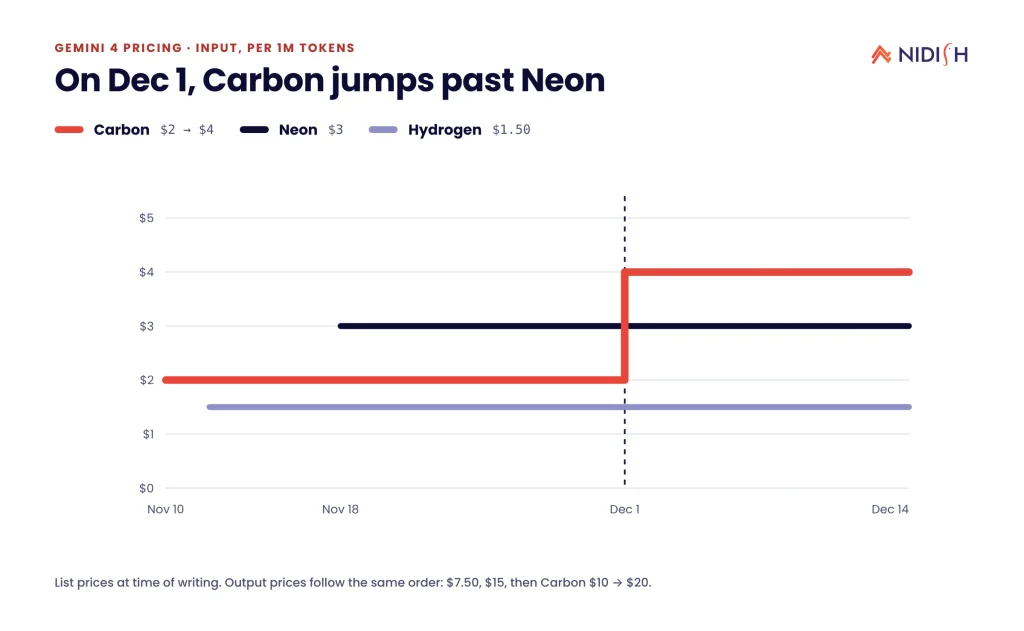
Two cautions apply to this Gemini 4 pricing table. First, price per token is not capability, so test your own prompts before you switch. Second, list price is not your bill. Thinking levels, output length, caching and the pricing tier you use all change the final number.
What Gemini 4 pricing means for CRM and ERP integrations
Gemini 4 pricing matters most where AI runs in a loop: one call per contact, per deal, per ticket or per invoice. Gemini inside Gmail or Docs is covered by your Workspace plan where it is included. A workflow that enriches 20,000 HubSpot contacts a month makes 20,000 API calls, and each one is billed.
In the CRM and ERP stacks we work on, Gemini calls usually hide in five places:
- HubSpot custom code actions that call the Gemini API to classify leads, summarize emails or draft notes. We cover the pattern in our guide to HubSpot custom LLM workflow actions.
- n8n or Make flows that run AI steps on CRM webhooks.
- NetSuite SuiteScripts or Node.js middleware that read invoices, match payments or tag transactions.
- Google Apps Script inside Sheets and Gmail. Google made the Gemini side panel in Apps Script generally available this month, so more of these scripts will appear.
- Custom agents built on Gemini Enterprise or the Agent Platform that read from Salesforce, HubSpot or an ERP.
The mistake we see constantly is that nobody owns the full list. Marketing ops built one flow, finance built another, and a contractor wired a third. When a price changes, no one knows which automations are affected. That is why the first of the seven steps below is an inventory, not a model switch.
7 proven ways to cut Gemini API costs in your CRM stack
These steps are in the order we would run them. The first three cost nothing and often deliver most of the savings.
1. Inventory every Gemini call before November 30
List every workflow, script and agent that calls the Gemini API. You cannot manage Gemini 4 pricing for calls you don’t know exist. For each one, record the model ID, the trigger, the average monthly call volume and the owner. Pull volumes from your Google Cloud billing export or AI Studio usage page, not from memory.
The fix: add a “model ID” column to your integration register. If you don’t have a register, this is the moment to start one. Our CRM data migration checklist uses the same principle: you cannot change what you have not listed.
2. Pin model IDs and watch for silent reroutes
Google sometimes routes old model IDs to new ones. On October 8, 2026, the AI Studio changelog noted that API requests to gemini-3.7-flash are automatically routed to gemini-3.8-flash. A reroute can change behavior, output length and therefore cost, without a single line of your code changing.
The fix: pin an explicit model ID in every call and log it with each response. Review the changelog monthly. If a model is rerouted, run your test prompts again before you accept the new behavior.
3. Route each task to the cheapest model that passes your test
Most CRM AI tasks are simple, and Gemini 4 pricing rewards you for noticing: classify a lead, extract a field, tag a ticket, write a two-line summary. These rarely need the most capable model. At list price, Hydrogen costs 25% less per token than Carbon’s intro rate and 62.5% less than Carbon’s rate from December 1.
The fix: build a small test set of 50 to 100 real records for each task. Run it on Hydrogen first. Move a task to Neon or Carbon only if Hydrogen fails your accuracy bar. Keep the test set, because you will need it at the next model release.
4. Re-price any Carbon workload before the intro rate ends
If your team moved workflows to Carbon during the introductory period, the cost of those workflows doubles on December 1. At list price, Carbon will then cost more per token than Neon on both input and output.
The fix: for each Carbon workload, calculate the monthly cost at $4 and $20 per million tokens. Then test the same prompts on Neon and Hydrogen. Decide before November 30, not after the first December invoice.
5. Move non-urgent jobs to a discounted tier
Many CRM and ERP AI jobs do not need an answer in seconds. Nightly lead scoring, weekly account summaries, invoice tagging and data clean-up can wait hours. The Gemini Enterprise Agent Platform’s Deferred tier became generally available on November 16 at 50% off Standard pay-as-you-go pricing, for supported models that include Carbon and Argon.
The fix: split your workflows into “real-time” and “can wait”. Check whether your model and region are supported on the Deferred tier, then move the “can wait” jobs. Confirm supported models in the release notes, because the list changes.
6. Control thinking levels and output length
Neon supports four thinking levels, with HIGH as the default on the Agent Platform. Carbon lists LOW, MEDIUM and HIGH. Higher thinking levels typically generate more tokens, and output tokens are the expensive side of every price in the table above.
The fix: set the thinking level explicitly for each task instead of accepting the default. Cap the maximum output tokens. Ask for structured JSON with only the fields you need, not a paragraph you then parse. A lead classification should return one label, not an essay.
7. Cache shared context, and plan for the January cache-write change
Many CRM prompts repeat the same long instructions, product catalog or scoring rubric on every call. Neon’s cached input price is $0.15 per million tokens, against $3 for standard input. That gap is large for repeated context.
The fix: move stable instructions into a cached context and keep the per-record part of the prompt short. Then note the date: from January 12, 2027, Neon cache writes on the Agent Platform are billed at 1.25x the standard input price by default. Caching still pays when the cache is reused many times, but a cache rebuilt for every call does not.
If you would rather have someone audit the AI calls across your HubSpot, NetSuite and middleware stack, that is the kind of work our HubSpot integration team does every week.
What a real workload costs: an illustrative Gemini 4 pricing model
Here is a worked example so you can see how list prices turn into a monthly bill. It is illustrative, not a quote. It ignores thinking tokens, caching, taxes and tier discounts.
Assume a HubSpot workflow enriches 20,000 contacts per month. Each call sends about 2,000 input tokens (instructions plus the contact’s activity) and returns about 500 output tokens. That is 40 million input tokens and 10 million output tokens per month.
| Model and rate | Input cost (40M tokens) | Output cost (10M tokens) | Monthly total |
|---|---|---|---|
| Gemini 4 Hydrogen | $60 | $75 | $135 |
| Gemini 4 Carbon (intro, to Nov 30) | $80 | $100 | $180 |
| Gemini 4 Neon | $120 | $150 | $270 |
| Gemini 4 Carbon (from Dec 1) | $160 | $200 | $360 |
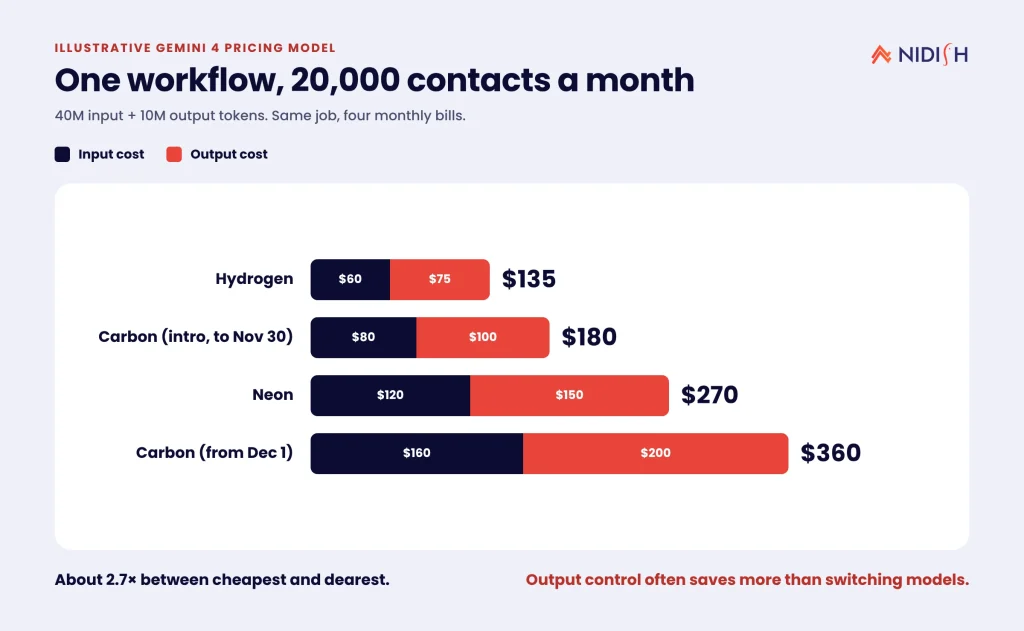
The spread is about 2.7x between the cheapest and most expensive option for the same job. Now apply step 6: if a tighter JSON format cuts output to 150 tokens per call, Hydrogen’s monthly output cost drops from $75 to $22.50. On Carbon at the standard rate, it drops from $200 to $60. Output control often saves more than switching models.
Scale matters too, and Gemini 4 pricing compounds with volume. A team with five workflows like this one is spending in the thousands per year, not the hundreds. That is enough to justify an afternoon of testing.
Common mistakes to avoid with Gemini API costs
Choosing the newest model by default
New releases get attention, but a lead-tagging task does not need a frontier model. Start cheap and move up only when tests fail.
Ignoring the defaults
Default thinking levels and unlimited output lengths are convenient for demos and costly in production. Set both explicitly.
Treating the Workspace plan as the API budget
Gemini features inside Gmail or Docs come with your Workspace plan. API calls from your own automations are billed separately through your Google Cloud or AI Studio project.
No owner, no alerts
Set a budget alert on the Google Cloud project that holds your API key. Give one person ownership of the model register from step 1.
Skipping data governance
The AI Studio changelog notes that, from October 26, 2026, Generate Content API storage is on by default for new paid-tier projects. If your prompts include customer data from your CRM, check that setting and your retention policy before you scale.
Hard-coding prices into business cases
Gemini 4 pricing changed within weeks. Keep a dated source next to every number you put in a budget.
How Nidish approaches AI model costs for CRM and ERP
We treat an AI model like any other paid integration: it has an owner, a register entry, a test set and a cost line. When we build AI steps into HubSpot, NetSuite or custom middleware, we start with the cheapest model that passes a real-record test. Then we pin the model ID, cap the output and log every call. That turns the next Gemini 4 pricing change into a 30-minute review instead of a fire drill.
Planning a wider AI rollout? Our guide to composable, AI-ready CRM stacks explains how we keep models swappable. Our piece on NetSuite integration with Node.js shows the middleware pattern we use on the ERP side.
Frequently asked questions
How much does Gemini 4 cost per million tokens?
Gemini 4 pricing depends on the model. At list price in November 2026, Hydrogen costs $1.50 input and $7.50 output per million tokens. Gemini 4 Neon costs $3 input and $15 output. Gemini 4 Carbon costs $2 input and $10 output until November 30, 2026, then $4 input and $20 output.
Does Gemini 4 Carbon get more expensive after November 30, 2026?
Yes. Google’s announcement says Carbon’s introductory price of $2 input and $10 output per million tokens ends on November 30, 2026. After that, $4 per million input tokens and $20 per million output tokens applies. Any workflow you moved to Carbon this month should be re-priced before then.
Which Gemini 4 model is best for CRM automation?
For most CRM automation, start with Hydrogen. Tasks like lead classification, field extraction and short summaries rarely need a more expensive model. Test 50 to 100 real records, and move a task to Neon or Carbon only if Hydrogen fails your accuracy bar.
Is the Gemini API included in my Google Workspace plan?
No, not for your own automations. Gemini features inside Workspace apps come with eligible plans, but API calls from HubSpot custom code, n8n, NetSuite scripts or other integrations are billed through your Google Cloud or AI Studio project. Set a budget alert on that project.
How can I reduce Gemini API costs without switching models?
Cap output tokens, set thinking levels explicitly, and ask for compact JSON instead of long text. Cache shared instructions where they repeat, and move non-urgent jobs to a discounted tier such as the Agent Platform’s Deferred tier, which is 50% off Standard pay-as-you-go for supported models.
What happens to my workflows when Google reroutes a model?
Your calls keep working, but behavior and cost can change. On October 8, 2026, Google noted that requests to gemini-3.7-flash are automatically routed to gemini-3.8-flash. Pin model IDs, log the model on every response, and re-run your test prompts when a reroute is announced.
Where to start
Start with the list, because Gemini 4 pricing only hurts where you have volume. Find every Gemini call in your CRM and ERP stack, write down the model and the volume, and re-price anything on Carbon before November 30. Then test Hydrogen on your simplest tasks and cap your outputs. Those three moves cover most of the savings for most teams.
If you want a second pair of eyes, book a 30 minute call. We’ll tell you honestly whether you need a model switch, a few prompt changes, or nothing at all.


 Blog
 Case Studies
 Career