
The most important NetSuite news from SuiteWorld 2026 is not the agents. It is what those agents will do to your integration.
On October 26, 2026, Oracle NetSuite announced the next step in its NetSuite Autonomous Suite: 45+ SuiteSkills, AI Workspaces, an agent builder and Model Context Protocol (MCP) connectors for Ask Oracle. Most coverage focused on the finance close.
If you run HubSpot alongside NetSuite, the bigger story is quieter. AI agents will soon create and update ERP records on their own, and the integration that keeps HubSpot and NetSuite in step was probably not built for that.
On top of that, NetSuite has published a hard end date for SOAP web services. This guide covers what changed, what it means for your HubSpot–NetSuite sync, and the order we would fix things in.
Table of Contents
Key takeaways
- The NetSuite Autonomous Suite is now partly live: SuiteSkills, AI Workspaces, AI Portlets and some industry SuiteAgents are available in NetSuite Next markets. Other capabilities, including the Ask Oracle MCP connectors, are planned but not committed.
- Agents will write to NetSuite records: Any HubSpot integration that assumes only people and scheduled jobs change data needs a review.
- SOAP has a shutdown date: From release 2027.1, no new token-based (TBA) integrations can be built. In release 2028.2, all SOAP endpoints are disabled.
- MCP connectors do not replace your integration: The NetSuite AI Connector Service and HubSpot’s remote MCP server let AI assistants read and act on each system. They do not keep two systems in sync.
NetSuite Autonomous Suite: what SuiteWorld 2026 announced
NetSuite announced a set of AI capabilities that move its ERP from answering questions to taking actions, all governed by existing NetSuite roles and permissions. The official SuiteWorld announcement lists these as the main pieces:
| Capability | What it does | Status (Oct 26, 2026) |
|---|---|---|
| SuiteSkills (45+) | Packaged AI skills that investigate issues such as close delays, revenue leakage and fulfilment exceptions, then act | Available in NetSuite Next markets, in Ask Oracle and in supported LLMs via the AI Connector Service |
| AI Workspaces | Shared spaces where people, agents, data and approvals meet; the first is Autonomous Close, aimed at a “zero-day close” | Available in NetSuite Next markets |
| AI Portlets | Dashboards, charts and actions generated from plain-language requests | Available in NetSuite Next markets |
| Industry SuiteAgents | Agents for software, product, healthcare, construction and nonprofit companies | Select agents available |
| SuiteFlow Agent | Builds workflows from a plain-language description, with user review before creation | Planned |
| SuiteAgent Studio | Build agents, set their tools, triggers and execution roles, then run them on schedules or business events | Planned |
| SuiteAgent Management Workspace | One view of every agent’s permissions and activity, with on/off control and agent changes logged in system notes | Planned |
| Ask Oracle Connectors | MCP client support so Ask Oracle can compare data across supported business systems and take permitted follow-up actions | Planned; supported systems not named |
| NetSuite Data Intelligence | The renamed NetSuite Analytics Warehouse, with new Data Intelligence and Deep Insights agents | Agents planned |
Oracle’s release says the planned items are “not a commitment to deliver any material, code, or functionality.” Treat the planned rows as direction, not dates.
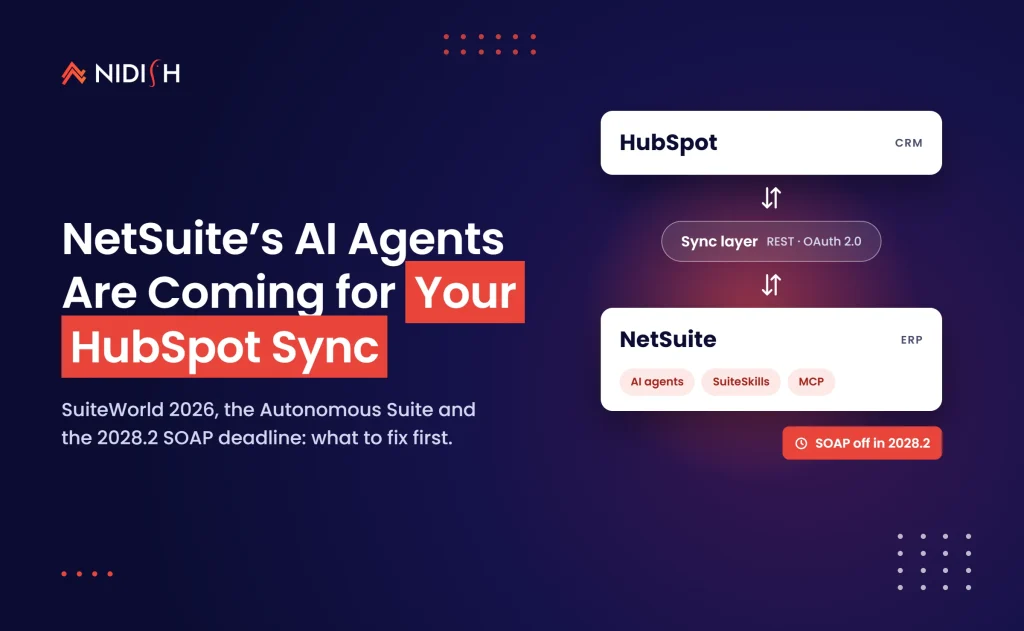
[Image suggestion: Diagram of HubSpot and NetSuite with a sync layer between them and AI agents acting on the NetSuite side. Alt text: “HubSpot–NetSuite integration with NetSuite AI agents updating ERP records”]
The deadline most SuiteWorld recaps skipped
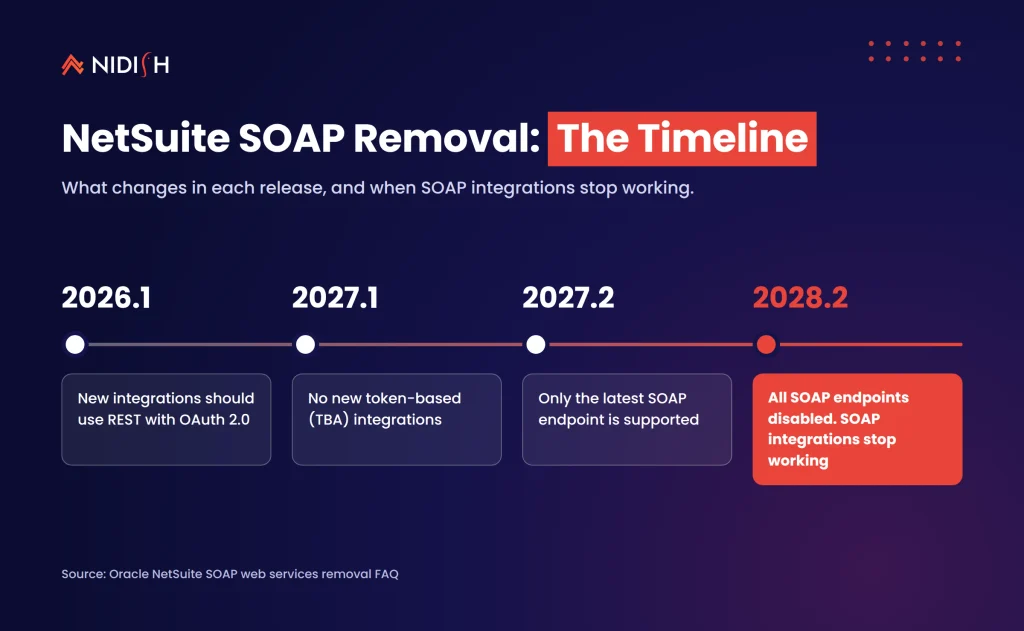
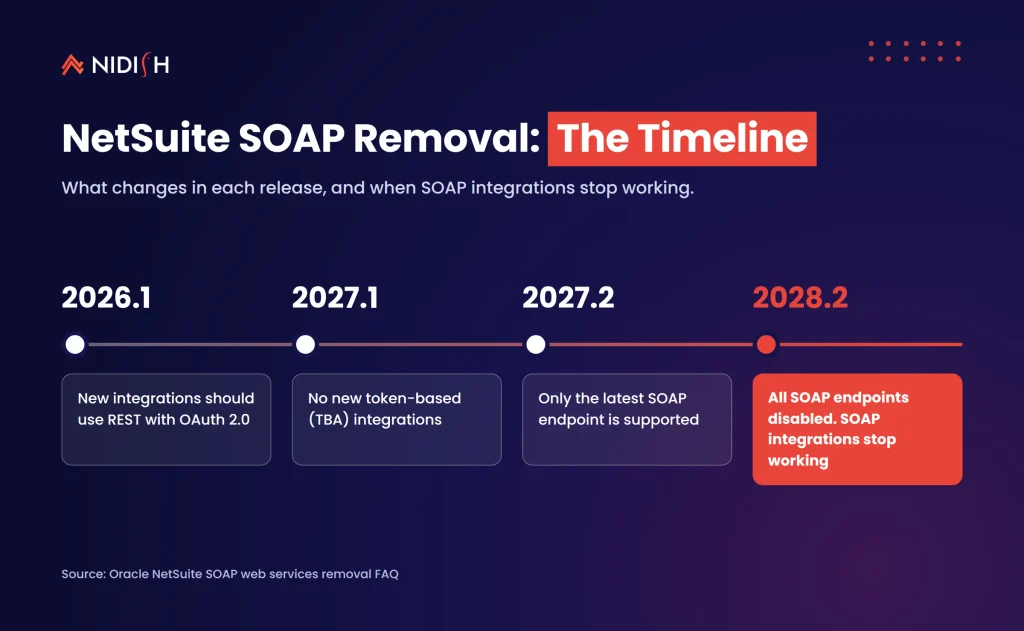
The deadline is release 2028.2. In that release NetSuite disables every SOAP web services endpoint, and SOAP-based integrations stop working. Oracle’s SOAP removal FAQ sets out the path:
| NetSuite release | What changes |
|---|---|
| 2026.1 | All newly built integrations should use REST web services with OAuth 2.0 |
| 2027.1 | No new integrations can be built with token-based authentication (TBA), which SOAP requires |
| 2027.2 | Only the latest SOAP endpoint is supported; older endpoints still run without support |
| 2028.2 | All SOAP endpoints are disabled and SOAP integrations stop working |
Plenty of older HubSpot–NetSuite connections still run on SOAP and TBA, often inside an older connector or a custom script nobody has opened in years. We see this constantly. The sync works, so nobody looks, until a field mapping breaks and the person who built it has left.
If you are unsure which API your integration uses, find out now. It is a one-hour check, and the answer decides whether the rest of this article is a nice-to-have or a project.
What the NetSuite Autonomous Suite means for HubSpot–NetSuite integrations
Agents change one basic assumption: that records change only when a person edits them or a known job runs. Here is what that breaks.
1. More records change, and faster
SuiteAgent Studio agents can run on schedules or in response to business events. An agent that fixes a customer address, holds an order or updates a payment status creates a change your integration must pick up. An integration that syncs on a fixed list of fields, or polls only records touched in the UI, will miss these. The fix is to sync on last-modified timestamps and treat agent changes like any other update.
2. Sync loops become more likely
If a HubSpot workflow updates a deal, the integration pushes it to a NetSuite sales order. A NetSuite agent then adjusts that order and the change syncs back. HubSpot may then trigger another workflow. Without loop protection, two automated systems can ping-pong a record.
Check that your integration ignores its own writes and that each field has one system of record.
3. Permissions now do real work
The NetSuite AI Connector Service FAQ is clear. The connector does not support Administrator roles, and queries “respect your NetSuite role’s permissions.” Agents built in SuiteAgent Studio also run under configured execution roles.
That is good governance. It also means your integration role, your agent roles and your human roles need a deliberate design rather than “give it admin and move on.”
4. Dirty data gets amplified
An AI agent reasoning over duplicate customers or mismatched item codes will reach the wrong answer quickly and confidently. Revenue-leakage and close skills are only as good as the HubSpot data flowing into NetSuite. If your company records do not match one-to-one across both systems, fix that before switching on agents.
If you are planning this work for your own stack, we design and rebuild HubSpot–NetSuite syncs for teams in exactly this spot. See how we approach HubSpot integration →
MCP connectors vs a real integration: which job is which?
MCP connectors let an AI assistant work inside each system. An integration keeps the two systems agreeing with each other. You need both, for different jobs.
Both sides now offer MCP. The NetSuite AI Connector Service can create, read and update records, and run saved searches and read-only SuiteQL queries, from supported AI clients such as Claude and ChatGPT. HubSpot’s remote MCP server has been generally available since April 13, 2026. It can read and write core CRM records such as contacts, companies, deals and tickets.
| Job | MCP connector (AI assistant) | Integration (iPaaS, native or custom) |
|---|---|---|
| “Which open deals have overdue invoices?” | Good fit | Overkill |
| Keep customers, items and orders in sync every few minutes | Not designed for it | Good fit |
| One-off record fix by a finance user | Good fit, within role permissions | Overkill |
| Lead-to-cash with error handling, retries and audit trail | Not designed for it | Good fit |
| Exploring data across both systems before a decision | Good fit | Reporting layer needed |
A useful rule: if the task must happen every time without a person asking, it belongs in the integration. If a person asks a question or approves an action, an MCP connector is a good fit.
What it actually costs and takes
The AI connector side is cheap. At the time of writing, Oracle says the NetSuite AI Connector Service “is not a paid feature” and the MCP Standard Tools SuiteApp is free, though you may need a paid AI client plan. For Claude, that means the Pro plan or higher, per Oracle’s setup guide. HubSpot’s remote MCP server is available to all HubSpot accounts.
The integration side is where the effort sits, and it depends on what you have today:
- Already on REST and OAuth 2.0 with clean mappings: a review of sync triggers, loop protection and roles. Usually days of work.
- On SOAP or TBA, single direction, few custom fields: a rebuild on REST. Usually a few weeks, including testing in a sandbox.
- Multi-entity, two-way lead-to-cash with heavy customisation: a planned migration with data clean-up first. Plan in months, not weeks, and start well before 2027.1.
These are ranges from our project experience, not quotes. Your connector vendor’s own roadmap matters too, so ask them for their REST and OAuth 2.0 migration date in writing.
Common mistakes to avoid
- Waiting for 2028.2: The 2027.1 change blocks new TBA integrations. If your connector needs a fresh integration record after that, you may be forced to migrate mid-quarter.
- Assuming the vendor has it covered: Some third-party NetSuite connectors still run on TBA today, as Apideck’s SuiteWorld 2026 integration notes say of its own connector. Ask, and get a date.
- Turning on agents before deciding systems of record: Decide which system owns each field first, or agents and integrations will overwrite each other.
- Using one admin-level role for everything: The AI connector will not accept it anyway, and a shared admin role makes audit trails useless.
- Treating MCP as an integration: A chat assistant that can read both systems is not a sync. It will not retry a failed order at 2 a.m.
A 90-day plan for HubSpot–NetSuite teams
- Audit the integration. Confirm SOAP or REST, TBA or OAuth 2.0, and who owns the connector.
- Map systems of record. One owner per field for customers, contacts, items, orders and invoices.
- Add loop protection and timestamp-based sync. Make sure agent-made changes are picked up and your own writes are ignored.
- Design roles. Separate roles for the integration, for agents and for people using the AI connector.
- Clean the shared data. Merge duplicates and align company, item and currency codes across both systems.
- Pilot one SuiteSkill or AI connector use case. Pick a read-heavy one first, such as overdue invoices on open deals.
- Schedule the REST migration. If you are on SOAP or TBA, book the work for the first half of 2027.
How Nidish approaches this
We start with the integration, not the AI. Our first step is a short audit of how HubSpot and NetSuite talk today: the API, the auth method, the mappings and the failure points. Then we fix the system-of-record design and roles before any agent or connector goes live. We have rebuilt lead-to-cash flows between HubSpot and NetSuite and between Pipedrive and NetSuite, so we know where these syncs usually break.
Frequently asked questions
What is the NetSuite Autonomous Suite?
The NetSuite Autonomous Suite is Oracle NetSuite’s plan for an ERP where AI agents and skills investigate issues and take actions, not just answer questions. At SuiteWorld 2026 it added SuiteSkills, AI Workspaces, AI Portlets and industry SuiteAgents, with more capabilities planned.
Does the NetSuite Autonomous Suite affect my HubSpot integration?
Yes, indirectly. Agents can update NetSuite records on schedules or business events, so your integration must pick up those changes and avoid sync loops. The separate SOAP removal timeline may also force a rebuild if your integration uses SOAP or token-based authentication.
When will NetSuite SOAP integrations stop working?
SOAP integrations stop working in NetSuite release 2028.2, when all SOAP endpoints are disabled. From release 2027.1, no new integrations can be built with token-based authentication, which SOAP requires. Oracle recommends REST web services with OAuth 2.0 for all new integrations.
Is the NetSuite AI Connector Service free?
Yes. Oracle states that the NetSuite AI Connector Service is not a paid feature and the MCP Standard Tools SuiteApp is free. You may still need a paid plan for your AI client. Claude requires the Pro plan or higher.
Can an MCP connector replace a HubSpot–NetSuite integration?
No. MCP connectors let an AI assistant read and act on each system when a person asks. An integration keeps records in sync automatically, with retries, error handling and an audit trail. Most teams will use both, for different jobs.
Which AI clients work with the NetSuite AI Connector Service?
Oracle currently lists Claude (Pro plan or higher) and ChatGPT as supported AI clients. Any client that supports remote MCP with OAuth 2.0 and PKCE can work, though some plans need extra setup, such as Developer Mode in ChatGPT.
Where to start
Three decisions matter most. Know which API your integration runs on, decide which system owns each field, and give agents, integrations and people their own roles.
Get those right and the NetSuite Autonomous Suite becomes a gain for your HubSpot data, not a new source of sync errors.
Book a 30 minute call. We’ll tell you honestly whether you need a quick review, a REST rebuild, or nothing at all yet.


 Blog
 Case Studies
 Career