
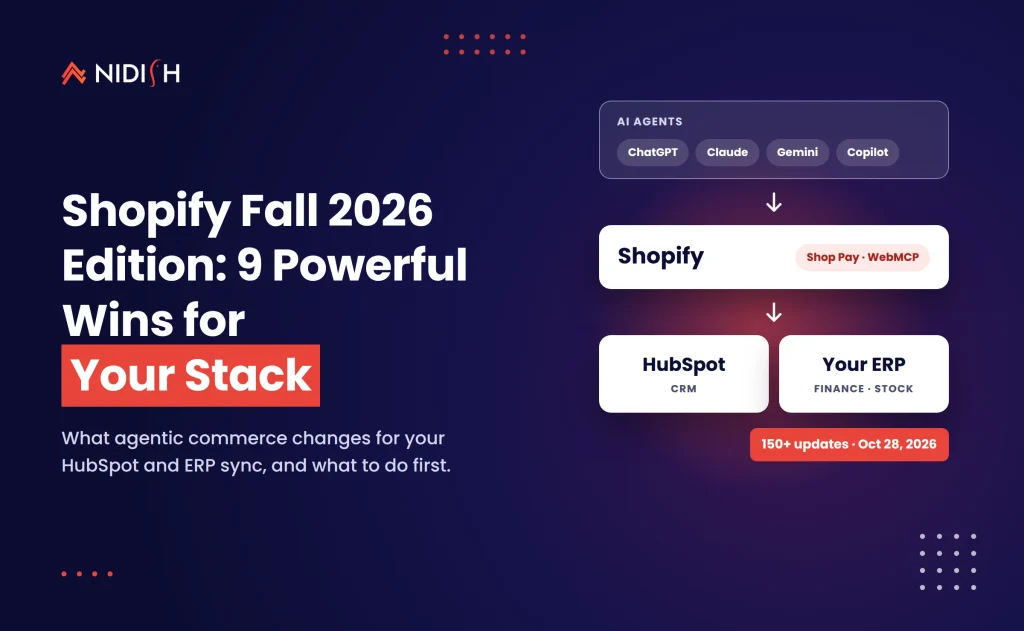
Your next Shopify order may never touch your storefront. The Shopify Fall 2026 Edition, branded “Exponential” and announced on October 28, 2026, lets AI agents find products, fill carts and check out with Shop Pay on a buyer’s behalf. Shopify lists more than 150 updates. Most coverage stops at the feature list.
This guide looks at the Shopify Fall 2026 Edition from the back office instead. If your store feeds HubSpot, NetSuite, QuickBooks or a custom data layer, several of these changes alter what lands in your CRM and ERP. Some are wins you can take this month. A few will quietly break reports if nobody plans for them.
We cover what shipped, what it means for your integrations, a decision table, a 30-day action plan, honest effort ranges and the mistakes we expect to see.
Table of Contents
Key takeaways
- Agent-driven buying is live: shop.md, Shop Pay inside AI agents and WebMCP tools make every Shopify store reachable by AI shoppers by default.
- Merchants can now run parts of the admin from ChatGPT, Claude, Copilot, Gemini and other assistants through Shopify connectors.
- POS customer recognition and App Events give your CRM richer, cleaner data, if your sync is ready to receive it.
- New local payment methods and multi-currency payouts change ERP reconciliation for cross-border sellers.
- Several items are early access, beta or “coming soon,” so check availability before you plan work around them.
What is the Shopify Fall 2026 Edition?
The Shopify Fall 2026 Edition is Shopify’s seasonal product release, published on October 28, 2026 under the name “Exponential.” Its headline theme is agentic commerce: AI agents that shop, and AI assistants that help merchants run stores. Shopify’s official Fall ’26 Edition page lists more than 150 updates across Sidekick, online store, checkout, payments, POS, B2B and developer tools.
The developer side matters just as much. Shopify’s developer announcement says a rebuilt Hydrogen is now generally available and works “with any framework and any runtime.” It also states that “every Shopify store is agent-ready by default” because WebMCP tools now sit on Liquid and Hydrogen storefronts and checkouts.
Not everything ships today. Canvas, the new visual store editor, is in early access. The Catalog API for searching products beyond Shopify is in beta. The Shopify Protect rule builder and checkout custom fields are marked as rolling out soon. Treat release dates as “at time of writing” and confirm in your admin.
The 9 changes that matter for your CRM and ERP stack
We read the full Shopify Fall 2026 Edition release with one question in mind: what changes for the systems behind the store? Here are the nine that matter most, ranked by how often we expect them to touch integration work.
1. Orders from AI agents become a real channel
Shop.md lets agents such as ChatGPT and Claude search products, make recommendations, check out with Shop Pay and track orders. IT Brief reports a catalogue of more than one billion products behind it. Shop Pay checkout now also runs inside agents including Meta’s Muse, Claude Duet, Grok Bot and Instinct. Shopify also describes selling in Google’s AI Mode and the Gemini app with Shopify-powered checkout.
Why it matters for your stack: Shopify agentic commerce orders still land in Shopify, but the “source” story changes. If your HubSpot attribution relies on UTM parameters and landing pages, agent orders may arrive with neither.
2. WebMCP makes every storefront agent-ready
WebMCP gives browser-based agents structured tools for product search, carts and checkout. Per IT Brief, checkout through these tools still requires buyer approval. The practical result is that your product data becomes your storefront. Missing specs, thin descriptions and messy variant names now cost you visibility with AI shoppers, not just with Google.
3. Shopify connectors bring the admin into AI assistants
Shopify connectors let merchants manage products, inventory, orders and performance from assistants including ChatGPT, Claude, Microsoft Copilot, Google Gemini, Grok, Muse and Perplexity. That is convenient. It is also a new door into your store data.
Why it matters: if staff can change inventory from a chat window, your ERP must still be the source of truth. Decide which system owns stock levels before someone “fixes” a number in ChatGPT that NetSuite overwrites an hour later.
4. Shopify Sidekick gets multi-step work and SimGym
Shopify Sidekick can now run calculations, write code, search the web and remember information you give it. Shopify says it still asks for approval before it makes changes. Sidekick can also test its recommendations in SimGym, a simulation tool, before you apply them. Shopify reports that daily Sidekick sessions grew 4.2x year over year.
For ops teams, Sidekick is a strong drafting tool for discounts, Flow automations and reports. It is not a replacement for integration logic that lives outside Shopify.
5. POS customer recognition feeds richer profiles
Shopify POS can now recognise more in-store shoppers through people who have paid with Shopify Payments. Shopify says known in-store customers have more than 60% higher lifetime value than unknown ones, a figure Small Business Trends also reported. POS also adds recent carts, so staff can start a cart on one device and finish it on another.
Why it matters: more identified in-store buyers means more contacts and orders flowing into HubSpot. That is good news only if your sync de-duplicates by email and handles consent correctly.
6. New local payments and multi-currency payouts
Shopify Payments adds Alipay, WeChat Pay, Satispay, Scalapay and GrabPay in-store and online, with MB WAY and OXXO online. Multi-currency payouts are now available in Australia, France, Singapore and Hong Kong, on Advanced and Shopify Plus plans only.
Why it matters: every new payment method and payout currency is a new line in your ERP’s cash application. Map them in your Shopify ERP integration before the first payout arrives.
7. App Events and a refreshed Dev Dashboard
App Events let apps define events and send them to Shopify Analytics, where merchants can view them. The refreshed Dev Dashboard shows app and store health, payouts, statements and billing on one home page. For custom integration apps, this is a cheap observability win: you can log sync successes and failures where merchants already look.
8. Hydrogen goes GA and themes get simpler
Hydrogen has been rebuilt and is generally available. Vercel Shop, an open-source Next.js template built on the Hydrogen SDK, is also GA. On the theme side, page structure now lives in the Liquid template itself rather than a separate JSON file. That should make themes easier for developers and coding agents to customize.
9. Fraud rules and app security checks
Shopify Protect gains a rule builder for writing and backtesting your own fraud rules, rolling out soon. For developers, a single Shopify CLI command in the AI Toolkit checks for common issues such as unauthenticated routes, cross-shop data access and unverified webhooks. If you run a private or custom app that syncs to your CRM, run that check this week.
What Shopify agentic commerce means for your HubSpot data
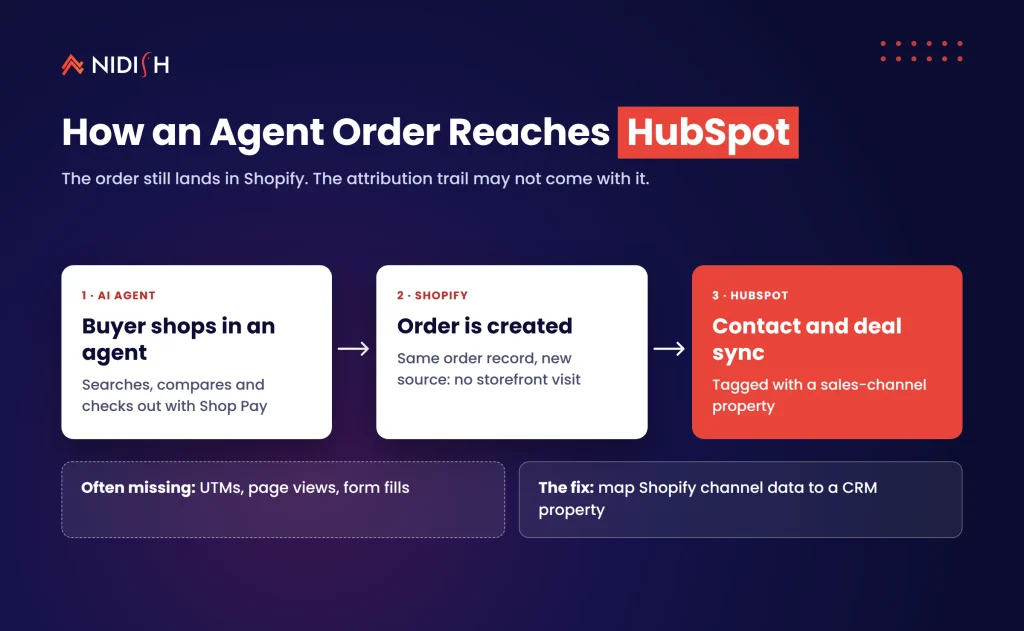
Shopify agentic commerce means some customers will discover, compare and buy without ever loading your theme. For a Shopify HubSpot integration, three things change at once.
Attribution gets thinner
Agent-led orders may not carry the UTM or page-view trail your reports expect. Add an “order channel” or “sales channel” property in HubSpot and map Shopify’s channel data into it. Report on it from day one, even if volumes are tiny.
Contacts arrive with less context
A buyer who checks out through an agent may never fill in a form or open an email. Your lifecycle stage logic should not assume a “lead” step that never happened. Let first purchase set the stage directly.
Product data quality becomes a revenue lever
Agents read structured data. If your product catalog in Shopify is cleaner than the one in HubSpot or your ERP, decide which side wins and sync in one direction. Our Shopify HubSpot integration guide covers field ownership in more depth.
The mistake we see constantly is teams adding a new channel and leaving their CRM model exactly as it was. Six months later, nobody trusts the revenue report.
If you are weighing these changes for your own store, Shopify, HubSpot and ERP integration is core work for our team. See how we handle HubSpot integration →
Shopify ERP integration: payments, payouts and B2B
A Shopify ERP integration usually breaks at the money layer, not the order layer. This release adds new payment methods, new payout currencies and per-market fees in early access. Each one needs a home in your chart of accounts.
Start with a simple mapping exercise. List every payment gateway and method your store now accepts, then confirm how each one posts to NetSuite, QuickBooks or Xero. Do the same for payout currencies if you are on Advanced or Plus in Australia, France, Singapore or Hong Kong.
B2B merchants get two useful updates. Algolia search can now show B2B customers only their own catalog and negotiated prices. CSV exports of B2B catalogs now include vendor details, which helps when you reconcile price lists against your ERP.
Shopify Functions also improve: delivery customizations can now read metafields on delivery options. If your ERP stores shipping rules, that gives you a cleaner way to push them into checkout logic. For the NetSuite side of this picture, see our breakdown of REST API vs native integration for HubSpot and NetSuite, and our recent post on the NetSuite Autonomous Suite and HubSpot sync.
Native vs custom: which updates need integration work?
Not every Shopify Fall 2026 Edition update needs a developer. Use this table to sort the release into “turn it on,” “configure it” and “build for it.”
| Update | Native, turn it on | Needs configuration | Needs custom integration work |
|---|---|---|---|
| Shop.md and Shop Pay in agents | Yes | Product data cleanup | Channel attribution in CRM |
| WebMCP on storefront | On by default | Catalog quality review | Rarely |
| Shopify connectors in AI assistants | Yes | Staff permissions | ERP stock-ownership rules |
| Shopify Sidekick and SimGym | Yes | Approval habits | No |
| POS customer recognition | Yes | Consent settings | CRM de-duplication |
| Local payments and multi-currency payouts | Yes | Payout settings | ERP cash application mapping |
| App Events | No | Analytics views | Yes, inside your custom app |
| Hydrogen GA and new theme architecture | No | Theme review | Yes, for headless builds |
| Shopify Protect rule builder | Rolling out soon | Rule design and backtests | No |
The right column is where budgets go. Everything else is mostly process and data hygiene.
Your 30-day Shopify Fall 2026 Edition action plan
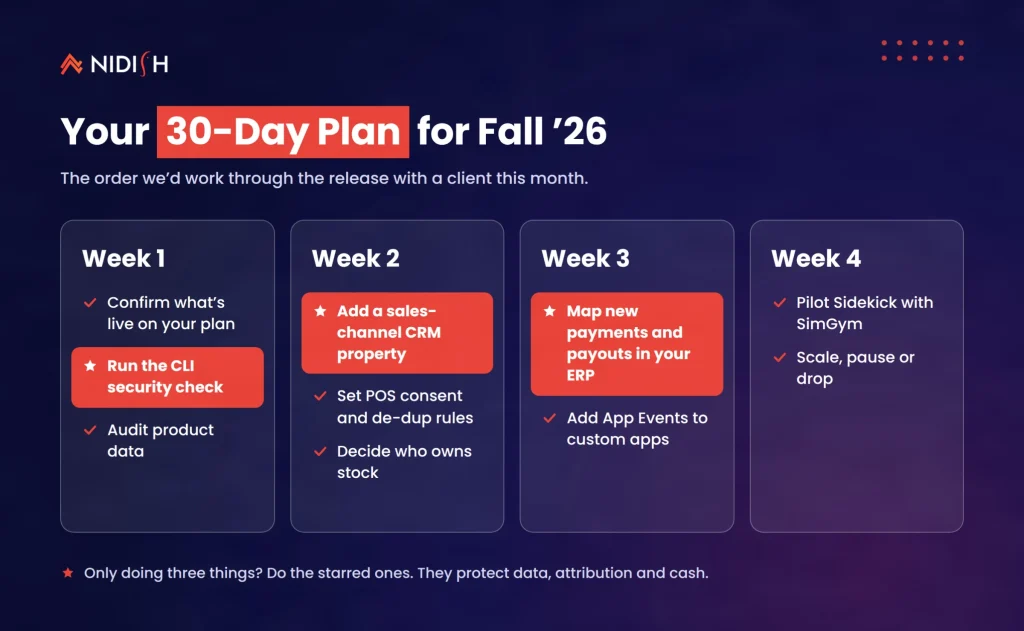
Here is the order we would work through the Shopify Fall 2026 Edition with a client this month. Bookmark it and tick items off.
- Week 1: confirm availability. Check which features are live on your plan and region. Note anything in early access, beta or coming soon.
- Week 1: run the CLI security check on any custom or private app that touches customer or order data.
- Week 1: audit product data. Fix missing attributes, vague titles and broken variant options. Agents will read them.
- Week 2: add a sales-channel property in your CRM and map Shopify channel data to it.
- Week 2: review POS consent and de-duplication rules before identified in-store buyers start syncing.
- Week 2: decide stock ownership. Write down whether Shopify or your ERP owns inventory, and restrict connector access to match.
- Week 3: map new payment methods and payout currencies in your ERP. Test one payout end to end.
- Week 3: add App Events to custom integration apps so sync errors show up in Shopify Analytics.
- Week 4: pilot Sidekick on one workflow, such as a Flow automation, with SimGym testing before you apply it.
- Week 4: review results and decide what to scale, pause or drop.
If you only do three things, do steps 2, 4 and 7. They protect data, attribution and cash.
What it costs and how long it takes
Most of the Shopify Fall 2026 Edition costs time, not licence fees. The features themselves come with your Shopify plan, though some sit behind plan or region limits. Confirm pricing and eligibility with Shopify at the time you plan.
Integration effort is where budgets move. These are rough planning ranges from typical projects, not quotes:
- Product data cleanup: a few days for a small catalog, several weeks for thousands of SKUs with messy variants.
- CRM channel attribution: usually a few days if you already have a working Shopify HubSpot integration.
- Shopify ERP integration updates for payments and payouts: one to three weeks, depending on how many entities and currencies you run.
- App Events in a custom app: a few days of developer time for basic success and failure events.
- Headless move to the new Hydrogen: a full project, typically measured in months, not weeks.
The cheapest option is often doing nothing on the riskier items until features leave early access. That is a valid choice, as long as it is a deliberate one.
Common mistakes to avoid
Treating agent orders like web orders
Shopify agentic commerce orders behave differently. Tag them, report on them and keep them separate until you understand them.
Letting two systems own inventory
Connectors make it easy to edit stock from a chat window. Pick one source of truth and lock the other side down.
Syncing POS contacts without consent rules
Identified in-store buyers are valuable. They also come with privacy obligations. Check your consent capture before you push them into marketing lists.
Building on early-access features
Canvas, the Catalog API beta and “coming soon” items can change. Prototype on them, but don’t ship core integrations that depend on them yet.
Ignoring the money layer
New payment methods look like a checkout feature. They are really an accounting change.
Skipping the security check
It is one command. Unverified webhooks and cross-shop data access are exactly the issues that hurt integration apps.
How Nidish approaches this
We start every Shopify engagement by deciding which system owns each piece of data: products, stock, customers, orders and cash. Then we build the sync around that map, not the other way round. For the Shopify Fall 2026 Edition, that means a short readiness review covering product data, CRM channel attribution, POS consent, and ERP payment mapping, followed by fixes in priority order. If you are moving commerce data into HubSpot itself, our Shopify to HubSpot Commerce Hub migration guide shows how we handle that path. We also make sure your store’s content is ready for AI answers, as covered in our AEO guide to optimizing for AI search.
Frequently asked questions about Shopify Sidekick and agentic checkout
When was the Shopify Fall 2026 Edition released?
Shopify announced the Fall ’26 Edition, called “Exponential,” on October 28, 2026. It includes more than 150 updates. Some features went live at launch, while others are in early access, beta or marked as coming soon, so check availability in your admin.
What is Shopify agentic commerce?
Shopify agentic commerce is buying and store management done through AI agents. Shoppers can use agents such as ChatGPT or Claude to find products and check out with Shop Pay. Merchants can use Sidekick and Shopify connectors to run store tasks from a chat interface.
Do I need to do anything to make my store agent-ready?
Not technically. Shopify says every store is agent-ready by default through WebMCP tools on Liquid and Hydrogen storefronts. In practice, you should clean up product data, review policies shared with agents and make sure your CRM can tell agent orders apart from regular web orders.
What can Shopify Sidekick do after the Fall 2026 Edition?
Shopify Sidekick can now handle multi-step tasks, run calculations, write code, search the web and remember information you share. It still asks for approval before making changes. It can also test recommendations in SimGym before you apply them to your live store.
Will the Fall 2026 Edition affect my Shopify HubSpot integration?
Yes, in a few places. Agent orders may arrive without the usual attribution data, and POS customer recognition can add more identified contacts. Review your channel properties, de-duplication rules and consent settings so new data flows into HubSpot cleanly and your revenue reports stay trustworthy.
Which Fall 2026 Edition features are limited by plan or region?
Multi-currency payouts in Australia, France, Singapore and Hong Kong are limited to Advanced and Shopify Plus plans. Per-market fees are listed as early access. Canvas is early access, and the Catalog API is in beta. Confirm eligibility in your admin before you plan work around any of them.
Where to start
The Shopify Fall 2026 Edition is a big release, but your first moves are small: run the security check, add a sales-channel property and map the new payment methods. Those three steps protect your data while the bigger agentic commerce features mature.
Book a 30 minute call. We’ll tell you honestly whether you need a new integration, a few configuration changes, or nothing at all.


 Blog
 Case Studies
 Career