
Table of Contents
A Shopify to HubSpot Commerce Hub migration is one of those searches where the honest answer matters a lot more than the exciting one. If you’ve landed here hoping HubSpot Commerce Hub is a drop-in replacement for your Shopify storefront, we’d rather tell you the truth upfront than let you find out the hard way three weeks into a build. For some businesses, this migration is exactly the right move. For a lot of others, it isn’t a migration at all, it’s an integration, and getting that distinction right before you start saves real time and money.
This guide breaks down what HubSpot Commerce Hub actually does, where it genuinely can replace Shopify, where it can’t, and what the migration or integration process looks like depending on which situation you’re actually in.
Quick Answer
A full Shopify to HubSpot Commerce Hub migration makes sense mainly for service-based and B2B businesses using Shopify for simple invoicing or payment collection, not for product-based ecommerce brands. HubSpot Commerce Hub is built around payment links, quotes, and invoicing, it does not include a real storefront builder, inventory management, shipping integration, or point-of-sale, the core functions Shopify is actually built for. Most ecommerce businesses evaluating this move are better served keeping Shopify for the storefront and connecting it to HubSpot for CRM, marketing, and customer service instead of migrating away entirely.
What HubSpot Commerce Hub Actually Is
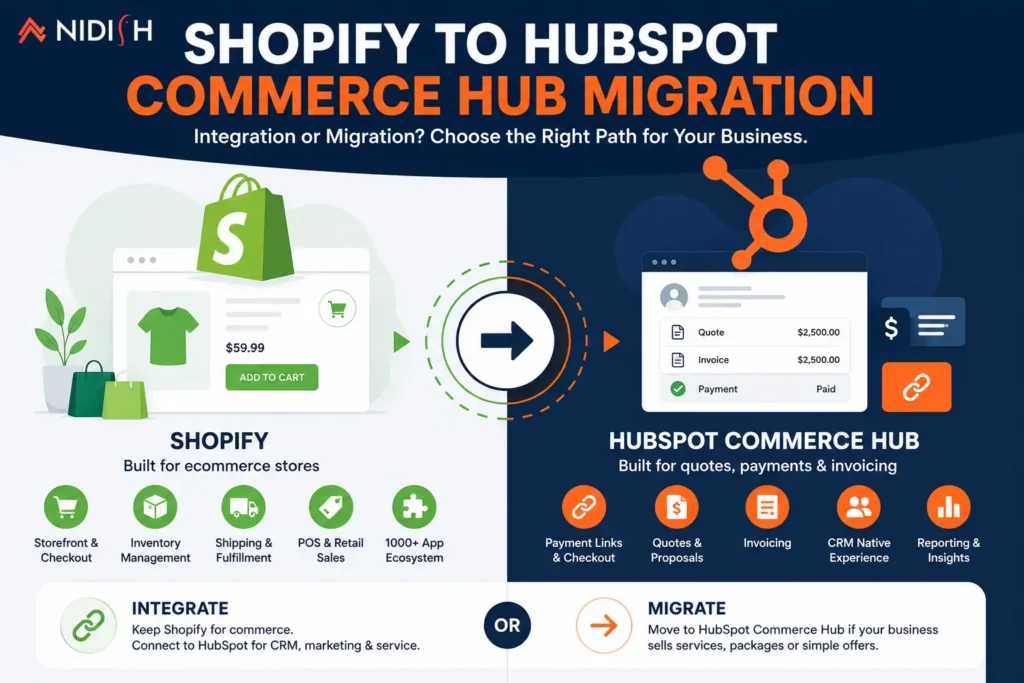
HubSpot Commerce Hub is built for collecting payments, sending quotes, and managing invoices directly inside the CRM, tightly connected to your deal and contact records. That’s genuinely useful for service businesses and B2B companies that need to bill clients without bouncing between a separate invoicing tool and their CRM.
What it is not built to do is run a product-based online store. As one detailed platform comparison puts it, Commerce Hub lets you create payment links, quotes, and invoices, which works fine for service businesses and B2B deals, but there’s no real storefront builder, no inventory system, no shipping integration, and no POS. If your business sells physical products with variants, stock levels, and shipping logistics, that gap matters immediately, not eventually.
What Shopify Does That Commerce Hub Doesn’t
Shopify was built from day one as an ecommerce-first platform, and it shows in the depth of what it handles natively: a full storefront builder, inventory tracking across variants and locations, shipping rate calculation and label printing, a point-of-sale system for in-person sales, and a massive app ecosystem covering nearly every ecommerce edge case imaginable.
Shopify has also pushed further into AI-assisted commerce, with built-in tools helping with product descriptions, store performance analysis, and automated back-office tasks like inventory alerts. This is functionality Commerce Hub was never designed to compete with, because HubSpot’s commerce tools solve a different problem: getting paid and managing the deal, not running the store itself.
Should You Fully Migrate From Shopify to HubSpot Commerce Hub?
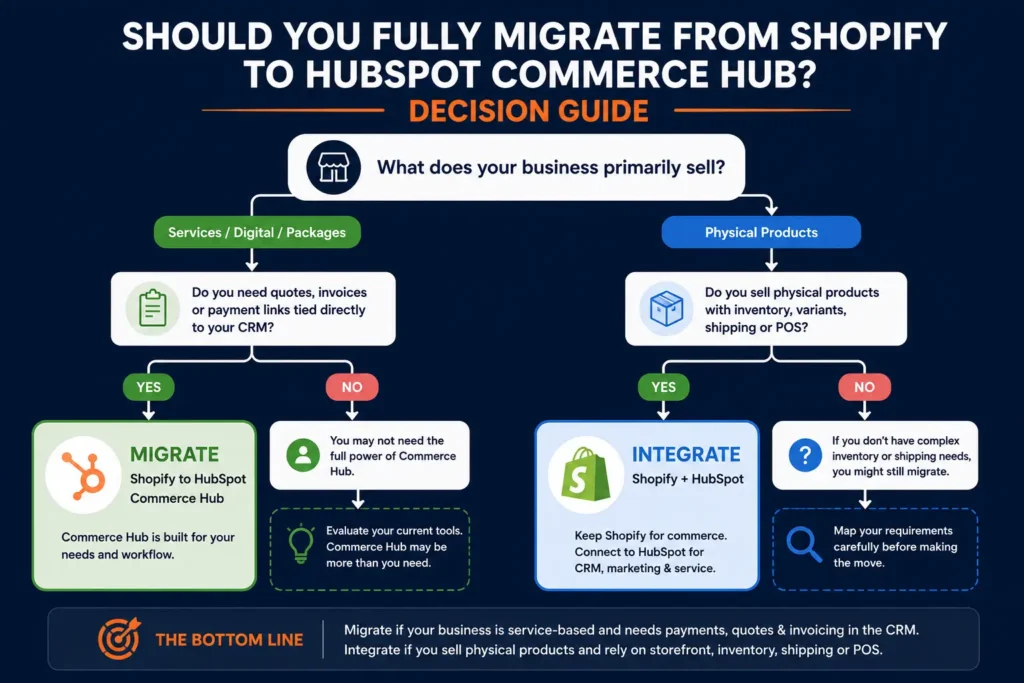
This is the question that actually matters, and the honest answer depends entirely on what your business sells and how.
A full migration tends to make sense when:
- You’re a service-based business (consulting, agencies, professional services) using Shopify mainly to collect payments or send simple invoices
- You don’t manage physical inventory, shipping, or variant-based products
- Your “store” is really a handful of fixed-price offers or packages, not a true product catalog
- You want quotes, invoices, and payment collection tied directly to the same CRM record as the deal and customer relationship
A full migration is the wrong move when:
- You sell physical products with inventory, variants, or shipping requirements of any real complexity
- You rely on Shopify’s POS for in-person sales
- Your business depends on Shopify’s app ecosystem for functionality Commerce Hub simply doesn’t offer
- Product discovery, cart, and checkout experience are core to how customers actually buy from you
If you fall into that second list, and most product-based ecommerce businesses do, the better path isn’t migration at all.
The Smarter Path for Most Ecommerce Businesses: Integration, Not Migration
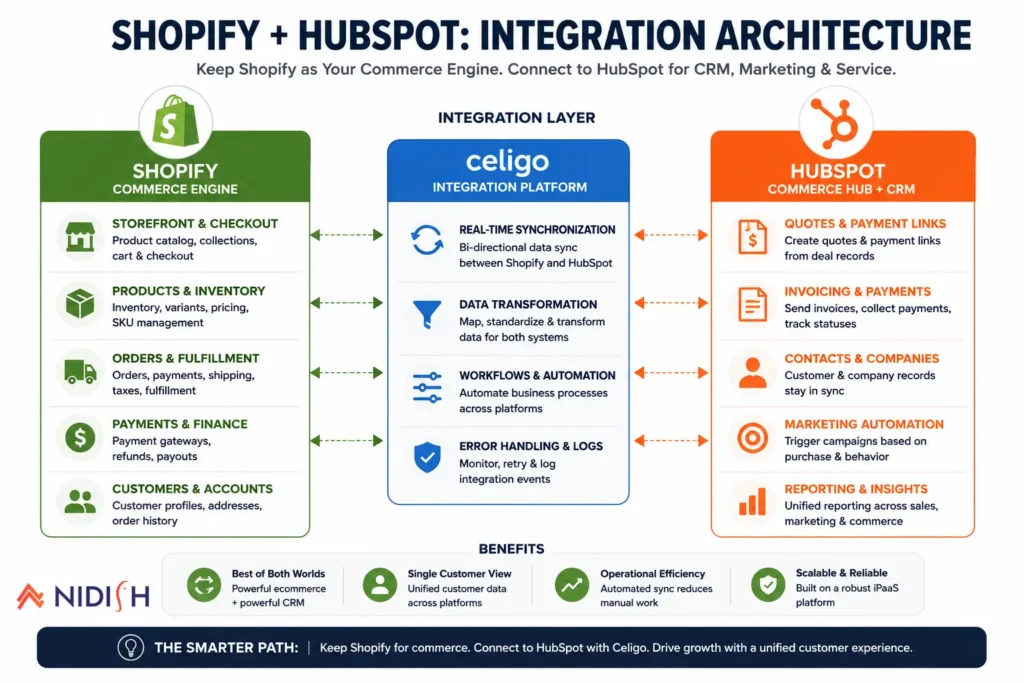
For businesses selling physical products, the pattern that actually works is keeping Shopify as the commerce engine, storefront, checkout, inventory, fulfillment, while connecting it to HubSpot for everything on the customer relationship side: CRM, email marketing, automation, and service. This hybrid setup gives you native commerce and full lifecycle marketing without forcing either platform to do a job it wasn’t built for, and it’s the setup we recommend far more often than a full Commerce Hub migration.
The part that actually determines whether this works well is the integration layer connecting the two systems. Shopify runs commerce execution, carts, checkout, orders, payments, and fulfillment, while HubSpot runs engagement and lifecycle management, leads, customers, and campaigns, and keeping customer identity and order data in sync between the two as your business grows is where most DIY integration attempts start to break down. A properly built Celigo integration keeps order history, customer data, and lifecycle stages accurate across both platforms automatically, rather than relying on manual exports or a brittle Zapier chain that quietly falls out of sync the moment your volume increases.
If you’re currently searching for a Shopify to HubSpot Commerce Hub migration and you sell physical products, this integration approach is very likely the actual answer to the problem you’re trying to solve, better marketing automation and CRM visibility, without giving up the ecommerce infrastructure Shopify already handles well.
What a Full Commerce Hub Migration Actually Involves
For the businesses where a full migration genuinely is the right call, service businesses, consultancies, and simple invoicing use cases, here’s what the process looks like.
Step 1: Audit your current Shopify setup: Document every product, price point, and payment flow currently running through Shopify, including any automation tied to order or payment events.
Step 2: Map offers to HubSpot’s commerce structure: Fixed-price services and packages get rebuilt as HubSpot products, tied to your deal pipeline rather than a storefront catalog.
Step 3: Rebuild payment and invoicing flows: Quotes, payment links, and recurring billing get configured inside Commerce Hub, connected directly to the relevant contact and deal record.
Step 4: Migrate customer and transaction history: Existing customer records and past transaction history move into HubSpot’s CRM, so historical context isn’t lost in the transition.
Step 5: Test payment processing thoroughly: Payment flows need real-world testing before cutover, since this directly affects revenue collection and can’t afford to break silently.
Step 6: Retire Shopify in stages: Rather than an immediate cutoff, most businesses run both systems in parallel briefly, particularly for any active subscriptions or recurring billing, before fully sunsetting Shopify.
What Transfers Cleanly and What Doesn’t
Customer contact information and basic transaction history generally migrate without much friction into HubSpot’s CRM. Payment methods on file typically need customers to re-enter payment details, since payment credentials don’t transfer directly between platforms for security reasons.
Recurring billing and subscriptions need careful handling, since the billing cycle needs to continue without interruption during the switch, which is usually the most delicate part of this specific migration.
Product catalog structure, if you’re moving from anything beyond simple fixed-price offers, generally doesn’t transfer cleanly, because Commerce Hub isn’t built around a true product catalog the way Shopify is. This is usually the clearest signal a business is a poor fit for full migration in the first place.
Common Mistakes to Avoid
- Assuming Commerce Hub is a like-for-like Shopify replacement: It isn’t, and businesses that migrate expecting full ecommerce parity end up rebuilding critical functionality that simply doesn’t exist on the other side.
- Migrating a real product catalog into a system built for quotes and invoices: This is the single most common mistake, and it usually gets discovered only after the migration is already underway.
- Overlooking the integration alternative: Many businesses searching for this migration actually need a connected Shopify-HubSpot setup, not a full platform switch, and skip evaluating that option before committing to a migration that solves the wrong problem.
- Not testing payment flows thoroughly before cutover: Payment collection issues discovered after go-live directly affect revenue, not just user experience.
- Ignoring recurring billing continuity: Subscriptions or recurring invoices need a clear continuity plan, not an assumption that billing cycles will simply carry over.
How Nidish Can Help
We help businesses figure out which of these two paths actually fits, a genuine Commerce Hub migration for service and B2B use cases, or a properly built Shopify-HubSpot integration for product-based ecommerce, rather than assuming migration is automatically the answer. Our Celigo integration services cover the connected-stack approach in more depth, and if you’re weighing HubSpot’s broader ecommerce capabilities more generally, our piece on HubSpot for ecommerce is a useful next read. For businesses further along in evaluating a full HubSpot rollout, our HubSpot implementation services page covers what that process looks like end to end.
Frequently Asked Questions
Can HubSpot Commerce Hub fully replace Shopify?
Not for product-based ecommerce. Commerce Hub is built for payment links, quotes, and invoicing, without a storefront builder, inventory system, shipping integration, or POS. It can fully replace Shopify only for simple, service-based billing use cases.
Is a Shopify to HubSpot Commerce Hub migration a good idea for an ecommerce store?
Generally no. Businesses selling physical products are usually better served keeping Shopify for the storefront and connecting it to HubSpot for CRM and marketing, rather than migrating away from Shopify entirely.
What’s the difference between migrating and integrating Shopify with HubSpot?
Migrating means moving your commerce functionality entirely into HubSpot and retiring Shopify. Integrating means keeping Shopify as your commerce engine while connecting customer and order data to HubSpot for marketing, CRM, and service. Most product-based businesses need integration, not migration.
Does customer payment information transfer during a Commerce Hub migration?
No, payment methods typically need to be re-entered by customers for security reasons, since stored payment credentials don’t transfer directly between platforms.
How do I know if I should migrate or integrate?
If you sell physical products with inventory, variants, or shipping, integration is almost always the right call. If you’re a service business using Shopify only for simple invoicing or fixed-price payment collection, a full migration to Commerce Hub is worth evaluating seriously.




 Blog
Blog Case Studies
 Career