
Odoo modules explained properly starts with a correction: “we need to customize Odoo” is not one decision. It’s three completely different decisions wearing the same sentence, and businesses that treat them as interchangeable are exactly the ones who end up either overpaying a developer to build something a checkbox in settings already did, or trying to force a no-code tool to handle logic it was never built to run.
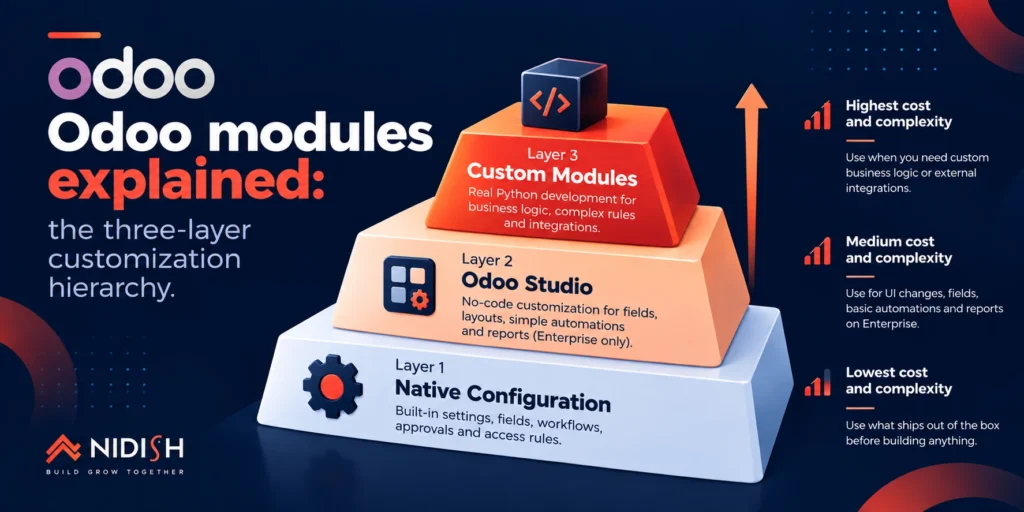
Odoo modules explained properly means separating three genuinely distinct layers: native configuration that ships out of the box, Odoo Studio’s no-code layer available on Enterprise, and real custom Python module development. Each layer has a different cost, a different risk profile, and a different relationship to Odoo’s upgrade cycle. Getting the layer wrong is where most Odoo budgets quietly go sideways.
We implement and extend Odoo for clients regularly, and Odoo modules explained from that vantage point looks different than from a sales page, across the native app layer, Studio configuration, and genuine custom development. Everything below reflects what that actually looks like in practice, including where each layer breaks.
Table of Contents
Odoo Modules Explained: The Three-Layer Reality of Customization
Odoo modules explained at the surface level sounds simple, apps you install, apps you don’t. The reality underneath is a genuine hierarchy, and most of the expensive mistakes we see trace back to skipping a layer or jumping straight to the most expensive one out of frustration rather than necessity.
Layer 1, native configuration
Odoo’s core apps, CRM, Sales, Inventory, Accounting, and dozens more, ship with extensive built-in settings, field customization, and workflow configuration that requires zero code and zero developer time.
Layer 2, Odoo Studio
A no-code, visual tool available on Enterprise that lets a business user add fields, adjust layouts, and build basic automations and reports without touching Python.
Layer 3, custom module development
Real code, built in Python against Odoo’s ORM, that changes how the system actually processes data and makes decisions, not just what a user sees on screen.
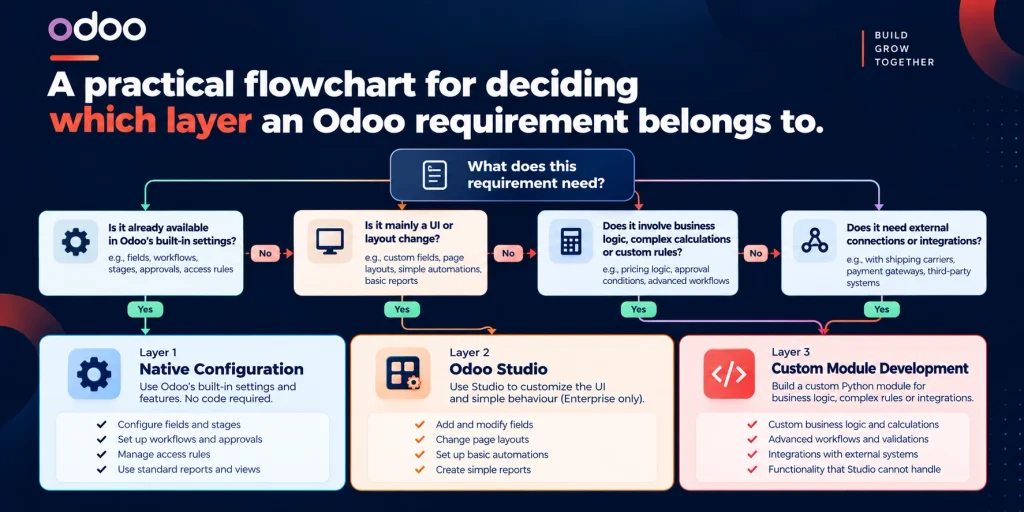
In Odoo modules explained terms, the layers are not interchangeable, and the single most useful thing you can do before starting any Odoo project is figure out, requirement by requirement, which layer each one genuinely belongs to.
Odoo Modules Explained, Layer 1: Native Configuration, What Ships Out of the Box
This is the layer most businesses underuse before jumping to something more expensive. Odoo’s modular architecture means each app, CRM, Sales, Inventory, Accounting, Manufacturing, HR, Website, eCommerce, Point of Sale, ships with genuinely deep configuration options: custom fields through the settings UI, workflow stages, automated actions, approval rules, and role-based access, all without a developer.
The mistake we see constantly in Odoo modules explained conversations is a business assuming a requirement needs custom work before actually testing whether Odoo’s native settings already cover it. A pricing rule, a stage-based automation, a custom report filter, these are frequently a configuration exercise, not a development project, and confirming that first is the cheapest step in this entire framework.
Odoo Modules Explained, Layer 2: Odoo Studio, the No-Code Middle Layer
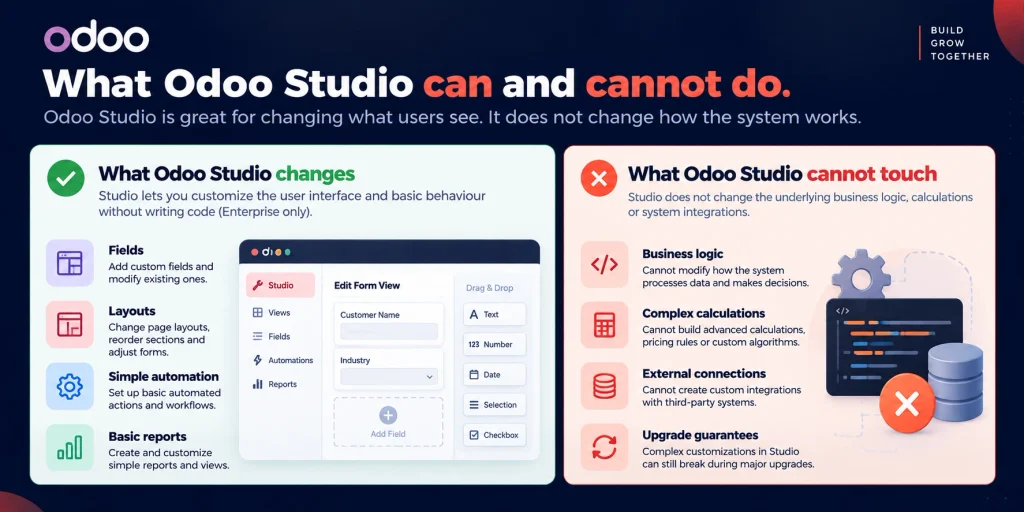
Odoo Studio is a no-code tool built into Odoo Enterprise that lets a business user add fields, change layouts, set up simple automations, and build basic reports without writing code. It is not available on the free Community edition.
Here’s the distinction that matters most when Odoo modules get explained honestly: Studio only changes what users see on screen. It does not change how Odoo processes data or makes decisions underneath that screen. That’s a real limitation, not a minor caveat. Studio changes have no version history and no record of who changed what, and critically, Studio-built changes don’t reliably survive major Odoo version upgrades, some do, some quietly break, and you generally only find out during testing after an upgrade has already happened.
Studio is the right tool for layout changes, simple field additions, and basic automation a business user should own directly. It is the wrong tool the moment a requirement involves real logic, a calculation, a conditional rule with genuine business consequences, or a connection to an outside system.
Odoo Modules Explained, Layer 3: Custom Python Development, When You Actually Need It
Custom modules are built in Python against Odoo’s structure, a manifest file declaring the module’s dependencies and metadata, model files defining data structure and business logic through Odoo’s ORM, and view files controlling how that data is presented. Unlike Studio changes, custom modules live in code, which means they can be version-controlled, tracked, moved between environments, and built deliberately to survive Odoo upgrades rather than hoping they do.
In Odoo modules explained terms, this is the layer you need when a requirement involves genuine business logic, a calculation with real financial or compliance consequences, a conditional rule too complex for Studio’s basic automation, or an integration connecting Odoo to an external system like a CRM, a shipping carrier, or a payment processor. If getting a requirement wrong would cost real money or create a compliance problem, it belongs in a properly built module, not a Studio configuration nobody can fully audit.
Odoo Modules Explained by Edition: How Community or Enterprise Changes This Calculus
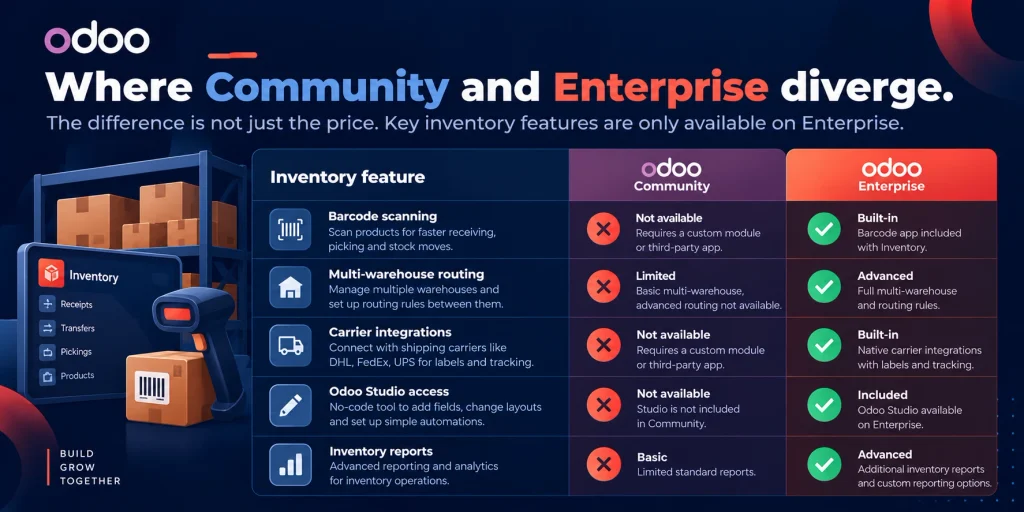
This edition decision compounds everything Odoo modules explained covers above, because Odoo Community and Enterprise start from the same open-source core but diverge significantly in what’s native versus what forces you up a layer.
Community restricts inventory management to basic stock operations, with no native support for barcode scanning, shipping carrier integrations, or multi-warehouse routing. As order volume grows, that gap increases fulfillment errors and manual workload, and businesses on Community hit this wall specifically at the point where operations have genuinely scaled past what manual picking workflows can handle. Enterprise addresses this natively, barcode automation, mobile scanning, multi-location routing, and carrier integrations ship built in.
Community also has no access to Odoo Studio at all, meaning any customization beyond basic settings-level configuration requires a developer, every time, for even a moderate layout change Enterprise users could make themselves. The practical difference isn’t whether Community can eventually do something, it’s how much ongoing technical responsibility your business is willing to carry to get there.
For manufacturers, distributors, and multi-company operations specifically, Enterprise’s advanced modules, MRP, multi-company accounting, and branch management, often eliminate the need for costly third-party modules that Community users end up paying for separately anyway, which changes the real cost comparison considerably once you account for what Community actually requires to reach feature parity.
Odoo Modules Explained: The App Store Trap and Why Third-Party Modules Aren’t Free Customization
Odoo modules explained wouldn’t be complete without a fourth option sitting between Layer 1 and Layer 3 that deserves its own honest treatment, Odoo’s App Store, a marketplace of third-party modules built by independent developers and agencies.
These modules range from roughly $50 to $1,500 or more per app, per year, and they genuinely solve real gaps quickly. The honest catch: a third-party module is code you didn’t write, maintained by someone else’s roadmap, on someone else’s update schedule, with your business’s Odoo upgrade path now dependent on whether that developer keeps their module compatible with the next Odoo version. This is the exact same technical debt pattern we’ve covered in the context of CRM customization decisions, and it applies to Odoo’s module ecosystem just as directly, a fast fix today can become a fragile dependency your team doesn’t fully control later.
Odoo Modules Explained: A Practical Decision Framework
| Requirement Signal | Layer 1: Configuration | Layer 2: Odoo Studio | Layer 3: Custom Module |
|---|---|---|---|
| Adding a custom field | Often, check settings first | If Community lacks it and Enterprise is available | Rarely needed for this alone |
| Changing a form layout | Sometimes | Yes, this is Studio’s core use case | Overkill for pure layout |
| A calculation with financial or compliance impact | No | No, Studio cannot run real logic | Yes |
| Connecting to an external system or API | No | No | Yes, always |
| A simple approval workflow | Often, native automated actions cover this | Yes if native automation falls short | Only if genuinely complex conditional logic |
| Requirement needs to survive Odoo upgrades reliably | N/A | Uncertain, some Studio changes break | Yes, built deliberately for this |
| You’re on Community and need barcode or multi-warehouse routing | No, not native to Community | Not available on Community | Custom module or third-party app |
The pattern across nearly every row of this Odoo modules explained framework is the same one we’ve applied to CRM decisions elsewhere: start at the cheapest, least risky layer that could plausibly solve the requirement, and only move up when the requirement itself, not frustration with the current layer, genuinely demands it.
Odoo Modules Explained: What Custom Development Does Not Solve
Any honest version of Odoo modules explained needs limits as much as a case for building.
It does not fix a process that was already wrong: Custom code that faithfully automates a broken workflow just makes that broken workflow run faster and with less visibility into what’s actually happening.
It does not eliminate upgrade risk entirely: Well-built custom modules survive upgrades far better than Studio changes, but “far better” is not “guaranteed,” major Odoo version changes can still require real testing and occasional rework even for properly architected code.
It does not change your Enterprise licensing cost: Enterprise is priced per user regardless of how much custom development sits on top of it, custom modules solve logic gaps, not subscription economics.
It does not happen quickly: A straightforward small-business Odoo rollout runs 6 to 10 weeks, a mid-market deployment with several integrations typically takes 3 to 6 months, and complex enterprise projects with heavy customization can run 6 to 12 months or longer. Custom module development specifically adds real engineering time on top of standard implementation, not a quick bolt-on.
Odoo Modules Explained: Realistic Timeline and Cost Reality
Beyond the general implementation timelines above, it’s worth being specific about what drives cost within a custom Odoo module project itself. Complexity of the business logic being encoded matters more than raw module count, a handful of modules handling genuinely complex, industry-specific calculations will cost more than a dozen modules doing straightforward field additions and simple automations. Integration scope adds meaningfully to both timeline and cost, connecting Odoo to an external CRM, ERP, or payment system is a different order of complexity than a module operating entirely within Odoo’s own data.
The global ERP market is projected to reach $106.22 billion in 2026, and Odoo’s modular, install-what-you-need architecture is a meaningful part of why mid-market businesses are increasingly choosing it over monolithic legacy platforms that require adapting the business to the software rather than the other way around. That same modularity is exactly what makes the three-layer decision in this post worth taking seriously, the flexibility is real, but it only pays off when each requirement lands in the right layer.
Odoo Modules Explained: Common Mistakes to Avoid
- Jumping straight to custom development without checking native configuration first: The most expensive Odoo projects consistently trace back to skipping the cheapest layer that would have actually solved the problem.
- Overusing Odoo Studio for logic it was never built to handle: Studio is a presentation-layer tool. Treating it as a substitute for real business logic creates fragile automations with no audit trail and uncertain upgrade survival.
- Assuming a third-party App Store module is a permanent, maintenance-free fix: It’s code you don’t control, on someone else’s update schedule, and it needs to be evaluated with the same scrutiny as a build-versus-buy decision anywhere else in your stack.
- Choosing Community to save on licensing without accounting for what Community actually lacks: Missing barcode scanning, multi-warehouse routing, and carrier integrations natively often means paying for third-party modules or custom development to reach what Enterprise already includes.
- Underestimating integration complexity specifically: Connecting Odoo to an external CRM or ERP is consistently where custom module timelines run longest, and where the difference between a properly architected integration and a fragile one matters most.
How Nidish Approaches Odoo Modules Explained the Right Way
We work across all three layers described in this post, native configuration, Studio setup where it genuinely fits, and custom Python module development where the requirement actually demands it, rather than defaulting to whichever layer happens to be easiest to sell. Our overview of Odoo and where it fits alongside a CRM covers the broader platform decision this post assumes you’ve already made, and our piece on when custom software makes more sense than customizing a platform covers the same underlying decision framework applied more generally. If your Odoo implementation needs to connect to other systems, our integration services cover what that architecture looks like when Odoo isn’t operating in isolation.
Frequently Asked Questions
What’s the difference between Odoo Studio and a custom module?
Odoo Studio is a no-code, Enterprise-only tool that changes what users see, layouts, fields, and simple automations. Custom modules are built in Python and change how Odoo actually processes data and logic. Studio cannot run calculations, enforce complex conditional rules, or connect to outside systems, that requires a real custom module.
Do I need Odoo Enterprise to customize Odoo?
Not for everything. Community supports custom module development through code, but has no access to Odoo Studio at all. Any customization beyond basic settings-level configuration on Community requires a developer, where Enterprise users could often make the same change themselves through Studio.
Are third-party Odoo App Store modules a good alternative to custom development?
Sometimes, for a genuine, well-scoped gap. They range from roughly $50 to $1,500 or more per app annually, and they solve problems quickly. The trade-off is ongoing dependency on someone else’s update schedule and upgrade compatibility, worth weighing the same way you’d weigh any third-party dependency in your tech stack.
How long does custom Odoo module development actually take?
It depends heavily on logic complexity and integration scope more than raw module count. Straightforward small-business Odoo rollouts run 6 to 10 weeks, mid-market deployments with integrations typically take 3 to 6 months, and complex, heavily customized enterprise projects can run 6 to 12 months or longer.
Does Odoo Community lack features that Enterprise has natively?
Yes, notably barcode scanning, multi-warehouse routing, and shipping carrier integrations in inventory management, along with Odoo Studio entirely. Businesses on Community often end up paying for third-party modules or custom development to reach functionality Enterprise includes out of the box.
Where This Goes Next
Odoo modules explained, in the end, comes down to one discipline more than any technical skill: resisting the urge to jump to the most expensive layer before confirming the cheaper ones genuinely can’t solve the problem. Configuration handles more than most businesses assume. Studio handles real ground between configuration and code, on Enterprise specifically. Custom modules exist for the requirements that genuinely need them, and pretending otherwise in either direction is where Odoo budgets go wrong.
If Odoo modules explained still leaves you unsure which layer a specific requirement actually belongs to, that’s worth a real conversation before any development work starts. Book a 30 minute call. We’ll tell you honestly whether it’s a settings change, a Studio job, or a real build.



 Blog
Blog Case Studies
 Career