
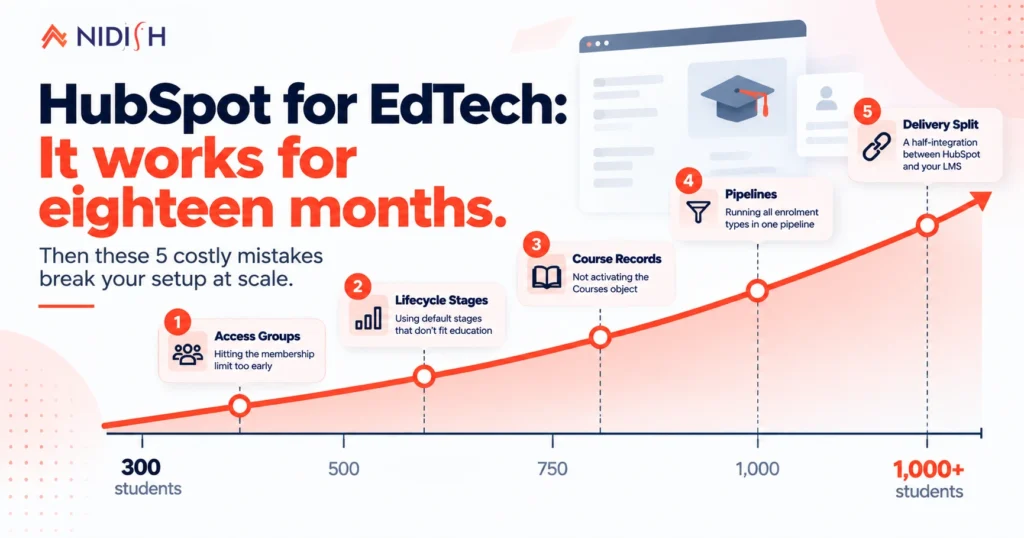
HubSpot for edtech works well for roughly eighteen months, and then it does not.
The early setup is fine. Contacts are students and prospects. A deal pipeline tracks enrolments. Forms capture course interest. For a company with two courses and three hundred students, this is a perfectly good configuration and nobody should touch it.
The trouble arrives at a specific point. You have enough courses that students need separate access, enough students that manual segmentation stops working, and enough stages that “lead, MQL, customer” describes nothing real.
Here are the five mistakes that break HubSpot for edtech companies, in the order they usually bite, plus the fix sequence that avoids expensive rework.
Table of Contents
Mistake 1: launching HubSpot for edtech without counting your access groups
This is the costly one, and almost nobody finds it until they hit the wall.
Gated course content runs on memberships. HubSpot memberships require Content Hub Professional or Enterprise, and there is a limit most teams never read.
Content Hub Professional allows two access groups. Enterprise allows 100.
An access group controls who sees what. Two is fine when your structure is free tier and paid tier. Two is useless when you have eight courses that each need separate gating, cohorts running on different schedules, or a certification track that introductory students should not see.
So the sequence goes like this. You launch on Professional. You add courses. Somewhere around the fourth or fifth you discover you cannot gate them independently.
At that point your options are an Enterprise upgrade, restructuring content so two groups suffice, or moving delivery elsewhere. All three cost more at month eighteen than the decision would have cost at month three.
The fix
count the access groups your eventual course structure needs, not your current one. If the answer exceeds two, your HubSpot for edtech build is on an Enterprise path and it is cheaper to know that now.
Two further HubSpot memberships limits are worth knowing. Each contact can receive a maximum of five membership emails per day, which matters during an enrolment surge when invitations, password resets and confirmations all fire together.
And private content only works on a connected subdomain. Default HubSpot domains such as hs-sites.com will not serve gated pages at all.
Mistake 2: keeping HubSpot’s default lifecycle stages
HubSpot ships with subscriber, lead, marketing qualified lead, sales qualified lead, opportunity, customer, evangelist.
Now map an education business onto that. Prospective student, applicant, enrolled, active learner, completed, alumni, returning student.
Those are not the same journey and they do not compress neatly. Any edtech CRM built on the default stages will eventually produce reports describing a business you do not run.
Teams running HubSpot for edtech usually notice when reporting stops making sense. “Customer” lumps together someone on day one of a free introductory course and someone three courses into a certification track. Those are different businesses with different retention risk, and one lifecycle value cannot separate them.
The fix for any HubSpot for Edtech build
customise lifecycle stages early, while you have hundreds of contacts rather than tens of thousands. Changing stage definitions is a reporting migration, and the cost scales with database size.
Add one more property alongside it: enrolment status, kept separate from lifecycle stage. Lifecycle describes the relationship. Enrolment status describes the current course state.
Merging those two is the most common data model error in any edtech CRM, and it is the one that quietly ruins cohort reporting.
Mistake 3: never activating the object HubSpot already gave you
Most companies running HubSpot for edtech store courses nowhere useful. The course is a name inside a deal, a text value on a contact, or an identifier living in whichever platform delivers the learning.
Which means nothing inside HubSpot can act on a course.
You cannot report enrolments per course without exporting. You cannot trigger a workflow when a specific course opens. You cannot tell which campaign produced students who actually finished.
HubSpot has a native Courses object that solves this, and it ships switched off in every account.
It stores a programme, a lesson series, or a training module as a real CRM record. The courses API documents its properties, including course name, course ID, description and enrolment capacity. It associates to contacts, so a student genuinely links to a course rather than carrying a text tag.
Courses is one of four objects HubSpot pre-builds and leaves dormant: Courses, Listings, Appointments and Services.
None of them require Enterprise
That matters, because the route most teams consider instead is building a custom object, and custom objects do require Enterprise.
If you are weighing an Enterprise upgrade purely to model courses in HubSpot for edtech, check Courses first. We covered it properly in the HubSpot Courses object guide.
The fix
Activate it now, even if you are not ready to build against it. Courses as records improves reporting immediately and costs nothing.
Mistake 4: running every enrolment type through one pipeline
If you sell more than one kind of learning, one deal pipeline is not enough.
A self-paced course purchase, a cohort programme enrolment, and a corporate training contract share almost nothing operationally. Different stages, different timelines, different decision makers, different revenue recognition.
Push all three through one pipeline and your HubSpot for edtech funnel report describes none of them accurately. Average deal cycle becomes a meaningless blend of a two-day impulse purchase and a four-month procurement process.
The fix
Separate pipelines per enrolment type, then associate each deal to the relevant course record.
That combination is what makes questions like “what is our average time from enquiry to enrolled, by course type” answerable without a spreadsheet. It is also what turns HubSpot for edtech from a mailing list into an operating system.
Mistake 5: tolerating a half-integration between website and LMS
This is the one most founders already know about and live with anyway.
In most HubSpot for edtech setups, HubSpot holds the CRM, the marketing site, the email and the pipeline. Something else entirely holds courses, progress tracking and delivery. Between them sits a Zapier connection, a nightly export, or a person.
The questions that arrangement cannot answer are always the same three. Which campaign produced students who finished? Which enrolled students are still receiving the enrolment nurture? Who started a course and stalled?
There are two honest resolutions, and the failure mode is trying to split the difference.
Resolution A: consolidate
HubSpot holds marketing, CRM, enrolment and the course website, with delivery content gated through memberships.
This works when your learning is video, text and downloadable material. It does not work if you need quizzing, progress tracking, certificates or SCORM, because HubSpot does none of those. EDULMS is our theme for this path.
Resolution B: integrate deliberately
HubSpot holds marketing, CRM and enrolment. A dedicated LMS handles delivery. You build one real integration rather than a chain of automations, and it syncs enrolment state and completion back into HubSpot.
Both are legitimate. What fails is the accidental middle: a partial integration moving some data some of the time, which is what most companies actually have.
Who HubSpot for edtech actually suits
Worth being direct, because HubSpot for edtech is not right for everyone.
It suits you if: your learning content is video, text and downloadable material, your sales motion involves a human for higher-value programmes, and you already run marketing on HubSpot. In that shape, consolidating onto HubSpot for edtech removes a sync nobody enjoys maintaining.
It suits you partially if: you need real assessment and certification. Keep the LMS, run HubSpot for everything up to enrolment, and build one integration. This is the most common configuration we see working well.
It does not suit you if: your product is the learning platform itself. If you are building an LMS rather than selling courses, your student data belongs in your own application and HubSpot is a marketing and sales layer on top of it, nothing more.
One honest limitation: Everything described here assumes Content Hub Professional at minimum. On Starter you can run HubSpot for edtech as a CRM and marketing tool, but gated content, dynamic course pages and memberships are all unavailable. That is a subscription conversation before it is an architecture one.
What HubSpot for edtech actually costs to run
Pricing is the question edtech founders ask last and should ask second.
A HubSpot for edtech stack has three cost layers, and only one of them is obvious.
Layer one, the subscription: Content Hub Professional is the realistic floor for anything involving gated content. If your course structure needs more than two access groups, Enterprise becomes mandatory rather than optional, and that is a step change rather than an increment. Model both before you design your content.
Layer two, the build: Course marketing pages, enrolment forms, the data model work described above. A purpose-built theme compresses most of this, which is why HubSpot for edtech projects that start with a theme land faster than ones that start with a blank CMS.
Layer three, the integration: Only applies if you keep a separate LMS. It is usually the largest single line item and the one most often left out of the original estimate, because it looks like a connector and behaves like a product.
The expensive version of HubSpot for edtech is the one where layers two and three get built twice. That happens when the data model is designed after the website rather than before it, which is the whole argument of this post.
A useful planning rule: decide your access group count and your delivery question before anyone opens the page editor. Those two answers determine your subscription tier and whether layer three exists at all.
Most teams can estimate layer one accurately and underestimate layer three by a wide margin. If you are building a business case, get the integration scoped properly first and the rest will be close enough.
What HubSpot for edtech looks like done properly
A target architecture for a company past the early stage:
| Layer | Where it lives |
| Students and prospects | Contacts, with custom lifecycle stages |
| Courses and programmes | Courses object, activated |
| Student to course link | Associations, labelled enrolled, completed, waitlisted |
| Enrolment transactions | Separate deal pipelines by enrolment type |
| Course marketing pages | HubSpot CMS |
| Gated learning content | HubSpot memberships, access groups sized to your structure |
| Delivery and assessment | HubSpot if simple, dedicated LMS if not |
| Reporting | HubSpot, because everything above is CRM data |
The test for whether your edtech CRM is right is one question.
Can you report enrolments per course, by acquisition channel, without exporting anything?
If not, one of those layers is missing, and it is usually the Courses object.
The HubSpot for edtech fix order that saves rework
Not all at once. Sequence matters, because some decisions are expensive to reverse and others are nearly free.
- Customise lifecycle stages: Cheapest now, most expensive later.
- Add enrolment status as a separate property: Same reasoning.
- Activate the Courses object: One minute, no downside.
- Count your eventual access groups: This decides your subscription path.
- Separate deal pipelines: by enrolment type.
- Decide the delivery question: Resolution A or B.
- Build the course website last.
Most teams run this list backwards, starting with the website. Then they discover the data model cannot support what they shipped, and the rebuild costs more than the original build did.
HubSpot for edtech rewards getting the data model right before the design. HubSpot’s guidance on using objects for business processes is a reasonable starting point if you want the platform view first.
Frequently asked questions
Is HubSpot good for edtech startups?
HubSpot for edtech startups works well for marketing, CRM, enrolment pipelines and course marketing pages, which covers most of what an early company needs. It is not a learning management system, so it handles no quizzing, progress tracking, certificates or SCORM. The common architecture is HubSpot through enrolment, with either memberships or a dedicated LMS handling delivery.
What subscription do edtech companies need for gated course content?
Content Hub Professional or Enterprise, because HubSpot memberships are unavailable on Starter. The detail that matters more is the access group limit: Professional allows two, Enterprise allows 100. If your course structure needs more than two independently gated areas, you are on an Enterprise path.
How should an edtech CRM model courses in HubSpot?
Use the native Courses object, which ships switched off and is activated by a super admin in the data model builder. It stores courses as CRM records with properties for name, ID, description and enrolment capacity, and associates to contacts. It does not require Enterprise, unlike building a custom object for the same job.
Should edtech companies change HubSpot’s default lifecycle stages?
Usually yes, and early. The defaults describe a B2B sales motion rather than an education journey, where the real stages run closer to prospective student, applicant, enrolled, active, completed and alumni. Changing definitions later is a reporting migration whose cost scales with your contact count.
Can HubSpot replace an LMS for an edtech startup?
For simple content, yes. HubSpot for edtech can host course pages, gate them with memberships, manage registration and login, and hold the student relationship. It cannot do assessment, progress tracking, certification or SCORM. If you need those, keep the LMS and build one deliberate integration.
How do you track which campaign produced students who completed a course?
Completion data has to exist inside HubSpot. If delivery happens in an external LMS, completion must sync back against the contact or the associated course record. Without that sync, HubSpot for edtech can attribute enrolments to campaigns but not outcomes, which is the most common reporting gap we see.
What is the biggest mistake edtech startups make with HubSpot?
Building the course website before designing the data model. Lifecycle stages, the Courses object, access group count and pipeline structure all shape what the website can do. Teams that build HubSpot for edtech website-first routinely ship an experience their data model cannot support.
Where to start with HubSpot for edtech
The highest-value hour you can spend is not in the website builder.
It is three things: customising lifecycle stages, activating the Courses object, and counting how many access groups your eventual course structure will need.
Those decisions determine what everything else can do, and all three get more expensive the longer you leave them.
Get those right and HubSpot for edtech holds up well past a thousand students. Get them wrong and you will rebuild at exactly the point growth demands your attention elsewhere.
If you want someone to review your setup before you build, book a 30 minute call. If the honest answer is to keep your current LMS and integrate rather than consolidate, we will say so.


 Blog
Blog Case Studies
 Career