
A few months ago a client asked us to scope a custom object. Two questions in, it turned out they wanted to track which of five certifications each partner held. No dates. No owner. No lifecycle. That is a multi-select property and about twenty minutes of work, and they had been sitting on it for a quarter waiting for budget approval on an Enterprise upgrade.
That conversation happens a lot. Most teams who ask for HubSpot custom objects do not actually need them, and that is no knock on the feature. It is the most powerful part of the HubSpot CRM data model. When it fits, nothing else comes close. But it sits behind an Enterprise paywall, you own it forever once you build it, and a good half of the requests we see could be solved with a property, an association label, or a native object HubSpot already shipped.
So this is a decision guide, not a feature tour. What the thing actually does. Five tests that tell you whether your use case qualifies. Four traps that quietly burn Enterprise budget. The tools that still do not support it. And the build steps, if you get a yes.
Table of Contents
Quick Answer
Use HubSpot custom objects when you need to track a distinct business entity that has its own lifecycle, its own properties, and many-to-many relationships with contacts, companies, or deals, and when you need to report on it as a countable unit. Serialised equipment, legal matters, insurance policies, and enrolled courses are good candidates.
Do not build one when a custom property or multi-select would carry the same data, when you are modelling a process stage rather than a thing, when HubSpot already offers a native standard object for that entity, or when the data belongs in your ERP and only needs to be visible in the CRM. The feature requires a HubSpot Enterprise subscription, so getting this wrong is expensive as well as messy.
What HubSpot custom objects actually are
HubSpot ships with a fixed set of standard objects. Contacts, companies, deals, tickets, and a list that keeps growing. Each one is a table with its own properties and its own defined relationships to the others.
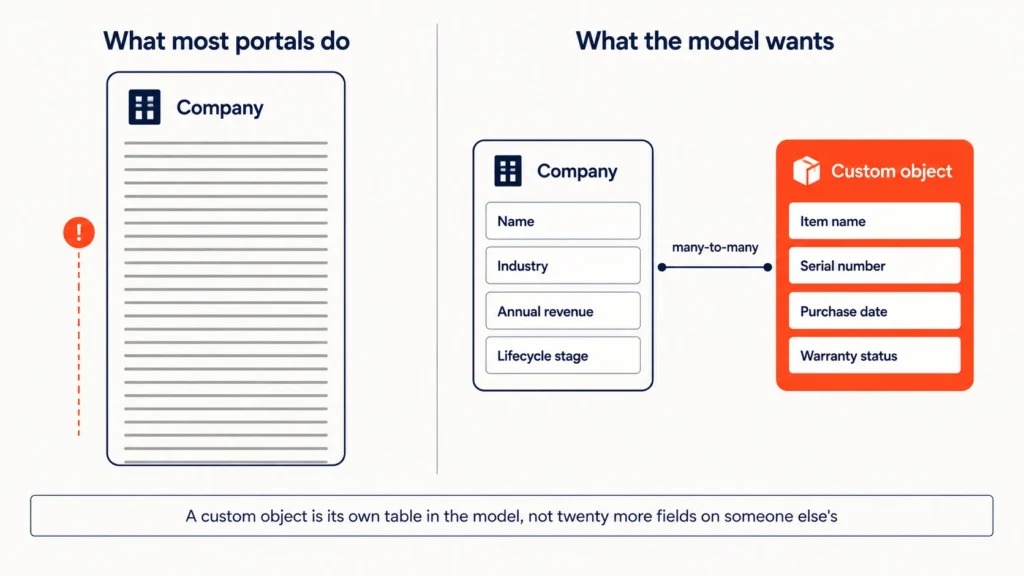
This feature lets you add your own table to that model. Your properties, your associations, your record pages, sitting in the CRM next to everything else.
And once it exists, it behaves like a native citizen. Records get detail pages, index views, property history, and a slot in the association sidebar. You can import by CSV, create through the API, filter lists on the properties, and build reports that count and group them. HubSpot’s own guide to creating and using custom objects walks the mechanics if you want the official version alongside this one.
Why “entity” is the operative word
Here is the distinction that saves people money. A custom object is not a field, a tag, or a status. It is a thing that exists in your business whether or not the contact who bought it is still around, and whether or not the deal that sold it ever closed.
An installed machine keeps existing after the deal closes. A legal matter outlives the contact who opened it. That independence is really the whole test, and most of what follows is just about applying it honestly to your own situation.
The Enterprise requirement and what it really costs
HubSpot custom objects are Enterprise-tier. That has held true across Marketing Hub, Sales Hub, Service Hub, Operations Hub, and Content Hub, and it is easily the biggest practical constraint on the feature.
If you are on Professional, the honest answer to “should we build one” is that you can’t. The real question becomes whether the rest of Enterprise earns the upgrade on its own merits, independent of the object.
Worth being blunt here: upgrading purely to unlock this one capability is almost never a good trade. Enterprise brings plenty else. If the object is the only reason you are moving, there is probably a simpler path you have not found yet.
The maintenance cost nobody quotes
Every object you create is a schema you now own.
Somebody has to maintain the properties. Somebody has to document what each one means, so the person who joins in eighteen months does not guess. Somebody has to keep the associations sensible as the business shifts, and make sure the next integration respects them.
Portals with four or five carefully designed HubSpot custom objects tend to be healthy places to work. Portals with ten hastily created ones tend to be the ones we get called in to untangle, usually alongside the other CRM mistakes growing companies make.
HubSpot custom objects vs custom properties vs standard objects
Almost every bad decision here comes from skipping this comparison. Five mechanisms can carry data in HubSpot. Work out which one fits before you build anything.
| Mechanism | Use it when | Reporting | Tier | Typical mistake |
|---|---|---|---|---|
| Custom property | The data is an attribute of an existing record and there is only ever one value per record | Filter and group on the parent object | All tiers | Adding twenty properties to Company instead of one child object |
| Multi-select property | A record can carry several fixed values from a short list, with no per-value data | Limited. Cannot report per value cleanly | All tiers | Using it where each value needs its own dates or owner |
| Association label | You need to describe the nature of a relationship between two existing records | Reportable on the association | Pro and above | Building an object to express a relationship |
| Standard object | HubSpot already models this entity natively | Full | Varies | Not checking whether one exists |
| HubSpot custom objects | It is a distinct entity with its own lifecycle, its own properties, and many-to-many links | Full, countable, groupable | Enterprise | Building one before ruling out the four above |
The mechanism most teams overlook: association labels
Association labels are the row people skip, and it costs them.
A surprising share of object requests are actually relationship requests in disguise. This contact is the billing contact. That company is the parent installer. This deal came through a referring partner. None of that needs a new table. Labels handle all of it, and they are available a full tier lower.
Do you actually need HubSpot custom objects? Five tests
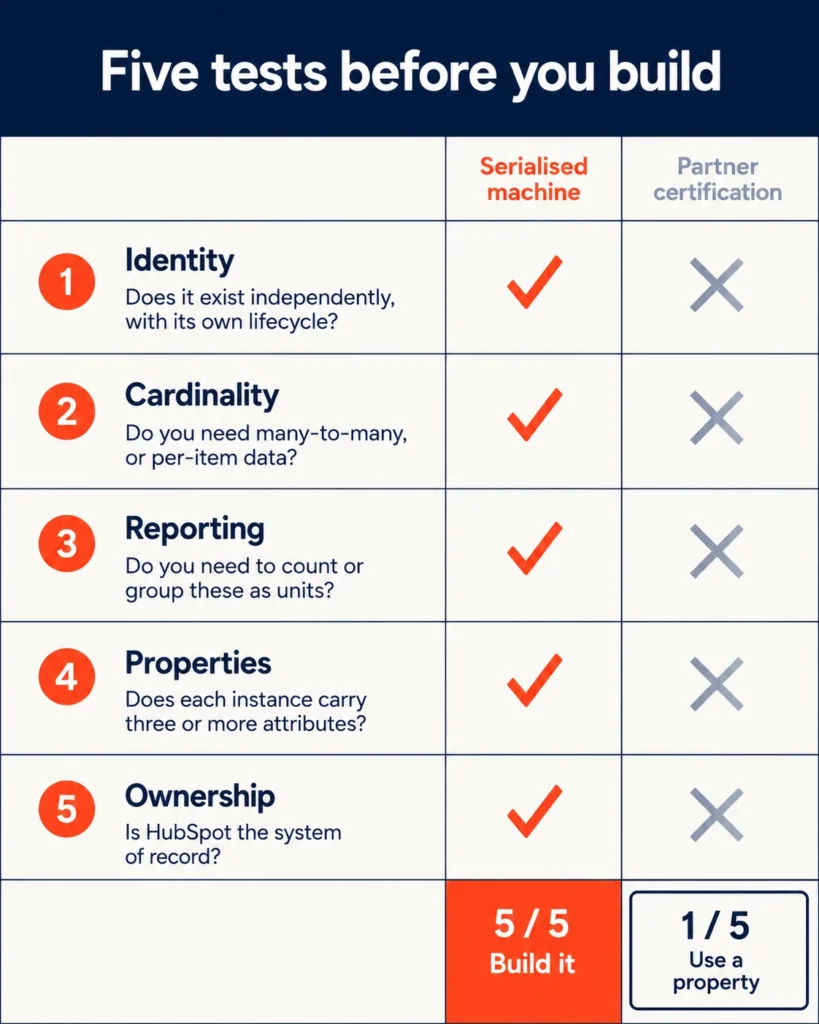
Run your use case through all five. A real case passes at least four.
| # | Test | The question | Fail signal |
|---|---|---|---|
| 1 | Identity | Does this thing exist independently, with its own lifecycle? | It only exists as a state of something else |
| 2 | Cardinality | Do you need many-to-many, or one-to-many with per-item data? | One value per parent record, always |
| 3 | Reporting | Do you need to count, sum, or group these as units? | You only ever need to see it on a record page |
| 4 | Properties | Does each instance carry three or more of its own attributes? | It carries a name and nothing else |
| 5 | Ownership | Is HubSpot the system of record, or at least a first-class copy? | It is a read-only mirror of an ERP table |
The identity test does most of the work
Try saying it out loud. “A renewal is a thing that exists.” Sounds wrong, doesn’t it, because a renewal is an event in a subscription’s life, not an entity in its own right. Now try “a subscription is a thing that exists.” That one lands.
Language is a weirdly reliable guide here. It settles the question of whether you need a custom object in HubSpot faster than any feature matrix will.
The ownership test is the one people resist
This is where the pushback usually comes.
If the data lives in NetSuite, changes in NetSuite, and is only ever read in HubSpot, you may not need a new object at all. What you probably need is a well-designed sync into properties, or an embedded view on the record page.
Getting that call right early is the difference between a clean integration and a bidirectional sync nobody wants to own two years from now. Before you commit to mirroring an ERP table, it is worth seeing how REST API and native integration choices play out for HubSpot and NetSuite, because the same trade-offs apply.
When HubSpot custom objects are the right call
A worked example: serialized equipment in manufacturing
Take an equipment manufacturer selling serialised machines through distributors.
Every machine carries a serial number, an install date, a warranty expiry, a firmware version, a service interval, and a physical location. One machine might be sold on one deal, installed by a second company, serviced by a third, and touched by four different contacts across a fifteen-year life. Machines get resold. Relocated. Decommissioned. None of it tied to a deal record.
Score it against the five tests. Identity, yes, the machine outlives every deal it ever appears on. Cardinality, yes, many-to-many with both companies and contacts. Reporting, yes, they need warranty expiries by quarter and install counts by region. Properties, yes, six at minimum. Ownership, yes, the service team works in HubSpot daily.
Five out of five. Build it.
Other patterns that reliably qualify
The same shape shows up in a handful of places.
Legal matters, where one client runs several concurrent matters with separate teams and separate billing. Insurance policies, where a household holds three policies on three different renewal dates. Enrolled programmes in education, where one student holds multiple enrolments with distinct outcomes. Physical properties in asset management.
Every one of those is an entity with a life of its own, which is precisely the pattern HubSpot custom objects were built for.
The four traps: when a custom object is the wrong call
Trap one: the object that should be a property
The certification example from the top of this article is the clean version of this trap. Five fixed values, no dates, no owner, no lifecycle of its own. That is a multi-select property.
The team spent a sprint on schema design for something that was an afternoon of field configuration. Nobody had asked the property question first.
Trap two: modelling a process as an entity
Requests for an “Onboarding” object, or a “Renewal” object, or an “Escalation” object almost always fail the identity test. These are stages. They are not things.
Onboarding is a phase of a customer relationship. Model it as a deal in a dedicated pipeline, or as a few properties plus a workflow, and you will be happier in a year.
There is a decent tell for this one. If you find yourself giving your object a status property whose values look suspiciously like pipeline stages, stop and reconsider what you are actually modelling.
Trap three: mirroring the ERP
“Sales should be able to see it” is how this one starts. It ends with a sync you maintain forever, carrying data nobody ever edits in HubSpot.
Ask a narrower question instead. What decision does the CRM user actually make with this data? Nine times out of ten the answer is a summary, not the full table, and a summary is a handful of rolled-up properties. If you do need real movement between systems, the real-time versus batch sync trade-offs in integration strategy matter more than where the data lands.
Trap four: skipping the standard object list
This is the expensive one. It gets its own section.
Check for a native standard object first
HubSpot has spent the last several years quietly converting common custom object patterns into native standard objects. Carts, orders, subscriptions, invoices, payments, appointments, courses, services, listings, leads. Every single one of those was, at some point, an object somebody built by hand.
Which changes the maths. A native standard object is maintained by HubSpot, integrated with the tools that matter, properly documented, and it does not eat into your per-portal allowance for HubSpot custom objects. Build a custom equivalent six months before HubSpot ships the native one, and you have inherited a migration project you did not plan for.
Real estate is the clearest case. Teams built property-tracking objects for years before a native equivalent arrived. If you are modelling real estate inventory today, start with what HubSpot’s native Listing object does and where it stops rather than assuming a build is required.
So, before you create anything: check the current standard object list in the documentation, scan the HubSpot product changelog for anything adjacent that has just shipped or is about to, and ask whether waiting one or two quarters is survivable. Often it is, and waiting wins.
How to create HubSpot custom objects, step by step
Two routes. Use the UI for your first build. Move to the API when you need the same model in more than one portal.
Creating a custom object in the HubSpot UI
- Go to Settings using the gear icon, then Data Management, then Objects, then Custom Objects.
- Click Create custom object.
- Set the singular and plural labels. Get these right the first time, because they turn up throughout the interface and in every report title you ever build.
- Set the primary display property. This is the record name everywhere in the product. For serialised assets, use the serial number, not a description.
- Add secondary display properties, which show beneath the name in previews.
- Define your properties, with the right types, before you import a single row.
- Configure associations to contacts, companies, deals, tickets, and any other objects.
- Set the record ID uniqueness rule if you need a natural key for deduplication on import.
- Save, then confirm the object shows up under the CRM navigation menu.
Creating HubSpot custom objects with the CRM Objects Schema API
POST your schema definition to the object schemas endpoint with labels, properties, associated objects, and your chosen primary display property. HubSpot’s CRM custom objects API reference has the payload shape.
This is the route to take if you deploy the same model across multiple portals, or if you want the schema living in version control next to the rest of your configuration. Doing it by hand in three portals is how they drift apart.
Define properties before your first import
One sequencing warning, because this one costs real time.
Define your properties and your uniqueness rule before the first import. Fixing a property type after records exist means an export, a transformation, and a reimport, and by then somebody has usually built a report on the old field. The discipline is the same as any CRM data load, and the checklist most teams skip on CRM data migration is worth twenty minutes before you start.
Properties, associations and configuration limits
HubSpot custom object property types
Same property types as standard objects, with the same gotchas.
| Property type | Good for | Watch out for |
|---|---|---|
| Single-line text | Serial numbers, external IDs | Not reportable as a measure |
| Number | Quantities, values, intervals | Set decimal precision deliberately |
| Date picker | Install, expiry, renewal dates | Timezone handling on import |
| Dropdown select | Status, category, tier | Changing options later orphans old values |
| Multiple checkboxes | Fixed attribute sets | Hard to report per value |
| Calculation | Rolled-up or derived values | Recalculation timing is not instant |
| Owner | Assignment and routing | Enables owner-based workflow branching |
HubSpot custom object associations
A custom object can associate to contacts, companies, deals, tickets, and to other custom objects. That includes self-association, where one record links to another record of the same object, which is how you model parent and child assets.
Association labels work here too. They are what let you tell the installing company apart from the servicing company on the same machine, without inventing two more objects to hold the distinction.
Portal limits on custom object definitions
There are portal-level caps on how many object definitions you can create and how many properties each can hold. Those numbers have moved more than once, so treat any figure you read anywhere, including in older articles, as something to verify against current documentation.
The design guidance is steadier than the number though. If you are creeping toward double digits of HubSpot custom objects in a single portal, the problem is almost certainly your data model, not the limit.
HubSpot custom objects in workflows
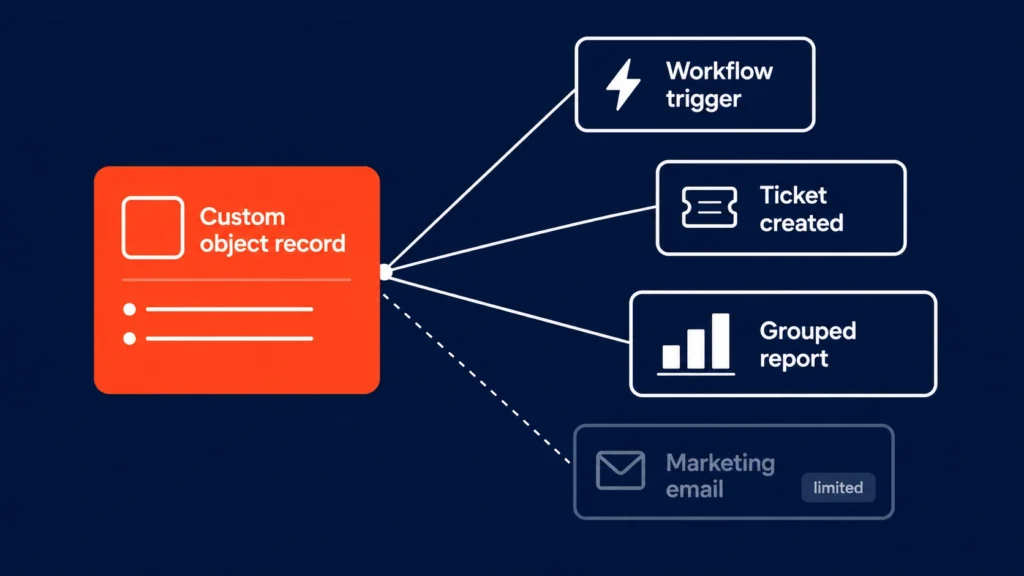
Workflow support is one of the strongest arguments for building HubSpot custom objects properly instead of bolting the data onto contacts. The object can be the enrolled record type, which changes what automation is possible.
Workflow triggers and actions available
| Trigger or action | Supported | Practical use |
|---|---|---|
| Enrol on object property change | Yes | Warranty expiry crosses a threshold |
| Enrol on record creation | Yes | New installation logged, notify service |
| Branch on an object property | Yes | Route by region, tier, or firmware version |
| Set an object property value | Yes | Stamp a derived status |
| Create a task or ticket | Yes | Open a service ticket on service interval |
| Send internal notification | Yes | Alert an owner or team |
| Trigger a contact workflow from an associated record | Partly | Often needs a property copied to the contact first |
| Marketing email personalisation from object data | Limited | Usually requires copying values to the contact |
| Custom coded action against the object | Yes, Operations Hub | Complex logic and external calls |
Designing around the gaps
That last row is where the interesting work happens. When the native actions run out, a coded action hands you the full API surface, and the patterns in HubSpot custom coded workflow actions carry over directly.
Pay attention to the “partly” and “limited” rows, because those are the ones you design around rather than discover late. The usual workaround is a calculated or workflow-stamped property on the contact or company that summarises the associated record’s state. Copy the value up once, and it works everywhere a contact property works.
What HubSpot custom objects still do not do
An honest limitations list, because every one of these catches somebody mid-build.
Forms cannot create custom object records natively
Forms write to contacts. If external users need to submit data that becomes an object record, you need an API-backed form, a workflow that creates the record from the submission, or a middleware step in between. Budget for it up front rather than discovering it in week three.
Marketing email personalisation is constrained
Personalisation tokens are happy against contact and company properties. Pulling a value off an associated object record usually means copying it onto the contact first.
Sequences do not enrol custom object records
Sequences are a contact-level tool and always have been. Automation against objects belongs in workflows.
Tool support still lags in places
Tool-by-tool support for HubSpot custom objects has improved a lot, but unevenly.
Before you commit, list every tool your process actually touches. Mobile app. Chat. Meetings. Quotes. Whatever integration sits in the middle. Then verify each one, rather than assuming parity with contacts. The gaps are rarely where you expect.
Associations are not a substitute for line items
If you are modelling products on a deal with quantities and pricing, use line items and the product library. That is what they are for.
Calculated properties are not real-time
Recalculation is not instant. That matters if a workflow branches on a calculated value immediately after the input changed, which is a fun bug to chase.
No version history on the object schema
Property history exists per record. Changes to the object definition itself are not versioned anywhere. Document your schema outside HubSpot, because nothing in the product will remember why you made that choice.
Reporting on HubSpot custom objects
Reporting is usually the strongest part of the business case. HubSpot custom objects are available in the custom report builder, so you can count records, group by their properties, and cross-reference against associated contacts, companies, and deals inside a single report.
Three things to design for up front
Anything you want as a chart axis needs to be a dropdown or a date, not free text. Decide that at schema time, not when somebody asks for the dashboard.
Cross-object reports live or die on associations being populated correctly, which quietly turns association hygiene into a reporting problem rather than a data-entry nicety.
And if you need a dashboard metric HubSpot cannot calculate natively, a workflow-stamped property on the object is usually cheaper than any reporting workaround you would otherwise invent.
One last honest note. If reporting is the only reason you want the object, pause and check whether the same numbers could come out of your warehouse or BI tool instead. Sometimes they can, and the CRM does not need to carry the model at all. That question sits inside the broader work of designing a HubSpot data model with custom and standard objects.
The pre-build checklist
Nine questions. If you cannot answer all of them, you are not ready to build HubSpot custom objects.
- Does it pass at least four of the five tests?
- Have you confirmed no native standard object covers it, including anything in recent release notes?
- Have you ruled out a custom property, a multi-select, and an association label?
- Is HubSpot the system of record, or a legitimate first-class copy?
- What are the singular and plural labels, and the primary display property?
- What is the natural key for deduplication on import?
- Which objects does it associate to, and do any of those associations need labels?
- Which tools in your process must support it, and have you verified each one?
- Who owns the schema documentation after go-live?
That last one separates the portals that stay clean from the portals that need an audit in eighteen months. It is also the question nobody wants to answer in the kickoff call.
Frequently asked questions about HubSpot custom objects
What are HubSpot custom objects?
HubSpot custom objects are user-defined record types that extend the HubSpot CRM data model beyond standard objects like contacts, companies, deals, and tickets. Each one gets its own properties, its own record pages, its own associations to other objects, and full availability in lists, workflows, and the custom report builder.
Do HubSpot custom objects require an Enterprise subscription?
Yes. This is an Enterprise feature across the Hubs. Professional and Starter accounts cannot create them, and upgrading solely to unlock them is rarely the right trade on its own.
What is the difference between HubSpot custom objects and custom properties?
A custom property is an attribute of an existing record, holding one value per record. A custom object is a separate entity with its own properties and its own lifecycle, capable of many-to-many relationships. If your data is one value hanging off a contact or company, use a property. If it is a thing that exists independently and carries several attributes of its own, use an object.
How many custom objects can I create in HubSpot?
There is a per-portal cap on object definitions and a cap on properties per object, and HubSpot has revised both more than once. Check current documentation for the live numbers. As a design rule, needing close to double digits usually points at a data model problem rather than a limit problem.
Can HubSpot forms create custom object records?
Not natively. Forms write to contact records. To create an object record from a submission you need a workflow that creates it, an API-backed form, or middleware between the form and HubSpot.
Can I use custom object data in marketing emails?
Only in a limited way. Personalisation tokens work reliably against contact and company properties, so the standard approach is to copy the values you need onto the contact with a workflow, then personalise from there.
Can HubSpot custom objects be used in workflows?
Yes. You can enrol records in workflows, trigger on property changes and record creation, branch on properties, set values, and create tasks or tickets. Operations Hub custom coded actions extend that to anything the API supports.
Should I build a custom object or wait for HubSpot to release a standard one?
Check the changelog and roadmap first. HubSpot has converted several common patterns into native standard objects, including listings, courses, services, orders, and subscriptions. If a native object looks close, waiting saves you a migration.
Can a custom object associate with another custom object?
Yes, including self-association between two records of the same object. Association labels can describe the nature of each relationship, which is how you separate roles like installing company and servicing company.
What is the most common mistake with HubSpot custom objects?
Building one to model a process rather than an entity. If your object needs a status property whose values look like pipeline stages, you are probably describing a phase of something else’s lifecycle, and a deal pipeline or a few properties will serve you better.
Getting the model right the first time is most of the work, and it is a great deal cheaper than unpicking it later. If you are weighing HubSpot custom objects against a simpler option and want a second opinion on the schema before you commit, that is the kind of question we spend most of our week on. A short conversation usually settles it either way.


 Blog
Blog Case Studies
 Career