
Designing a CRM that truly supports business growth is not about features. It is about structure. This is where HubSpot data model design becomes a strategic lever rather than a technical setup.
In many implementations of HubSpot CRM, teams jump into pipelines, workflows, and automation without defining how their data should be structured. The outcome is predictable. Reporting becomes unreliable, automation breaks under edge cases, and the system struggles to scale.
To avoid this, businesses need to deeply understand custom objects vs standard objects in HubSpot and how they shape the overall architecture.
Table of Contents
Why HubSpot Data Model Design Impacts Revenue
A well-planned HubSpot data model design is not just about organizing data. It directly impacts how revenue flows through your system.
When the structure is weak, teams face:
- Data inconsistencies across sales and marketing
- Manual fixes inside automated workflows
- Limited visibility into pipeline and forecasting
- Challenges integrating with ERP or billing systems
On the other hand, a strong HubSpot data model design enables a unified system where every team works on the same data foundation, improving both efficiency and decision-making.
Standard Objects: Where Every Implementation Begins
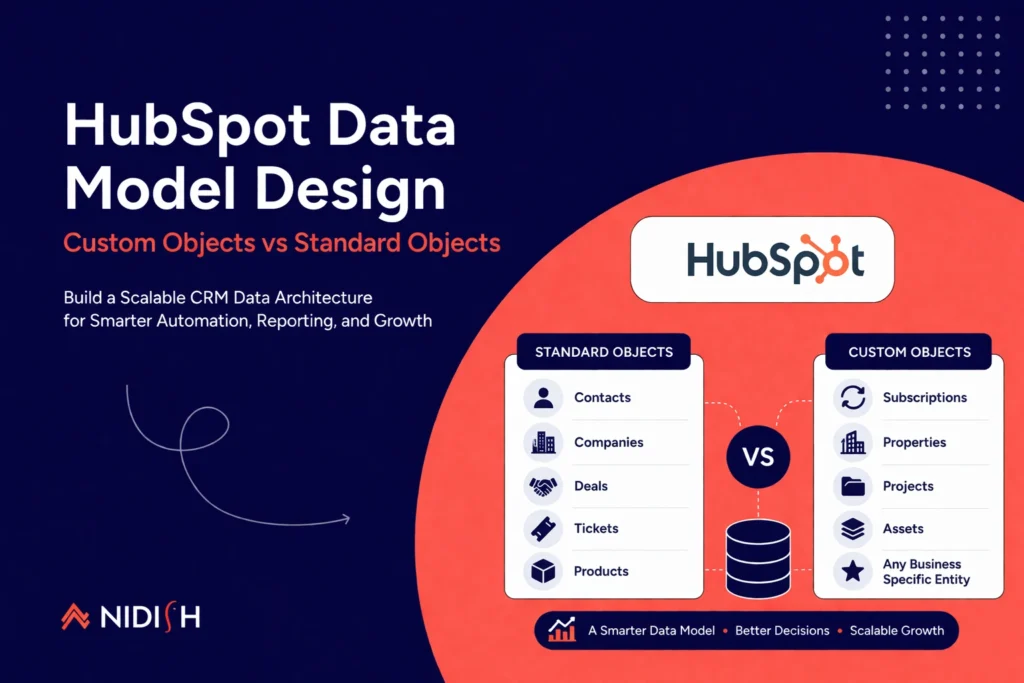
Standard objects in HubSpot are designed to support common business processes. They include contacts, companies, deals, tickets, and products.
For businesses with linear sales cycles, these objects are often sufficient. A typical structure might involve:
- Contacts representing individuals
- Companies representing organizations
- Deals tracking revenue opportunities
This is where many implementations should start. A clean HubSpot data model design always prioritizes simplicity before introducing complexity.
However, issues arise when businesses try to force complex processes into these predefined structures.
When Standard Objects Are Not Enough
As operations grow, businesses often deal with relationships that do not fit neatly into standard CRM structures.
For example, you might need to:
- Track multiple assets tied to a single deal
- Manage recurring subscriptions separate from sales pipelines
- Handle multi-layer relationships between entities
In such cases, stretching standard objects leads to data duplication and reporting gaps. This is where evolving your HubSpot data model design becomes necessary.
Custom Objects: Designing Around Your Business Model
Custom objects allow you to represent entities that are unique to your business. Instead of adjusting your processes to fit the CRM, you design the CRM to reflect your operations.
A mature HubSpot data model design uses custom objects to:
- Capture business-specific entities
- Define relationships beyond default limitations
- Enable more accurate reporting
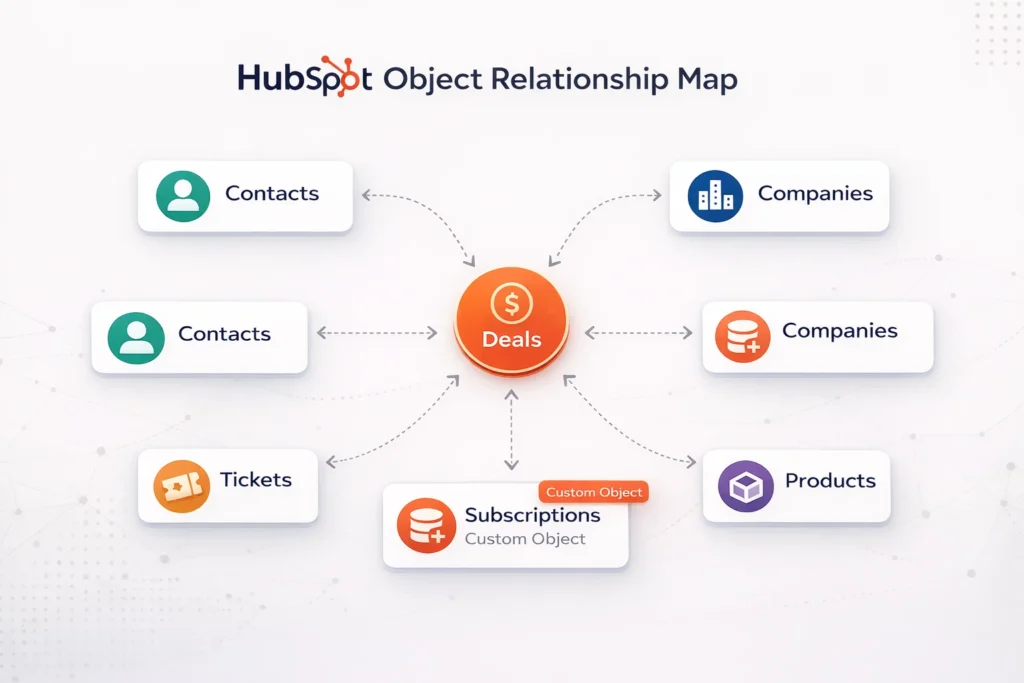
For instance, a SaaS company might create a “Subscription” object that connects deals, customers, and billing cycles. This creates a much clearer lifecycle view compared to using deals alone.
Custom Objects vs Standard Objects in HubSpot
At an advanced level, the discussion around custom objects vs standard objects in HubSpot is about balance, not replacement.
Standard objects should remain the foundation because they are deeply integrated into HubSpot’s ecosystem. Custom objects should extend this foundation where required.
A practical way to approach HubSpot data model design is:
- Use standard objects for core CRM functions
- Introduce custom objects only when your business logic cannot be represented otherwise
- Focus on relationships between objects, not just the objects themselves
This layered approach ensures scalability without unnecessary complexity.
The Role of Relationships in HubSpot Data Model Design
Most CRM implementations fail not because of objects, but because of poorly defined relationships.
In a strong HubSpot data model design, relationships determine:
- How workflows trigger across objects
- How attribution is calculated
- How reports are generated
For example, a single company might have multiple subscriptions, each linked to different deals and stakeholders. Without properly structuring these relationships, your CRM becomes fragmented.
Integration-First Thinking
Modern businesses rarely operate on a single system. CRM needs to integrate with ERP, billing, marketing, and analytics platforms.
This makes HubSpot data model design an integration problem as much as a CRM problem.
Before finalizing your structure, consider:
- Which system owns the source of truth
- How data will sync across platforms
- Whether integrations are real-time or scheduled
Ignoring this layer leads to duplication, sync errors, and operational inefficiencies.
Avoiding Over-Engineering
One of the biggest risks in advanced implementations is overcomplicating the system.
Adding too many custom objects without clear purpose results in:
- Difficult-to-maintain workflows
- Confusing reporting structures
- Increased dependency on technical teams
A strong HubSpot data model design always balances flexibility with simplicity. Every object should exist for a clear business reason.
How Nidish Designs Scalable HubSpot Data Models
At Nidish, we approach HubSpot data model design from a revenue systems perspective, not just a CRM setup.
Instead of starting with tools, we focus on:
- Mapping your lead-to-cash journey
- Identifying core revenue-driving entities
- Designing relationships that support automation and reporting
- Aligning CRM structure with integration architecture
This ensures that your HubSpot setup does not just work today, but continues to scale as your business grows.
Book a Strategy Call
If you are planning a new implementation or struggling with an existing setup, we can help you redesign your HubSpot data model design for scalability and performance.
👉 Request a Data Model Audit with Nidish to:
- Audit your current CRM structure
- Identify gaps in your data model
- Build a scalable architecture aligned with your business
Final Perspective
The choice between custom objects vs standard objects in HubSpot is not about preference. It is about designing a system that reflects your business reality.
A well-structured HubSpot data model design uses standard objects for stability and custom objects for flexibility. When combined with clear relationships and integration planning, it becomes the foundation of a scalable revenue engine.


 Blog
Blog Case Studies
 Career