
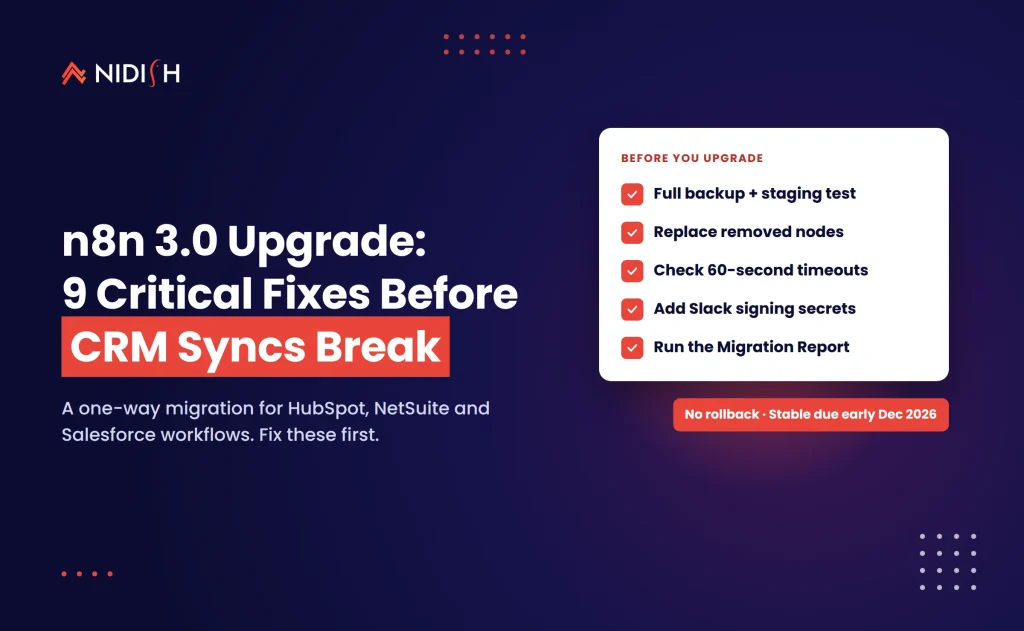
The n8n 3.0 upgrade is the first n8n release in a while that can quietly stop a revenue workflow. Nothing crashes on screen. A nightly HubSpot-to-NetSuite sync just doesn’t activate, a Slack deal alert returns a 401, and nobody notices until finance asks why invoices stopped.
n8n shipped the 3.0.0 beta on October 27, 2026, with the stable release due in early December. Version 2.x keeps getting security and critical fixes for 12 months after that, and 1.x support ends on December 31, 2026. If you run CRM, ERP or lead-routing automation on n8n, this guide to the n8n 3.0 breaking changes shows which ones hit those workflows, how to find them, and the order we’d fix them in.
Table of Contents
Key takeaways
- The n8n 3.0 upgrade is one-way: There is no rollback, so a full backup and a staging test come first.
- Self-hosted n8n now runs on Docker only: npm and
npx n8ninstalls are no longer supported. Kubernetes and Helm setups are unaffected. - Old nodes are gone: Function, Function Item, Item Lists, Cron, Interval and legacy OpenAI nodes are removed, and published workflows that still use them won’t activate on startup.
- Defaults got stricter: Task runner timeouts drop from 300 to 60 seconds, unverified community nodes are off, and Slack credentials need a signing secret.
- Use the built-in n8n Migration Report: It flags affected workflows and can rewrite some nodes for you, but an empty report doesn’t guarantee a clean upgrade.
What is the n8n 3.0 upgrade?
The n8n 3.0 upgrade is a major version that bundles breaking changes n8n held back under semantic versioning. New features keep shipping continuously, so 3.0 is mostly about removing old nodes, hardening security defaults, and simplifying self-hosting. The official announcement is clear that new features will land only on 3.x from here on, and the community announcement confirms the same timeline.
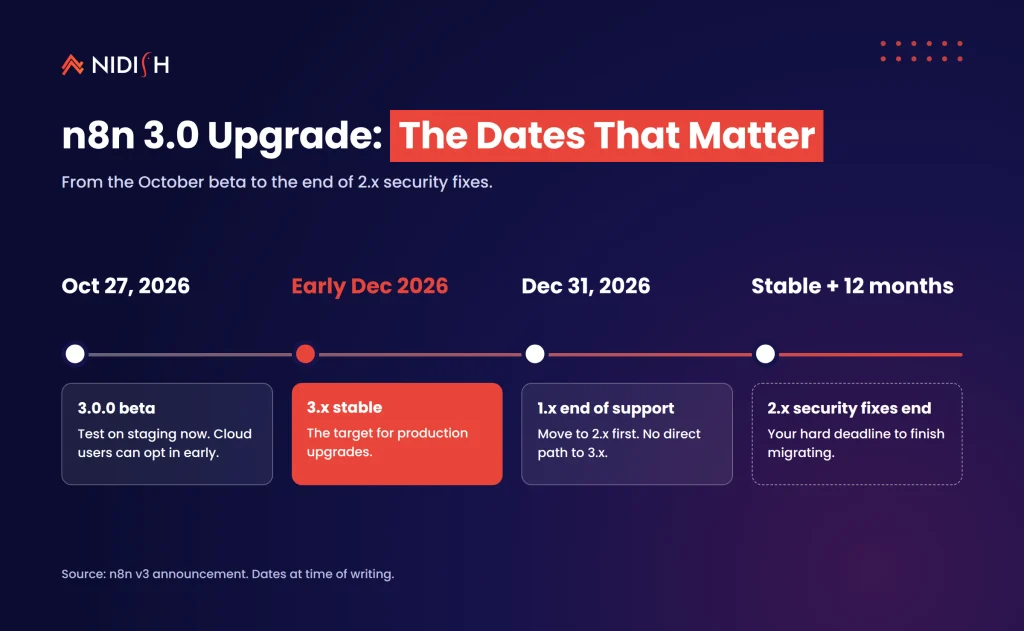
Here are the dates that matter, as published by n8n at the time of writing:
| Milestone | Date | What it means for you |
|---|---|---|
| 3.0.0 beta | October 27, 2026 | Test on staging now. Cloud users can pick “3.0.0 Beta (early access)”. |
| 3.x stable | Early December 2026 | The target for production upgrades. |
| 1.x end of support | December 31, 2026 | 1.x users must move to 2.x first. There’s no direct path to 3.x. |
| 2.x security fixes end | 12 months after 3.x stable | Your hard deadline to finish the n8n 3.0 migration. |
The n8n 3.0 upgrade applies to Community, Cloud, and Enterprise or Business editions. Credentials and execution history carry over, and the upgrade causes only a short restart. What doesn’t carry over cleanly is any workflow built on a node or default that 3.0 retires.
Why CRM and ERP teams should care about n8n 3.0 breaking changes
Most n8n 3.0 breaking changes look minor in a changelog. They stop looking minor once you map them to the workflows revenue teams depend on. Integration workflows tend to be the oldest ones in an instance. They were built early, they work, and nobody has opened them in a year.
That’s exactly the profile the n8n 3.0 upgrade catches. On most n8n builds we inherit, the CRM sync was written when the Function node and the Cron node were the normal way to do things. The person who built it has often moved on.
There’s a second reason. CRM and ERP syncs move a lot of data in a single run. A Code node that pages through 40,000 HubSpot contacts, or reconciles a month of NetSuite invoices, can easily run longer than a minute. After the n8n 3.0 upgrade, that run fails under the new default.
Third, these workflows touch money and pipeline. A broken blog-to-Slack notifier is an annoyance. A broken quote-to-invoice handoff is a missed month-end close. That difference should drive where you look first.
The n8n 3.0 breaking changes that hit integrations hardest
Not every one of the n8n 3.0 breaking changes matters to every team. Below are the ones we expect to cause the most trouble in CRM, ERP and lead-handling automation, based on what n8n documents in its v3.0 breaking changes page.
Removed nodes in old sync workflows
The Function, Function Item, Item Lists, Cron and Interval nodes are removed. So are HTML Extract, Read PDF, Read/Write Binary File(s), the legacy OpenAI nodes and the legacy HTTP Request Tool. Published workflows that still use removed nodes won’t activate on startup.
The fix is mostly mechanical. Function becomes the Code node. Item Lists splits into Split Out, Aggregate, Sort, Limit, Remove Duplicates or Summarize. Cron and Interval become the Schedule Trigger.
The 60-second task runner timeout
The N8N_RUNNERS_TASK_TIMEOUT default drops from 300 to 60 seconds. Code node tasks run in task runners, so long-running scripts are the ones at risk. Bulk record pulls, deduplication passes and invoice reconciliation are the usual suspects.
You can raise the value, but we’d treat that as a stopgap. A sync that needs five minutes inside one Code node usually needs batching or pagination across nodes instead.
Stricter credentials and security defaults
Slack API credentials now require a signing secret. Without it, Slack Trigger workflows fail to publish, and published ones stop receiving events. If your deal-desk approvals or “new enterprise lead” alerts run through Slack, check this before anything else.
Encryption key rotation is now on by default. Unverified npm community nodes stop loading unless you set N8N_UNVERIFIED_PACKAGES_ENABLED to true. That matters if you rely on a community node for a niche CRM, ERP or accounting tool.
SSRF block list changes for private ERP endpoints
When SSRF protection is enabled, the default block list now adds 100.64.0.0/10 and some IPv6 transition ranges. That 100.64.0.0/10 block is carrier-grade NAT space, which some mesh VPN tools also use for private addresses. If n8n reaches an on-premise ERP or database that way, those calls can start failing.
The fix is to allow specific hosts with N8N_SSRF_ALLOWED_IP_RANGES or N8N_SSRF_ALLOWED_HOSTNAMES. Allow the exact endpoints rather than reopening the whole range.
Trigger behaviour changes for lead intake
Gmail Trigger versions 1 to 1.3 now behave like version 1.4. That means 10 emails per poll by default (50 maximum), drafts are skipped unless you turn on Include Drafts, and sent or scheduled emails no longer fire the workflow. Shared-inbox lead capture is the workflow most likely to notice this.
Chat Trigger WebSocket frames are now JSON objects with a type field. Custom website chat clients must parse that format, and embedded @n8n/chat widgets need version 1.31.0 or later.
Storage, Docker and AI Agent changes
Self-hosted instances must run on Docker. The binary data folder moves from ~/.n8n/binaryData to ~/.n8n/storage, and n8n won’t start if both exist. If your workflows store generated invoice or quote PDFs, plan this step carefully.
AI Agent version 1 is removed, along with its SQL, Conversational, OpenAI Functions, Plan and Execute, and ReAct modes. Tools Agent workflows keep working. Any lead-scoring or enrichment agent built in 2024 deserves a quick check.
Native nodes vs custom code: what needs work after the n8n 3.0 upgrade
The quickest way to scope your n8n 3.0 migration is to sort workflows by how they were built. The table below is our rough triage guide, not an official n8n classification.
| Workflow pattern | Typical CRM or ERP example | Effort after 3.0 | What to do |
|---|---|---|---|
| Native nodes, Schedule Trigger, no Code node | HubSpot form to Pipedrive deal | Low | Run the Migration Report and retest. |
| Function or Item Lists nodes | Contact dedupe before a HubSpot upsert | Low to medium | Swap to Code, Split Out, Aggregate or Remove Duplicates. |
| Cron or Interval triggers | Nightly NetSuite invoice pull | Low | Replace with the Schedule Trigger and confirm the time zone. |
| Long-running Code node | Bulk Salesforce or HubSpot record sync | Medium to high | Batch the work, or raise the timeout as a stopgap. |
| Unverified community node | Niche ERP or accounting connector | Medium | Re-enable deliberately, or rebuild with the HTTP Request node. |
| Slack Trigger | Deal-desk approval in Slack | Low | Add the signing secret before you publish. |
| AI Agent v1 modes | Lead scoring or enrichment agent | Medium | Rebuild on the Tools Agent and compare outputs. |
| Private ERP behind CGNAT or VPN | On-premise ERP database calls | Medium | Allow-list exact hosts in the SSRF settings. |
If most of your rows sit in the first three lines, the upgrade is an afternoon of work. If several sit near the bottom, budget real engineering time and a proper test cycle.
How to use the n8n Migration Report
The n8n Migration Report is the built-in scanner for the n8n 3.0 upgrade. Open it under Settings > Migration Report in the editor. The migration tool docs say it lists workflow issues and instance issues separately, each labelled with an impact level.
It does more than flag problems. For some node changes it rewrites the workflow automatically and saves the result as a new version for you to review. Published workflows keep running their current version until you publish the fixed one, so nothing changes in production by surprise.
You can assign an owner to each workflow, email owners, mark old workflows as “won’t fix”, and export a CSV summary. n8n’s announcement recommends updating to the latest 2.x release before relying on the report.
The n8n Migration Report has two limits that matter. Non-admin users only see workflows they can edit, so an admin should run the full scan. And n8n states plainly that the tool can’t detect every change, so an empty report is a good sign, not a guarantee.
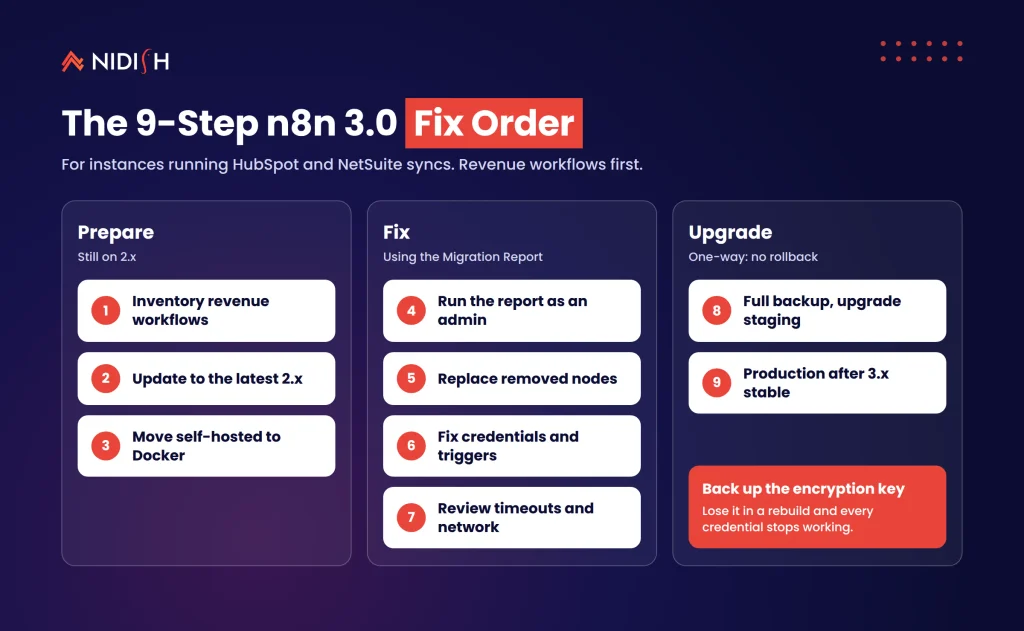
The 9-step n8n 3.0 migration fix order
Here’s the order we’d follow on a production instance that runs CRM and ERP integrations. It front-loads the steps that protect revenue data and leaves cosmetic fixes for last.
1. Inventory revenue workflows first
Tag every workflow that writes to your CRM, ERP, billing or accounting system. These get tested first and monitored hardest.
2. Update to the latest 2.x release
The n8n Migration Report and several fixes depend on it. If you’re still on 1.x, this step is mandatory, since there’s no direct jump to 3.x.
3. Move self-hosted installs to Docker while still on 2.x
Change one thing at a time. Keep the same data folder and encryption key, then confirm 2.x runs cleanly on Docker.
4. Run the Migration Report as an admin
Export the CSV and sort by impact. Assign each revenue workflow a named owner.
5. Replace removed nodes
Swap Function, Item Lists, Cron and Interval nodes for their replacements. Accept the automatic rewrites where offered, then read each diff.
6. Fix credentials and triggers
Add Slack signing secrets, review Gmail Trigger settings on lead inboxes, and check any custom chat clients.
7. Review timeouts, storage and network settings
Find Code nodes that run longer than 60 seconds, plan the binary data folder rename, and allow-list private ERP hosts if you use SSRF protection.
8. Take a full backup and upgrade staging
Rollback isn’t possible, so the backup is your only way back. Run every revenue workflow end to end with real-shaped test data.
9. Upgrade production after 3.x stable
Schedule a quiet window, watch execution logs for 48 hours, and compare record counts in the CRM and ERP against a normal day.
We see this constantly on integration audits: the n8n 3.0 upgrade itself is fast, but the testing is where teams cut corners. Step 8 is the one not to skip.
If your n8n instance carries HubSpot, NetSuite or Salesforce syncs and you’d like a second pair of eyes on the Migration Report, we review these as part of our HubSpot integration services.
What the n8n 3.0 migration actually costs and takes
The honest answer is that n8n 3.0 migration effort depends on how old your workflows are, not how many you have. Twenty workflows built last quarter on native nodes can take less time than five workflows built in 2023 with Function nodes and custom Code.
As a rough pattern from our own integration work, not a quote: a small instance with mostly native nodes is often a day of review and testing. A mid-sized instance with several long Code nodes, community connectors and a self-hosted npm install usually runs to a week or two, because the Docker move and testing take longer than the node swaps.
The biggest hidden cost is testing time on syncs that run once a day or once a month. You can’t confirm a month-end invoice workflow works by running it once in staging with three records. Build representative test data now, while 2.x is still supported.
There’s no licence or pricing change in the 3.0 announcement at the time of writing. Confirm your own plan terms with n8n before you budget.
Common n8n 3.0 migration mistakes to avoid
Upgrading production on the beta
The beta is for testing. Wait for the stable release unless you have a specific reason and a tested backup.
Treating an empty n8n Migration Report as a green light
n8n says the scanner can’t catch everything. Behaviour changes, such as the Gmail Trigger poll size, won’t always look like errors.
Raising every timeout to the old value
Setting the runner timeout back to 300 seconds hides the problem. It’s fine for launch week, but fix the long scripts afterwards.
Changing Docker and the n8n version at once
If something breaks, you won’t know which change caused it. Move to Docker on 2.x first, then upgrade.
Forgetting the encryption key
Credentials depend on it. Lose it during a rebuild and every connection to your CRM, ERP and email tools needs re-authorising.
Skipping record-count checks
A sync can “succeed” while writing half the records. Compare totals in HubSpot, Salesforce or NetSuite before and after the cutover.
Should you rethink your integration stack instead?
For most teams, no. The n8n 3.0 upgrade is a cleanup release, and the n8n 3.0 breaking changes are well documented. Upgrading is usually cheaper than rebuilding elsewhere.
That said, a forced migration is a good moment to ask a broader question. If your n8n instance now carries mission-critical lead-to-cash syncs with no owner, no monitoring and no tests, the risk isn’t the version number. It’s how the integration layer is run.
Some workflows belong in a native app or a managed iPaaS. Others are better as a small custom service. Our guide to native vs custom HubSpot integrations covers that decision, and our comparison of REST API vs native integration for HubSpot and NetSuite goes deeper on the ERP side.
If you’re weighing real-time against scheduled syncs while you rebuild triggers, our piece on real-time vs batch sync strategy applies just as well to n8n.
How Nidish approaches the n8n 3.0 upgrade
We start with the data, not the workflows. First we list which records each workflow creates or changes in your CRM and ERP, and what breaks downstream if it stops. Then we run the n8n Migration Report, fix and test the revenue-critical workflows on staging, and leave the low-risk ones for a second pass.
Where a workflow has outgrown n8n, we’ll say so and suggest a HubSpot custom coded workflow action or a small service instead. If you’re also cleaning up the CRM data those syncs write to, our CRM data migration checklist is a useful companion.
Frequently asked questions
When is the n8n 3.0 stable release?
n8n says the 3.x stable release is due in early December 2026. The 3.0.0 beta came out on October 27, 2026. Version 2.x then gets security and critical bug fixes for 12 months after the stable release, which gives most teams time to test properly before upgrading production.
Can I roll back after the n8n 3.0 upgrade?
No. n8n states that rollback isn’t possible once you upgrade to 3.0. Restoring a full backup is the only way back to 2.x. Take that backup, including your database and encryption key, and test the upgrade on a staging instance before touching production.
Does n8n 3.0 still support npm installs?
No. Self-hosted n8n 3.0 runs on Docker, and npm or npx installs are no longer supported, though n8n offers a one-line setup script. Kubernetes and Helm deployments aren’t affected. If you run n8n through npm today, move to Docker on 2.x before upgrading the version.
Will my HubSpot and NetSuite workflows break in n8n 3.0?
Not automatically. They break only if they use removed nodes, long-running Code nodes, unverified community nodes or changed triggers. Run the Migration Report under Settings, fix what it flags, then test each sync end to end on staging. Check Code nodes that run longer than 60 seconds, since that’s the new default timeout.
What replaces the Function and Cron nodes in n8n 3.0?
The Code node replaces Function and Function Item. The Schedule Trigger replaces Cron and Interval. Item Lists is replaced by Split Out, Aggregate, Sort, Limit, Remove Duplicates or Summarize. The Migration Report can rewrite some of these automatically and save the result as a new workflow version for review.
Does the n8n 3.0 upgrade change pricing or licensing?
The 3.0 announcement doesn’t mention any pricing or licensing changes, and the upgrade applies to Community, Cloud and Enterprise or Business editions. Check your own plan terms with n8n before budgeting, because commercial terms can change separately from product releases.
Where to start
Start your n8n 3.0 migration with an inventory, not an upgrade. List every workflow that touches your CRM, ERP or billing system, update to the latest 2.x, and run the n8n Migration Report this week. You’ll know within an hour whether this is an afternoon of work or a proper project.
Book a 30 minute call. We’ll tell you honestly whether your instance needs a quick node swap, a proper staged migration, or nothing at all.


 Blog
 Case Studies
 Career