
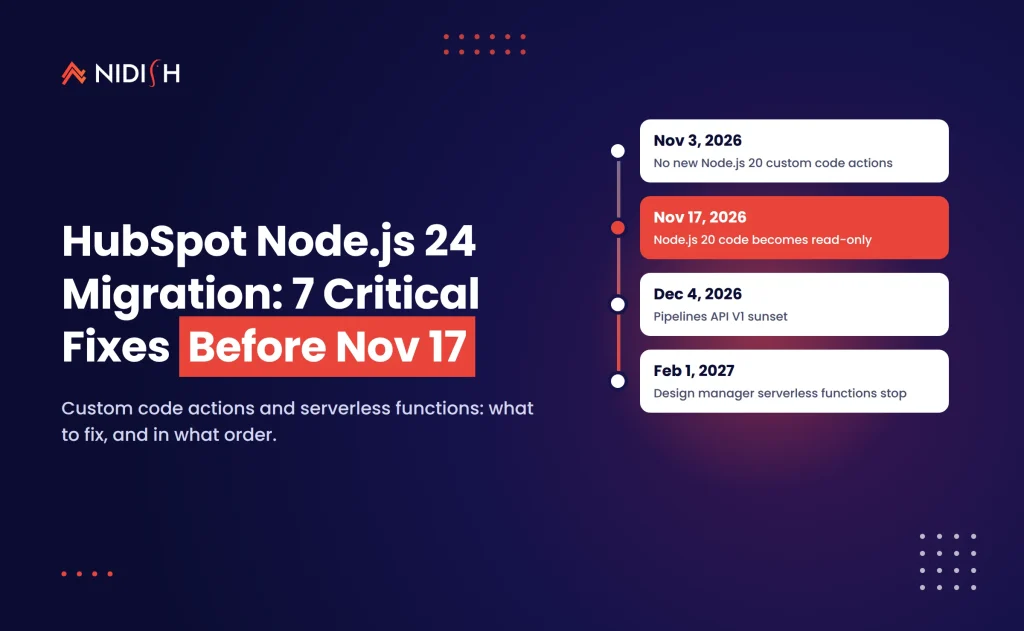
Your HubSpot workflows still run today. On November 17, you lose the right to fix them. On November 3, 2026, HubSpot announced that Node.js 20 custom code actions and design manager serverless functions are being retired, and the first deadline already hit that same day. The HubSpot Node.js 24 migration is not optional for any portal that runs custom code in workflows or calls /_hcms/api/ endpoints from a website.
Here is the trap. Your existing actions keep running, so nothing looks broken. But from November 17, 2026 you can’t save a single change to a Node.js 20 action, and on February 1, 2027 design manager serverless functions stop responding entirely. If a CRM sync, lead router or ERP lookup breaks after that, the fix is a rewrite, not an edit.
This guide gives you the dates, who is affected, and the seven fixes we would run on any portal we support.
Table of Contents
Key takeaways
- Since November 3, 2026, you can’t create new Node.js 20 custom code actions or new design manager serverless functions in HubSpot.
- From November 17, 2026, existing Node.js 20 actions and design manager functions become read-only. They keep running, but you can’t change them.
- On February 1, 2027, design manager serverless functions stop running and
/_hcms/api/requests fail. - HubSpot custom code actions on Node.js 24 accept only
asynchandlers thatreturnoutput. Callback-style code must be rewritten and retested. - The Pipelines API V1 also sunsets on December 4, 2026, so integration teams face two deadlines at once.
What the HubSpot Node.js 24 migration actually changes
The HubSpot Node.js 24 migration moves two kinds of server-side code off old runtimes. Workflow custom code actions move from Node.js 20 to Node.js 24, and website serverless functions built in the design manager move into developer projects. HubSpot published both changes in a single developer changelog post on November 3, 2026.
Why now? Node.js 20 reached end of life upstream in April 2026, according to the Node.js release schedule. Runtimes past end of life stop receiving security patches. HubSpot’s post says plainly that custom code actions “can now use Node.js 24, which receives security updates.”
A HubSpot Node.js 24 migration is not a rename. Node.js 24 in HubSpot “doesn’t support callback-style handlers,” and the libraries bundled with your code have new versions. That means every action needs a code change and a test, even if the business logic stays the same.
The deadlines: November 17, December 4 and February 1
The dates matter more than the details, so here they are in one place. All dates come from HubSpot’s own changelog and were checked on November 5, 2026.
| Date | What happens | Who it hits |
|---|---|---|
| Nov 3, 2026 | No new Node.js 20 custom code actions. No new design manager serverless functions. | Workflow builders, CMS developers |
| Nov 17, 2026 | Existing Node.js 20 actions and design manager functions become read-only. They keep running. | Anyone who needs to edit a workflow’s code |
| Dec 4, 2026 | Pipelines API V1 stops responding. Move to version 2026-03 or newer. | Integrations that read or write pipelines and stages |
| Feb 1, 2027 | Design manager serverless functions stop running. /_hcms/api/ requests fail. | Websites with forms, lookups or calculators built on serverless |
| Mar 2027 | Projects on platform 2025.2 or older must reach 2026.09. | Private and public app developers |
| Sep 2027 | Legacy private apps built before the Projects model must migrate. | Most older custom integrations |
The March and September 2027 dates come from HubSpot’s separate legacy APIs and apps timeline in the developer changelog. They are further out, but if you are already opening up integration code, it is cheaper to fix them in the same pass.
Who needs to act (and who can relax)
You need a HubSpot Node.js 24 migration plan if your portal has any workflow with a Custom code action written in JavaScript. That feature requires Data Hub Professional or Enterprise, per HubSpot’s custom code action documentation. HubSpot renamed Operations Hub to Data Hub, so older contracts may still use the old name.
You also need to act if your HubSpot CMS site calls endpoints under /_hcms/api/. Those are design manager serverless functions. They often power gated content checks, membership lookups, quote calculators and form handlers that write to the CRM.
You can relax, at least for now, in three cases:
- Your developer projects already run on platform version 2026.03 or 2026.09. HubSpot says these already run Node.js 24 and don’t need migration “at this time.”
- Your custom code actions are written in Python. The November 3 announcement doesn’t mention Python, which is still in beta.
- Your workflows use only standard actions, with no custom code at all.
One more group to check: chatbot custom code snippets. HubSpot made Node 18 and 20 chatflow snippets read-only after August 31, 2026. If a snippet broke in September and nobody could edit it, this is why.
7 critical fixes for your HubSpot Node.js 24 migration
These are the steps we run, in order, on every HubSpot Node.js 24 migration. The first two take an afternoon. The rest depend on how much custom code your portal has collected over the years.
Fix 1: Inventory every custom code action before the Node.js 20 deprecation freeze
You can’t migrate what you can’t find. On most portals we inherit, HubSpot custom code actions are spread across dozens of workflows, often written by three different people.
Build a simple list with these columns: workflow name, action position, runtime (Node.js 16, 20 or 24), secrets used, owner, and what breaks if it fails. Sort it by business impact. Lead routing and deal-stage sync go to the top. A one-off data cleanup from 2024 goes to the bottom, or gets deleted.
The fix: finish the inventory before November 17, because it sets the scope of your HubSpot Node.js 24 migration. After that date you can still read Node.js 20 code, but you can’t save changes to it. Any action you need to tweak in the next quarter must move first.
Fix 2: Rewrite callback handlers as async functions
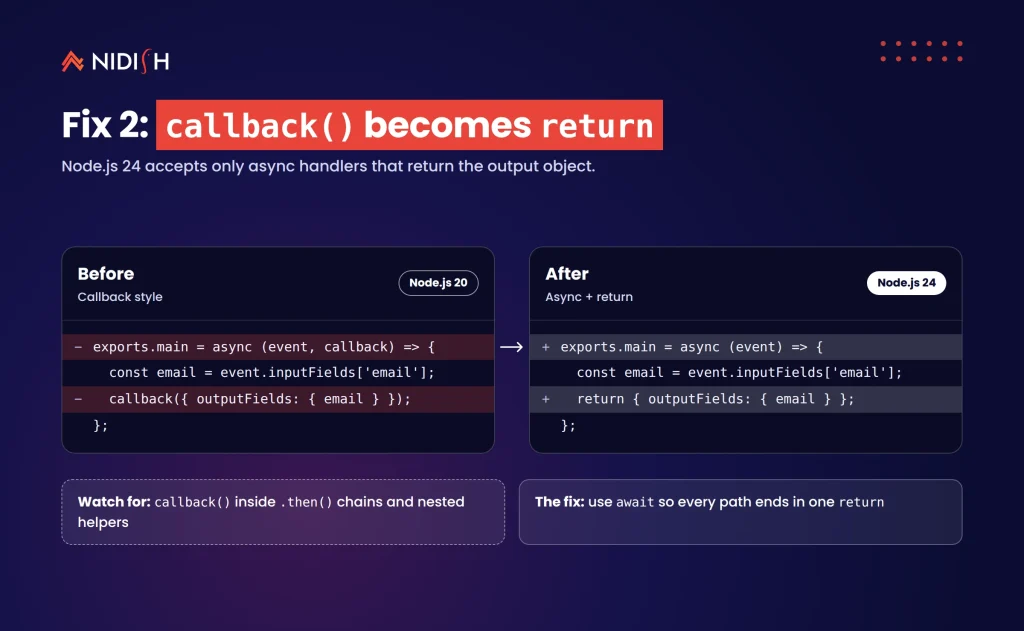
This is the core code change in any HubSpot custom code actions upgrade. Node.js 24 accepts only async handlers, and the function must return the output object instead of calling callback().
The old pattern looks like this:
exports.main = async (event, callback) => {
  const email = event.inputFields['email'];
  callback({ outputFields: { email } });
};
The Node.js 24 pattern looks like this:
exports.main = async (event) => {
  const email = event.inputFields['email'];
  return { outputFields: { email } };
};
HubSpot’s Node.js 24 upgrade guide shows the same shape. The edit looks small, but watch for code that calls callback() inside .then() chains or nested helpers. Those paths are where outputs silently go missing.
The fix: convert every handler to async/return, and replace promise chains with await so each path ends in a single return.
Fix 3: Update library versions and retest API calls
The libraries available to your code changed with the runtime. HubSpot’s upgrade guide lists @hubspot/api-client version 13.4.0 for Node.js 24, while older actions were written against much earlier major versions. Method names, error shapes and pagination helpers can differ between those versions.
This is where most surprises live. A search call that returned results in one version may throw on a renamed parameter in the next. An HTTP client default may change how timeouts behave.
The fix: for each action, run it against a test record in a sandbox or test portal. Compare the output fields with the Node.js 20 version line by line. Don’t sign off on “it ran.” Sign off on “it returned the same values.”
Fix 4: Keep error handling compatible with HubSpot retries
Custom code actions have hard limits. They must finish within 20 seconds and use no more than 128 MB of memory, per HubSpot’s documentation. HubSpot retries an action for up to three days after a 429 or 5XX error, but only if your code throws the error.
The mistake we see constantly is a try/catch block that logs the error and then returns empty output. The workflow continues as if nothing failed, and the CRM record ends up half-updated.
The fix: in every catch block, rethrow rate-limit and server errors so HubSpot can retry. Return output only on a true success. If an action regularly runs near the 20-second limit, split it or move the heavy work to an external service.
If your portal has more than a handful of these actions, this is the step where outside help pays for itself. Our HubSpot development team migrates and tests custom code for teams who need it done before the freeze, without pausing live workflows.
Fix 5: Rebuild design manager serverless functions in a developer project
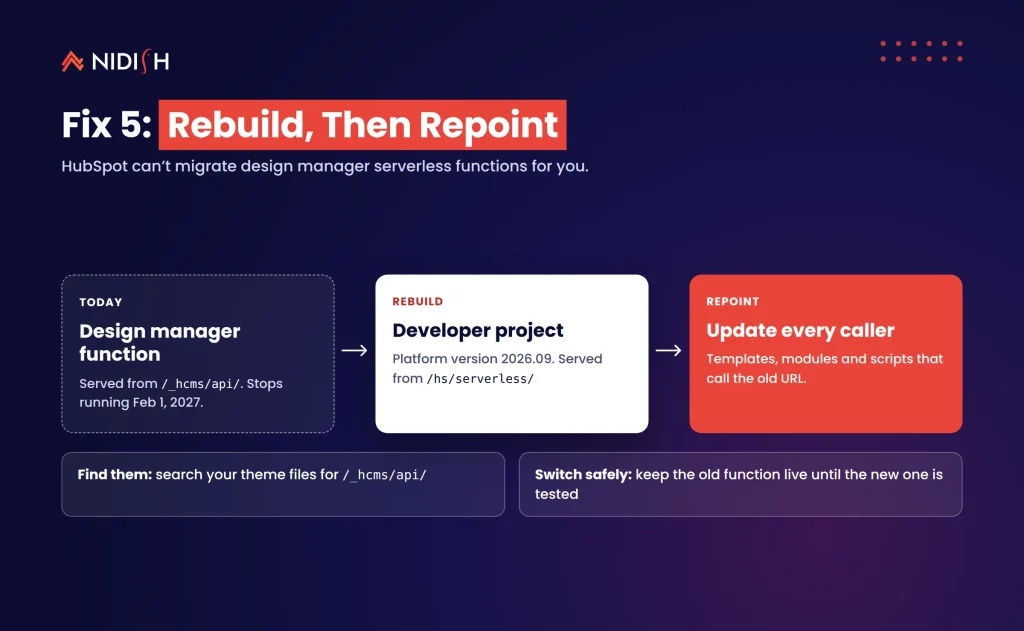
Design manager serverless functions are the bigger job. HubSpot says it “can’t migrate your functions automatically.” Each function must be rebuilt inside a developer project, where it is served from /hs/serverless/ instead of /_hcms/api/.
That path change matters. Every page template, module or script that calls the old URL must be updated too. If you miss one, a form or calculator fails quietly on February 1, 2027, and you find out from a customer.
HubSpot has published a migration guide for design manager serverless functions. It even includes a prompt you can hand to an AI coding agent.
The fix: list every function, search your theme files for /_hcms/api/, rebuild each function in a project on platform version 2026.09, then update every caller. Keep the old function live until the new endpoint is tested in production.
Fix 6: Move older developer projects with hs project migrate
If your custom apps or CMS projects sit on platform versions 2023.1, 2023.2 or 2025.1, they run on Node.js 18 or 20 and receive no security updates. HubSpot says builds and deploys on those versions are already blocked.
That is a quiet risk. Nothing breaks until you need to ship a fix, and then you can’t deploy at all.
The fix: run hs project migrate with the HubSpot CLI, move the project to 2026.09, redeploy, and retest. Do this now, while nothing is on fire. HubSpot’s platform migration guide in the developer docs covers the steps.
Fix 7: Check your integrations for the Pipelines API V1 sunset
This one is separate from the runtime change, but it lands in the same window. HubSpot will sunset the Pipelines API V1 on December 4, 2026, and V1 endpoints will stop responding after that date.
ERP and billing integrations are the usual suspects. Some older HubSpot–NetSuite and HubSpot–QuickBooks connectors read pipeline stages to decide when a deal becomes an order or an invoice. If that call fails, nothing gets created downstream.
The fix: search your integration code and middleware for V1 pipeline endpoints. Move them to version 2026-03 or newer; HubSpot recommends 2026-09. We cover the wider trade-offs in our guide on REST API vs native integration for HubSpot and NetSuite.
HubSpot custom code actions: Breeze, rewrite or rebuild?
HubSpot says “Breeze can update the custom code actions in a workflow for you.” That is useful, and you should try it. But an AI rewrite is a draft, not a release.
| Situation | Best path | Why |
|---|---|---|
| 1–5 simple actions, no external APIs | Let Breeze update, then test each | Fast, and the logic is easy to check |
| Actions that call HubSpot APIs with paging or batch writes | Manual rewrite with tests | Library changes affect error shapes and pagination |
| Actions that call ERP, billing or payment systems | Manual rewrite, sandbox first | A silent failure costs money, not just data quality |
| Design manager serverless functions | Rebuild in a developer project | HubSpot can’t migrate these automatically |
| Projects on 2023.x or 2025.1 | hs project migrate, then redeploy | Deploys on old versions are already blocked |
| Actions that do heavy processing | Move logic to an external service | The 20-second and 128 MB limits still apply |
Our rule for HubSpot custom code actions is simple. Use Breeze for the first draft wherever it helps, then review every diff as if a junior developer wrote it. We explain more about when custom code beats native tools in our guide to HubSpot custom coded workflow actions.
What a HubSpot Node.js 24 migration costs in time
Most of the cost of a HubSpot Node.js 24 migration is testing, not typing. The code change for a single action is often ten lines. Proving it returns the same values on real records takes longer.
From the portals we work on, these ranges are typical. Your own numbers depend on how well the original code was written and documented.
- Simple action (formatting, field copy, a single lookup): under an hour, including a test.
- API-heavy action (searches, associations, batch updates): half a day each, mostly testing.
- ERP-connected action (NetSuite, QuickBooks, Xero calls): a day or more, because you need a sandbox on both sides.
- Design manager serverless function: one to three days each, including updating every page that calls it.
The cost of doing nothing is harder to see. After November 17, a pricing change, a new territory or a renamed property can’t be applied to a Node.js 20 action. Your team will either rebuild under pressure or work around the workflow by hand.
Common mistakes to avoid
Assuming “still running” means “still fine”
Existing Node.js 20 actions keep executing, so dashboards stay green. The problem shows up the first time someone needs to change one.
Forgetting the callers of serverless functions
Rebuilding the function is half the job. Every template, module and script that calls /_hcms/api/ must point to the new path.
Swallowing errors in catch blocks
If your code returns empty output on failure, HubSpot won’t retry. Throw rate-limit and server errors instead.
Testing on production records
A custom code action that writes to the CRM or an ERP should be tested in a sandbox or test portal first. HubSpot notes that developer API keys won’t work for test accounts, so use OAuth or a private app token.
Ignoring secrets and limits
The total length of all secret values in one action can’t exceed 1,000 characters, and you can use up to 50 properties. Check these during the rewrite, not after a failed run.
Fixing runtimes but not the API versions
If you are already touching integration code, check for the Pipelines API V1 and legacy app dates too. One planned pass beats three emergency ones.
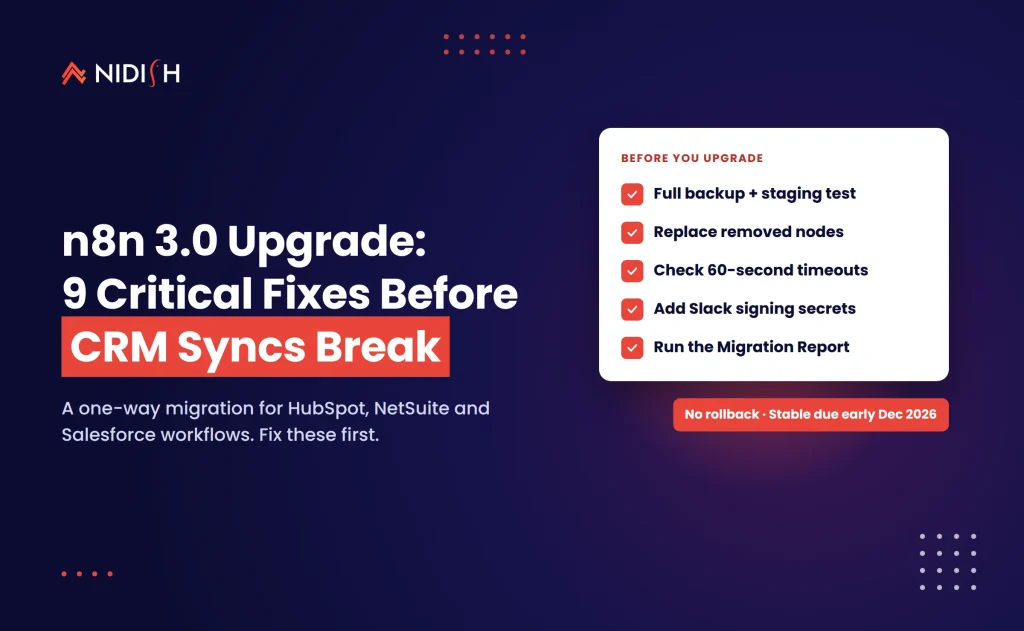
We see the same pattern on the n8n 3.0 upgrade: forced platform changes rarely break things on day one. They break the first time someone needs to change something.
How Nidish approaches this
We start with the inventory, because it decides everything else. Then we sort actions by risk, migrate the revenue-critical ones first, and test each against real record samples before we switch it over. For design manager functions, we rebuild them in a developer project, update every caller, and keep the old endpoint live until the new one is proven. If an integration also touches pipelines or legacy apps, we fix those in the same pass. You can see how we handle connected systems in our HubSpot–NetSuite lead-to-cash case study and on our HubSpot integration services page.
Frequently asked questions
Will my existing Node.js 20 custom code actions stop working?
No. HubSpot says existing custom code actions that use Node.js 16 or 20 keep running. The change is that you can’t create new Node.js 20 actions since November 3, 2026, and you can’t save changes to existing ones from November 17, 2026. To edit an action after that, you must move it to Node.js 24.
What is the main code change for Node.js 24 in HubSpot?
Node.js 24 accepts only async handlers. Your exports.main function must return an object with outputFields instead of calling callback(). The bundled libraries also have new versions, including @hubspot/api-client, so you should retest every API call your action makes, not just the handler shape.
Can Breeze migrate my custom code actions automatically?
Partly. HubSpot says Breeze can update the custom code actions in a workflow for you. Treat its output as a first draft. Review each change, check library calls and error handling, and test the action against real records before relying on it, especially if it writes to an ERP or billing system.
When do design manager serverless functions stop working?
Design manager serverless functions stop running on February 1, 2027, and requests to /_hcms/api/ endpoints will fail from that date. You can’t create new ones since November 3, 2026, or edit existing ones from November 17, 2026. HubSpot can’t migrate them automatically, so each must be rebuilt in a developer project.
Do Python custom code actions need to be migrated?
Not under this announcement. HubSpot’s November 3, 2026 changelog covers Node.js runtimes for custom code actions and design manager serverless functions. It doesn’t mention Python, which is still in beta for custom code actions. Keep an eye on the developer changelog, because runtime policies can change.
Which HubSpot subscription do I need for custom code actions?
You need Data Hub Professional or Enterprise to use the Custom code action in workflows, according to HubSpot’s developer documentation. Data Hub is the former Operations Hub, so older contracts may still use that name. Confirm your edition before you plan the migration, because the action isn’t available on lower tiers.
Where to start
Start your HubSpot Node.js 24 migration with the inventory today, and move anything you will need to edit in the next quarter before November 17. Then plan the serverless rebuild and the Pipelines API V1 change on one timeline, so you open your integration code once instead of three times.
If you want a second pair of eyes, book a 30 minute call. We’ll tell you honestly if you need a full rewrite, a Breeze-assisted cleanup, or nothing at all.


 Blog
 Case Studies
 Career