
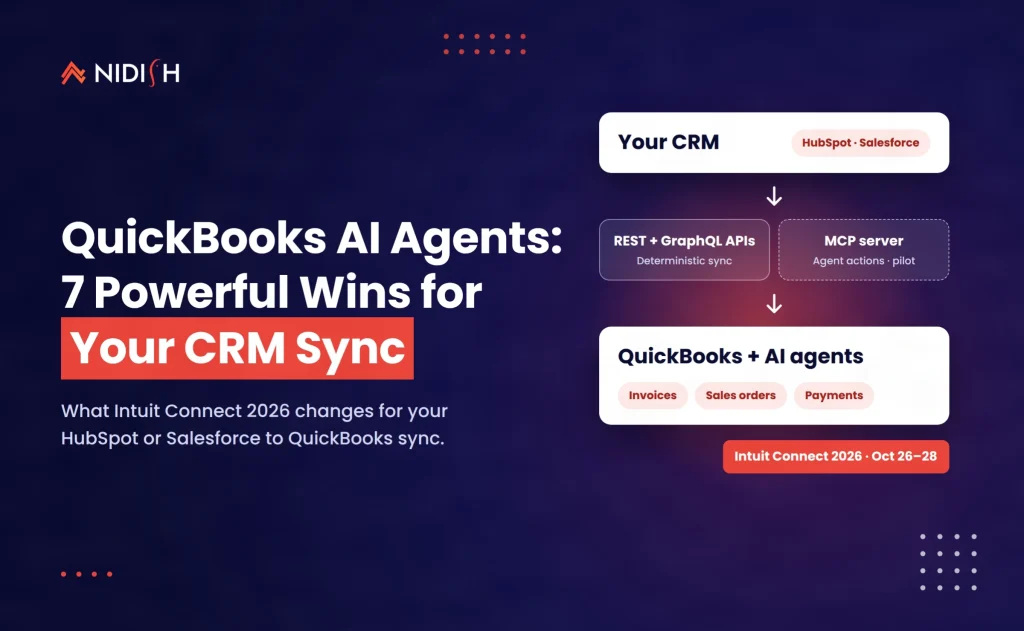
QuickBooks AI agents can now draft invoices, chase late payments and soon close the books. That sounds like good news for finance. For the CRM sitting upstream, it is a stress test. Every agent works from the records it is handed, and in most companies we audit, the customer, product and deal data flowing from the CRM into QuickBooks is the weakest link in the stack.
At Intuit Connect 2026 in Las Vegas (October 26–28), Intuit rolled out a wave of AI features built on its Intuit Intelligence platform. Invoicing from Claude and ChatGPT is now generally available. A hosted QuickBooks MCP server is in an invite-only pilot. A new Sales Order API landed on October 20. And revenue management is “coming soon” after Intuit agreed to acquire Sequence.
This guide is for RevOps leads, finance owners and HubSpot or Salesforce admins who sync deals into QuickBooks. You will get the seven changes that matter, what each means for your QuickBooks CRM integration, a decision table, and a seven-step prep checklist.
Table of Contents
Key takeaways
- QuickBooks AI agents are real but uneven. Claude and ChatGPT invoicing is GA; Intuit Intelligence itself and most connectors are still beta, per Intuit’s fall 2026 release notes.
- Agents amplify your data. Duplicate customers or mismatched items in your CRM sync become duplicate invoices, faster.
- Pick the right pipe. Use the REST and GraphQL APIs for deterministic sync; treat the QuickBooks MCP server as a pilot for assistive, human-approved actions.
- The Sales Order API is the sleeper hit. It closes the quote-to-order gap many HubSpot–QuickBooks builds patch with workarounds.
- Most announcements are U.S.-first. Intuit says international availability will follow.
What Intuit announced at Intuit Connect 2026
Intuit announced on October 27, 2026 that QuickBooks, Intuit Enterprise Suite and Intuit Accountant Suite are getting new AI capabilities on one shared Intuit Intelligence platform. Most items are rolling out to U.S. businesses and accounting firms first, with several still in beta or “coming soon”.
The official Intuit Connect 2026 press release describes the platform as more than 60 specialized language models and over 100 AI skill agents. It also says AI already categorizes more than 400 million transactions a month. Those are Intuit’s numbers, not independent benchmarks, but they show the scale Intuit is betting on.
The release is written for accountants and owners. It barely mentions APIs. The developer news came separately, through the Intuit Developer blog and GitHub, in the week before the event. That split matters, because the integration story is where your CRM gets affected.
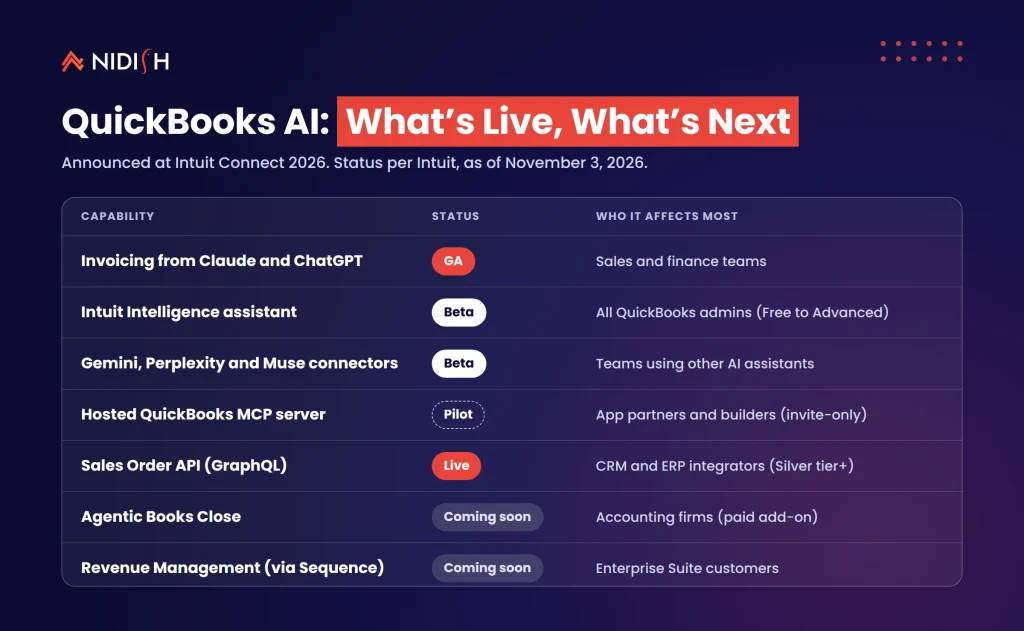
Here is the short version of what shipped, by status, as of November 3, 2026:
| Capability | Status (per Intuit) | Who it affects most |
|---|---|---|
| Invoicing from Claude and ChatGPT | GA | Sales and finance teams |
| Intuit Intelligence assistant | Beta, Free to Advanced plans | All QuickBooks admins |
| Gemini, Perplexity and Muse connectors | Beta | Teams using other AI assistants |
| Hosted QuickBooks MCP server | Invite-only pilot | App partners and builders |
| Sales Order API (GraphQL) | Live for Silver tier and above | CRM and ERP integrators |
| Agentic Books Close | Coming soon, paid add-on, pilot | Accounting firms |
| Revenue Management (via Sequence) | Coming soon | Enterprise Suite customers |
7 changes to QuickBooks AI agents worth acting on
Not every announcement deserves a project. These seven do, because each one touches the data your CRM sends to QuickBooks.
1. Invoicing from Claude and ChatGPT is generally available
The QuickBooks fall 2026 update lists connectors for ChatGPT, Claude, Gemini, Perplexity and Muse, with “ChatGPT and Claude invoicing” marked GA. That builds on July, when QuickBooks added write actions in Claude and ChatGPT for invoices, estimates, customers and products.
Why it matters for your CRM: a sales rep can now create a customer and an invoice in QuickBooks from a chat window. If your CRM also creates that customer, you now have two front doors. Decide which system owns customer creation before reps discover the shortcut.
2. Intuit Intelligence is in beta on every plan, with undo controls
Intuit Intelligence is “currently available as a beta release” for admin users from QuickBooks Free through Advanced. The useful detail is governance. Intuit says you can review and undo AI actions on all plans, with custom roles on Advanced.
Why it matters: these controls protect the ledger, not the CRM. If an agent edits a customer record in QuickBooks, your sync may push that change back, or overwrite it. Map the direction of every field before you switch agents on.
3. A hosted QuickBooks MCP server is in pilot
The QuickBooks MCP server pilot repository on GitHub documents a hosted endpoint for AI agents. It is marked “PILOT – By Invitation Only” for App Partner Program members. It uses the same OAuth 2.0 flow as the QuickBooks Online REST API.
The tools cover customers, products, sales orders, invoices, estimates, payment links and settings. Intuit also states it may change the functionality or charge for it later.
Why it matters: MCP is how agents like Claude call business systems. It is great for “draft this invoice and let me approve it”. It is not yet the place to run your nightly deal-to-invoice sync.
4. The Sales Order API closes the quote-to-order gap
On October 20, 2026, Intuit Developer launched the QuickBooks Sales Order API. It is a GraphQL API with create, read, update and delete for sales orders. Sales orders are non-posting, so they reserve inventory without hitting the books.
It works on QuickBooks Online Plus, Advanced and Intuit Enterprise Suite, and on Simple Start and Essentials with the Inventory Add-on. Access needs a Silver, Gold or Platinum App Partner tier and restricted scopes.
Why it matters: closed-won deals in HubSpot or Salesforce can now become a real sales order first, then an invoice when goods ship. That is cleaner than invoicing on signature and issuing credit memos later.
5. Revenue Management is coming to Intuit Enterprise Suite
Intuit signed an agreement to acquire Sequence on October 15, 2026 (the deal was pending close at announcement), and says Revenue Management is “coming soon”. It covers contract-to-cash steps: deal configuration and pricing, billing, collections and revenue recognition.
Why it matters: “deal configuration and pricing” is CRM territory. If QuickBooks starts holding contract terms, you need one source of truth for price books and renewal dates. Otherwise sales and finance will quote different numbers.
6. Agentic Books Close is coming, as a paid add-on
Intuit describes Agentic Books Close as automating more of the monthly close, following a firm’s procedures and logging every action. It is “coming soon” as an add-on to Intuit Accountant Suite, in pilot with select customers, and may carry extra fees.
Why it matters: an automated close is only as fast as the messiest account. Unmatched payments and orphan invoices from a CRM sync are exactly the items that stall a close.
7. AI cash flow tools now chase late invoices
QuickBooks is adding tools that flag aging invoices, benchmark against peers and automate customer follow-ups. Intuit claims these help businesses get paid about four days faster on average. It also cites a worrying trend: nearly three in five small businesses have invoices overdue by 30 days or more.
Why it matters: collections data belongs in your CRM too. Account managers should see that a client is 45 days late before they pitch an upsell.
What QuickBooks AI agents mean for your CRM integration
QuickBooks AI agents make your QuickBooks CRM integration more important, not less. Agents read and write the same customer, item and invoice records your sync depends on. Bad mappings that once caused a monthly cleanup now cause instant, automated mistakes.
The mistake we see constantly is treating finance automation as a finance project. The trigger for most QuickBooks records is upstream: a deal stage in HubSpot, an opportunity in Salesforce, an order in Shopify. When an agent sends an invoice from a chat, it trusts that the customer record, tax settings and line items are right.
Three things usually break first:
Customer identity
The CRM uses company names; QuickBooks uses display names. “Acme Inc” and “Acme, Inc.” become two customers.
Product catalogue drift
A new SKU gets added in the CRM but not in QuickBooks, so the sync fails or falls back to a generic item.
Write-back loops
An agent updates an email address in QuickBooks, the sync copies it to the CRM, and a marketing workflow fires on a changed field.
If you run several QuickBooks companies, the risk multiplies. Our multi-account HubSpot–QuickBooks integration case study shows how routing rules decide which entity a deal lands in. Agents will need the same rules.
The upside is real. With clean data, the new tools let a rep confirm an invoice from chat, let finance see deal context, and give leadership one revenue number. That is the lead-to-cash loop we cover in our RevOps audit guide to lead-to-cash leakage.
QuickBooks MCP server vs REST API vs Sales Order API
Use the REST and GraphQL APIs for any sync that must run the same way every time. Use the QuickBooks MCP server for assistive actions where a person approves the result. Use the Sales Order API when deals should reserve stock before they become invoices.
| Option | Best for | Status (Nov 2026) | Access | Watch out for |
|---|---|---|---|---|
| QuickBooks Online REST API | Deal-to-invoice sync, payments, customers | GA | Any App Partner tier | Rate limits and sync token conflicts |
| Sales Order API (GraphQL) | Quote-to-order, inventory reservation | Live | Silver tier and above, restricted scopes | Updates replace the full line list |
| Hosted QuickBooks MCP server | Agent-drafted invoices and estimates | Invite-only pilot | Whitelisted partners | Functionality and pricing may change |
| Claude or ChatGPT connector | Ad-hoc invoicing by staff | GA for invoicing | QuickBooks plan plus AI account | Bypasses CRM ownership rules |
| iPaaS (Celigo, Boomi, n8n) | Multi-system orchestration | Depends on connector | Vendor licence | Connector may lag new APIs |
One Sales Order API detail will bite careless builds. Intuit notes that line updates fully replace existing lines. If your sync sends only the changed line, every other line is deleted. Always resend the full line set with the current sync token.
We have written more on this trade-off in REST API vs native integration for HubSpot and NetSuite. The same logic applies to QuickBooks: native and agent tools are fast to start, custom APIs are safer at volume.
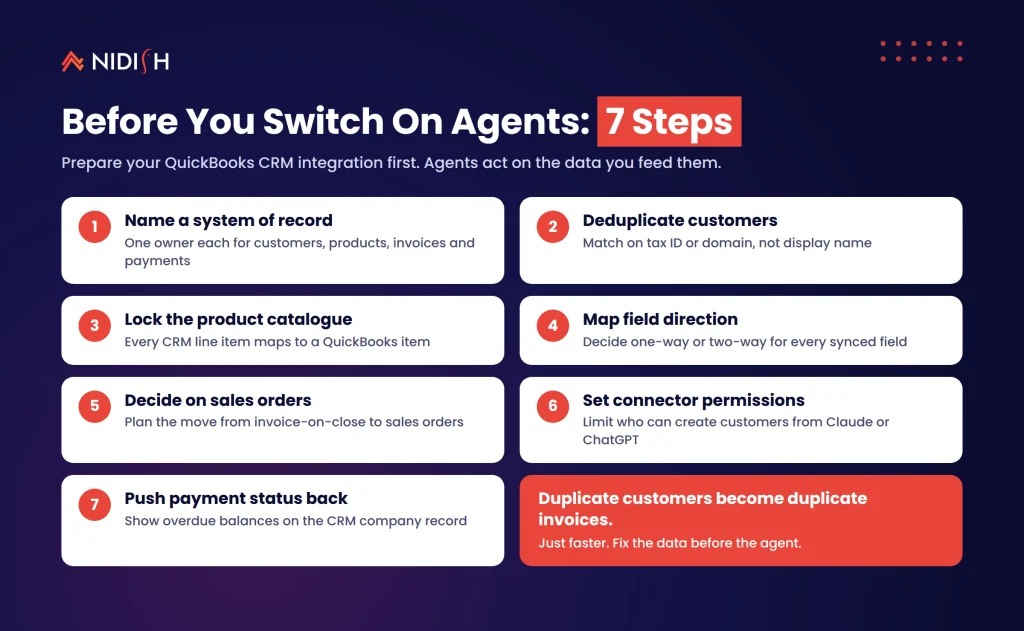
How to prepare your QuickBooks CRM integration: a 7-step checklist
Do these steps before anyone turns on QuickBooks AI agents or a chat connector. Each one reduces the chance that an agent acts on bad data. Most take days, not weeks.
1. Name a system of record for each object
Customers, products, price books, invoices and payments each get one owner. Write it down.
2. Deduplicate customers in both systems
Match on tax ID or domain, not display name. Merge before the agent starts creating more.
3. Lock the product catalogue
Every CRM line item must map to a QuickBooks item. Block deals with unmapped SKUs from closing.
4. Map field direction
For each synced field, decide one-way or two-way. Anything an agent can edit in QuickBooks should not silently overwrite CRM data.
5. Decide on sales orders
If you sell physical goods, plan a move from invoice-on-close to sales-order-on-close using the Sales Order API.
6. Set connector permissions
Limit who can create customers through Claude or ChatGPT. Use QuickBooks roles and its review-and-undo controls.
7. Push payment status back to the CRM
Show overdue balances on the company record so account teams see them before renewal calls.
If you’d like a second pair of eyes on your mapping, this is the kind of build we do every week. See how we handle HubSpot integration for finance and ERP systems.
What it costs and how long it takes
Expect the AI features themselves to cost little at first and the integration clean-up to cost the most. Intuit Intelligence is in beta on existing plans, while Agentic Books Close is expected to be a paid add-on. Pricing for the MCP server is not set; Intuit says it reserves the right to charge later.
The hidden costs sit elsewhere:
- App Partner tier. The Sales Order API needs Silver tier or above. Confirm current fees with Intuit before you plan a build.
- AI assistant seats. Claude or ChatGPT connectors need a separate account, which may require a paid subscription.
- Data clean-up. From experience, deduplication and catalogue mapping is the largest line item in most projects.
Typical timelines we see, framed as ranges rather than promises:
| Scope | Typical effort | Main risk |
|---|---|---|
| Audit an existing CRM to QuickBooks sync | 1–2 weeks | Hidden duplicates |
| Add sales orders to a deal-to-invoice flow | 2–4 weeks | Line-replacement bugs |
| Multi-entity routing with payment write-back | 4–8 weeks | Entity and tax rules |
| Pilot an agent workflow through MCP | 2–3 weeks after access | Pilot terms changing |
All prices and statuses are at the time of writing; confirm them with Intuit.
Common mistakes to avoid
Letting two systems create customers
If reps can add customers in the CRM and through a chat connector, duplicates are certain. Pick one front door.
Building production sync on a pilot
QuickBooks AI agents are moving fast, and the QuickBooks MCP server is invite-only and may change. Keep deterministic jobs on the documented APIs.
Partial line updates
The Sales Order API deletes lines you leave out of an update. Test with multi-line orders, not single-item demos.
Ignoring region and edition
Many features are U.S.-only for now, and some need Plus, Advanced or an add-on. Check before you promise anything to the board.
Skipping the audit trail
Agents act fast. Make sure every agent action is traceable in both QuickBooks and the CRM timeline. The same discipline applies to any one-off data migration.
How Nidish approaches QuickBooks AI agents
We treat QuickBooks AI agents as a data-quality project first and an AI project second. We start with a short audit of your CRM, QuickBooks and any iPaaS in between. Then we fix ownership, mapping and write-back rules, and only then add agent or chat workflows with human approval. We have built HubSpot integrations with QuickBooks, Xero and NetSuite, so we can tell you honestly when an agent helps and when a plain API job is the better answer.
Frequently asked questions
What are QuickBooks AI agents?
QuickBooks AI agents are AI features inside QuickBooks, built on Intuit Intelligence, that can draft invoices, flag late payments and automate parts of the close. Intuit says the platform uses more than 100 AI skill agents. Most features are in beta or rolling out to U.S. customers as of November 2026.
What did Intuit announce at Intuit Connect 2026?
At Intuit Connect 2026, Intuit announced on October 27 new AI capabilities across QuickBooks, Intuit Enterprise Suite and Intuit Accountant Suite. Highlights include Agentic Books Close (coming soon), industry editions in beta, Revenue Management via the Sequence acquisition (coming soon), and AI cash flow tools for small businesses.
Can Claude create invoices in QuickBooks?
Yes. Intuit’s fall 2026 update marks invoicing through the Claude and ChatGPT connectors as generally available. Users can create, update and send invoices and estimates from chat. You need a QuickBooks Online subscription and a Claude account, and some payment features need QuickBooks Payments.
Is there a QuickBooks MCP server?
Yes, but it is an invitation-only pilot. The hosted QuickBooks MCP server is open to selected App Partner Program members and uses the same OAuth 2.0 flow as the REST API. Intuit says it may change the functionality or charge for it in future, so treat it as experimental.
Do QuickBooks AI agents replace my CRM integration?
No. QuickBooks AI agents rely on your CRM integration rather than replacing it. Agents act on the customer, product and invoice records your sync creates. Deterministic jobs like deal-to-invoice sync should stay on the documented APIs, with agents handling assisted, human-approved tasks.
Who can use the QuickBooks Sales Order API?
The Sales Order API is available to Silver, Gold and Platinum App Partner Program members with restricted scopes. It supports QuickBooks Online Plus, Advanced and Intuit Enterprise Suite, plus Simple Start and Essentials with the Inventory Add-on. It is a GraphQL API launched on October 20, 2026.
Where to start
Start with your data, not the agent. Pick an owner for each object, clean up duplicates, and lock your product mapping. Then pilot one assisted workflow, such as agent-drafted invoices with human approval, and measure what breaks.
QuickBooks AI agents will keep improving through 2027. The teams that benefit first will be the ones whose CRM and finance records already agree.
Book a 30 minute call. We’ll tell you honestly whether you need a sync rebuild, a light clean-up, or nothing at all.
[Image: quickbooks-ai-agents-hubspot-deal-to-invoice.png — alt: “QuickBooks AI agents and HubSpot deal-to-invoice workflow diagram”]


 Blog
 Case Studies
 Career