
Table of Contents
Introduction
Law firms rarely lose cases at trial that they never should have taken. They lose them at intake, in the twenty minutes between a potential client filling in a form at 11pm and somebody calling them back the next afternoon, by which time three other firms have already spoken to them.
This Pipedrive implementation case study covers a multi-state personal injury and mass tort law firm that had already bought the software, already used it daily, and still could not answer a basic question: which marketing spend produced signed cases. The firm did not need a new CRM. It needed a Pipedrive implementation designed around how legal intake actually works, with multiple intake channels, a conflicts check that has to happen before anyone signs anything, a case management system that owns the matter after sign-up, and a marketing budget that has to be defended every quarter.
Nidish rebuilt the firm’s Pipedrive CRM from the data model up: a multi-pipeline architecture, a custom two-way integration between Pipedrive and the firm’s legal case management platform, automated intake routing with response-time enforcement, document generation and e-signature inside the deal record, and a closed-loop attribution model that pushed signed-case data back into the firm’s advertising platforms. It follows the same engineering pattern as the two-way API integration we built for a multi-location behavioral health group, applied to a very different regulatory context.
The client is not named. Industry, structure and scale are described; nothing identifying is included.
Client Background
The client is a plaintiff-side law firm operating across several states, with a mix of personal injury, employment and mass tort work. The firm runs a central intake team, a distributed group of case managers, and a partner-level referral network that sends and receives co-counsel matters.
Their stack, before the engagement:
- Pipedrive as the CRM, used almost exclusively by the intake team
- A legal case management platform holding matters, documents, deadlines and billing once a case was signed
- A cloud telephony and after-hours answering service covering nights and weekends
- Google Ads and paid social, managed by an outside media buyer
- An accounting platform for settlements, disbursements and costs
- A significant volume of spreadsheets filling the gaps between all of the above
Nothing in that list was inherently wrong. The problem was that none of it was connected, and the CRM in the middle had been configured by five different people over four years with no single owner. It is a familiar pattern, and close to the full set of problems that show up when a firm runs without a properly built law firm CRM.
The Challenges
Most of what follows will be recognisable to anyone who has read our breakdown of the pain points law firms hit without proper legal operations software. What made this engagement unusual was the number of them running at once.
1. One pipeline doing four different jobs
Every record sat in the same Pipedrive pipeline: a cold web enquiry, a qualified claimant awaiting a conflicts check, a signed case in litigation, and a referral coming in from another firm. Stages had names like “Working” and “Follow Up.” Two people could look at the same deal and reasonably disagree about what was supposed to happen next.
Because the pipeline mixed unqualified enquiries with signed matters, pipeline value was meaningless, forecasting was impossible, and no report could separate intake performance from case performance.
2. Speed to lead measured in hours, not minutes
Leads arrived from web forms, paid landing pages, live chat, the answering service, and inbound calls. Each channel landed somewhere different. Some went into Pipedrive, some into an inbox, some into a shared spreadsheet the answering service updated in the morning. There was no queue, no assignment rule and no escalation. Overnight and weekend enquiries routinely waited until the next business day.
3. Conflicts checks happening too late
The firm’s conflicts process lived outside the CRM. Intake specialists sometimes progressed a potential client through qualification, booked a consultation, and only then discovered a conflict. That wasted attorney time and created a risk the firm was not comfortable carrying.
4. Double entry between the CRM and case management
When a case was signed, someone manually recreated the client in the legal case management platform: names, contact details, incident dates, insurer information, referral source. The two systems then drifted apart immediately. Updates made in case management never came back to Pipedrive, so the intake team had no idea what happened to the cases they had signed.
5. Referral relationships that could not be measured
Co-counsel and attorney referrals were a major source of high-value matters, but were tracked in a partner’s personal notes. The firm could not say which referral relationships were productive, which had gone quiet, or which owed reciprocal referrals.
6. Marketing spend defended on faith
The media buyer optimised campaigns toward form fills, because form fills were the only conversion the ad platforms could see. Nobody knew which campaigns produced signed cases, which meant budget kept flowing to keywords that generated volume and no retained matters. Cost per lead was known. Cost per signed case was not.
7. Confidentiality with no structural enforcement
Everyone in the CRM could see everything. For a firm handling sensitive matters across practice areas, including matters where an ethical wall was appropriate, visibility was a policy statement rather than a system control.
Our Approach
We did not start in Pipedrive. We started with the firm’s intake script, its conflicts checklist, its fee agreement templates and a week of listening to how the intake team actually worked.
The approach was staged deliberately:
- Discovery and process mapping. Every intake channel traced end to end, every handoff documented, every field in the existing portal audited for actual use.
- Data model design before configuration. Objects, fields, pipelines, stages and exit criteria agreed on paper and signed off before anything was built.
- Build in a controlled environment. Configuration, automation and integration logic built and tested against sample data, not live matters.
- Migration and reconciliation. Historical records cleaned, deduplicated, mapped and imported with a reconciliation report.
- Phased rollout. Intake team first, then case managers, then partners and referral tracking, then the marketing attribution loop.
- Enablement and handover. Documentation, recorded walkthroughs, role-based training and a named internal owner.
The principle throughout: the CRM should make the correct next action obvious, and should make the incorrect action difficult.
The Solution
Multi-pipeline architecture built around legal intake
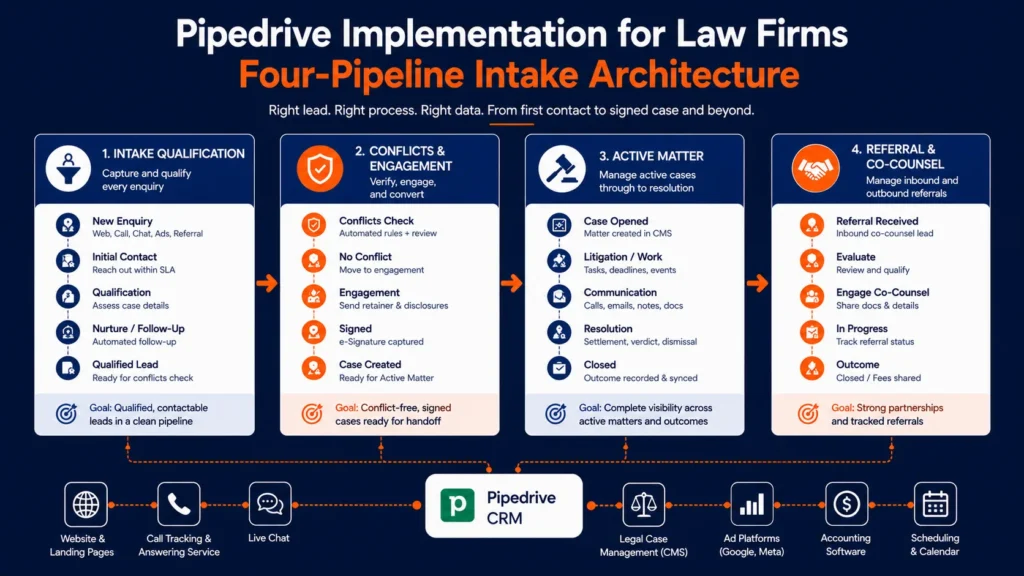
The single pipeline was replaced with four purpose-built Pipedrive pipelines, each with its own stages, required fields and exit criteria:
- Intake Qualification. From first contact to qualified potential client. Stages reflect the intake script: New Enquiry, Contact Attempted, Screening Call Held, Qualified, Declined.
- Conflicts and Engagement. Conflicts check, fee agreement issued, signature received, engagement confirmed. A case cannot enter this pipeline without the qualification data being complete.
- Active Matter (Mirror). A read-oriented pipeline reflecting the case lifecycle stage held in the legal case management platform, so intake and marketing can see what happened to a signed case without touching the system of record.
- Referral and Co-Counsel. Inbound and outbound referral relationships tracked as their own pipeline, with fee-share expectations and reciprocity captured as structured fields.
Unqualified enquiries no longer become deals at all. They arrive in the Leads Inbox and are only converted to a deal once they clear basic screening. Pipeline value now means something, because everything in it has been qualified by a human.
A data model designed to be reported on
The audit found a large number of custom fields, many duplicated, most rarely completed. We rebuilt the model around the questions the firm needed to answer.
Structured, reportable fields replaced free-text notes for: practice area, incident date, statute of limitations date, jurisdiction, insurer, referral source and referral partner, marketing channel and campaign, and case value band. Field types were chosen so they could be filtered and grouped, which meant single-option and multiple-option fields rather than text, and dates rather than notes.
Required fields by stage enforce data quality at the moment it matters. A deal cannot move to Qualified without a practice area, incident date and jurisdiction. A deal cannot enter Conflicts and Engagement without a completed conflicts result.
Intake automation and response-time enforcement
Pipedrive Workflow Automation was used to remove the delay between an enquiry arriving and a human acting on it. This is the layer that separates firms who compete on responsiveness from firms who do not, and it is the same principle behind legal operations automation in boutique firms:
- Unified capture: Web forms, landing pages, live chat, telephony events and the after-hours answering service all write into Pipedrive through a single normalised entry point, so every enquiry lands in one queue regardless of channel.
- Weighted round-robin assignment: New enquiries are assigned by practice area and current open workload rather than alphabetically, so the specialist handling twenty active screenings does not receive the next five.
- Response-time timers: If a new enquiry has no logged contact activity within the agreed window, the deal is flagged and escalated to the intake supervisor. Overnight and weekend enquiries follow a separate rule set tied to the answering service.
- Deal rotting: configured per stage, so a potential client who has gone quiet in Screening surfaces automatically instead of sitting in the pipeline indefinitely.
- Statute of limitations warnings: Automations watch the limitation date field and generate escalating activities and owner notifications as the date approaches. This is one of the highest-value automations in the entire build, because it turns a date in a field into an action on somebody’s calendar.
- Sequenced follow-up: Structured multi-touch follow-up across call, SMS and email for potential clients who do not answer the first attempt, with automatic exit when contact is made.
Multi-level, multi-channel integration
This was the most technically involved part of the project, and the part no off-the-shelf app covered. It is the situation we described in custom integrations: when native apps fall short, and it is common in CRM builds that have to sit alongside legal case management and billing systems.
Pipedrive and the legal case management platform, two-way. Built as a custom integration on the Pipedrive API v2 with webhooks v2 for event-driven updates rather than scheduled polling. When a deal reaches signed engagement, the integration creates the matter in the case management platform with the full intake payload: parties, incident details, jurisdiction, referral source, marketing attribution. As the matter progresses, status, case stage and outcome flow back into the Active Matter pipeline in Pipedrive.
The integration was built with the failure cases handled inside the sync rather than cleaned up afterwards:
- A field mapping registry as the single source of truth for how every field in one system corresponds to the other, so mapping changes are configuration rather than code changes
- Idempotency keys so a retried webhook cannot create a duplicate matter
- Duplicate prevention and matching logic on contact identity before any record is created
- A retry queue with exponential backoff and a dead-letter queue for payloads that fail repeatedly
- Validation on write, so malformed or incomplete data is rejected and surfaced rather than silently written
- A sync activity log the firm’s operations lead can read without engineering help
Telephony and after-hours answering service: Call events are written into Pipedrive as activities against the correct person and deal, with recordings and dispositions attached. Missed calls create a deal or update an existing one and enter the follow-up automation immediately, including outside business hours.
Document generation and e-signature: Fee agreements, engagement letters and intake questionnaires are generated from Smart Docs templates populated directly from deal and person fields, sent for trackable e-signature, and written back to the deal on completion. Signature status drives stage movement, so the pipeline reflects reality without anyone updating it manually.
Accounting platform: A one-way sync exposes settlement, cost and disbursement reference data against the matter record in Pipedrive for visibility only. Pipedrive was deliberately not made an accounting system. The deal became a read-only control plane for financial context rather than the ledger, the same architecture we used when syncing accounting data into the CRM for a services business.
Scheduling: Consultation booking through the Pipedrive Scheduler, writing directly to attorney calendars and creating the corresponding activity on the deal, eliminating the email back-and-forth that previously consumed a chunk of every intake specialist’s day.
Closing the marketing loop
This is where the implementation moved from operations into revenue.
Paid traffic click identifiers and campaign parameters are captured on the landing page, passed through the web form, and stored as hidden structured fields on the Pipedrive person and deal. They persist through the entire lifecycle: enquiry, qualification, conflicts, engagement, signed matter.
When a deal reaches signed engagement, the integration layer pushes an offline conversion back into the firm’s advertising platforms, with the case value band attached. The advertising algorithms stopped optimising toward form fills and started optimising toward signed cases.
Pipedrive Campaigns handles the nurture side: segmented sequences for potential clients who were qualified but not yet signed, dormant enquiries, and, separately, a referral partner communication track that keeps co-counsel relationships warm without a partner having to remember to do it.
Permissions, visibility and confidentiality
Pipedrive visibility groups and permission sets were configured to match the firm’s actual confidentiality requirements. Intake specialists see the deals they own and their team’s queue. Case managers see active matters in their practice area. Partners see their referral relationships and firm-level reporting. Where an ethical wall was required, visibility was restricted structurally rather than by instruction.
Reporting that answers the questions leadership actually asks
Pipedrive Insights dashboards were built by role rather than as one universal dashboard nobody reads. The discipline behind them is the same one we apply to advanced analytics and reporting builds: decide the question first, then build the report.
- Intake dashboard. Enquiry volume by channel, response time distribution, contact-to-screening rate, screening-to-qualified rate, decline reasons.
- Marketing dashboard. Cost per signed case by channel and campaign, referral source performance, channel mix over time.
- Partner dashboard. Referral partner productivity, reciprocity balance, case value band by source.
- Operations dashboard. Pipeline conversion by stage, stalled deals, limitation date exposure, integration sync health.
Implementation Highlights
- Four purpose-built pipelines replacing a single general-purpose pipeline
- Leads Inbox used for unqualified enquiries, keeping the deal pipeline clean and forecastable
- Stage-gated required fields enforcing data quality at the point of entry
- Custom two-way Pipedrive integration with the legal case management platform on API v2 and webhooks v2
- Idempotency, duplicate prevention, validation, retry and dead-letter handling built into the sync layer
- Telephony and after-hours answering service writing into a single intake queue
- Weighted round-robin routing with response-time escalation
- Statute of limitations monitoring converted into automated activities
- Smart Docs fee agreements and e-signature driving stage progression
- Offline conversion feedback to advertising platforms for signed-case optimisation
- Visibility groups and permission sets enforcing confidentiality structurally
- Role-based Insights dashboards for intake, marketing, partners and operations
Data Migration and Cleanup
The existing portal held years of accumulated records. Migration was treated as its own workstream rather than an afterthought, following the CRM data migration checklist most teams skip:
- Duplicate contacts identified and merged using deterministic matching on phone and email, with fuzzy matching reviewed by hand
- Free-text values normalised into the new option sets, with practice areas, referral sources and jurisdictions consolidated from dozens of spelling variants into controlled lists
- Historical deals mapped into the correct new pipeline and stage based on their actual state, not their old stage name
- Records with no usable data archived rather than migrated
- Unused custom fields retired, with their data preserved in an export before removal
- A reconciliation report produced after import, so the firm could verify counts before the old configuration was retired
Nothing was deleted until the firm signed off on the reconciliation.
Adoption and Enablement
A well-architected CRM that nobody uses correctly is an expensive spreadsheet.
Rollout was phased by team, with each group trained on their own workflow rather than on the system as a whole. Deliverables included role-based documentation, recorded walkthroughs of each pipeline, a one-page intake reference card for the screening call, an escalation path for integration issues, and a named internal system owner with the access and authority to approve changes.
A change-control process was put in place so new fields, pipelines and automations require a stated reason and an owner. That is the mechanism that prevents a clean implementation from turning back into forty half-remembered workflows in eighteen months. The same governance thinking applies to every new tool a firm adopts, which is why we treat governance around legal AI and firm risk as an operations problem rather than a technology one.
Results
Consistent with how we report all client work, the outcomes below describe what changed. No figures are attributed to the firm.
Every enquiry lands in one queue: Web, chat, phone, after-hours and referral enquiries arrive in the same place, assigned automatically, with response time measured rather than assumed. Overnight enquiries no longer wait for the morning.
Manual re-entry between systems stopped: Signed engagements create the matter in case management automatically, with the full intake payload intact. Case progress flows back without anyone rekeying it.
Conflicts checks happen before engagement, structurally: The pipeline will not allow a matter to progress without a recorded conflicts result, which removed an operational risk the firm had been managing manually.
Marketing spend became defensible: With signed-case data flowing back to the advertising platforms and cost per signed case visible by channel and campaign, budget conversations moved from lead volume to retained matters, and spend was reallocated accordingly.
Referral relationships became visible: Partners can see which relationships produce work, which have gone quiet, and where reciprocity is owed, without maintaining a private list.
Limitation dates stopped depending on memory: Statute of limitations exposure is monitored by the system and surfaced as work on somebody’s calendar.
Confidentiality is enforced by configuration: Visibility is a system control aligned to practice area and role rather than an instruction in a policy document.
Leadership reports from one source: Intake performance, marketing performance and matter progression are read from the same dataset, so meetings are spent on decisions rather than on reconciling competing spreadsheets.
What This Means for Other Law Firms
Several patterns from this Pipedrive implementation apply well beyond one firm, and beyond legal. They line up closely with the law firm CRM use cases we see repeat across the sector.
Pipeline design is process design: A pipeline that tries to serve intake, sign-up and matter progression at once cannot report on any of them. Separate pipelines with explicit exit criteria are almost always the right answer once a business has more than one distinct process.
Qualified and unqualified records should not share a pipeline: The Leads Inbox exists for a reason. Keeping unscreened enquiries out of the deal pipeline is what makes pipeline value and forecasting trustworthy.
Integration quality is defined by how failures are handled: Any competent developer can write a happy-path sync. The difference between an integration that lasts and one that quietly corrupts data is idempotency, validation, duplicate prevention, retries and an audit log a non-engineer can read.
Attribution has to survive the whole lifecycle: Capturing a campaign parameter at form fill is easy. Carrying it through qualification, sign-up and into the case record, then feeding the outcome back to the ad platform, is what turns marketing spend into a measurable investment.
Governance is part of the build: Without a named owner and a change-control process, every clean implementation degrades. The technical work has a shelf life; the governance is what extends it.
Frequently Asked Questions
Is Pipedrive suitable for law firms?
Pipedrive works well for law firms as an intake and business development CRM, managing potential clients, qualification, conflicts workflow, fee agreements, referral relationships and marketing attribution. It is not a legal case management or practice management system and should not replace one. The strongest configuration uses Pipedrive for law firms for everything up to signed engagement, integrates with the firm’s case management platform for the matter itself, and syncs status back for visibility.
Can Pipedrive integrate with legal case management software?
Yes. Where a marketplace app exists it can cover basic field syncing, but firms with real intake complexity generally need a custom integration built on the Pipedrive API and webhooks. That allows control over field mapping, duplicate prevention, sync direction, validation rules and error handling, none of which off-the-shelf connectors typically expose.
How many pipelines should a law firm have in Pipedrive?
As many as it has genuinely distinct processes, and no more. For most firms that means separate pipelines for intake qualification, conflicts and engagement, active matter visibility, and referral relationships. The test is whether two stages in the same pipeline would ever need different owners, different required fields or different reporting.
How do you track cost per signed case in Pipedrive?
Capture the advertising click identifier and campaign parameters on the landing page, store them as structured fields on the person and deal, and preserve them through the entire lifecycle. When a deal reaches signed engagement, push an offline conversion back to the advertising platform. Cost per signed case can then be reported in Pipedrive Insights by channel and campaign, and the ad platform can optimise toward signed cases rather than form fills.
Can Pipedrive handle confidentiality and ethical walls?
Pipedrive supports visibility groups and permission sets that restrict which users can see which records, configurable by team, role and ownership. Combined with two-factor authentication and access controls, this allows a firm to enforce confidentiality structurally rather than relying on policy. Firms with specific regulatory obligations should validate the configuration against their own compliance requirements.
How long does a Pipedrive implementation of this scope take?
An implementation involving multi-pipeline architecture, data model redesign, custom two-way integration, automation and migration is a multi-phase project rather than a configuration exercise. Discovery and design typically account for a meaningful share of the timeline, because building the integration is fast compared with agreeing what should be synced and why.
What is the most common Pipedrive implementation mistake?
Configuring the CRM to match how the business currently works, including the parts that are broken. The second most common is adding fields without retiring any, until the record becomes unreadable and nobody completes it accurately.
Conclusion
The firm in this case study did not have a Pipedrive problem. It had four intake channels, two systems of record, a referral network, an advertising budget and no architecture connecting them, plus a CRM that had absorbed the resulting mess.
The work was not about features. It was about deciding what each system was responsible for, designing a data model that could answer the firm’s real questions, and building an integration layer robust enough that nobody has to think about it. Intake now has a queue. Marketing has attribution. Partners have visibility. Leadership has one dataset.
If any system in your stack is still being updated by hand, that is usually the tell.
Nidish designs and implements CRM architecture, custom integrations and revenue operations for professional services firms. If you are evaluating a Pipedrive implementation, a migration, or a custom integration between your CRM and the systems around it, we are happy to look at it with you.



 Blog
Blog Case Studies
 Career