
Table of Contents
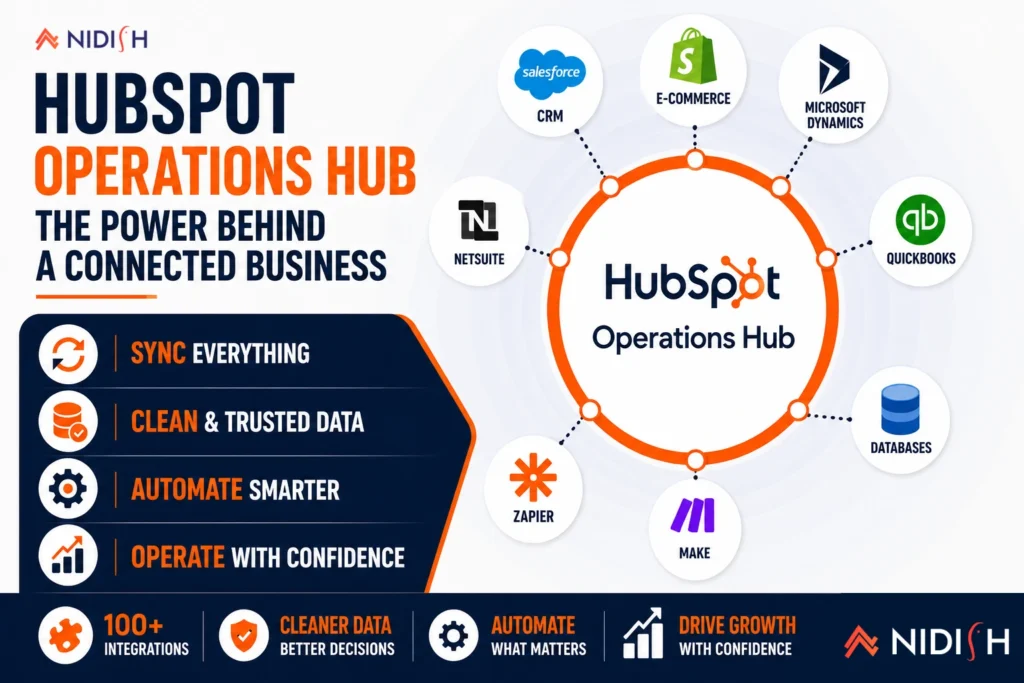
HubSpot Operations Hub is one of those products everyone’s heard of and almost nobody can describe precisely. It doesn’t have the obvious pitch that Marketing Hub or Sales Hub have, generate leads, close deals, it’s the hub built for the plumbing behind those tools, the part of the system nobody notices until it’s broken. That makes it genuinely useful for the right business and a wasted line item for the wrong one, and the difference usually isn’t obvious until you look at what it actually does tier by tier.
This guide breaks down what HubSpot Operations Hub actually includes, what it costs at each level, and the honest signs that tell you whether your business needs it now, later, or possibly not at all.
Quick Answer
HubSpot Operations Hub is the hub focused on data sync, data quality, and automation between HubSpot and the rest of your tech stack, rather than a customer-facing tool like Marketing or Sales Hub. It’s genuinely worth it once you’re connecting HubSpot to non-native systems like an ERP, cleaning up years of accumulated dirty data, or building automation logic HubSpot’s native workflows can’t handle alone. Pricing runs from free at the basic tier up to $800 or more per month at Professional, where most of the meaningful automation and data quality features actually live. If your integrations are simple and your data is reasonably clean, you likely don’t need it yet.
What Is HubSpot Operations Hub, Actually?
At its core, HubSpot Operations Hub exists to solve a problem every growing business eventually hits: your CRM data is only as good as the systems feeding it, and those systems rarely speak the same language natively. Operations Hub sits in that gap, syncing data between HubSpot and connected tools, cleaning up inconsistent records, and running automation logic that goes beyond what a standard HubSpot workflow can do on its own.
Worth knowing upfront: HubSpot rebranded Operations Hub to Data Hub at INBOUND 2025, so you’ll see both names used depending on where you’re reading. The functionality is the same, most people, including HubSpot’s own sales team in casual conversation, still refer to it as Operations Hub, so that’s the term this guide uses throughout.
What Does Each Tier of HubSpot Operations Hub Actually Include?
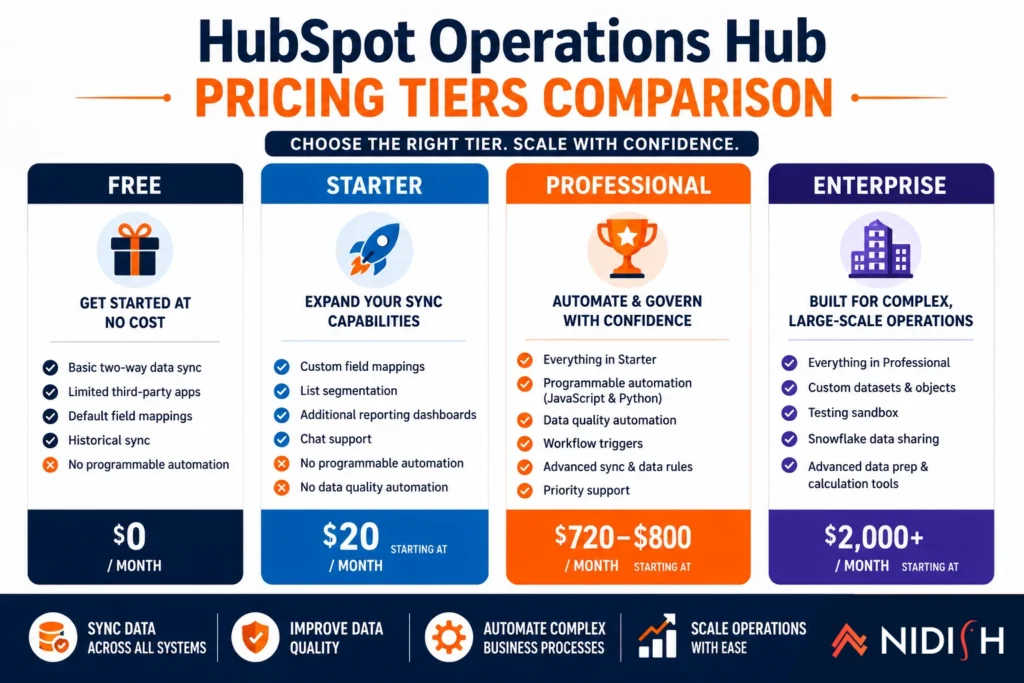
Understanding the tiers matters more here than with most HubSpot products, because the gap between the entry tier and the tier where this product actually earns its keep is significant.
Free
The built-in HubSpot CRM includes basic two-way data sync with a limited set of third-party apps, default field mappings, and historical sync. No programmable automation. This is enough to test whether Operations Hub is worth exploring further, not enough to run real operations on.
Starter, around $20 per month
Adds custom field mappings, list segmentation, additional reporting dashboards, and chat support. Custom field mapping is consistently cited as the main reason businesses upgrade from the free tier, but programmable automation, data quality automation, and workflow triggers still aren’t included at this level.
Professional, around $720 to $800 per month
This is where HubSpot Operations Hub genuinely becomes an operations platform rather than a data-syncing convenience. Professional unlocks programmable automation, meaning JavaScript or Python code can run directly inside HubSpot workflows, along with data quality automation that cleans up formatting, standardizes fields, and deduplicates records automatically. This tier is where G2 reviewers in mid-market and enterprise segments consistently describe the platform as essential rather than a nice-to-have add-on.
Enterprise, around $2,000 per month
Adds custom datasets and objects, a testing sandbox, Snowflake data sharing, and advanced data prep and calculation tools built for large-scale, complex data environments.
The jump from Starter to Professional is steep, roughly forty times the monthly cost, and that gap reflects a real functional line: below it, you’re syncing data. Above it, you’re automating and governing it.
Do You Actually Need HubSpot Operations Hub?
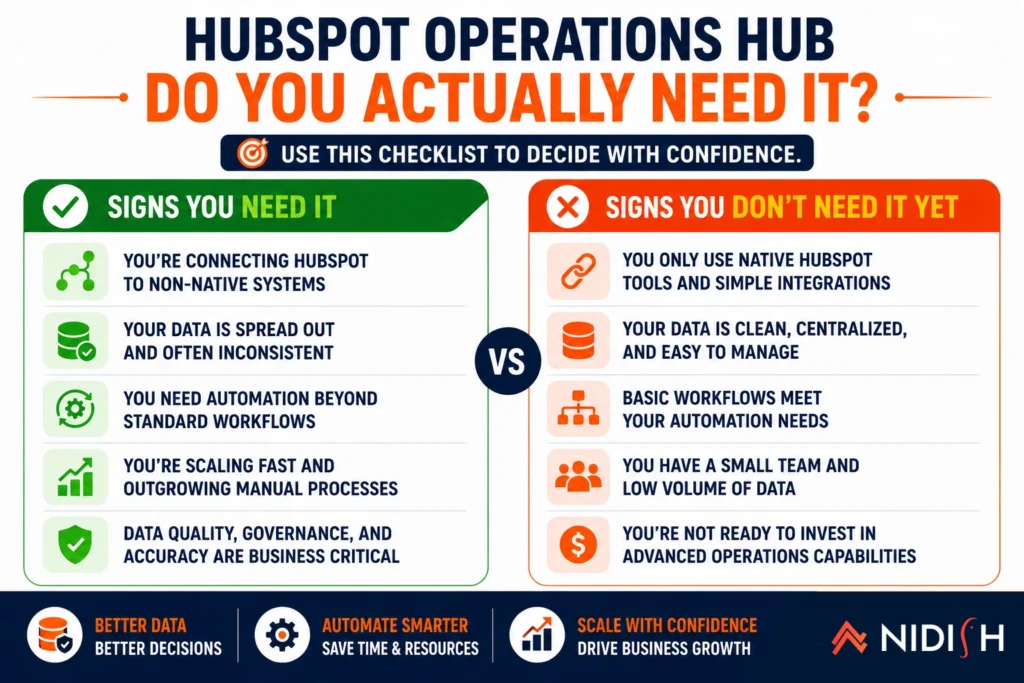
This is the question worth answering honestly before committing budget to it, and a handful of specific signs tend to separate the businesses that genuinely benefit from it from the ones paying for capability they won’t use.
You’re connecting HubSpot to non-native systems: If your business runs on NetSuite, SAP, a custom-built order management system, or any application without a native HubSpot integration, Operations Hub’s programmable automation and data sync become the bridge between them. Without it, that same connection usually requires custom development work or an expensive standalone middleware platform.
Your data has been quietly degrading for years: If your HubSpot database has been accumulating for two or more years without systematic data governance, data quality automation tends to pay for itself within the first 90 days, through cleaner segmentation, better email deliverability, and reporting your team can actually trust.
You need workflow logic HubSpot can’t natively execute: Native HubSpot workflows handle a lot, but complex conditional logic, calculations, or third-party lookups mid-workflow often hit a wall that only programmable automation can clear.
You’re building serious revenue attribution: Businesses trying to connect marketing spend, sales activity, and closed revenue into one coherent attribution model usually need the custom datasets and calculation tools that live above the Starter tier.
Signs you probably don’t need it yet: your integrations are limited to apps with solid native HubSpot connections already, your database is relatively clean and recently built, and your automation needs are met by standard HubSpot workflows without custom logic. If that describes your setup, Operations Hub is a cost worth revisiting later, not a gap you’re currently exposed by.
HubSpot Operations Hub vs Building Custom Integrations or Using an iPaaS
For businesses on the fence about whether HubSpot Operations Hub is worth the cost, it helps to see this against the alternatives rather than in isolation.
Custom-built integrations and standalone middleware are the traditional path, and they work, but they come with ongoing engineering overhead every time an API changes or a new system gets added to the stack. One documented comparison found that adding Zapier for gaps Operations Hub couldn’t handle natively brought total integration costs to roughly $1,458 per month, while a standalone Workato contract for the same integration scope was quoted at $2,500 per month, with Operations Hub coming out ahead specifically because the business already paid for HubSpot CRM as its foundation.
That comparison won’t hold for every business, if your integration needs are genuinely complex and span many systems beyond HubSpot, a dedicated iPaaS platform like Celigo often makes more sense as the central nervous system, with HubSpot as one connected endpoint rather than the hub everything routes through. The right call depends on whether HubSpot is the center of your operation or one piece of a larger, multi-system architecture.
Common Mistakes When Evaluating HubSpot Operations Hub
- Buying Starter and expecting Professional-level results: The meaningful automation and data quality tools in HubSpot Operations Hub live at Professional, not Starter, and businesses that upgrade expecting programmable automation at the entry paid tier are consistently disappointed.
- Treating it as a replacement for a real integration strategy: Operations Hub is a strong bridge for HubSpot-centric stacks, but it isn’t a substitute for actually planning how data should flow between all your systems, that planning still has to happen first.
- Ignoring the seat structure at higher tiers: Data Hub includes only one seat at Professional and Enterprise, with every additional user adding to the cost, a detail that changes the total price picture for larger teams.
- Assuming data quality automation fixes root causes: It cleans formatting and standardizes fields effectively, but it doesn’t fix upstream process issues causing bad data to enter the system in the first place, that still requires a process fix, not just a tooling one.
How Nidish Can Help
We help businesses figure out whether HubSpot Operations Hub is actually the right layer for their integration and data needs, or whether a dedicated integration platform like Celigo is the better architectural fit for their situation, rather than assuming HubSpot Operations Hub is automatically the answer.
If dirty data or fragile integrations are the actual problem you’re trying to solve, our CRM data migration checklist covers the data quality side in depth, while our Celigo integration services and NetSuite integration work cover what a dedicated integration layer looks like when HubSpot needs to connect to a broader stack. If you’re earlier in the RevOps conversation entirely, our RevOps audit guide is a useful starting point before deciding which tool solves which piece of the problem.
Is HubSpot Operations Hub the same as Data Hub?
Yes. HubSpot rebranded Operations Hub to Data Hub at INBOUND 2025. The functionality is unchanged, both names refer to the same product, though Operations Hub remains the more commonly used term.
How much does HubSpot Operations Hub cost?
Pricing runs from free at the basic tier, to around $20 per month at Starter, roughly $720 to $800 per month at Professional, and around $2,000 per month at Enterprise. Most of the meaningful automation and data quality features are only available starting at Professional.
Do I need HubSpot Operations Hub if I already use Zapier?
Not necessarily, but it depends on scale. For simple integration needs, Zapier alone may be sufficient. As integration complexity grows, Operations Hub’s programmable automation often replaces the need for multiple separate Zapier workflows, sometimes at a lower total cost since it builds on a platform you’re already paying for.
Does HubSpot Operations Hub replace the need for an iPaaS like Celigo?
Sometimes, but not always. For businesses where HubSpot is the center of the tech stack, Operations Hub can cover most integration needs. For businesses connecting many systems beyond HubSpot, a dedicated iPaaS platform is often the better architectural foundation, with HubSpot as one connected system among several.
What’s the difference between Operations Hub Starter and Professional?
tarter covers basic data sync, custom field mappings, and segmentation. Professional adds programmable automation, meaning custom code can run inside workflows, along with automated data quality tools, the features most businesses actually need Operations Hub for.



 Blog
Blog Case Studies
 Career