
Table of Contents
A Shopify HubSpot integration sounds like a simple checkbox until you actually try to keep two systems in sync as your store grows past a few hundred orders a month. The native connector works well for a while. Then a metafield doesn’t sync, or an order updates in Shopify but HubSpot never hears about it, or someone asks for a report that requires data neither system has cleanly on its own. This guide covers what the integration actually does out of the box, where it holds up, where it doesn’t, and how to know which path fits your business.
If you landed here after reading our piece on Shopify to HubSpot Commerce Hub migration, this is the other side of that conversation, integration is the path most product-based ecommerce businesses actually need, rather than migrating away from Shopify entirely.
Quick Answer
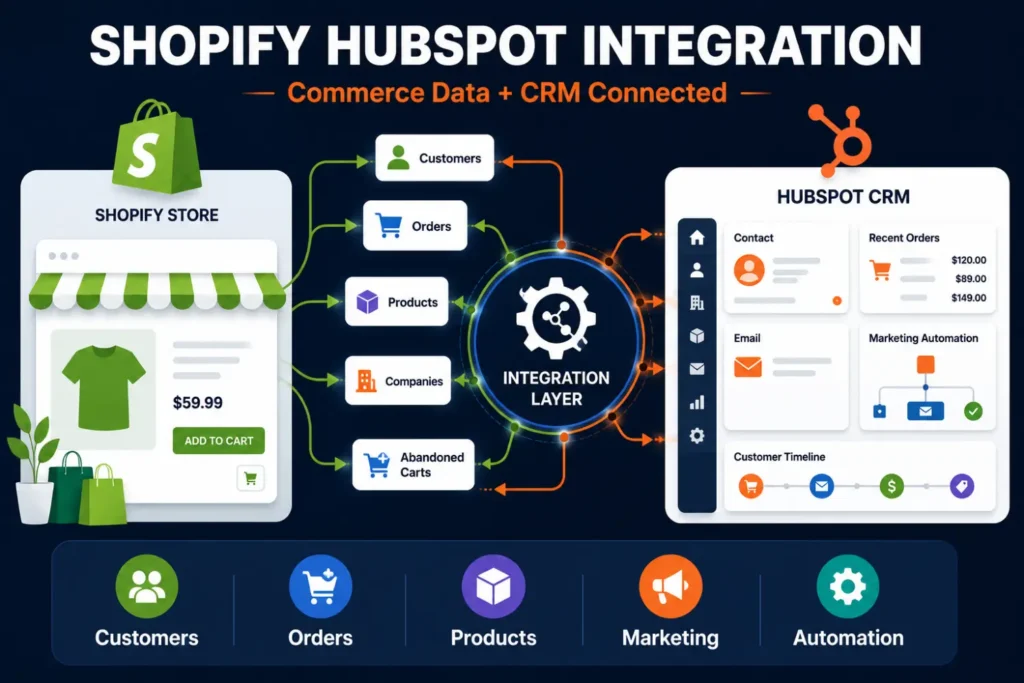
Shopify HubSpot integration connects your store’s customer, order, and product data to HubSpot’s CRM and marketing tools, so sales and marketing teams can see full commerce context without leaving HubSpot. HubSpot’s native Shopify app handles the basics for free, syncing contacts, companies, products, orders, and abandoned carts within about ten minutes of a change. It breaks down once you need custom Shopify metafields synced, multi-store consolidation, ERP connectivity, or complex, rule-based automation, at that point, an iPaaS platform like Celigo becomes the more reliable foundation.
What Does Shopify HubSpot Integration Actually Sync?
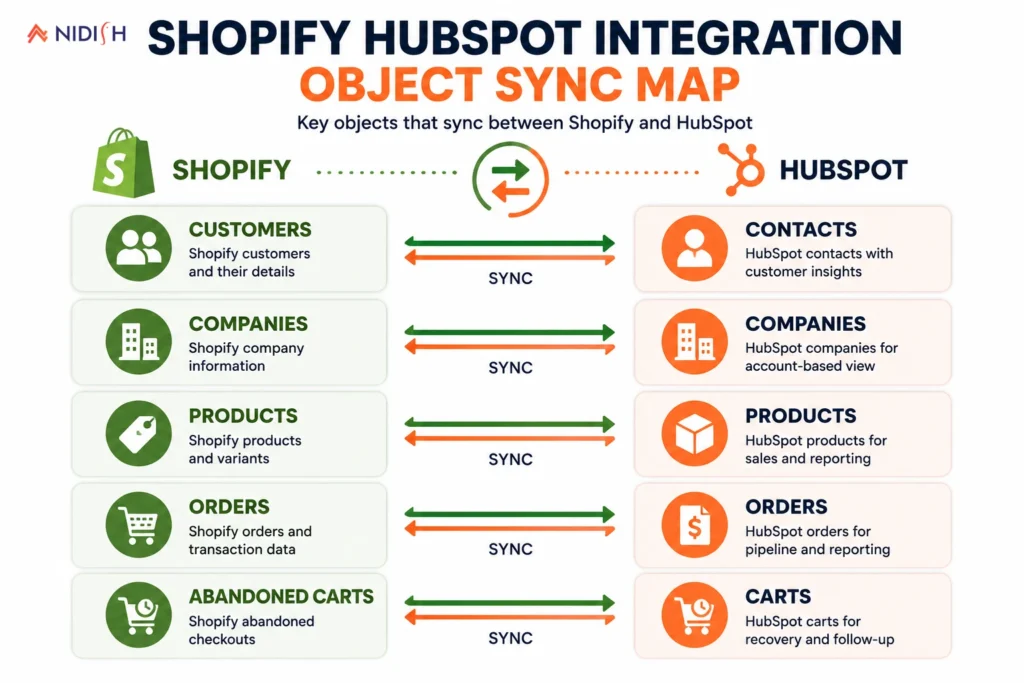
HubSpot’s official native integration is installed directly from the HubSpot Marketplace and connects to your Shopify store through an authorized login, no code required. Once connected, it syncs five core object types: Shopify Customers into HubSpot Contacts, Shopify Companies into HubSpot Companies, Shopify Products into HubSpot Products, Shopify Orders into HubSpot Orders, and abandoned checkouts into HubSpot Carts.
Once the initial sync completes, records update within about ten minutes of a change, which is fast enough for most standard marketing and sales use cases. Core contact fields, first name, last name, email, phone, and address, sync bidirectionally between the two systems. Order and transactional data generally flows one direction, from Shopify into HubSpot, which makes sense given how that data is structured. Shopify holds the transactional source of truth, so changes to that data are intentionally not pushed back from HubSpot, keeping order records from being overwritten by edits made on the CRM side.
Native Integration or iPaaS: Which Do You Actually Need?
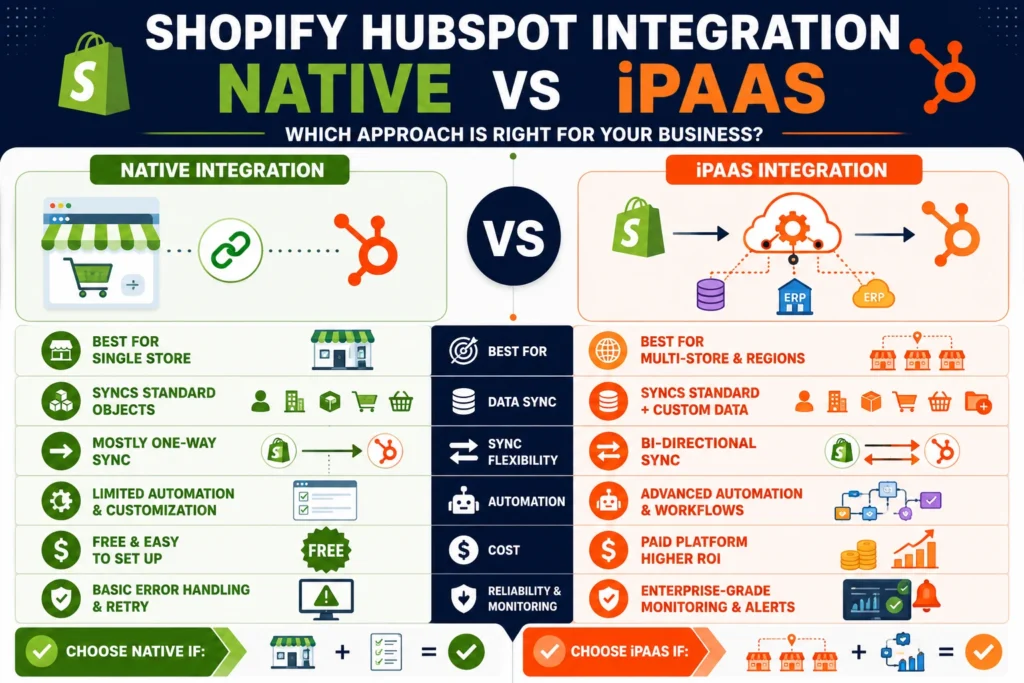
This is really the central decision in any Shopify HubSpot integration project, and getting it right up front saves a lot of rework later.
The native integration is the right starting point when:
- You’re a single-store operation with straightforward product and order data
- Your reporting and marketing needs are covered by standard fields, contacts, orders, products, and abandoned carts
- You don’t rely heavily on Shopify metafields for custom product or customer data
- Your team is comfortable with a mostly one-way data flow from Shopify into HubSpot
An iPaaS platform like Celigo becomes necessary when:
- You’re running multiple Shopify stores or regions that all need to feed into one unified HubSpot instance
- You need Shopify metafields, custom fields storing things like part numbers or specialized product data, synced into HubSpot, since the native integration doesn’t support this
- Your business also runs an ERP or billing system that needs to stay in sync alongside Shopify and HubSpot
- You need centralized error handling, retry logic, and monitoring rather than a sync that silently fails on an edge case
- Your automation needs go beyond simple field mapping into genuinely custom business logic, refund handling, lifecycle gating, or multi-system orchestration
How to Set Up the Native Shopify HubSpot Integration
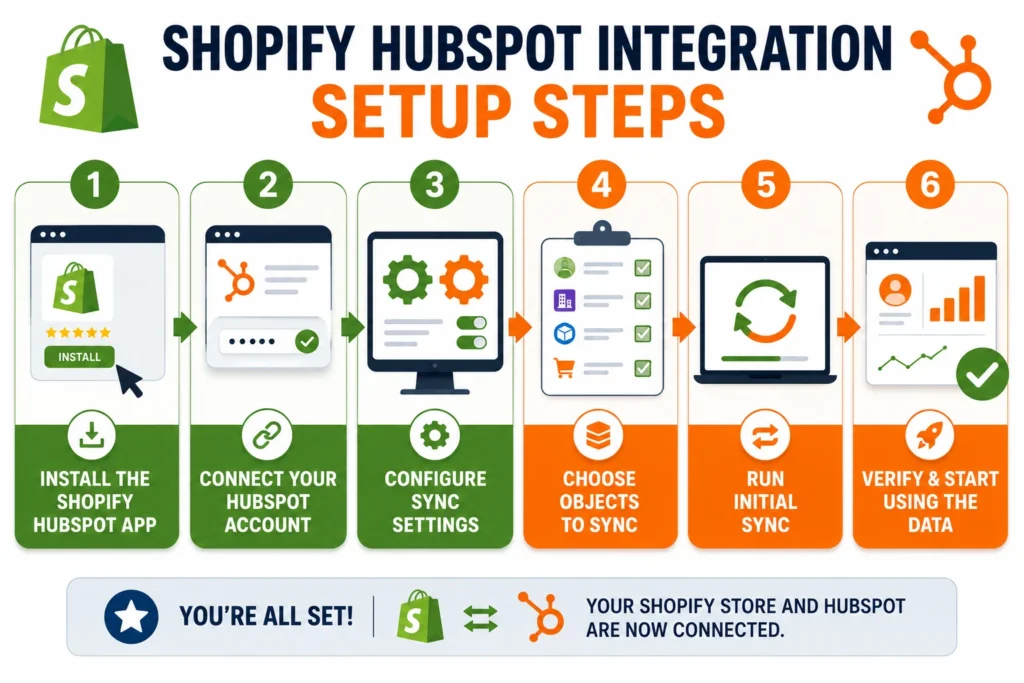
For businesses starting with the native connector, the setup itself is genuinely simple:
Step 1: In your HubSpot account, click the Marketplace icon in the top navigation and search for Shopify.
Step 2: Click Install, then enter your Shopify store’s URL to begin the connection.
Step 3: Log in with your Shopify credentials to authorize the connection between the two platforms.
Step 4: In HubSpot, navigate to Settings, then Integrations, then Connected Apps, and select Shopify.
Step 5: Open the CRM syncs tab and select which objects to sync, contacts, companies, products, orders, and carts.
Step 6: Review and adjust field mappings as needed, particularly for any custom fields you want carried across, keeping in mind that Shopify metafields aren’t supported through this native sync.
Note that custom field mapping specifically requires at least a HubSpot Data Hub Starter subscription, the basic connection works without it, but deeper field customization does not.
When Native Sync Isn’t Enough
The native integration is a genuinely good starting point, but it has real, well-documented limits that tend to surface as a business scales.
Shopify metafields, the custom fields many stores use for specialized product data, customer tags, or segment information, simply aren’t supported by the native sync. If your marketing segmentation depends on that data, you’ll hit this wall quickly.
Multi-store operations are another common breaking point. The native integration is built around a single Shopify store connected to a single HubSpot instance. Businesses running multiple regional or brand-specific storefronts that all need to report into one HubSpot account need a different architecture entirely.
When HubSpot and Shopify are connected only through native apps, custom scripts, and ad hoc flows, integration logic tends to sprawl over time, identity resolution rules live in one place, lifecycle rules in another, refunds get handled inconsistently, and reporting stops matching what finance sees. This is less a flaw in the native tool itself and more a natural consequence of trying to scale a point-to-point connection into something it was never designed to be.
What a Celigo-Based Integration Adds
Rather than treating Shopify and HubSpot as two systems connected by a single sync, an iPaaS approach treats the connection as a proper integration layer with its own logic and governance.
Celigo normalizes and routes data across Shopify, HubSpot, ERP, billing, and other systems, including multi-store and multi-region setups, applying consistent business rules for identity resolution and lifecycle gating in one place rather than scattering that logic across disconnected connectors. It also handles exceptions operationally, centralized monitoring, retries, and alerting, so a sync failure becomes a visible, fixable event instead of silently missing data that nobody notices until a report looks wrong weeks later.
This matters most for businesses where ecommerce is one piece of a broader stack. If Shopify needs to stay in sync with HubSpot and an ERP system simultaneously, orchestrating that through a single platform is significantly more reliable than stacking multiple point-to-point connections on top of each other and hoping they don’t conflict.
Common Mistakes That Break Shopify HubSpot Data Sync
A handful of avoidable mistakes account for most of the “why isn’t this syncing” support tickets we see.
- Assuming metafields sync natively: They don’t, and businesses that build segmentation or personalization around metafield data need a third-party or custom solution from day one, not as an afterthought.
- Treating the native sync as bidirectional for everything: Core contact fields sync both ways, but transactional data intentionally flows from Shopify to HubSpot only, editing order data in HubSpot and expecting it to update Shopify leads to confusion.
- Adding a second Shopify store without rethinking the architecture: The native integration wasn’t built for multi-store consolidation, and bolting on a second connection often creates duplicate or conflicting contact records.
- Relying on Zapier for high-volume, business-critical syncs: Zapier works well for simple, lower-volume automations, but usage limits and a lack of centralized error handling make it a fragile foundation once order volume or complexity increases.
- Not planning for reporting alignment: Marketing sees numbers in HubSpot, finance sees numbers from Shopify and any ERP system, and without a single source of truth for key metrics, these numbers quietly drift apart over time.
A Practical Use Case: Recovering Abandoned Carts
One of the clearest wins from a properly built Shopify HubSpot integration is abandoned cart recovery. Once Shopify’s abandoned checkout data syncs into HubSpot, it becomes a trigger for HubSpot’s marketing automation, timed email sequences, personalized offers, or retargeting workflows, built around a customer’s actual behavior rather than a generic campaign schedule. This is a genuinely simple, high-return use case that the native integration supports out of the box, and it’s often the first tangible proof point a business sees that the integration is paying for itself.
How Nidish Can Help
We build both sides of this decision, straightforward native integration setups for businesses just getting started, and full Celigo-based architectures for businesses running multiple stores, an ERP, or complex lifecycle automation that the native connector was never built to handle. Our Celigo integration services cover the more advanced end of this in detail, and if you’re still deciding between a full platform migration and a connected setup like this, our guide on Shopify to HubSpot Commerce Hub migration walks through that decision directly. For a broader look at HubSpot’s ecommerce capabilities, our piece on HubSpot for ecommerce is worth a read, and our data integration services page covers how we approach multi-system architecture more generally.
Frequently Asked Questions
Is the native Shopify HubSpot integration free?
Yes, the basic connection and object sync is included with HubSpot, though custom field mapping requires at least a Data Hub Starter subscription.
Does Shopify HubSpot integration sync data both ways?
Partially. Core contact fields like name, email, phone, and address sync bidirectionally. Transactional data like orders flows one direction, from Shopify into HubSpot, since Shopify holds the source of truth for that data.
Can I sync Shopify metafields to HubSpot?
Not through the native integration. Metafields require a third-party app, custom API work, or an iPaaS platform like Celigo to bring that data into HubSpot.
How long does it take for data to sync between Shopify and HubSpot?
After the initial sync completes, records typically update within about ten minutes of a change in either connected system.
When should I move from native sync to an iPaaS platform like Celigo?
Once you’re running multiple Shopify stores, need metafield data synced, are also connecting an ERP or billing system, or need centralized error handling and custom business logic that the native integration can’t support.


 Blog
Blog Case Studies
 Career