
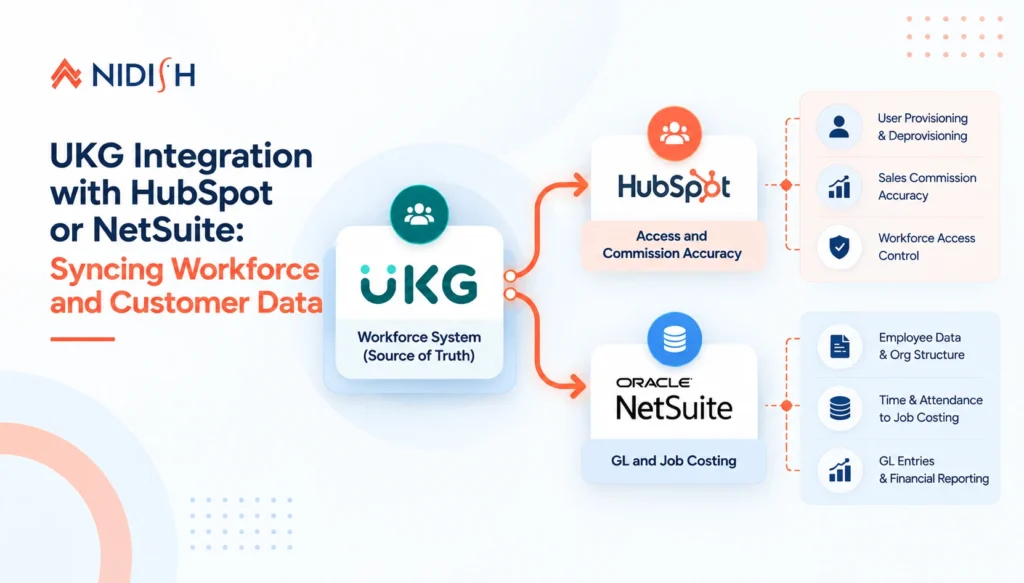
Most businesses considering UKG integration with HubSpot or NetSuite start from treating UKG as a closed system, the place payroll and HR live, disconnected from wherever revenue and financial operations actually happen. That’s a reasonable default until the questions start. Does a terminated sales rep still have an active HubSpot login? Does closed-won commission in HubSpot actually match what payroll paid out in UKG? Does labor cost from UKG’s time and attendance data ever make it into NetSuite’s job costing, or does someone reconcile that by hand every month?
UKG integration with HubSpot or NetSuite exists to answer exactly those questions, and it’s a genuinely different engineering problem than most CRM-to-CRM or CRM-to-ERP integrations, because UKG’s data model, API complexity, and authentication requirements are built for HR and payroll compliance first, not for being a friendly integration partner. This guide to UKG integration with HubSpot or NetSuite covers what actually gets synced, why the two integration directions, toward HubSpot and toward NetSuite, solve entirely different problems, and the architecture decisions that separate a reliable integration from a fragile one.
We build UKG integration with HubSpot or NetSuite, and other workforce-to-CRM and workforce-to-ERP connections, regularly. Everything below reflects what that work has actually required.
Table of Contents
What Problem Does UKG Integration with HubSpot or NetSuite Actually Solve?
It helps to separate these into two distinct problems, because UKG integration with HubSpot and UKG integration with NetSuite solve genuinely different business needs, even though both start from the same source system.
UKG to HubSpot is fundamentally about connecting workforce status to go-to-market operations. Sales and service reps exist as both employees in UKG and users or associated records in HubSpot, and when those two representations drift out of sync, real operational risk follows: a terminated employee retaining CRM access, commission calculations in HubSpot that don’t match what payroll actually processed, or new hires waiting days for CRM access that should have been provisioned automatically the moment UKG marked them as active.
UKG to NetSuite is fundamentally a financial and compliance problem. Employee demographics, organizational hierarchy, general ledger entries, and time and attendance data all need to flow into NetSuite accurately for job costing, labor allocation, and financial reporting to reflect reality rather than a monthly manual reconciliation someone dreads.
Both directions of a UKG integration with HubSpot or NetSuite matter for different teams, and businesses running both HubSpot and NetSuite alongside UKG often need both integration paths built with different priorities, near-real-time for the HubSpot side where access and compensation accuracy matter immediately, and reliably batched for the NetSuite side where financial close processes tolerate a defined sync window.
The Real Complexity Behind UKG Integration with HubSpot or NetSuite
This needs to be said plainly before any architecture discussion, because most integration guides understate it. UKG Pro is widely regarded as one of the more complex enterprise HRIS integrations to build against, given its scope and API design. UKG provides separate API surfaces across UKG Pro, built for enterprise HRIS and payroll, and UKG Ready, built for mid-market needs, and the two are not interchangeable in how they’re structured or authenticated.
Authentication runs through OAuth 2.0 with UKG-specific app key registration requirements, a meaningfully heavier lift than a standard OAuth flow. Integration work against UKG Pro’s API specifically typically requires several months of dedicated engineering time to properly account for its data model, not a weekend project connecting two webhook endpoints. Any UKG integration with HubSpot or NetSuite scoped as a quick connector job is scoped wrong from the start.
UKG Integration with HubSpot: What Gets Synced and Why
The HubSpot half of UKG integration with HubSpot or NetSuite is about keeping workforce reality and CRM access in sync, and a few specific data flows account for most of the real business value.
| Data Flow | What It Solves |
|---|---|
| Employee status change (active, terminated, leave) | Automatically provisions or revokes HubSpot access the moment UKG reflects the change, closing the gap where a terminated employee retains system access |
| New hire record created | Triggers onboarding sequences and CRM access provisioning automatically, rather than a manual IT ticket after the fact |
| Compensation and commission structure | Enables reconciliation between closed-won deals recorded in HubSpot and actual commission calculated and paid through UKG payroll |
| Employee-to-rep mapping | Keeps HubSpot user records, deal ownership, and territory assignment aligned with current employment status and role |
The access-revocation pattern in UKG integration with HubSpot deserves particular attention, since it’s one of the more overlooked security gaps in businesses running HubSpot and UKG as disconnected systems. Without a direct sync, a termination in UKG has no automatic downstream effect in HubSpot, which means access lingers until someone remembers to manually deactivate it, often well after the fact. A properly built UKG integration with HubSpot closes that gap by treating an employment status change as an event the CRM reacts to automatically, not a task on someone’s offboarding checklist.
UKG Integration with NetSuite: What Gets Synced and Why
The NetSuite half of this UKG integration with HubSpot or NetSuite work is a financial data problem more than an access problem, and the data flows reflect that.
| Data Flow | What It Solves |
|---|---|
| Employee demographics and organizational hierarchy | Keeps NetSuite’s people data aligned with UKG as the system of record, rather than a second, drifting copy |
| General ledger entries from payroll | Feeds real financial and resource management data directly into NetSuite, eliminating duplicate manual entry between payroll and the general ledger |
| Time and attendance data | Enables accurate job costing and labor allocation tied to actual hours worked, rather than estimated or manually reconciled figures |
| Benefits and deduction data | Keeps NetSuite’s financial reporting reflecting true labor cost, not just gross payroll |
UKG and NetSuite already offer a native, purpose-built integration path through NetSuite’s SuiteApp ecosystem specifically for this data flow, which is worth evaluating first before assuming a fully custom build is necessary. Where that native path falls short is usually in the specifics: multi-entity NetSuite structures, custom GL mapping rules, or job costing logic specific to how a particular business actually allocates labor cost, which is exactly where a properly configured iPaaS layer or custom integration work becomes the more reliable answer.
UKG Integration with HubSpot or NetSuite: Native Connector, iPaaS, or Custom Build?
This is the architecture decision that determines whether a UKG integration with HubSpot or NetSuite stays reliable as the business scales, or quietly becomes another fragile point-to-point connection nobody wants to touch.
| Approach | Best For | Real Limitation |
|---|---|---|
| Native connector (UKG’s SuiteApp for NetSuite) | Standard GL and employee data sync with minimal customization needs | Limited flexibility for custom mapping rules or multi-entity structures |
| iPaaS layer (Celigo or equivalent) | Businesses connecting UKG to multiple systems (HubSpot and NetSuite simultaneously, or alongside other platforms) with centralized monitoring and error handling | Requires proper architecture and ongoing platform management, not a zero-effort setup |
| Custom-built integration | Genuinely unique data model requirements, complex conditional logic, or UKG API surfaces without existing connector support | Highest engineering investment, and the maintenance burden sits fully with whoever built it |
For businesses scoping UKG integration with HubSpot or NetSuite where NetSuite is the only downstream system and requirements are fairly standard, the native SuiteApp path is often the right starting point.
The moment UKG needs to feed both HubSpot and NetSuite simultaneously, or the mapping logic gets genuinely specific to how the business operates, a dedicated iPaaS layer becomes the more maintainable architecture, since it centralizes monitoring, retry logic, and error visibility across every connected system rather than scattering that logic across two or three separate point-to-point connections. This is the same underlying logic we’ve written about in the context of when custom software makes more sense than customizing a CRM, the right architecture depends on where the actual complexity lives, not a default preference for build versus buy.
Data Model Alignment: What Most UKG Integration With HubSpot or NetSuite Projects Get Wrong
This is where most UKG integration projects lose time that was never budgeted for. UKG, HubSpot, and NetSuite each define an employee or contact record differently, different required fields, different status vocabularies, different unique identifiers.
The critical decision in any UKG integration with HubSpot or NetSuite is choosing a single stable identifier, typically UKG’s employee ID, as the matching key across all three systems, rather than matching on name or email, which breaks the moment someone gets married, changes their preferred name, or has a typo introduced anywhere in the chain. Status field mapping needs equal care: UKG’s employment status values (active, on leave, terminated, and the specific sub-statuses each product uses) need an explicit, documented mapping to whatever HubSpot or NetSuite consider an equivalent state, because assuming a loose, informal translation between systems is exactly how a terminated employee quietly retains CRM access for months.
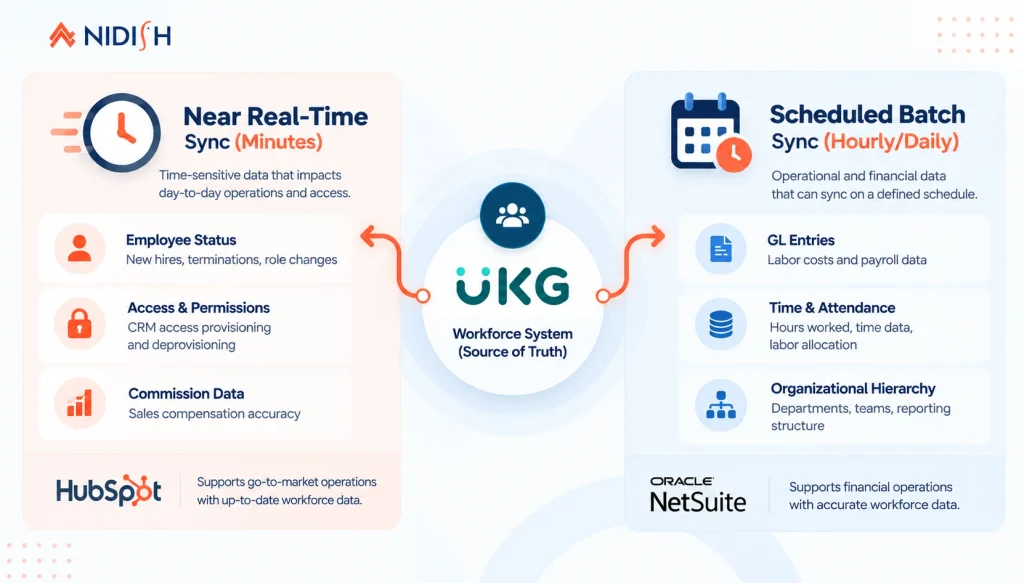
Timing matters just as much as mapping in UKG integration with HubSpot or NetSuite. Access-and-security-relevant data, employment status specifically, generally needs to sync close to real time. Financial and reporting data bound for NetSuite can often tolerate a scheduled batch window without meaningfully affecting outcomes, and forcing everything into real-time sync when it isn’t actually required just adds unnecessary API load and complexity to the integration.
What UKG Integration with HubSpot or NetSuite Does Not Solve
Honest limits matter here as much as anywhere else, because a well-built integration is not a substitute for a well-run underlying process.
It does not fix inaccurate payroll or HR data at the source
If UKG itself contains incorrect employment status or compensation data, syncing that data faithfully into HubSpot or NetSuite just distributes the same error more widely and more quickly.
It does not replace a defined offboarding process
Automated access revocation on termination is a valuable safety net, not a substitute for HR and IT having a clear, documented offboarding procedure that this automation supports.
It does not eliminate the need for compliance review
Payroll, benefits, and labor data crossing into financial systems still needs human oversight for regulatory compliance, particularly around GL entries and job costing, an integration reduces manual entry error, it doesn’t remove the compliance function.
Real-time sync is not always the right goal
Forcing every data point into instantaneous synchronization adds engineering complexity and API load for data where a daily or even weekly batch would serve the business just as well.
A Practical Architecture Pattern for UKG Integration with HubSpot or NetSuite
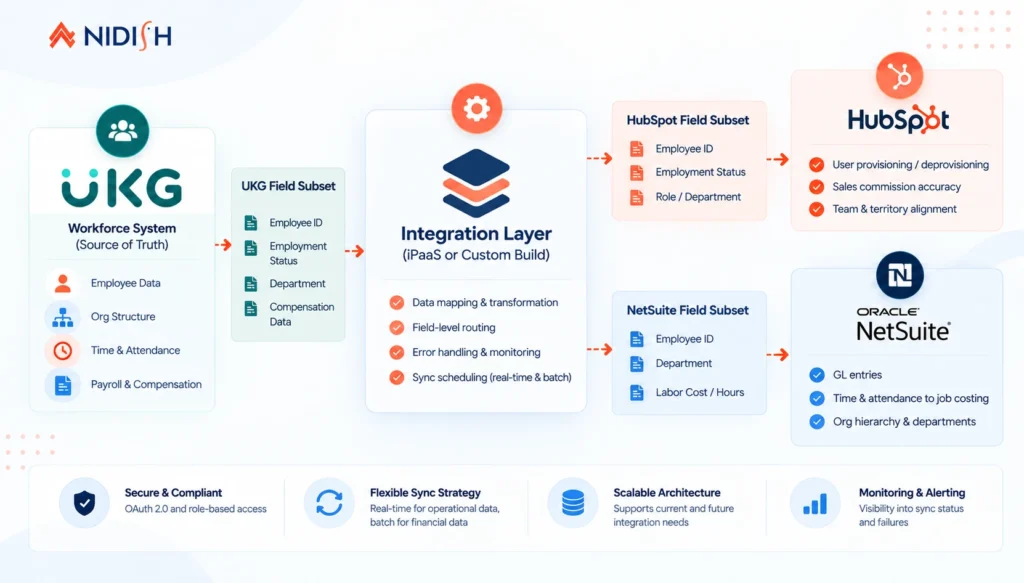
For businesses running UKG alongside both HubSpot and NetSuite, a pattern that holds up well in practice treats UKG as the single source of truth for all workforce data, with a centralized integration layer, rather than UKG connecting separately and inconsistently to each downstream system.
In that recommended UKG integration with HubSpot or NetSuite pattern, UKG pushes employee status, role, and compensation-relevant events into the integration layer. From there, a defined, near-real-time subset, status, access-relevant fields, rep-to-deal ownership mapping, flows to HubSpot. A separate, batched subset, GL entries, time and attendance, organizational hierarchy, flows to NetSuite on a schedule aligned with financial close needs. Both downstream systems receive exactly the fields they need, mapped explicitly against a shared employee ID, with the integration layer itself handling retries, error alerting, and a single place to debug when something doesn’t sync as expected, rather than two independent, differently-built connections that each fail in their own way.
Common Mistakes to Avoid in UKG Integration with HubSpot or NetSuite
- Underestimating UKG’s API complexity from the start: Scoping this as a quick connector project rather than a genuine integration build sets the whole project up to run over budget and over timeline.
- Matching records on name or email instead of a stable ID: This is the single most common source of silent data corruption in workforce integrations.
- Treating every data point as requiring real-time sync: Adds unnecessary complexity for data, particularly financial reporting data, that tolerates a scheduled batch window without any real business cost.
- Skipping the native connector evaluation: For UKG-to-NetSuite specifically, the existing SuiteApp integration may cover the need without a custom build, worth evaluating before committing engineering time to something that already exists.
- Building two separate point-to-point connections instead of one integration layer: When UKG needs to feed both HubSpot and NetSuite, a centralized layer is more maintainable than two independently built, independently failing connections.
How Nidish Approaches UKG Integration with HubSpot or NetSuite
We’ve worked directly with UKG’s time and attendance data in production, and we build the integration layer connecting workforce systems to both HubSpot and NetSuite using the same architecture principles covered in this post, a stable identifier strategy, appropriately different sync timing for access-critical versus financial data, and centralized error handling rather than fragile point-to-point connections. Our Celigo integration services cover the iPaaS layer approach in more depth, and our NetSuite integration work covers what the financial-data side of this pattern looks like in practice. If UKG data quality itself is the underlying issue rather than the integration architecture, our UKG time and attendance optimization guide covers that starting point directly.
Frequently Asked Questions
Can I build UKG integration with HubSpot or NetSuite directly, or do I need both?
Yes, though it typically requires two distinct integration paths built with different priorities, near-real-time for HubSpot access and commission data, and batched for NetSuite financial and job costing data, ideally coordinated through a single integration layer rather than two independent connections.
Does UKG have a native integration with NetSuite?
Yes. UKG Pro offers a native SuiteApp integration with NetSuite covering employee demographics, organizational hierarchy, and general ledger data. It’s a reasonable starting point for standard needs, though custom GL mapping or multi-entity structures often require additional configuration or a dedicated integration layer.
How complex is UKG’s API compared to other HR platforms?
UKG Pro’s API is considered one of the more complex enterprise HRIS integrations to build against, given its scope, OAuth 2.0 authentication requirements with app key registration, and detailed data model. Integration work typically requires several months of dedicated engineering time rather than a quick connector setup.
Should UKG employee status changes sync to HubSpot in real time?
Generally yes, for access-and-security-relevant data specifically. A termination in UKG that doesn’t quickly deactivate CRM access is a real security gap, which is why this particular data flow benefits from near-real-time sync even when other data, like financial reporting figures, can tolerate a batched schedule.
What’s the biggest risk in a UKG integration with HubSpot or NetSuite?
Matching employee or contact records on an unstable identifier like name or email instead of a consistent ID, typically UKG’s employee ID, across every connected system. This is the most common source of silent, hard-to-detect data corruption in workforce integrations.
Where This Goes Next
UKG integration with HubSpot or NetSuite is really two different engineering problems wearing one label, keeping workforce access and compensation accurate in your CRM, and keeping labor and financial data accurate in your ERP. Treating them as the same project, with the same sync timing and the same architecture, is where a lot of these builds go wrong.
If you’re weighing which shape of UKG integration with HubSpot or NetSuite your business actually needs, HubSpot side, NetSuite side, or both, and whether a native connector, an iPaaS layer, or a custom build is the right call for your specific setup, that’s exactly the architecture conversation worth having before any engineering work starts. Book a 30 minute call. We’ll tell you honestly what your situation actually needs.


 Blog
Blog Case Studies
 Career