
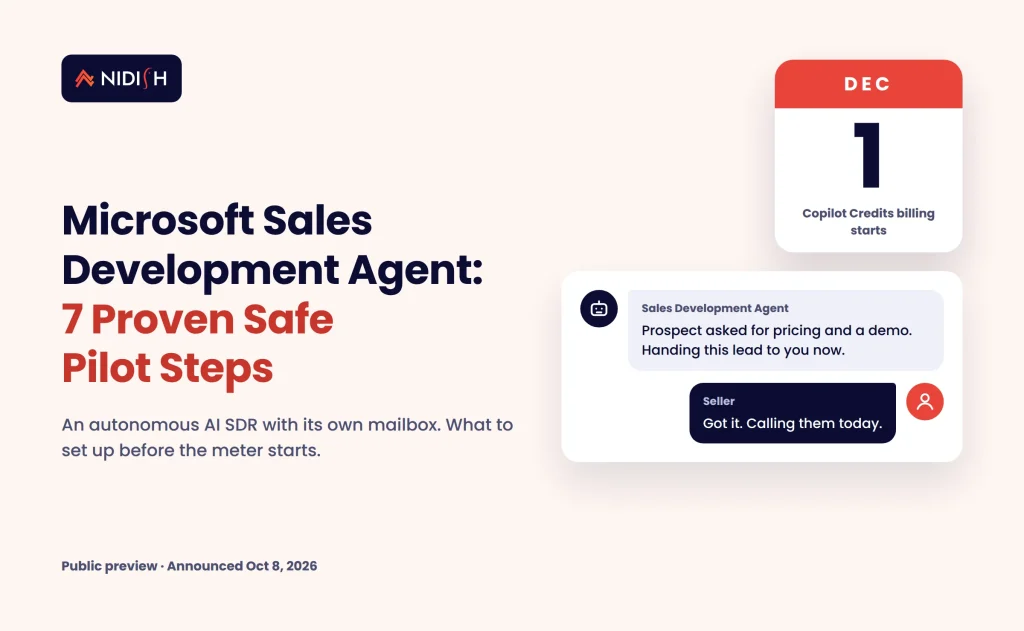
On December 1, 2026, an AI agent with its own mailbox starts costing you money. The Microsoft Sales Development Agent has been free to try in public preview since Microsoft announced it on October 8. Microsoft first set billing for November 16, then moved it to December 1 in a Message Center update on November 10. From that date, the agent draws down Copilot Credits as it works.
That changes the question. It is no longer “should we play with this?” It is “do we know what this agent is doing in our CRM, our domain and our budget?” Most teams we talk to cannot answer that yet.
This guide covers what the Microsoft Sales Development Agent does, what Microsoft has and has not confirmed, and seven steps to run a safe, measured pilot. It is written for sales and RevOps leaders on Dynamics 365, Salesforce or HubSpot who already pay for Microsoft 365 Copilot.
[Image 1: hero graphic of an AI teammate in Microsoft Teams handing a qualified lead to a seller — filename: microsoft-sales-development-agent-hero.webp — alt: “Microsoft Sales Development Agent handing a qualified lead to a seller in Teams”]
Key takeaways
- The Microsoft Sales Development Agent is in public preview and starts consuming Copilot Credits on December 1, 2026, moved from November 16 in a November 10 update.
- It gets its own identity, Teams account and Exchange mailbox, researches prospects, sends outreach and follow-ups, and hands warm leads to sellers.
- Microsoft says it “connects to leading CRM platforms” but has not published a named list in the pages we reviewed.
- Once launched, it runs autonomously until stopped and sends email at all hours, weekends included. Your guardrails have to live outside the agent.
- Set a Copilot Credits spending policy and a written handoff rule before the billing date, not after.
Table of Contents
What is the Microsoft Sales Development Agent?
The Microsoft Sales Development Agent is an autonomous AI teammate that does the work of a sales development rep inside Microsoft 365. It researches prospects, personalizes outreach, manages follow-up conversations, and hands qualified opportunities to a human seller when buying signals appear. Microsoft announced it on October 8, 2026 in a Microsoft Copilot blog post on bringing CRM into the flow of work.
It is not a chatbot that drafts emails for a rep to send. It is a separate worker. When you create an instance, Microsoft provisions a dedicated agent identity with its own Teams account, Exchange mailbox, OneDrive and SharePoint resources. It is managed in Teams and sends email from its own Exchange account.
Microsoft’s Sales Development agent overview on Microsoft Learn adds the working details. The agent writes outreach and replies in 22 languages. It reads prospect lists from CSV or Excel, text documents, web links, and 1:1 Teams chats with its creator.
One naming note saves confusion. Microsoft also has a “Sales Agent” inside Microsoft 365 Copilot that helps human sellers. The Sales Development Agent is the autonomous one that does outreach on its own. Keep them separate in your planning documents.
What changes on December 1, 2026
On December 1, 2026, the Sales Development Agent moves to usage-based billing through Copilot Credits. Microsoft’s October 8 blog first gave November 16 as the start date. The Message Center notice for this release (MC1492151) was updated on November 10 to say billing begins December 1, and that Frontier enablement stays required until then.
The same notice tells admins to configure spending policies for applicable AI experiences before billing begins. It also says consumption estimates and licensing guidance will be shared closer to the transition. As of November 11, we have not found a published per-action credit rate for this agent.
Copilot Credits are the shared currency Microsoft uses across Copilot Studio and agent experiences. The Copilot Studio billing and licensing page says there has been no change to prepaid pack quantity or the pay-as-you-go rate since September 1, 2025. Confirm current prices with your Microsoft account team; we deliberately do not quote a figure here.
Here is the status of each piece as of November 11:
| Component | Status (Nov 2026) | What it means for you |
|---|---|---|
| Sales Development Agent | Public preview | Free to try until Dec 1, then billed in Copilot Credits |
| Dynamics 365 CRM in the flow of Teams | Public preview | CRM records surfaced inside Teams |
| Sales and Service skills for Copilot Cowork | Generally available | 30 skills for sellers and service reps |
| Frontier enablement for the agent | Required until Dec 1 | Admin opt-in needed to activate |
Status reflects Microsoft’s October 8 notices and the November 10 update. Check the Microsoft 365 admin center for current state before you act.
Who should care, and who should wait
You should care now if three things are true. You already license Microsoft 365 Copilot. You have a top-of-funnel list that human SDRs cannot work fully. And you have a clean CRM with clear lead ownership.
You should probably wait if your CRM is messy, if you rely on one sending domain for all customer email, or if nobody owns lead routing. An AI SDR agent amplifies whatever process it lands in. A broken process gets broken faster.
Here is the pattern we see constantly with AI SDR agents: teams evaluate the writing quality and skip the plumbing. The emails look good in the demo. Three weeks later, sellers find duplicate contacts, prospects who already bought, and replies that never reached the CRM. The writing was never the risk. The data was.
Microsoft Sales Development Agent requirements and setup
Before you can activate the Microsoft Sales Development Agent, you need the right licences, admin roles and a Frontier opt-in. Microsoft’s activation guide for the Sales Development agent lists the prerequisites.
- Licences: Microsoft 365, Microsoft 365 Copilot, and Microsoft Teams subscriptions.
- Copilot Frontier: enabled in Copilot settings, with the creating users enabled for Frontier features.
- Agent 365 (preview): a Global Administrator buys the $0 Agent 365 SKU, which includes licences for 25 agent instances.
- Activation: an AI Administrator or Global Administrator activates “Sales Development (Frontier)” and chooses which users can create instances.
- Provisioning: each instance needs a unique name, an email alias and a designated manager. Microsoft says provisioning typically takes about five minutes.
The agent requests broad permissions, including Mail.Send, Files.ReadWrite.All and Sites.ReadWrite.All. Have your security lead review that scope before activation, not after.
Two data points matter for regulated teams. Microsoft says processing uses your selected geographic region, but data might be processed elsewhere when in-region capacity is unavailable. It may also route requests to third-party models, including Anthropic’s. If you have data-residency commitments, raise this with your compliance team first.
7 proven steps for a safe Microsoft Sales Development Agent pilot
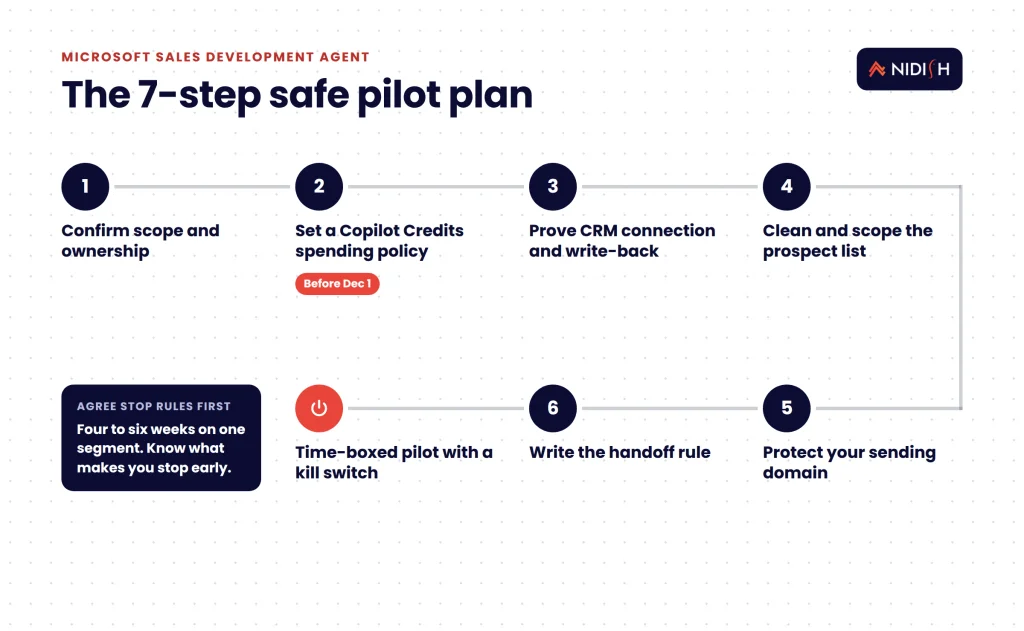
These seven steps turn the Microsoft Sales Development Agent from a preview feature into a controlled experiment. Work them in order. Each one closes a gap that the agent will not close for you.
- Confirm scope and ownership.
- Set a Copilot Credits spending policy before December 1.
- Prove the CRM connection and write-back.
- Clean and scope the prospect list.
- Protect your sending domain and mailbox.
- Write the handoff rule in plain language.
- Run a time-boxed pilot with a kill switch.
Step 1: Confirm scope and ownership
Name one business owner and one technical owner before anyone clicks Activate. The business owner decides who the agent prospects and when it hands off. The technical owner handles licences, permissions and CRM sync.
Then limit who can create instances. Microsoft lets admins choose specific users or groups. Start with one instance for one segment. You can always add more.
Step 2: Set a Copilot Credits spending policy before December 1
This is the step with a deadline. Microsoft’s own admin notice asks you to configure spending policies before billing starts on December 1, 2026. Without one, a busy agent can draw credits you never planned for. The date has already moved once, so check the admin center for the latest.
Set a monthly cap you would be comfortable losing on a failed experiment. Assign a named person to check consumption weekly. When Microsoft publishes consumption estimates, compare them with your pilot volume and adjust.
Step 3: Prove the CRM connection and write-back
The Microsoft Sales Development Agent connects to leading CRM platforms, according to Microsoft, but the pages we reviewed do not name them. Ask your Microsoft account team in writing whether your CRM is supported, and how. Then test it.
A real test answers four questions. Does the agent check whether a contact already exists? Does it log emails and replies on the right record? Does it update lead status or lifecycle stage? Does it respect existing owners? If any answer is “no” or “not sure,” you need integration work before launch.
For HubSpot portals, the risk is collisions with existing HubSpot sequences and playbooks. A prospect enrolled in a human sequence should never also receive agent outreach. Build an exclusion property and check it on both sides.
Step 4: Clean and scope the prospect list
The agent reads prospect lists from CSV or Excel, with optional Language and Country/Region columns. That makes the list your main control surface. Whatever you put in it, the agent will work.
Remove current customers, open opportunities, and anyone who has unsubscribed. Deduplicate against your CRM, not just within the file. Our CRM data migration checklist covers the same matching rules you need here.
Step 5: Protect your sending domain and mailbox
Microsoft’s documentation states the agent “sends emails at all hours, including weekends.” It also “replies only to email threads that it starts.” Those two facts shape your setup.
Give the agent a clearly named alias so prospects know who they are talking to. Watch your domain reputation, because the agent sends from your tenant. Decide whether weekend sends fit your market. If they do not, keep the pilot list small enough that you can pause the agent on Friday.
Outreach rules on consent and opt-out vary by country. Check your plan with your own legal counsel before you email new regions.
Step 6: Write the handoff rule in plain language
The agent hands prospects to sellers when “buying signals indicate they are ready for a human conversation.” You need to define what that means for your business. Write it down in one paragraph that a new rep could follow.
Spell out who receives the handoff, how fast they must respond, and what CRM stage the record moves to. Our guide to HubSpot AI agents for lead qualification walks through scoring and routing rules you can reuse here.
Step 7: Run a time-boxed pilot with a kill switch
Microsoft is clear on two points. Preview features “aren’t meant for production use.” And once launched, the agent “runs autonomously until stopped.” So treat the pilot as an experiment with an end date.
Run it for four to six weeks on one segment. Agree in advance what would make you stop early: bounce rate, complaints, CRM errors or credit burn. The Microsoft Sales Development Agent has no built-in visual reporting dashboards, so build a simple report in your CRM before day one.
If you want help wiring the agent’s activity into your CRM properly, our team does this work every week. See how we handle HubSpot integration →
Native features vs the work you still own
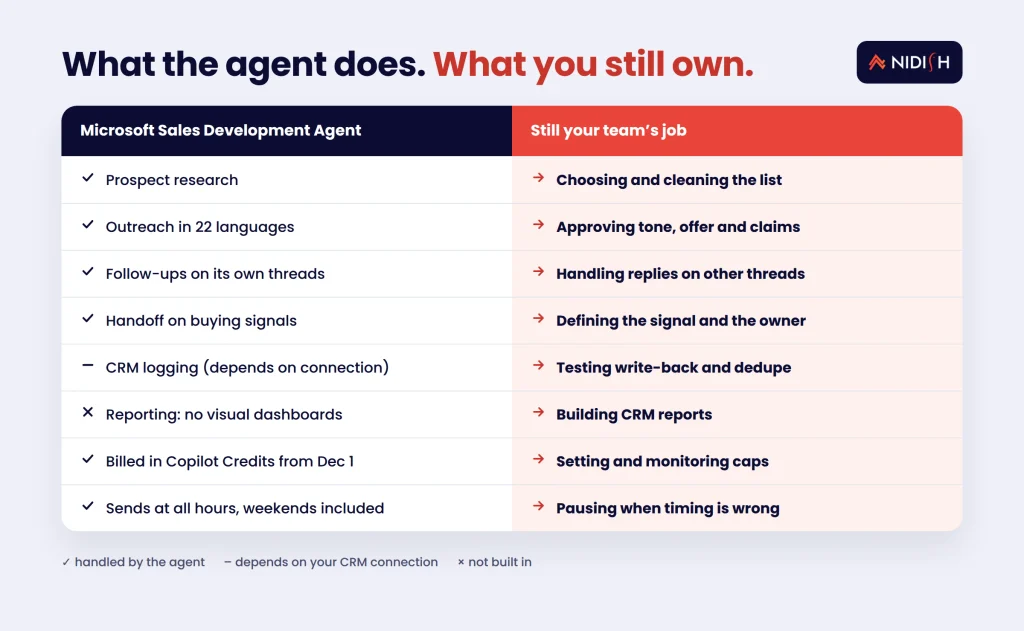
The table below separates what the Microsoft Sales Development Agent does on its own from the work your team must still do. It is based on Microsoft’s published documentation as of November 2026.
| Capability | Handled by the agent | Still your job |
|---|---|---|
| Prospect research | Yes, from lists, documents and web links | Choosing and cleaning the list |
| Outreach in 22 languages | Yes | Approving tone, offer and claims |
| Follow-ups | Yes, on threads it starts | Handling replies on other threads |
| Handoff to sellers | Yes, on buying signals | Defining the signal and the owner |
| CRM logging | Depends on your CRM connection | Testing write-back and dedupe |
| Reporting | No built-in visual dashboards | Building CRM reports |
| Spend control | Billed in Copilot Credits from Dec 1 | Setting and monitoring caps |
| Scheduling | Sends at all hours, weekends included | Pausing when timing is wrong |
Copilot Credits costs and timeline: what a pilot really takes
The honest answer on Copilot Credits cost is that nobody outside Microsoft can give you a reliable per-email figure yet. Microsoft has said consumption estimates are coming closer to the December 1 transition. Until then, budget with a cap, not a forecast.
Effort is easier to estimate. In our experience, a well-run pilot of an AI SDR agent needs these pieces:
- Admin setup: licences, Frontier, Agent 365 and activation. Often a day or two of admin time, depending on approvals.
- Security and compliance review: permissions, data residency and third-party model routing. Usually the slowest step.
- CRM integration and testing: write-back, dedupe and exclusion logic. This is where most of the real work sits.
- List preparation: cleaning and segmenting the first prospect file.
- Pilot run and review: four to six weeks, with a weekly check-in.
These are typical patterns, not quotes. Your timeline depends on how clean your CRM already is.
Common mistakes to avoid
Treating the demo as the test
Good emails in a demo prove nothing about your CRM. Test write-back with real records before launch.
Skipping the spend policy
Microsoft asked admins to set one before billing starts on December 1. A missing cap is the easiest preventable surprise.
Running two outreach engines at once
Human sequences and agent outreach must exclude each other. Otherwise the same prospect hears from you twice in one day.
Leaving the handoff vague
“Warm leads go to sales” is not a rule. Name the owner, the response time and the CRM stage.
Forgetting it never sleeps
The agent sends at all hours and runs until stopped. Someone must own the off switch.
Ignoring the data questions
Regional processing exceptions and third-party model routing need a compliance answer, not an assumption.
How Nidish approaches AI SDR agents
We start with the CRM, not the agent. On most builds we inherit, the agent’s output is fine and the data underneath is the problem. So we audit lead ownership, dedupe rules and lifecycle stages first. Then we build the exclusion logic, write-back checks and reporting that let you trust what an autonomous agent does. We do this for HubSpot, Salesforce and Dynamics 365 shops. We tell you plainly when the right answer is to wait. If you are weighing several AI agents at once, our notes on Agentforce Coworker pricing and composable, AI-ready CRM stacks cover the wider choice.
Frequently asked questions
When does the Microsoft Sales Development Agent start costing money?
Billing through Copilot Credits starts on December 1, 2026, per Microsoft’s Message Center notice updated on November 10. The original date was November 16. Until then it is available in public preview. Microsoft has said consumption estimates will be shared closer to the transition, so set a spending policy now and confirm rates with your account team.
Does the Microsoft Sales Development Agent work with HubSpot or Salesforce?
Microsoft says it connects to leading CRM platforms, but the pages we reviewed do not name them. Ask Microsoft in writing whether your CRM is supported. Then test duplicate checks, activity logging, status updates and owner rules before any live outreach.
What licences do I need to activate it?
You need Microsoft 365, Microsoft 365 Copilot and Microsoft Teams. Copilot Frontier must be enabled. During preview, a Global Administrator also adds the $0 Agent 365 SKU, which includes 25 agent instances. An AI Administrator or Global Administrator then activates the agent.
Is the Sales Development Agent ready for production use?
Not yet, by Microsoft’s own description. The documentation labels it a preview feature and says preview features are not meant for production use. Treat any rollout as a time-boxed pilot with a small list, a spending cap and a named owner who can stop it.
Can I control when the agent sends emails?
Not through a built-in schedule that we found. Microsoft’s documentation says the agent sends emails at all hours, including weekends, and runs autonomously until stopped. Control timing by keeping pilot lists small and pausing the agent when sends would be unwelcome.
How is it different from Microsoft’s Sales Agent?
The Sales Agent helps human sellers inside Microsoft 365 Copilot. The Sales Development Agent works on its own, with its own mailbox and Teams identity. It researches prospects, sends outreach and follow-ups, and hands qualified leads to a seller when buying signals appear.
Where to start this week
You have until December 1 before the meter starts. Use the time to set a spend cap, name an owner, and test your CRM connection on ten real records. If those three things go well, run a small pilot. If they do not, you have learned something cheaply.
Book a 30 minute call. We’ll tell you honestly whether you need the Microsoft Sales Development Agent, a different AI SDR setup, or nothing at all yet.


 Blog
 Case Studies
 Career