
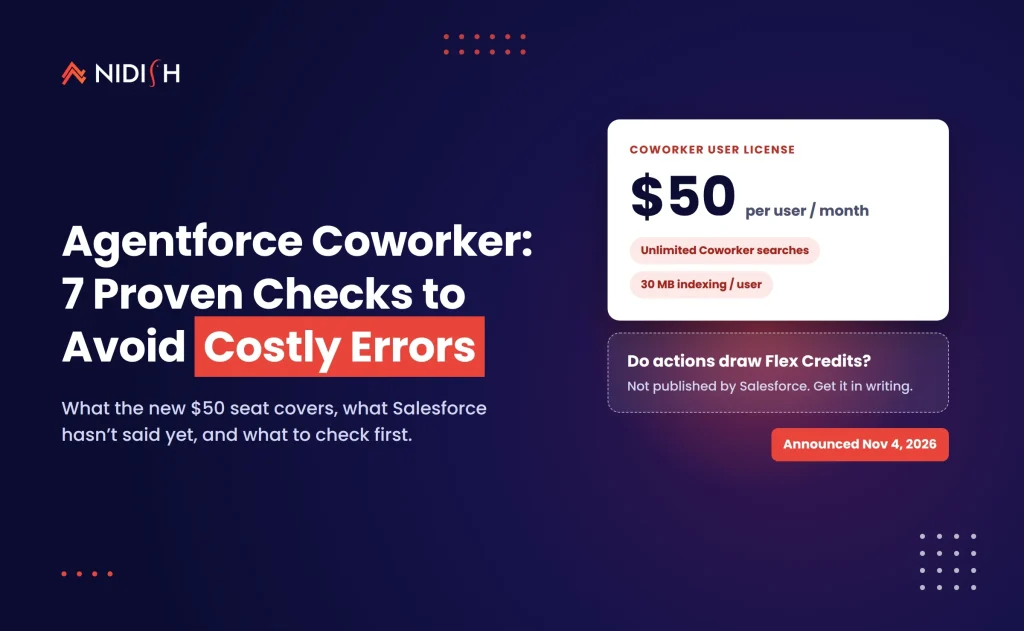
A $50 AI seat sounds simple. It stops being simple the first time someone asks what it can actually see, what it can actually do, and what happens to the bill when it does it.
On November 4, 2026, Salesforce announced a major expansion of Agentforce Coworker, its AI teammate for employees. The headline is a new $50 per-user, per-month option, plus Microsoft Teams, desktop and iOS apps rolling out this month. Salesforce says more than 185,000 users already work with it.
This guide is for Salesforce admins, RevOps leads and CFOs who now have to decide whether Agentforce Coworker earns a line in the 2027 budget. You’ll get what changed, what the $50 covers (and what Salesforce hasn’t said yet), a pricing comparison, and seven checks to run before you switch it on for everyone.
Table of Contents
Key takeaways
- Agentforce Coworker is Salesforce’s AI teammate. It plans multi-step work, calls Agentforce agents and workflows, and returns results for review.
- The new $50 per user, per month seat is a standalone SKU with unlimited Coworker searches and 30 MB of indexing per user each month.
- Microsoft Teams, iOS, Mac and Windows apps and a Coworker MCP server are due to reach general availability in November 2026.
- Salesforce has not published whether Coworker actions draw down Flex Credits under the $50 seat. Get that in writing.
- Coworker answers only from records each user already has permission to see, so your sharing model becomes your AI policy.
What is Agentforce Coworker?
Agentforce Coworker is an AI assistant inside Salesforce that takes a plain-language request, plans the steps, and coordinates Agentforce agents and workflows to complete it. Salesforce describes it as an “AI teammate that helps employees delegate business work using trusted Salesforce context.” It hands back results and recommended actions for a person to review.
The difference from a chatbot is scope. A chatbot answers questions about one record. Agentforce Coworker is built to chain work together: pull an account’s open cases, check renewal dates, draft the follow-up, and queue the task.
It draws on Salesforce records, business metadata and data connected through Data 360. According to the Agentforce Coworker product page, you can use it in Salesforce, Microsoft Teams and mobile, and in Claude and ChatGPT through MCP.
Salesforce’s June 2026 admin blog described Agentforce Coworker as being in beta for eligible orgs. It was included in Enterprise, Unlimited and Agentforce 1 Editions, and available in Salesforce Foundations. The November release is the first time Salesforce has put a clear per-seat price on Agentforce Coworker.
What changed on November 4, 2026
Salesforce’s November 4 announcement does three things at once: it adds a per-seat price, widens where the assistant runs, and sets dates for the next features. Usage, Salesforce says, grew 21x in three months.
Here is the rollout as Salesforce published it.
| Status | What ships |
|---|---|
| Available now | Google Workspace and Microsoft 365 connectivity, Conversation History, Skills, the per-user per-month SKU |
| GA in November 2026 | Coworker in Microsoft Teams, iOS app, desktop app for Mac and Windows, Coworker MCP server, free trial for Flex Credits customers |
| Expected December 2026 | Daily Digest, scheduled tasks, Coworker in Field Service, Consumer Goods Cloud and Life Sciences Cloud mobile apps |
Two items matter most for buyers. Skills turn a proven workflow into a one-line request anyone on the team can run. The Coworker MCP server lets outside AI tools reach Coworker, which is how Claude and ChatGPT access fits in.
Salesforce adds a standard caveat: pricing and packaging are subject to change, and availability may vary by region. Treat every date in that table as a target, not a contract.
Agentforce Coworker pricing: the $50 seat vs Flex Credits
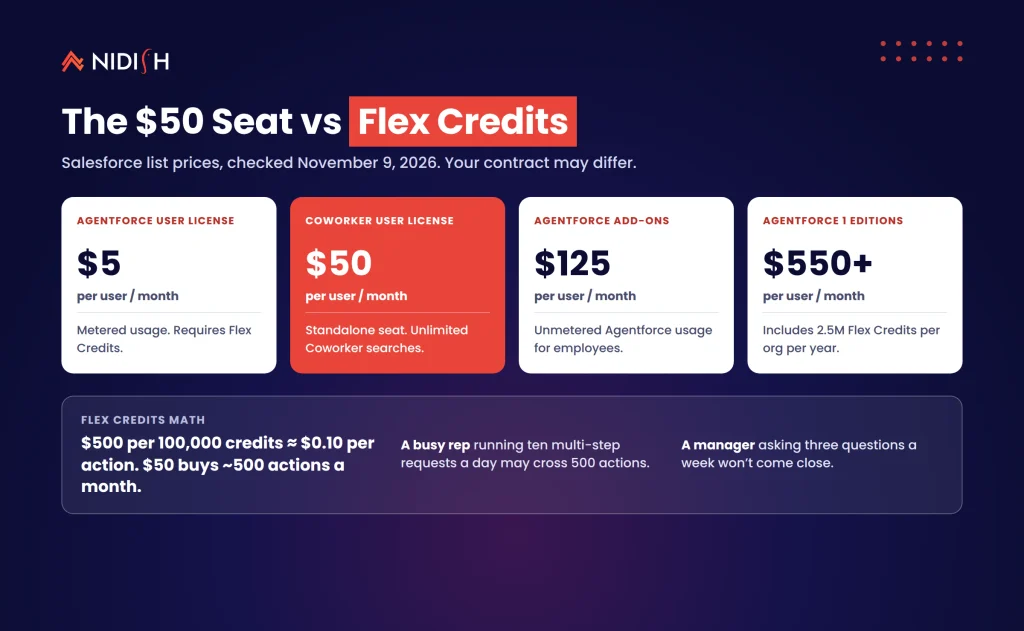
Agentforce Coworker pricing now has a simple headline: $50 per user per month for a standalone Coworker User License. The product page lists unlimited Coworker searches and 30 MB of indexing per user per month inside that seat.
The harder question is how the Agentforce Coworker seat compares with the other ways Salesforce already sells Agentforce. Here is the public price list as of November 9, 2026.
| Option | List price | What Salesforce says it includes | Best fit |
|---|---|---|---|
| Agentforce Coworker User License | $50 per user/month | Standalone SKU, unlimited Coworker searches, 30 MB indexing per user/month | Teams that want a predictable per-head AI budget |
| Agentforce User License | $5 per user/month | Limited CRM object access, metered usage; requires Flex Credits | Light or occasional users |
| Flex Credits | $500 per 100,000 credits | Credits shared across actions, prompts, translations and voice actions; unused credits don’t roll over | Usage you can forecast |
| Agentforce add-ons | $125 per user/month | Unmetered Agentforce usage for employees | Heavy users across many agents |
| Agentforce 1 Editions | From $550 per user/month | Includes 2.5M Flex Credits per org per year | Orgs standardising on the full stack |
Source: Salesforce Agentforce pricing and the Coworker product page, checked November 9, 2026. List prices only; your contract may differ.
Salesforce’s pricing examples imply 20 Flex Credits per standard action. At $500 per 100,000 credits, that is about $0.10 per action. By that arithmetic, $50 buys roughly 500 actions a month on Flex Credits.
So the real question isn’t “is $50 cheap?” It is how many actions each of your users will trigger. A rep who runs ten multi-step requests a day may cross 500 actions inside a month. A manager who asks three questions a week won’t come close.
The gap you need to close: Salesforce’s public pages don’t state whether Coworker actions under the $50 seat draw from Flex Credits, or whether the seat covers them. CX Today’s analysts flagged the same open question in their November 5 coverage. Ask for the answer in your order form, not in a slide.
Where it runs: Microsoft Teams, Google Workspace, Claude and ChatGPT
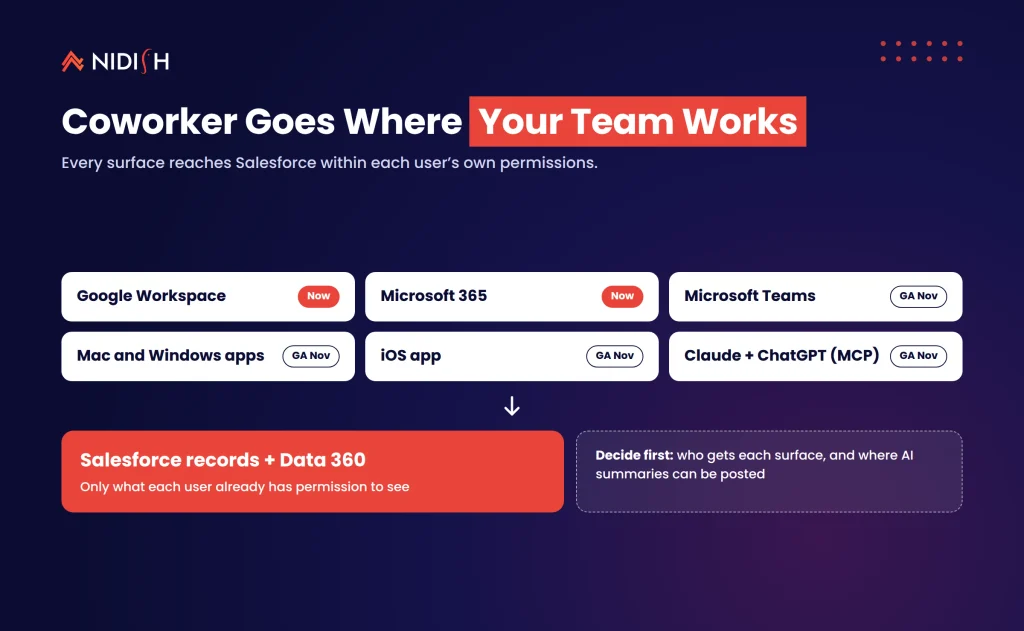
This is the part of the release with the biggest day-to-day effect. Most of your users don’t live in Salesforce. They live in email, documents and chat.
With Google Workspace and Microsoft 365 connectivity available now, Agentforce Coworker can work with the files and mail your teams already use. Once the Teams app reaches GA this month, a rep can ask for an account summary inside a Teams chat instead of opening a Salesforce tab.
The MCP route is newer and worth watching. MCP (Model Context Protocol) is the open standard Claude and other AI tools use to call outside systems. A Coworker MCP server means a user working in Claude or ChatGPT can reach Coworker, and through it Salesforce, within that user’s permissions.
That convenience has a cost. Every new surface is another place where data leaves the CRM screen. Before the Teams app lands, decide who gets it, which channels it can post into, and whether your retention policy for Teams covers AI-generated summaries of customer records.
Running HubSpot or NetSuite alongside Salesforce
Many of the stacks we work on aren’t Salesforce-only. Marketing runs in HubSpot, finance runs in NetSuite or QuickBooks, and Salesforce holds the sales pipeline. Agentforce Coworker can only reason over what it can reach.
Salesforce says Agentforce Coworker draws on Salesforce records, business metadata and data connected through Data 360. Data that lives only in HubSpot or your ERP stays invisible unless it is synced into Salesforce or connected through Data 360.
That has a practical effect. Ask Coworker “which accounts are at renewal risk?” and it won’t see unpaid invoices sitting in NetSuite or a collapse in email engagement in HubSpot. The answer will sound complete and still be wrong.
The fix: before the pilot, list the five questions your team most wants answered. For each one, write down which system holds the data. Any answer that depends on a system Agentforce Coworker can’t reach needs an integration or a Data 360 connection first, or it shouldn’t be in the pilot.
This is the same lead-to-cash problem that predates AI. AI just makes the gap louder.
7 proven checks before you roll out Agentforce Coworker
These are the checks we’d run before giving any AI teammate access to a live CRM. None of them need a consultant. All of them are cheaper before go-live than after.
1. Audit your sharing model first
Agentforce Coworker answers only from records and objects a user already has permission to see. That is good security design. It also means every over-shared record becomes something the AI will happily summarise.
The fix: review profiles, permission sets, sharing rules and public groups before launch. Pay special attention to “View All” permissions granted years ago as a shortcut.
2. Get action billing in writing
As covered above, the public pages don’t say how the $50 seat treats actions. Your finance team needs a clear answer before you sign.
The fix: ask your account executive for written confirmation of what the seat includes, what draws Flex Credits, and what happens when a user exceeds any limit.
3. Clean the data Coworker will read
An AI teammate turns bad data into confident bad answers. Duplicate accounts, stale opportunity stages and empty fields all show up in its summaries.
The fix: run a duplicate and completeness pass on Accounts, Contacts and Opportunities. Our CRM data migration checklist covers the same hygiene steps.
4. Pilot with one team and three jobs
Turning on Agentforce Coworker for the whole company on day one makes it hard to measure anything. A narrow pilot gives you real usage numbers for the pricing decision.
The fix: pick one team, such as customer success, and three repeatable jobs, such as renewal prep, case summaries and meeting follow-ups. Track actions per user per week.
5. Build Skills before you scale
Skills let a proven workflow become a one-line request that runs within each user’s own permissions. They are where consistent results come from.
The fix: turn your pilot’s best three prompts into shared Skills. Name them clearly, document the inputs, and assign an owner who updates them when processes change.
6. Decide your Teams and MCP policy
The Teams app, the desktop apps and the MCP server all widen where customer data can appear. That is useful, and it is also new risk.
The fix: write a one-page policy. It should cover which surfaces are approved, which user groups get them, and whether AI tools outside Salesforce may connect through MCP at all.
7. Set a review rule for anything that writes
Coworker returns results and recommended actions for review. Keep it that way for anything that updates records, sends emails or changes amounts.
The fix: require human approval for write actions during the pilot. Use Salesforce’s approval and audit capabilities to check what Coworker changed and why.
If you’re weighing Agentforce Coworker alongside a HubSpot or ERP stack, the integration layer decides how useful it is. We’ve connected Salesforce to other systems for teams like yours, including a HubSpot and Salesforce SSO build. Talk to us about your Salesforce integration →
Who should move now, and who should wait
Not every org should buy Agentforce Coworker seats this quarter. Here is how we’d split it.
Move now if
- Your Salesforce data is reasonably clean and your sharing model was reviewed in the last year.
- Your teams already work in Microsoft Teams or Google Workspace all day.
- You have repeatable, multi-step jobs that eat hours each week, such as renewal prep or case triage.
Wait if
- Your org still runs on years of “temporary” sharing exceptions.
- You can’t yet answer how many actions a typical user would run.
- Salesforce is one of several CRMs in play and your data isn’t unified. In that case, fix the data layer first. Our guide to composable, AI-ready CRM stacks explains why.
If you’re still choosing between platforms, the HubSpot vs Salesforce comparison is the better starting point. HubSpot’s answer to this category is its Breeze AI assistant and agents.
What a rollout actually takes
The Agentforce Coworker licence is the smallest part of the effort. In our experience with CRM AI rollouts, most of the work sits in permissions, data and process, not in the AI itself.
A typical sequence looks like this:
- Readiness review (1–2 weeks). Sharing model audit, data quality scan, list of candidate jobs.
- Pilot (3–4 weeks). One team, three Skills, weekly usage tracking, human approval on writes.
- Pricing decision (1 week). Compare pilot usage against the $50 seat, Flex Credits and the $125 add-on.
- Phased rollout (4–8 weeks). Team by team, with Skills and surface policy in place.
These are typical ranges, not promises. A clean org with one sales team can move faster. A multi-cloud org with heavy customisation will take longer, which is usually a sign the data layer needs work anyway.
Budget for internal admin time, not just seats. Someone has to own Skills, review the audit trail and answer “why did it say that?” in the first month.
Common mistakes to avoid
Buying seats for everyone on day one
You lose the usage data you need to choose between the $50 seat and Flex Credits.
Treating Agentforce Coworker as a chatbot
Its value is multi-step work. If your users only ask one-line questions, a cheaper licence may do.
Ignoring the sharing model
Permissions you forgot about are now permissions an AI can read from.
Skipping write approvals
One wrong bulk update to opportunity amounts will cost more trust than a month of saved clicks earns.
Leaving HubSpot or ERP data outside
If half your customer story lives in another system, Agentforce Coworker sees only half the customer. That is a lead-to-cash gap, and our RevOps audit guide shows how to find it.
How Nidish approaches this
We start with the plumbing, not the prompts. For teams evaluating Agentforce Coworker, we review the sharing model, map which systems hold the customer record, and fix the integrations so the AI reads one consistent version of the truth.
Then we help you pilot with a small group, build the first Skills, and compare real usage against the pricing options. We’ll also tell you when the honest answer is to wait. We have followed Salesforce’s recent moves closely, including the Braze acquisition, and the pattern is consistent: the AI is only as good as the data and permissions underneath it.
Frequently asked questions
How much does Agentforce Coworker cost?
Agentforce Coworker costs $50 per user per month as a standalone Coworker User License, according to Salesforce’s product page in November 2026. The seat lists unlimited Coworker searches and 30 MB of indexing per user per month. Confirm with your account executive whether actions draw Flex Credits.
Is Agentforce Coworker available in Microsoft Teams?
Yes, Salesforce says Agentforce Coworker in Microsoft Teams reaches general availability in November 2026. Google Workspace and Microsoft 365 connectivity is available now. Desktop apps for Mac and Windows and an iOS app are also due to reach GA this month.
Does Agentforce Coworker see all my Salesforce data?
No. Agentforce Coworker answers only from records and objects each user already has permission to see. It follows your existing profiles, permission sets and sharing rules. That makes a sharing model review the most important step before rollout.
What are Skills in Agentforce Coworker?
Skills turn a proven workflow into a one-line request anyone on the team can run. Each person runs a shared Skill within their own permissions. Skills are available now, and they are the best way to get consistent results from a pilot.
Can I use Agentforce Coworker from Claude or ChatGPT?
Yes, through MCP. Salesforce says you can use Coworker in Claude and ChatGPT through MCP, and a Coworker MCP server is due to reach general availability in November 2026. Set a policy on which outside AI tools may connect before you enable it.
Should I choose the $50 seat or Flex Credits?
Choose based on measured usage. Salesforce’s pricing examples imply about $0.10 per action on Flex Credits, so $50 equals roughly 500 actions a month. Pilot first, track actions per user, and then compare. Heavy users may suit the $125 unmetered add-on instead.
Where to start
Agentforce Coworker is a real step forward for Salesforce users who spend their days in Teams, email and documents. The $50 seat makes budgeting easier. It doesn’t remove the work of cleaning permissions, fixing data and proving usage first.
Start with one team, three jobs and a written answer on action billing. Then decide.
Book a 30 minute call. We’ll tell you honestly whether you need the $50 seat, Flex Credits, or nothing at all yet.


 Blog
 Case Studies
 Career