
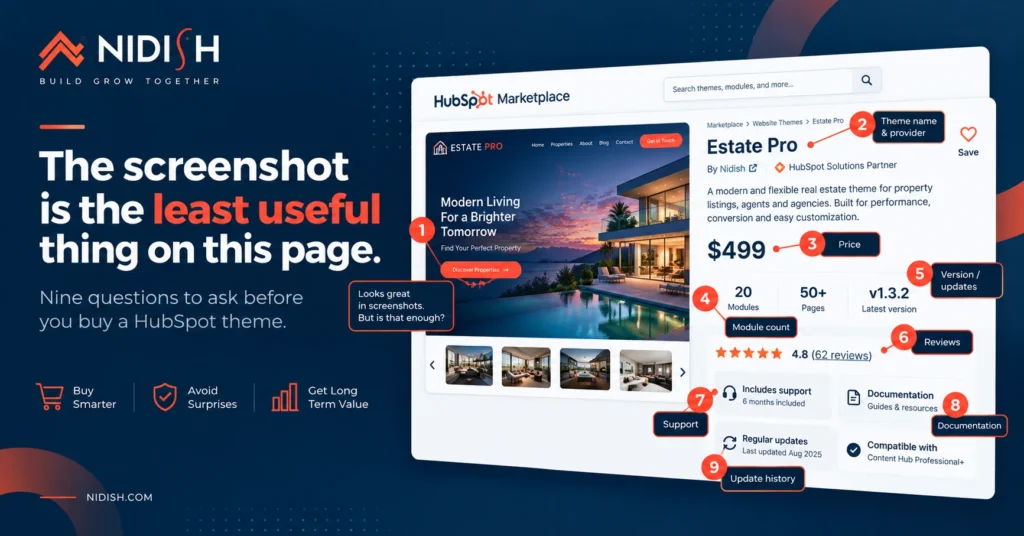
Buying a HubSpot theme usually goes the same way. Someone browses the marketplace, sorts by popular, finds three that look good, compares screenshots, picks the nicest one, and installs it.
Then two months in they discover the thing they actually needed is not there, or requires a subscription tier they do not have, or the theme has not been updated since 2023.
Screenshots are the least reliable signal on a marketplace listing. Every theme looks good in a screenshot, because the screenshot was made by the person selling it. These are the nine questions that actually predict whether you will still be happy in a year.
We build four themes, so read this knowing that. The questions are the ones we would ask about somebody else’s product, and a couple of them are ones our own themes do not answer perfectly.
Table of Contents
1. What subscription tier does it actually require?
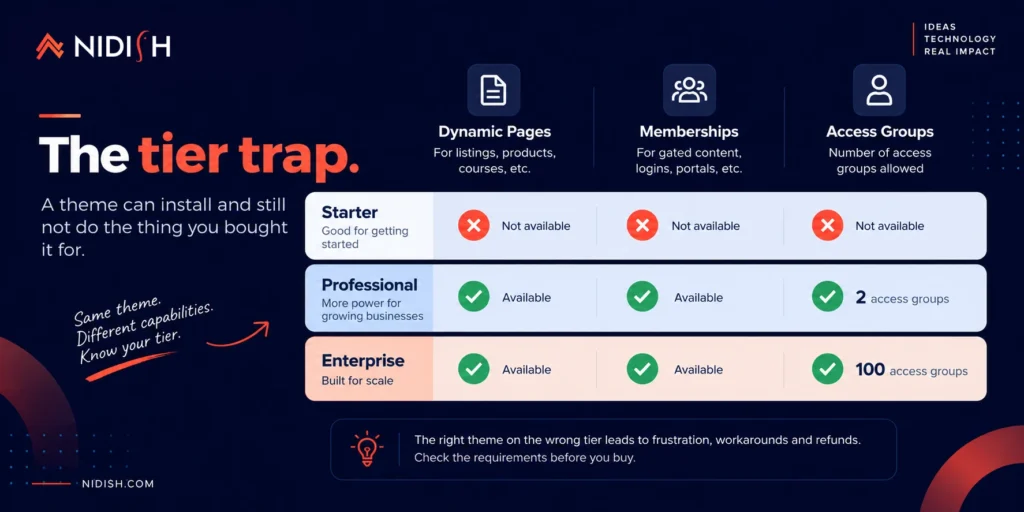
Start here, because it is the question that most often turns a purchase into a refund request.
A theme can install on your account and still not do the thing you bought it for. The clearest example is dynamic pages, which is how any theme renders a catalog of records: properties, products, courses, locations. HubSpot gates dynamic pages at Content Hub Professional. On Starter they do not generate at all.
Memberships are the same story. If a theme advertises gated content, student logins, or a customer portal, that runs on HubSpot memberships, which also need Content Hub Professional or Enterprise. And there is a detail almost nobody mentions: Professional allows two access groups, Enterprise allows 100. Two is fine for free versus paid. It is not enough for eight courses that each need separate access.
Ask the provider directly: which features of this theme require a tier above the one I am on? Any provider worth buying from will answer plainly.
2. Is it built on CRM objects or HubDB?
This one sounds technical and is actually commercial.
If a theme displays a catalog, that data lives somewhere. Two options. HubDB is a website database, so your records are website content. CRM objects mean your records are real CRM records.
The difference shows up the first time somebody in sales asks a reasonable question. Which contact enquired about this property? Which student is enrolled in this course? On HubDB, the answer is a text string in a form submission. HubDB rows do not appear in workflow and list filters, so your automation cannot see them at all.
HubSpot ships four industry objects that sit switched off in every account: Listings, Courses, Appointments, and Services. None require Enterprise. We wrote up two of them in detail, the Listing object and the Courses object.
Ask: does this theme read from a CRM object or a HubDB table? If the answer is vague, it is HubDB.
3. How often is it actually updated?
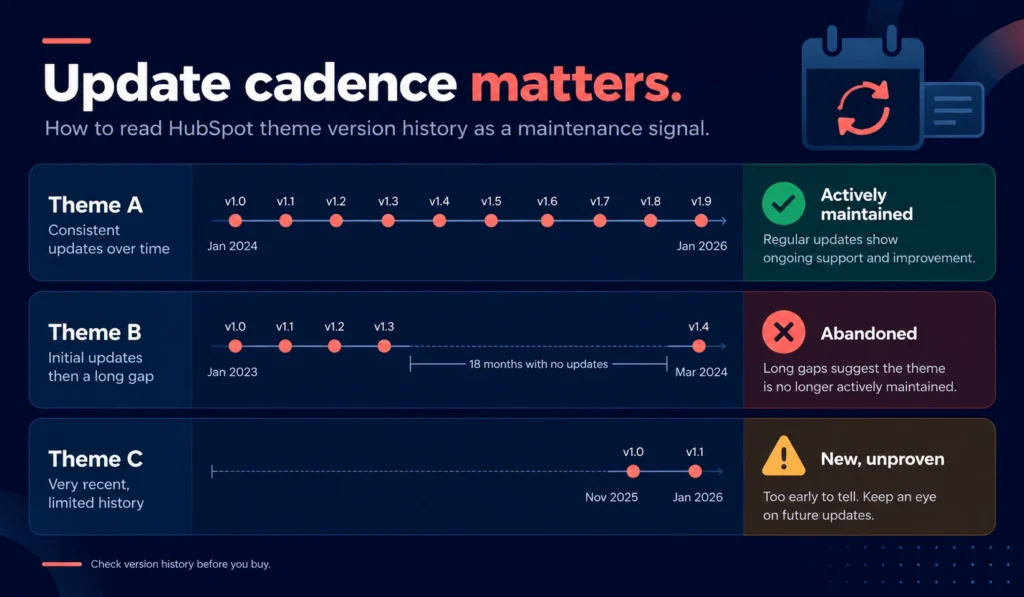
Every marketplace listing shows a version number and a last-updated date. Most buyers scroll past both. They are the single best predictor of what the next two years look like.
A theme on version 2 might be excellent and new. A theme on version 40 has been maintained through several HubSpot platform changes. A theme last updated eighteen months ago is a liability regardless of how good the screenshots are, because HubSpot changes and an unmaintained theme quietly stops keeping up.
For context on what active maintenance looks like: our own Siloh Pro is on version 61, having been on the marketplace since August 2024. That is roughly monthly. Our newest theme is on version 2. Both facts are on the listings, and you should check them for every theme you are considering, ours included.
Ask yourself: how many versions, over how long? Then divide.
4. What does the support actually include?
“Support included” means very little on its own. Three things to pin down.
How many hours of setup support? Ours is 4 hours across all four themes. Some providers offer none, some offer more.
Is email support unlimited or ticket-capped?
What are the response times and business hours? A provider operating in a timezone twelve hours from yours with a one-business-day response means a two-day round trip on every question.
All three are usually stated on the listing. If they are not stated, assume the answer is unfavourable.
5. How many modules, and are they the right ones?
Module count is the most-quoted and least-useful number on any theme listing.
Fifty generic modules are worth less than fifteen built for what you actually do. A real estate theme with a working property search that filters against live CRM records beats a general theme with forty content blocks and no search, every time.
Worth knowing too: module counts on listings are not always internally consistent, including on our own. Check the structured “What’s included” panel rather than the marketing copy, and if the two disagree, ask.
Ask: which modules do the job I am buying this for? Not how many are there.
6. Can your marketing team edit it without a developer?
“Drag and drop” is claimed by nearly every theme. The claim is usually true and usually incomplete.
The real question is what happens at the edges. Can a non-developer change the header layout, adjust the colour system globally rather than per page, reorder a module’s internal elements, or add a new section to an existing template? Some themes allow all of that. Others allow you to move pre-built blocks around and nothing more.
Best test: open the theme’s live preview and its documentation before buying. Documentation quality tells you a great deal about build quality, and it is free to inspect.
7. What happens when you need something it does not do?
You will hit this. No theme covers everything.
The question is what the ceiling looks like when you do. Can a developer extend it, or does customisation mean forking the theme and losing all future updates? A theme you cannot modify without breaking upgrades is a theme with an expiry date.
We wrote about where those limits sit in HubSpot theme customization.
Ask: can I add custom modules alongside this theme without breaking its update path?
8. Are there reviews, and who wrote them?
Reviews on theme marketplaces are sparse, so treat their absence carefully rather than as a red flag.
A theme with no reviews might be new, or might be unloved. Check the install count and the creation date together. Live for two years with few installs and no reviews is a different signal from live for two months.
When reviews exist, read what they praise. “Looks beautiful” is weak. “Support responded in a day and helped us fix X” is worth considerably more.
Being straight about our own position: Siloh Pro has four reviews averaging 5.0. Our other three themes have none yet. That is a real gap and we would rather name it than have you notice it.
9. What does it cost to leave?
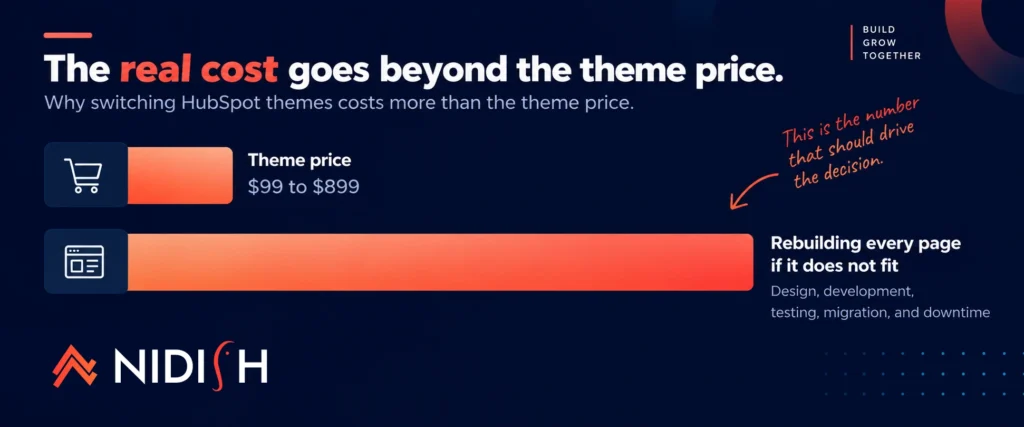
Nobody asks this before buying and everybody discovers it eventually.
Switching HubSpot themes is a rebuild, not a swap. Modules differ between themes, so page content does not transfer cleanly. A page built with Theme A’s module set has to be reassembled with Theme B’s.
Which means the real cost of getting this decision wrong is not the theme price. It is the rebuild. A $499 theme that fits is dramatically cheaper than a $99 theme that does not.
Ask: how much work have I committed to if this turns out to be wrong in a year?
The short version
| # | Question | What a bad answer looks like |
| 1 | What tier does it require? | Vague, or “works with HubSpot” |
| 2 | CRM objects or HubDB? | Evasive, which means HubDB |
| 3 | How often updated? | Last update over a year ago |
| 4 | What support is included? | Not stated on the listing |
| 5 | Which modules matter? | Only a headline count |
| 6 | Can marketers edit it? | No live preview or documentation |
| 7 | Can developers extend it? | Customising forks the theme |
| 8 | Reviews, and from whom? | Old listing, few installs, no reviews |
| 9 | What does leaving cost? | Nobody has thought about it |
If you want to run this on ours
We would rather you use this checklist on our themes than take our word for anything. The full comparison of Estate Pro, Siloh Pro, EDULMS and Commerce Craft has the prices, template counts, module counts, and version numbers in one table, including where each one is the wrong choice.
One timely note. Estate Pro is currently $1 rather than $499, which is unusual enough that question 9 answers itself: at that price the cost of the decision being wrong is close to zero. Questions 1 through 8 still apply, and the first one matters most, so read that section before you install.
If you get to the end of this checklist and the honest answer is that no marketplace theme fits, that is HubSpot development work and we will tell you so rather than sell you a theme.
Frequently asked questions
What should I check before buying a HubSpot theme?
Check the subscription tier its features require, whether it reads from CRM objects or HubDB, how frequently it has been updated and for how long, what support is included, which modules do the specific job you need, whether your marketing team can edit it unaided, whether developers can extend it without breaking updates, what reviews say, and what a future migration off it would cost.
Do HubSpot themes require a paid subscription?
Themes install on paid Content Hub tiers, but individual features have their own requirements. Dynamic pages, which power property, product, and course catalogs, require Content Hub Professional or Enterprise. Memberships and gated content have the same requirement. Confirm which of a theme’s advertised features depend on a tier above yours before purchasing.
How much should a HubSpot theme cost?
Premium marketplace themes generally run from around $200 to $1,000 as a one-time purchase. Price tends to track the depth of the problem solved and the maturity of the product rather than the module count. Because switching themes later means rebuilding pages, a more expensive theme that fits is usually cheaper overall than a cheap one that does not.
What is the difference between a free and a paid HubSpot theme?
Free themes are generally well suited to simple marketing sites of modest size. Paid themes typically add vertical functionality, catalog architecture, support hours, and ongoing maintenance. If you are validating an idea with a handful of pages, a free theme is often the right call.
How do I know if a HubSpot theme is still maintained?
The marketplace listing shows the current version number and the date of the last update. Divide the version count by the time on the marketplace to get a rough update cadence. A theme not updated in over a year is a risk, because HubSpot changes and unmaintained themes fall behind.
Can I switch HubSpot themes later?
Yes, but it is a rebuild rather than a swap. Modules differ between themes, so page content does not transfer cleanly and pages need reassembling with the new theme’s module set. This is why the choice matters more than the price difference between options.
Is a theme with no reviews a bad sign?
Not necessarily. Read the install count and creation date alongside it. A theme live for two months with no reviews is simply new. A theme live for two years with few installs and no reviews is a different signal.
Before you pay
Buying a HubSpot theme is a two-year decision priced like a one-off purchase. The rebuild cost of getting it wrong exceeds the price of every theme on the marketplace.
Work through the nine questions. Most of the answers are on the listing already, and the ones that are not are questions any decent provider will answer directly.
If you want a second opinion before committing, book a 30 minute call. We will run the checklist with you, including on themes that are not ours.



 Blog
Blog Case Studies
 Career