
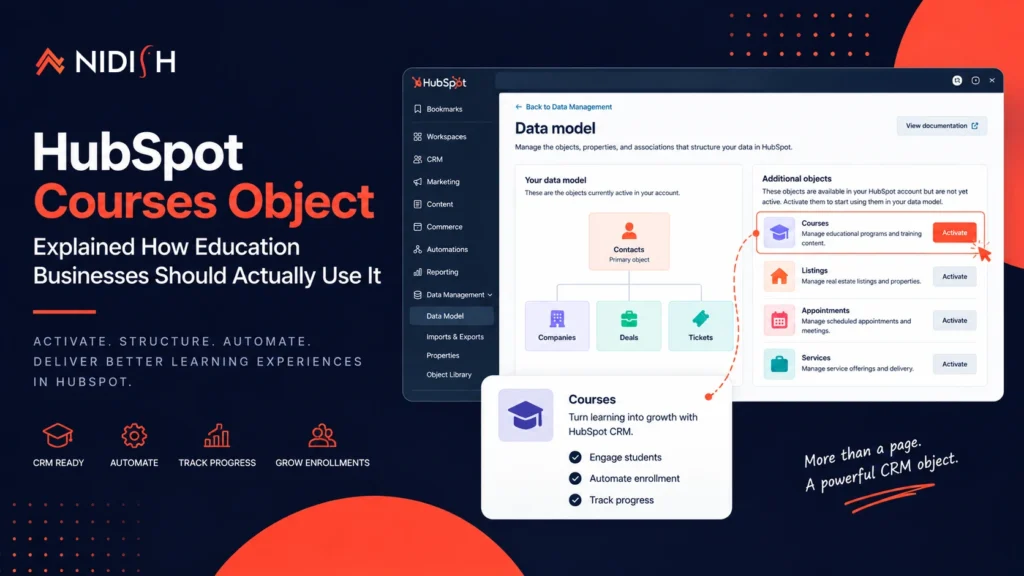
HubSpot Courses object explained for education and edtech CRM teams
The HubSpot Courses object is a native CRM object that stores a program, a series of lessons, a training, an educational module, as a real record, with its own properties, associations, workflow triggers, reporting, and API. It is not a custom object you build. It ships with HubSpot and sits switched off until a super admin activates it.
Almost every edtech company we have worked with runs two systems that do not talk to each other. HubSpot holds the CRM, the marketing, and the pipeline. Something else entirely, Teachable, Thinkific, a WordPress LMS plugin, holds the courses and the students. Then somebody spends months trying to join them with Zapier, a spreadsheet, and increasingly desperate custom work, and the Courses object sitting dormant in the same account the whole time never enters the conversation.
This post covers what the HubSpot Courses object is, how to activate it, how to structure it properly, and what it unlocks once you do. It also covers what it does not do, and the two subscription limits that decide whether gated learning content actually works on your plan, because that matters just as much as the feature list.
We build on this object regularly. It is the foundation of the HubSpot LMS theme we shipped for education businesses, and everything below is what putting it into production has actually taught us.
Table of Contents
What Is the HubSpot Courses Object?
In HubSpot, courses store information about programs such as a series of lessons, trainings, or educational modules. Each course is a full CRM record. It has properties, it associates to contacts, it can trigger workflows, and it is addressable through the courses API.
That is the entire point of the HubSpot Courses object. A course stops being a page on a separate platform and becomes a record your CRM actually understands.
HubSpot ships the object with core properties already defined, including:
| Property | Internal name | Purpose |
|---|---|---|
| Course name | hs_course_name | The program identifier |
| Course ID | hs_course_id | Unique reference used for deduplication and API matching |
| Course description | hs_course_description | What the program covers |
| Enrollment capacity | hs_enrollment_capacity | Maximum seats or slots available |
You add your own properties on top of these HubSpot Courses object defaults. Category, delivery format, instructor, duration, price tier, cohort dates, and anything else your business actually uses to run the program.
Where the HubSpot Courses Object Sits in the Data Model
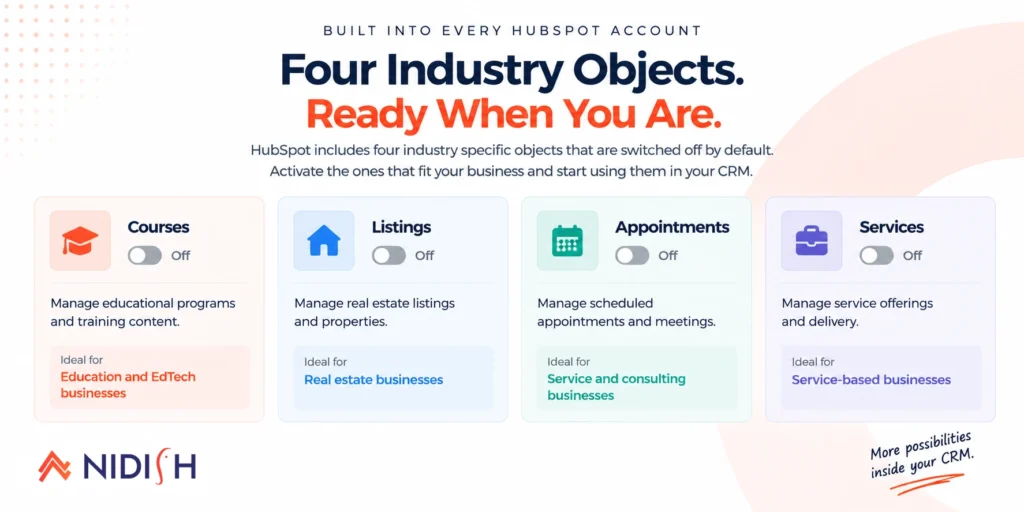
This is the part most education businesses on HubSpot do not know. The HubSpot Courses object is one of four objects that exist in every account but stay dormant until activated:
- Courses (education and training)
- Listings (real estate)
- Appointments (services and scheduling)
- Services (service-based businesses)
These are not custom objects. Custom objects require an Enterprise subscription and you build them yourself, field by field. These four are pre-built industry objects HubSpot maintains, and none of them require Enterprise to activate. We made the same argument for real estate in our HubSpot Listing object guide. The reasoning holds here too: if your business runs on a specific kind of record, and HubSpot already has an object for it, use that object rather than bolting a second platform onto the side of your CRM.
How to Activate the HubSpot Courses Object
Activation takes about a minute and requires super admin permissions.
- In your HubSpot account, click More, then go to Data Management > Data Model. If More does not appear, go to Data Management > Data Model directly.
- Click Edit data model.
- Find the Courses object and click Activate.
- Click Confirm.
That is it. The HubSpot Courses object is now live in your account. Once activated, courses appear on a CRM index page, associate to other objects, and become usable in workflows, lists, and reporting.
Even if you are not ready to build a full course website against it, having courses exist as CRM records improves your reporting and automation immediately, before a single page changes.
Structuring HubSpot Courses Object Properties: Get This Right First
The most common mistake we see is teams activating the Courses object and immediately importing every program with a loose property structure. Fixing this after data exists is significantly harder than getting it right before.
Rule 1: use dropdowns for category, level, and format
Free text fields become unfilterable within weeks. Someone types “Beginner,” someone else types “beginner level,” and your course catalog filter now treats them as separate categories.
Rule 2: enrollment capacity and duration must be numeric
If capacity is a text field, you cannot trigger a workflow when a cohort fills up, cannot sort by seats remaining, and cannot build a “closing soon” view. This is the mistake that quietly breaks capacity-based automation.
Rule 3: separate course status from publish visibility
“Open, full, archived” is a status. “Published, hidden, coming soon” is a visibility flag. Teams that merge these into one field end up unable to keep a completed cohort visible as a case study, or unable to stage a new course before it goes live.
Custom properties on the HubSpot Courses object are created directly in the data model builder. Expand the Courses object, click Create property, and configure the field type in the panel.
HubSpot Courses Object Associations: Connecting Courses to the Rest of Your CRM
Associations are where the HubSpot Courses object earns its place over a standalone platform with no CRM connection at all.
Course to contact: The student, the enquirer, the corporate training coordinator booking seats for a team. When someone enrolls, that contact associates to the specific course they enrolled in. Your team opens the contact record and sees exactly which program they are in, without hunting through a separate platform.
Course to company: Useful for corporate training providers and certification businesses selling seats to organizations rather than individuals.
Course to deal: The transaction, particularly relevant for paid courses, cohort-based programs, or any enrollment that goes through a sales conversation rather than a self-serve checkout.
You can go further with association labels, defining the nature of the relationship rather than just its existence. On a single course record, one contact might be labelled “enrolled,” another “waitlisted,” another “completed.” Labels are created in the data model builder under the Associations tab, and association limits can enforce structure, if a course should only have one primary instructor, set that association to one-to-one and HubSpot enforces it.
What You Can Automate Once the HubSpot Courses Object Holds Real Records
This is the practical payoff. Because courses are real records, HubSpot automation can act on them directly.
| Trigger | Example automation |
|---|---|
| New enrollment on a course | Add the contact to a course-specific nurture sequence and remove them from general lead nurture |
| Course reaches enrollment capacity | Notify the team, close registration, trigger a waitlist workflow |
| Contact enrolls in a second course | Flag the contact as a repeat student for a loyalty or referral sequence |
| Course start date approaches | Send a reminder sequence to enrolled contacts |
| Enrollment stalls with no login activity | Task an advisor to follow up, if activity data is being synced from your LMS |
| Corporate account enrolls multiple contacts | Associate all enrolled contacts to the company record and notify the account manager |
Reporting on the HubSpot Courses object works the same way. Enrollment counts by course, conversion from marketing campaign to enrolled student, and revenue per program all become standard CRM reports instead of a spreadsheet someone rebuilds every term.
Working With the HubSpot Courses Object Through the API
The courses endpoints sit at /crm/objects/2026-03/courses and require the corresponding course object scopes. They support create, read, update, upsert, merge, and associate operations, individually or in batch.
To create one course, you make a POST request to /crm/objects/2026-03/courses with your course data in a properties object. Batch creation works the same way against the /batch/create endpoint, useful if your course catalog lives somewhere else first and needs to sync in as CRM records.
Courses are deduplicated by the Record ID property, which matters if you are syncing from an external system, use a stable external ID as your matching key rather than course name, program names get renamed for marketing reasons far more often than anyone plans for.
What the HubSpot Courses Object Does Not Do
Honest limits, because a post that only lists benefits is not useful.
It does not track student progress: There is no built-in “60% through this course” state on the record. Progress tracking is a learning platform function, not a CRM function.
It does not handle quizzing or assessment: No question banks, no scoring, no pass marks live on a course record.
It does not issue certificates: No completion certificates, no credential management, no badge system.
It does not support SCORM or xAPI: If you have existing SCORM packages, the Courses object has nowhere to run them.
It is not a video hosting platform: Course content itself, the actual lessons, lives elsewhere and gets embedded or linked.
It does not render your website by itself: Activating the object gives you records in the CRM. Turning those records into a course catalog, single course pages, and student-facing structure is a separate build.
If you need progress tracking, assessment, or certification, the HubSpot Courses object is not the layer for it, you need a dedicated learning platform, and the right architecture is HubSpot for marketing, CRM, and enrollment, with the LMS handling delivery and a deliberate integration between the two. That is a legitimate, common setup, not a failure to commit to one platform.
The Two Subscription Limits That Decide Gated Learning on the HubSpot Courses Object
This is the section most comparisons skip, and the one worth reading before you commit to anything.
Limit 1: memberships need Content Hub Professional
A gated learning experience, content only visible to enrolled students, runs on HubSpot memberships, which require Content Hub Professional or Enterprise. Accounts on a legacy CMS Hub Professional subscription do not support memberships at all, worth checking before you build anything. Private content also only works on a connected subdomain, not a default hs-sites.com domain.
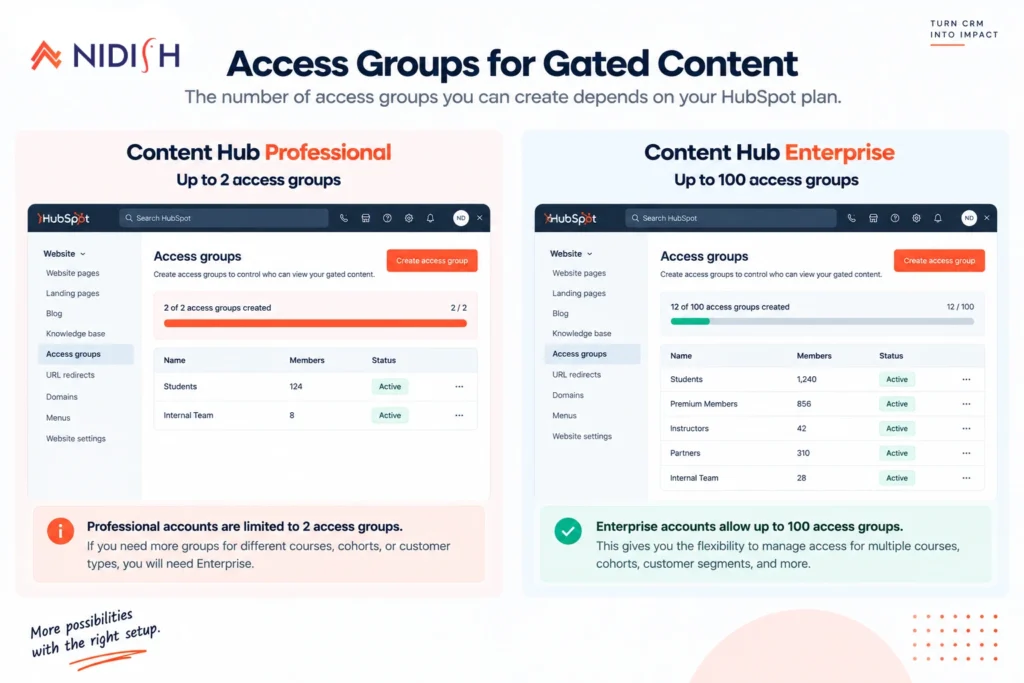
Limit 2: Professional gives you two access groups. Only two
An access group controls who can see what. Content Hub Professional accounts can have up to two access groups. Enterprise accounts can have up to 100. Two groups is fine for a simple “free tier, paid tier” structure. It is not enough for a catalog of eight courses that each need separate access, or a training provider running distinct cohorts that shouldn’t see each other’s content.
| Your setup | What works |
|---|---|
| Content Hub Starter | Memberships not available, public course marketing pages only |
| Content Hub Professional | Gated learning, but a maximum of 2 access groups |
| Content Hub Enterprise | Up to 100 access groups, per-course or per-cohort access |
| Legacy CMS Hub Professional | Memberships not supported, check your plan first |
If you need per-course access control and you are on Professional, you have three legitimate options: upgrade to Enterprise, restructure your content so two groups is genuinely enough, or keep learning delivery on a dedicated platform and use HubSpot for marketing, CRM, and the Courses object underneath it. A few other membership details worth having: each contact can receive a maximum of five membership emails per day, passwords must be at least 12 characters, and password-protected pages return a no-index response, so they will not appear in search results.
Turning the HubSpot Courses Object Into a Website
Records in the CRM are half the job. The visitor-facing half, a course catalog, single course pages, student login, and registration, is a separate build, and for most education businesses, the cost of building it from scratch exceeds the cost of buying it.
EDULMS is our HubSpot LMS theme, built specifically on the HubSpot Courses object described in this post. It ships with 22 page templates, 15 system templates, and 35 modules, course listing pages, single course templates with curriculum and instructor sections, student profile and login flows, and an events listing for cohorts and workshops alongside self-paced content, all fully drag-and-drop editable. It is $399 one-time on the HubSpot marketplace.
It fits businesses that market and sell courses, want the course website and CRM in one system, and are on Content Hub Professional or Enterprise with access needs that fit their tier’s group limit. It does not fit if you need assessment, progress tracking, certification, or SCORM support, those still need a dedicated learning platform connected to HubSpot through a deliberate integration, which is HubSpot development work we scope separately.
Frequently Asked Questions
What is the HubSpot Courses object?
The HubSpot Courses object is a native CRM object that stores information about a program, a series of lessons, a training, or an educational module. Each course is a full record with properties, associations to contacts and companies, workflow eligibility, and API access. It exists in every HubSpot account but must be activated by a super admin before use.
Can you run a course platform entirely on HubSpot CMS?
You can run course marketing, enrollment, and CRM entirely on HubSpot using the Courses object and a theme built on it. Assessment, progress tracking, certification, and SCORM support are not native to HubSpot and require a dedicated learning platform connected through integration.
What subscription do I need for gated course content in HubSpot?
Content Hub Professional or Enterprise for memberships, which control gated access. Professional supports up to two access groups. Enterprise supports up to 100, needed if you require per-course or per-cohort access control.
Do I need an Enterprise subscription to use the HubSpot Courses object?
No. The HubSpot Courses object is one of four pre-built industry objects, alongside Listings, Appointments, and Services, that can be activated without building a custom object. Custom objects require Enterprise. The Courses object does not.
Is a HubSpot LMS theme suitable for corporate training teams?
Yes, particularly for course marketing, enrollment, and company-to-contact associations tracking which employees from an organization are enrolled. Assessment and certification for compliance training still typically require a dedicated LMS connected to HubSpot.
Can I use the Courses object for events and workshops instead of online courses?
Yes. The object covers programs broadly, and course-based themes like EDULMS typically include an events listing for cohorts, workshops, and in-person training alongside self-paced content.
Does activating the Courses object change my website automatically?
No. Activation creates the CRM structure only. Your website needs templates that read from course records to display a catalog and course pages, handled either by custom development or a theme built for the object.
Where This Goes Next
The HubSpot Courses object is the piece of HubSpot’s education stack that most teams have not switched on, the same pattern we found with the Listing object in real estate. Activating it costs nothing, takes a minute, and immediately changes what your CRM can answer about your programs and students.
Get the property structure and access group planning right before you import courses or build gated content. Those are the decisions hardest to unwind after the fact.
If you want to talk through your course data structure, your membership tier, or whether EDULMS or a custom build fits your business, book a 30 minute call. We will tell you if you actually need help or not.
Related reading
Our HubSpot Listing object guide covers the same activation and structuring pattern for real estate, and our guide on whether HubSpot can replace a traditional LMS covers the broader platform decision this post assumes you have already made.


 Blog
Blog Case Studies
 Career