
There is a spreadsheet. There is always a spreadsheet.
It sits open on a second monitor next to the CRM, it has four tabs, one person maintains it, and if that person goes on leave the process stops. Everybody knows it is a problem. Nobody has been able to explain why the CRM cannot just do that, because on paper the CRM can do almost everything.
That spreadsheet is a custom application layer. It’s just a very bad one, with no permissions, no audit trail, and a single point of failure who is currently in Goa.
The useful question is not whether you need software on top of your CRM. If your team is already improvising one, you have your answer. The useful question is whether you should build a proper custom application layer, or whether four cheaper things would close the gap first. This guide covers both, plus the architecture patterns, the data contract that decides whether the thing survives, and the parts nobody warns you about.
Quick Answer
Build a custom application layer when your CRM holds the right data but cannot express the process that acts on it: multi-record workflows, cross-field validation, action-level permissions, real computation, or access for people who should never have a CRM seat. The CRM stays the system of record. The application layer owns the interface and the business rules.
Do not build one when the gap is unexhausted native configuration, when the pain is reporting alone, when the process itself is still being argued about internally, or when the underlying data is dirty. A custom application layer over undecided process just makes the disagreement permanent, and one over bad data fails faster and more expensively than the spreadsheet did.
Table of Contents
What a custom application layer actually is
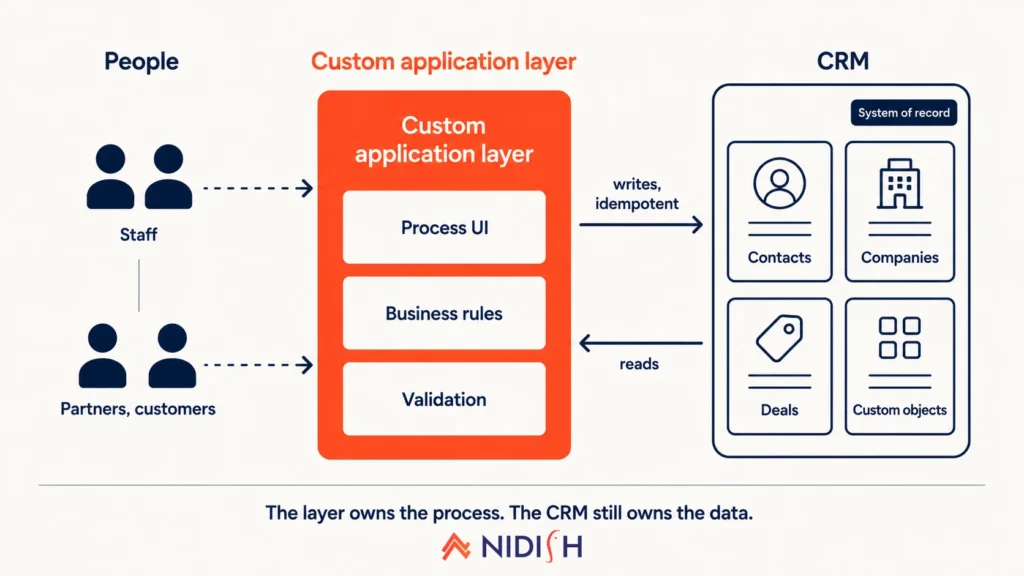
A custom application layer is purpose-built software that sits on top of your CRM’s data and API, giving people a task-shaped interface and enforcing rules the CRM cannot express on its own.
Note what it is not. It is not a replacement CRM, and it does not take ownership of your commercial data. Contacts, companies, deals, and whatever custom objects you have modelled all stay where they are. The layer reads and writes through the API, and the CRM remains the system of record for anything the business considers canonical.
What the layer owns is the experience and the logic. The sequence people move through. The validation that spans five fields and three records. The calculation that needs a real function rather than a rollup. The screen that shows one distributor exactly the twelve machines they are allowed to see, and nothing else.
The three things it gets confused with
It is not an integration: An integration moves data between two systems that both already have interfaces. A custom application layer is the interface.
It is not a report: If the entire complaint is that people cannot see the numbers, you want BI, not an application. Building software to solve a reporting problem is the single most expensive mistake in this category.
It is not a workaround for CRM configuration you never finished: This is the common one, and it deserves its own section further down.
Why every CRM hits a ceiling eventually
CRMs are not badly built. They are built for a specific shape of work, and some work is a different shape. Six ceilings account for almost every custom application layer we have seen justified, and it is worth knowing which one you are pressed against.
Record-centric interfaces versus process-centric work
Open any CRM and it shows you one record at a time. That is the right design for a salesperson working a deal, because the deal is the unit of work.
Now picture provisioning a piece of industrial equipment. You touch a company, two contacts, a deal, a serialised asset record, a warranty term, and a service schedule, in a specific order, where step four is invalid until step two has a particular value. There is no single record that is the unit of work. The process is the unit of work, and a record-centric UI has nowhere to put it.
People solve this by opening six tabs. Then somebody builds the spreadsheet.
The validation ceiling
CRM property validation is per field. Required, format, maybe a dropdown constraint.
What you often need is conditional and relational. This field is required only when that other field on an associated record equals a particular value, and only after the deal has passed a stage, and only if the owner belongs to a certain team. That rule is expressible in code in about nine lines. It is not expressible in property settings at all, and the workflow-based approximations get fragile fast.
Permission granularity
CRM permissions are typically object level, property level, and team level. Genuinely useful, and for most companies enough.
The moment you need action-level permissions, the model runs out. Only a senior reviewer may approve after stage three. Anyone may draft, but only two named people may release. A distributor may update a serial number but never a price. You can approximate some of this with property-level edit restrictions and a lot of discipline, but you cannot enforce it, and unenforced permission rules are decoration.
No transactional integrity
This one is quiet and it bites. When your process writes across four records, the CRM API gives you four separate writes. If the third fails, you now have half-written state and nothing rolls it back.
A service layer can wrap that sequence, detect the failure, and either retry or unwind it. The CRM on its own cannot, which is why “we ran the process and it half worked” shows up in support tickets. Transactional integrity is one of the few genuinely unarguable reasons for a custom application layer.
Real computation
Pricing engines. Eligibility rules. Scheduling with constraints. Anything that needs to loop, or hold intermediate state, or call an external service and act on the answer.
Calculated properties and coded workflow actions cover a surprising amount of ground here, and you should exhaust them before concluding otherwise. The patterns in HubSpot custom coded workflow actions handle more than most teams expect. But there is a point past which you are writing an application inside a workflow action, and at that point you should admit you are writing an application.
People who should not have a seat
Customers. Distributors. Contractors. Students. Anyone who needs to act on CRM data without ever seeing your pipeline, your notes, or each other.
Seats are the wrong instrument for this, on cost and on security both.
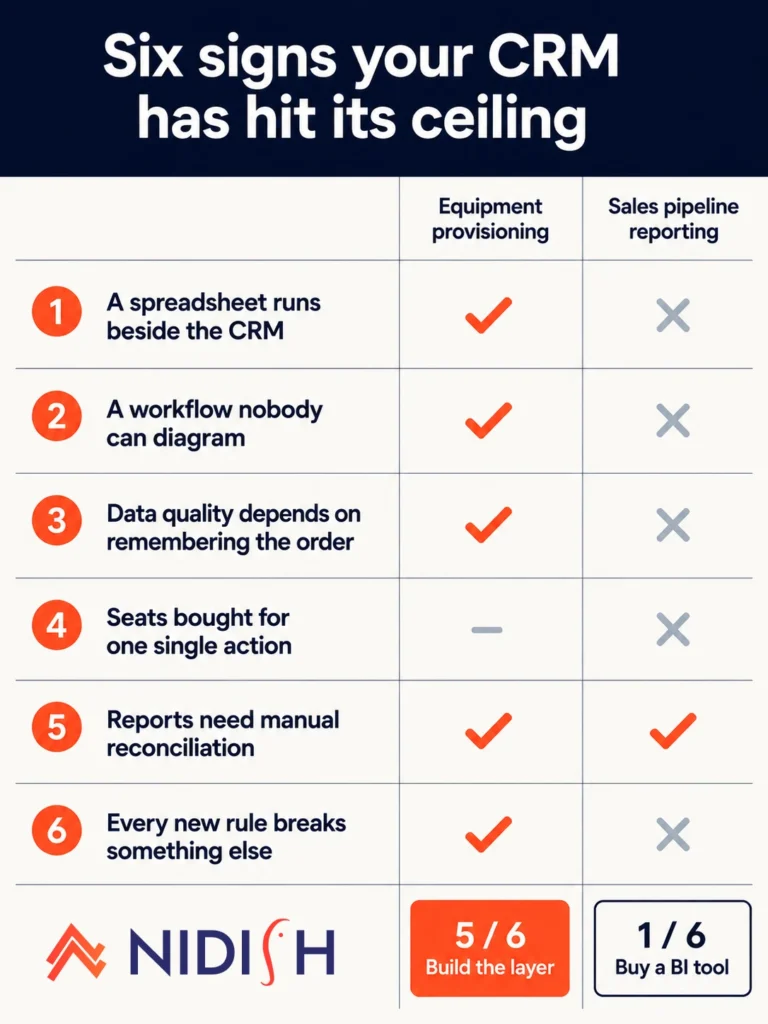
Does your CRM need a custom application layer? Six signs
None of these is conclusive alone. Three or more together, and the conversation is worth having properly.
| # | Sign | What it usually means |
|---|---|---|
| 1 | A spreadsheet runs alongside the CRM and one person maintains it | The process needs state the CRM has nowhere to hold |
| 2 | You have a workflow nobody can diagram from memory | Business logic has outgrown declarative tooling |
| 3 | Data quality depends on people remembering an order of operations | You need enforced sequence, not training |
| 4 | You bought seats for people who perform exactly one action | You are paying licence cost for an interface problem |
| 5 | Reports need manual reconciliation before anyone trusts them | Either the data contract is broken or the model is wrong |
| 6 | Every new business rule costs a config sprint and breaks something else | Configuration complexity has passed the point where code is cheaper |
The workflow test is the most reliable one
Ask whoever owns your automation to draw the current state on a whiteboard without opening the tool.
If they can, you have a configuration problem and you should keep configuring. If they cannot, and if the reason is that there are nine workflows calling each other with a shared status property acting as an informal state machine, you have already built an application. You just built it in a tool with no version control, no tests, and no way to see what changed last Tuesday.
That is usually the moment a custom application layer stops being a luxury.
The one sign that is a trap
“Our CRM is ugly” is not on the list, deliberately.
Aesthetic complaints usually mean nobody has configured the record page layouts, hidden the forty properties nobody uses, or set up the views people actually need. That is a day of work, not a build. We see this misdiagnosed often enough that it belongs alongside the other CRM mistakes growing companies make.
Four cheaper fixes to try before you build
Every one of these is faster, cheaper, and easier to reverse than software. Rule them out honestly, in this order.
Finish the native configuration. Most portals are running at maybe sixty percent of what they already own. Association labels instead of a new object. Conditional property logic. Required properties on stage transitions. Multiple pipelines. Quotes and line items instead of a bespoke pricing screen. If you have a genuine entity that the model does not represent, that is a data modelling question first, and the decision framework in when to use a HubSpot custom object and when not to will settle it faster than an architecture conversation.
Push logic into coded workflow actions. You get a real runtime, external calls, and proper branching, all inside the tool your admins already use. The ceiling is real but it is higher than most people assume.
Use middleware for orchestration only. If the problem is that three systems disagree, you may need integration rather than an interface. Deciding between platform-native connectors and something bespoke is its own question, covered in native versus custom HubSpot integrations, and the real-time versus batch sync trade-offs determine how much of the pain actually goes away.
Point BI at it. If the complaint is visibility, a warehouse and a dashboard tool will beat a custom build on every axis, including how quickly you can change your mind.
Only once all four have genuinely failed does the case for a custom application layer hold up.
Custom application layer vs the alternatives
| Approach | Solves | Cannot solve | Time to first value | Who maintains it | Reversible? |
|---|---|---|---|---|---|
| Native configuration | Missing entities, field-level rules, basic sequencing | Cross-record validation, action permissions, computation | Days | CRM admin | Easily |
| Coded workflow actions | Logic, external calls, derived values | Interface problems, multi-record transactions, external users | Days to weeks | Admin plus a developer | Mostly |
| Middleware or iPaaS | System disagreement, data movement, orchestration | Anything a user needs to look at and act on | Weeks | Integration owner | With effort |
| Embedded BI | Visibility, reconciliation, executive reporting | Any write path, any process enforcement | Weeks | Data team | Easily |
| Custom application layer | Process interfaces, enforced rules, computation, external access | Bad data, undecided process, adoption | Months | Product and engineering, ongoing | Expensively |
The last column is the one people underweight. Configuration is a decision you can unmake on a Thursday afternoon. A custom application layer is a commitment with a maintenance tail, and that asymmetry should raise the bar for building it.
Four architecture patterns for a custom application layer
Choosing the pattern is the highest-leverage decision in the whole project, and it is usually made by accident.
| Pattern | Where the UI lives | Auth model | Best for | Main failure mode |
|---|---|---|---|---|
| Embedded UI extension | Inside the CRM record page | CRM session, server-side token | Work still anchored to one record | Outgrows the viewport, no bulk actions |
| Adjacent application | Separate web app | SSO mapped to CRM users | Multi-record process work | Two interfaces, users drift back to the CRM |
| Service layer, no UI | Nowhere, it is an API | Server-to-server token | Logic and validation problems | Invisible, nobody can debug it but you |
| External portal | Separate app for non-staff | Own identity provider | Customers, partners, contractors | Security surface and support load |
Pattern one: the embedded UI extension
A custom card on the record page that renders your own interface inside the CRM.
This is the right starting point far more often than teams assume, because it costs the least and keeps people in one tool. It works when the work is genuinely anchored to a single record: show me this machine’s service history and let me book the next visit.
It stops working when the task spans records, needs a table wider than the panel, or requires bulk action. Do not fight this. When you outgrow the card, move to pattern two rather than cramming.
Pattern two: the adjacent application
A separate web app for the process, with the CRM behind it as the system of record.
This is what most people mean when they say custom application layer. It handles multi-record work properly, you control the entire interface, and you can build the sequence the business actually follows.
The failure mode is human, not technical. You now have two places to work, and unless the app is clearly better for its specific job, people drift back to the CRM and update records directly, which quietly breaks whatever the app was enforcing. Design for that. Either make the CRM path impossible for the fields the app owns, or accept that the app is advisory and stop calling it enforcement.
Pattern three: the service layer with no interface
Sometimes the interface is fine and the logic is the problem. In that case, build an API that owns the business rules, call it from CRM workflows and webhooks, and add no new screens at all.
This is the cheapest of the four by a wide margin and the most underused. It also has the nastiest operational property: it is invisible. When it misbehaves, an admin sees a record that did not update and has no way to find out why. Logging and a status surface are not optional here, they are the whole product.
Pattern four: the external portal
For people who need to act on CRM data and must never have a seat.
Technically this is pattern two with a different identity model and a much larger security surface. Treat the auth design as the project rather than an afternoon of it. Decide early what happens when a portal user’s contact record is deleted, merged, or reassigned, because all three will happen.
Worth noting: HubSpot’s own memberships and CMS features cover a meaningful slice of simple portal use cases without a custom build. Check that before committing.
The data contract: what the CRM owns and what your custom application layer owns
If you take one thing from this article, take this. The data contract determines whether the project is maintainable, and it should be written on one page before anybody opens an editor.
The rule is simple and almost never followed: every field has exactly one writer.
The moment two systems can write the same field, you own a conflict resolution problem, and conflict resolution problems do not get solved, they get lived with. Write the contract as a table and make somebody sign it.
| Data | System of record | Direction | Cadence | Conflict rule |
|---|---|---|---|---|
| Contact and company core fields | CRM | App reads only | Real time on read | CRM always wins |
| Deal stage and amount | CRM | App reads, writes only via defined action | Event driven | CRM wins, app retries |
| Serialised asset records | CRM custom object | App reads and writes | Event driven | App wins on operational fields, CRM wins on commercial |
| In-progress process state | Application | Never syncs to CRM | Not applicable | App only |
| Derived pricing or eligibility | Application | Writes result to CRM property | On calculation | App wins, CRM property is read-only in UI |
| Audit log | Application | Never syncs | Not applicable | App only |
Two rows there do the heavy lifting. In-progress process state should almost never live in the CRM, because it is transient, high-volume, and nobody reports on it. And derived values written back to the CRM should be read-only in the CRM UI, or somebody will helpfully correct them and break your calculation.
Getting the CRM-side model right first makes all of this easier, which is why the question of how to design a HubSpot data model with custom and standard objects comes before the architecture question, not after it.
How to build a custom application layer on HubSpot, step by step
Order matters here more than tooling. Every step below exists because skipping it costs a rebuild.
- Write the data contract. One page, the table above, agreed by whoever owns the CRM and whoever owns the app. Before any code.
- Pick the pattern deliberately. Write down why the other three do not fit. If you cannot, you have not decided, you have defaulted.
- Model the CRM side properly first. Objects, properties, associations, uniqueness rules. Get this stable before the app depends on it, because changing a property type after the app is live is a coordinated release.
- Create a private app and scope it minimally. Only the scopes you need today. Adding scopes later is a five-minute job. Removing them after an audit is not.
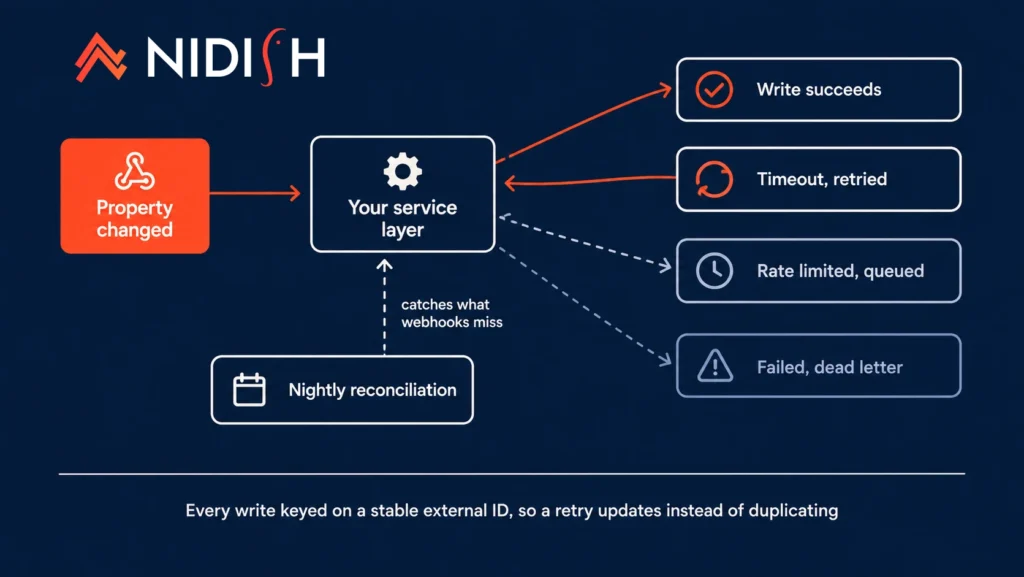
- Build the service layer before the interface. Every write idempotent, keyed on a stable external ID you control, so a retry cannot create a duplicate. This single decision prevents most of the data mess we get called in to clean up.
- Handle rate limits properly. Exponential backoff, a retry queue, and a dead-letter queue you actually monitor. The HubSpot API documentation sets out the current limits, and treat published figures as needing verification since they change.
- Subscribe to webhooks rather than polling. Polling is easier on day one and a liability by month three.
- Build the interface last. By this point the rules are enforced whether or not anybody uses your screens, which is exactly the resilience you want.
- Instrument every write. Correlation IDs, a plain-language activity log, and a status page an admin can read without asking a developer. Non-negotiable for pattern three.
- Ship one process end to end. Resist the second until the first has been in real use for a month. The strangler fig approach applies cleanly here: replace one slice at a time and leave the rest alone.
For the operational side of the service layer, the twelve-factor app conventions are worth following even for something small. Config in the environment, disposable processes, logs as streams. It costs nothing at the start and saves you the day you need a second environment.
Authentication and permissions
Your custom application layer needs four authentication decisions made early, and each one is expensive to undo later.
Private app token or OAuth: Server-to-server work inside one portal wants a private app token. Anything that needs to run across multiple portals, or that you might list publicly, wants OAuth from the start. Retrofitting OAuth is a rewrite of your auth layer, not a config change.
Never put a token in the browser: Obvious until somebody builds a quick front-end call to save a round trip. All CRM API traffic goes through your server.
Map roles to the CRM, do not invent a second permission system: Derive app permissions from CRM owner, team, and role wherever you can. Two permission systems drift apart within a quarter, and the drift is always discovered during an incident.
Decide the deactivation path now: When somebody leaves and their CRM user is deactivated, what happens to their app sessions, their queued actions, and the records they own? Write the answer down. Nobody thinks about this until it happens.
Events and triggers between the CRM and your custom application layer
| Event | Mechanism | Notes |
|---|---|---|
| Property changed on a record | Webhook subscription | Preferred. Include the previous value in your handler logic |
| Record created | Webhook subscription | Beware the import case, a bulk import can fire thousands at once |
| Deal stage changed | Webhook or workflow calling your endpoint | Workflow gives you filtering before the call |
| Form submitted | Workflow with a webhook action | Do not read form submissions directly |
| Association changed | Webhook subscription | Support varies by object, verify before you depend on it |
| Complex condition met | Coded workflow action calling your API | Filter in the workflow, act in your service |
| Scheduled reconciliation | Cron in your application | Always have one. Webhooks get missed |
| App writes back to CRM | API call, idempotent, keyed on external ID | The retry safety net for everything above |
Two entries there are load bearing. Bulk imports firing creation webhooks is the classic first outage, so build a circuit breaker before you need one. And the scheduled reconciliation job is the difference between an app that drifts silently and one that self-heals, because webhooks do get dropped and you will not notice for weeks otherwise.
What a custom application layer will not fix
The honest list. Every one of these has been the actual reason a project disappointed somebody.
Bad data: An application layer over dirty data does not clean it, it just fails faster and more visibly. Sort the data first, ideally against something like the CRM data migration checklist most teams skip, because a build is a terrible time to discover your duplicates.
Undecided process: If two departments disagree about the steps, code does not resolve the argument. It freezes it, in a form that now costs a sprint to change. Get the decision, then build.
Adoption: A better interface helps. It does not persuade people that a process they think is pointless is worth following. If the current tool is being avoided rather than fought with, software is not the intervention.
Reporting on its own: Repeating this because it keeps happening. Reporting pain means BI.
Your licence bill: Sometimes an external portal genuinely beats buying seats. Often the maintenance cost of the portal exceeds the seats you avoided. Do that arithmetic honestly, including the second year.
Complexity: You now own two systems instead of one, plus the contract between them. The complexity did not disappear, it moved somewhere you control. That is often worth it, but it is not a reduction.
Cost, timeline and team shape
Ranges rather than numbers, because what a custom application layer costs is driven by scope far more than by pattern. Treat these as planning shapes, not quotes.
| Pattern | Typical first release | Minimum team | Ongoing signal |
|---|---|---|---|
| Embedded UI extension | 3 to 6 weeks | One full-stack developer, part-time admin | Low. Mostly follows CRM platform changes |
| Service layer, no UI | 4 to 8 weeks | One backend developer, one admin | Low to moderate. Monitoring is the real cost |
| Adjacent application | 3 to 6 months | Two developers, a designer, a product owner | Moderate to high. It is a product now |
| External portal | 4 to 8 months | As above plus security review | High. Support load scales with users |
Budget for maintenance as a real line item, somewhere in the region of fifteen to twenty five percent of build cost annually. Platform APIs change, dependencies need patching, and the business changes its mind. A custom application layer with no maintenance budget becomes a liability in about eighteen months, and the second rebuild always costs more than the first build.
Team shape matters more than headcount. The projects that go badly are usually the ones with no single person who understands both the CRM configuration and the application code. That gap is where the data contract quietly gets violated.
The pre-build checklist
Ten questions. If you cannot answer all of them, you are not ready to build a custom application layer.
- Have you genuinely exhausted native configuration, or just concluded that you have?
- Which of the six signs apply, and can you name three?
- Is the process itself decided and signed off, in writing?
- Is the underlying data clean enough that the app will not immediately expose it?
- Which of the four patterns, and why not the other three?
- Is the data contract written, with one writer per field?
- What is the stable external ID that makes your writes idempotent?
- Which CRM events drive the app, and what is the reconciliation fallback when one is missed?
- Who monitors it, and how do they see a failure without a developer?
- What is the annual maintenance budget, and who signed off on it?
Question three is the one that gets skipped, and it is the one that kills projects. Question ten is the one that gets promised and then quietly removed from next year’s budget.
Frequently asked questions about custom application layers
What is a custom application layer for a CRM?
A custom application layer is purpose-built software that sits on top of a CRM’s data and API, providing a task-shaped interface and enforcing business rules the CRM cannot express natively. The CRM remains the system of record for commercial data, while the layer owns the process experience, validation across multiple records, computation, and access for users who should not have CRM seats.
How is a custom application layer different from an integration?
An integration moves data between two systems that each already have their own interface. A custom application layer is the interface for a process, and it treats the CRM as its back end. Many projects need both, but they solve different problems and conflating them leads to building the wrong one.
Do I need a custom application layer or just better CRM configuration?
Configuration first, almost always. Most portals use around sixty percent of what they already have. Build only when cross-record validation, action-level permissions, real computation, or external non-seat access are genuinely required, since none of those can be configured.
Which architecture pattern should I choose?
Start with an embedded UI extension if the work is anchored to a single record, since it is the cheapest and keeps users in one tool. Choose an adjacent application when the process spans many records. Choose a service layer with no interface when the problem is logic rather than screens. Choose an external portal only when non-staff users must act on CRM data.
Where should in-progress process state live?
In the application, not the CRM. Transient working state is high volume, nobody reports on it, and pushing it into CRM properties inflates your data model for no benefit. Only the outcome belongs in the CRM.
How do I stop duplicate records when the application writes to the CRM?
Make every write idempotent and key it on a stable external ID that your application owns. Then a retry after a timeout updates the existing record instead of creating a second one. This is the single most valuable decision in the build, and retrofitting it is painful.
Should I use a private app token or OAuth?
Use a private app token for server-to-server work inside a single portal. Use OAuth if you need to operate across multiple portals or might distribute the app publicly. Choose at the start, because moving from a token to OAuth later means rewriting your authentication layer rather than changing a setting.
How do I handle CRM API rate limits?
Exponential backoff, a retry queue, and a dead-letter queue that somebody actually monitors. Also add a circuit breaker for bulk events, because a large CSV import can fire thousands of creation webhooks in seconds and take your service down on an ordinary Tuesday.
What does a custom application layer cost to maintain?
Plan for roughly fifteen to twenty five percent of the original build cost each year, covering platform API changes, dependency patching, and business change. An application layer with no maintenance budget tends to become a liability within about eighteen months.
Can a custom application layer replace the CRM entirely?
It can, and that is usually a mistake. The CRM gives you reporting, automation, email, permissions, and an ecosystem you would otherwise rebuild. The point of the pattern is to keep all of that and add only the specific thing the CRM cannot do.
The pattern that works is narrow. Keep the CRM as the system of record, build the smallest layer that closes the actual gap, and write the data contract before anybody writes code. If you are trying to work out whether your situation calls for a custom application layer or three days of configuration you have not finished yet, that is a question worth an hour with somebody who has seen both go wrong. Usually the answer becomes obvious quite quickly.


 Blog
Blog Case Studies
 Career