
Most manufacturing sales teams don’t reject a CRM because the software is bad. They reject it because nobody asked what their day actually looks like before building it.
That was the starting point for a custom parts and precision components manufacturer we’ll refer to as the client in this piece. They didn’t need a platform migration. They needed their first real Pipedrive implementation for manufacturing, built around how quote-heavy, relationship-driven sales actually works, not a generic template borrowed from a SaaS company selling software instead of steel. Manufacturing accounts for a meaningful share of GDP, and margin pressure in the sector makes a slow, invisible sales process an expensive problem to leave alone, as National Association of Manufacturers data shows.
Table of Contents
Quick Answer
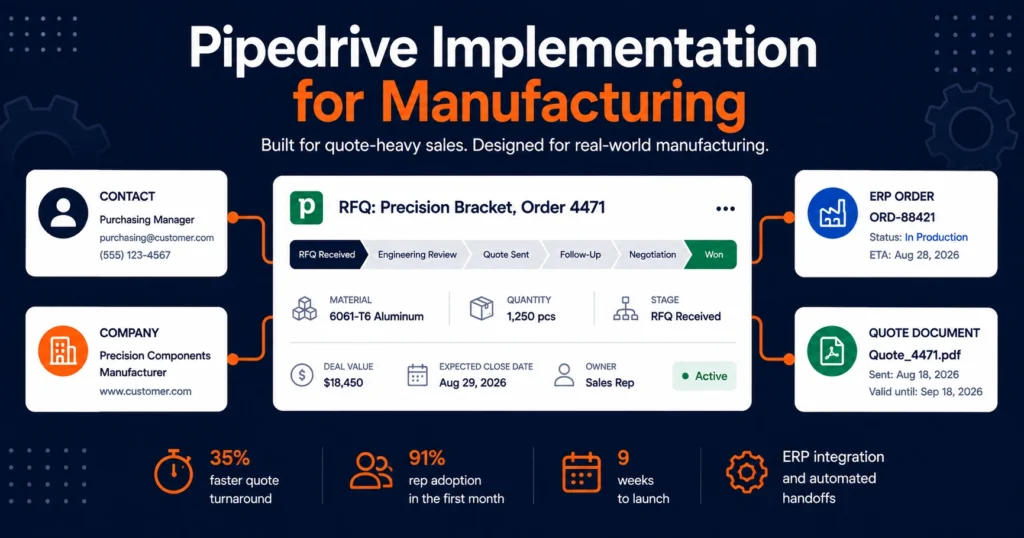
This case study covers a Pipedrive implementation for a 22-person sales and customer service team at a custom precision components manufacturer previously running sales through a mix of email, spreadsheets, and a shared inbox. The nine-week project built a quote-to-order pipeline structure, automated RFQ intake and follow-up, connected Pipedrive to the client’s existing ERP for inventory and order status visibility, and closed with 91% rep adoption within the first month and a 35% reduction in average quote turnaround time.
Key Terms RFQ (Request for Quote): the customer’s initial inquiry asking for pricing and lead time on a custom part, the starting point of the sales pipeline in this implementation. ERP integration: the connection between Pipedrive and the client’s production system, syncing inventory levels and order status so sales and the shop floor work from the same data. Pipeline stage: a defined step a deal moves through, in this case RFQ Received, Engineering Review, Quote Sent, Follow-Up, Negotiation, and Won or Lost.
Client Overview
The client manufactures custom precision components for industrial and aerospace clients, running two production facilities with a combined 22-person team spanning outside sales, inside sales, and customer service. This Pipedrive implementation for manufacturing needed to fit a process where deals typically start as a request for quote, move through engineering review and pricing, and close as either a one-time production run or a recurring supply contract. Sales cycles range from a few days for repeat orders to several months for new part qualification.
Before this project, the company had no CRM at all. RFQs arrived by email and were tracked in a shared spreadsheet that only one person kept updated. Sales reps managed their own follow-ups from memory or personal notes, and there was no shared visibility into which quotes were open, which were stalled waiting on engineering, or which customers hadn’t heard back in two weeks.
The Challenge
In short: the client had no shared visibility into open quotes, no consistent follow-up process, and a manual, error-prone handoff between sales and production. The core problem was invisibility. Leadership had no reliable way to see how many active quotes were in the pipeline at any given time, what stage they were in, or which reps were sitting on unanswered RFQs. When a customer called asking for a status update, whoever answered the phone often had to track down the right person before they could give an actual answer.
Quote turnaround was inconsistent across reps. Some followed up within a day, others let requests sit for a week or more, and there was no system flagging quotes that had gone quiet. In a business where competitors often win jobs simply by responding first, that inconsistency was costing real revenue, even though nobody had a clean way to quantify exactly how much.
The handoff between sales and production was another weak point. Once a quote turned into an order, the information needed to travel to the shop floor and the ERP system, and that handoff happened manually through email forwards and phone calls. Details got lost occasionally, and there was no audit trail showing what had been promised to the customer versus what production had actually scheduled.
Reps were also reluctant to adopt any system that felt like it was built for software sales rather than manufacturing. An earlier attempt to roll out a different CRM had failed two years prior, largely because the pipeline stages and fields didn’t match how the team actually worked, and the rollout was abandoned within a few months.
Why They Chose Pipedrive
The client evaluated a few options but wanted something visual, fast to configure, and simple enough that reps who weren’t naturally tech-forward would actually use it without resistance. Pipedrive’s deal-pipeline interface mapped closely to how the team already thought about their process, quotes moving left to right through stages, rather than forcing them into a more complex, marketing-heavy platform they didn’t need. The lighter footprint and faster setup timeline also mattered for a company that wanted to see results without a long, disruptive rollout.
Why Does a Pipedrive Implementation for Manufacturing Work Better Than a Generic CRM Setup?
A generic CRM setup assumes a sales process that looks like software sales: a single pipeline, a handful of stages, and no real dependency on production data. Manufacturing sales doesn’t work that way. A Pipedrive implementation for manufacturing has to account for engineering review, material specifications, and inventory visibility from day one, or the team ends up right back where this client started, tracking the real work in a spreadsheet on the side.
What Does a Pipedrive Implementation for Manufacturing Actually Include?
In short: a manufacturing-specific pipeline, RFQ automation, an ERP connection, custom fields for specs and certifications, and a rollout plan built around adoption, not just configuration. This was a from-scratch build, not a migration, which gave us room to design the pipeline around the client’s actual sales motion instead of retrofitting old habits into new software. For a deeper look at how Pipedrive stacks up against other platforms for this kind of build.
Pipeline and stage design
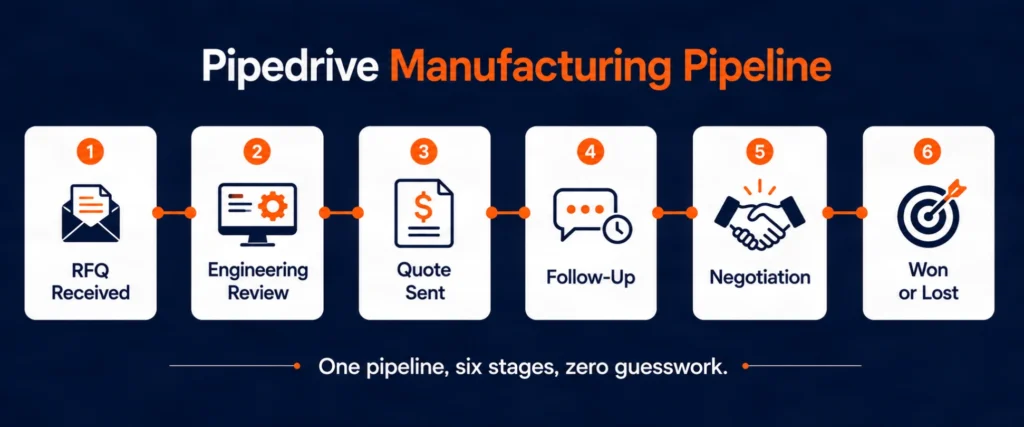
We built a primary pipeline reflecting the real RFQ-to-order journey: RFQ Received, Engineering Review, Quote Sent, Follow-Up, Negotiation, Won, and Lost with reason codes. A separate, shorter pipeline was built for repeat orders from existing accounts, since those deals move faster and don’t need the full engineering review stage. Splitting the two pipelines kept reporting clean and stopped fast repeat-order deals from cluttering the view of new business.
Quote and RFQ workflow automation
Every inbound RFQ email now automatically creates a deal and assigns it to the right rep based on product category and region. Automated reminders trigger for reps if a quote hasn’t been followed up on within two business days, and deals sitting untouched in the Follow-Up stage for more than a week automatically flag the sales manager. This single change addressed the inconsistent follow-up problem directly instead of relying on reps to remember.
ERP and inventory integration
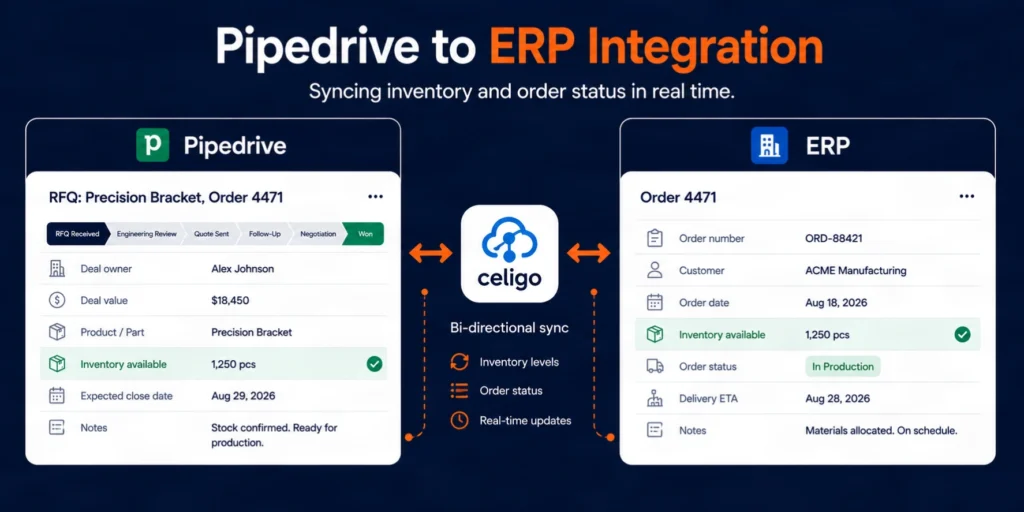
The client’s production data lived in a separate ERP system, and previously that information never touched the sales process at all. We connected Pipedrive to the ERP through Celigo’s integration platform, so reps can see current inventory levels and rough production lead times directly inside a deal before quoting, and won deals push order details into the ERP automatically instead of relying on a manual handoff.
Custom fields for manufacturing-specific data
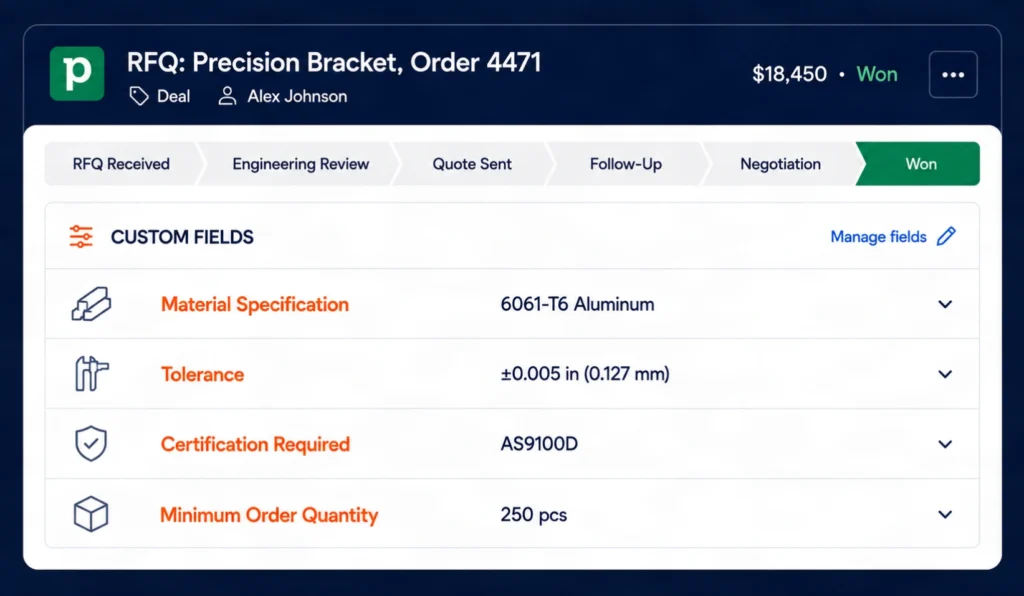
Standard CRM fields don’t capture what a manufacturing quote actually needs. We built custom fields for material specification, tolerance requirements, certification needs, and minimum order quantity, all visible directly on the deal card so reps and engineering could reference the same information without digging through email threads.
Rep adoption and mobile setup
Given the failed CRM attempt two years earlier, adoption risk was treated as seriously as the technical build. We kept the pipeline view intentionally simple, limited required fields to the ones the team actually needed, and set up the mobile app for outside sales reps who spend most of their time visiting customer sites rather than sitting at a desk.
Reporting and forecasting
We built dashboards showing open quote volume by rep, average time in each stage, win rate by product category, and a rolling forecast based on weighted deal value. For the first time, leadership had a single view of the pipeline instead of piecing it together from a spreadsheet and a handful of phone calls.
The Implementation Process
Weeks 1-2: Discovery and process mapping: We shadowed the sales and customer service process as it actually ran, mapped every step from RFQ intake to production handoff, and identified where information was getting lost or delayed.
Weeks 3-4: Pipeline and field build: Configuration of both pipelines, custom fields, deal stages, and the reason-code structure for lost deals, reviewed with the sales manager before automation work began.
Weeks 4-6: Automation and integration: Build of the RFQ auto-assignment logic, follow-up reminder automations, and the ERP integration connecting inventory and production data to the deal record.
Weeks 6-7: Pilot with a small group: Four reps, a mix of outside sales and inside sales, ran live deals through the new system while the rest of the team continued their existing process, giving us a chance to catch friction points early.
Weeks 7-8: Full team rollout and training: Hands-on training sessions for all 22 team members, split by role, with a focus on the mobile app for outside sales and the reporting dashboards for management.
Week 9: Stabilization: Close monitoring of adoption, quick fixes to a handful of automation rules that needed adjusting once real deal volume started flowing through the system.
The Results
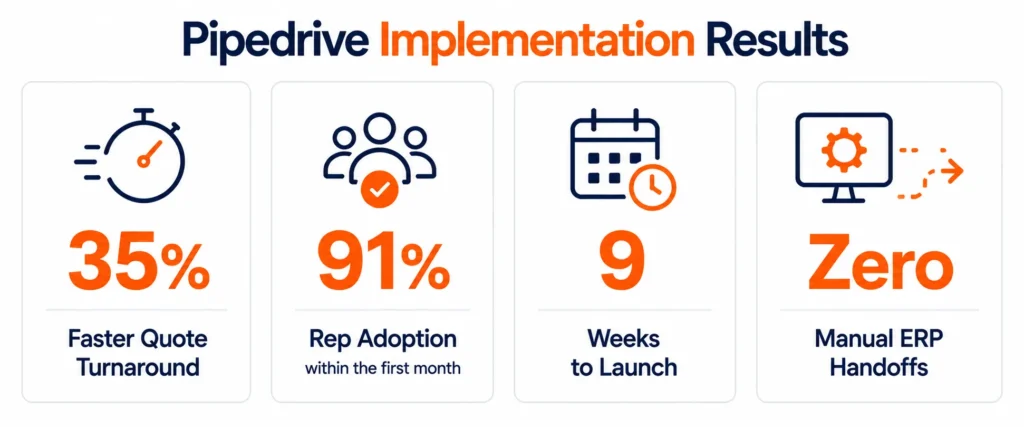
Quote turnaround dropped 35%, rep adoption hit 91% within a month, and the ERP handoff that used to be manual became automatic. This Pipedrive implementation for manufacturing delivered measurable results within the first two months, not just a cleaner-looking pipeline. Quote turnaround time dropped by 35% within the first two months, largely driven by the automated follow-up reminders that stopped RFQs from quietly going stale. Reps no longer needed to remember who they hadn’t followed up with, since the system was flagging it for them.
Rep adoption reached 91% within the first month, a meaningful outcome given the team’s earlier failed CRM attempt. The simplified field structure and the mobile setup for outside sales were the two factors reps consistently pointed to when asked why this rollout stuck where the previous one hadn’t.
Pipeline visibility, previously nonexistent, became a daily management tool. The sales manager could see stalled deals, upcoming forecast value, and rep-level performance without waiting on anyone to manually update a spreadsheet.
The ERP integration eliminated the manual handoff between sales and production for won deals, cutting a step that had previously introduced errors and delays, and giving customer service a reliable way to answer status questions without tracking down whoever had originally handled the account.
What Their Team Said
“We tried a CRM once before and it died within a few months because it just didn’t fit how we actually sell. This time felt different from week one. The pipeline looks like our actual process, and I’m not chasing quotes in my head anymore because the system is doing it for me.” , Sales Manager, custom precision components manufacturer
Key Takeaways
A manufacturing CRM rollout succeeds or fails based on how closely the pipeline matches the team’s real process, not on how many features the platform offers. The client’s earlier failed attempt happened because the system forced a generic sales motion onto a quote-heavy, engineering-dependent process that didn’t fit it. Building the pipeline around actual RFQ-to-order behavior, rather than a default template, was the single biggest factor in adoption sticking this time.
Automation aimed at the specific point of failure, in this case inconsistent follow-up, delivered a bigger measurable result than broad, generic automation would have. Knowing exactly where deals were getting lost mattered more than automating everything possible.
How We Approach Manufacturing CRM Implementations
Manufacturing sales doesn’t look like software sales, and a CRM built without accounting for that difference usually gets abandoned within a year. Every Pipedrive implementation for manufacturing we run starts by mapping the actual quote-to-order process before touching any configuration, then builds pipelines, fields, and automation around that reality rather than a generic template.
Where a client’s sales process depends on production or inventory data, we connect the CRM directly to the systems that hold it, so reps aren’t quoting blind and the handoff to the shop floor doesn’t rely on someone remembering to forward an email. Our Pipedrive implementation services cover this kind of build end to end. If your team has tried a CRM before and it didn’t stick, that’s usually a process-fit problem rather than a software problem, and it’s worth a conversation before assuming the next platform will fail the same way.
Frequently Asked Questions
How long does a Pipedrive implementation typically take for a manufacturing sales team?
For a team without an existing CRM, eight to ten weeks is a realistic timeline covering discovery, pipeline design, automation, a small pilot group, and full team rollout. Teams migrating from another CRM usually need additional time for data cleanup and mapping.
Does Pipedrive integrate with ERP systems used in manufacturing?
Yes, Pipedrive connects to most ERP systems either through native integrations or an iPaaS platform, allowing inventory levels, production lead times, and order status to sync with deal records without manual data entry.
Why do manufacturing CRM rollouts fail more often than in other industries?
Most failed rollouts come from forcing a generic sales pipeline onto a process that doesn’t match it, particularly the RFQ and engineering review steps that don’t exist in typical B2B software sales. A pipeline built around the team’s actual process is usually the difference between adoption and abandonment.
Can Pipedrive handle custom fields for specifications like tolerances and certifications?
Yes, custom fields can be built for any manufacturing-specific data point, including material specification, tolerances, certification requirements, and minimum order quantities, and displayed directly on the deal record so sales and engineering are working from the same information.
What happens to the old process, spreadsheets or email tracking, after a Pipedrive rollout?
In this project, the previous spreadsheet was retired once the pilot group confirmed the new pipeline was capturing everything reliably, with a short overlap period during the pilot phase to catch any gaps before fully switching over.
Is Pipedrive a good fit for a manufacturing company that has never used a CRM before?
Yes, Pipedrive’s visual, low-complexity interface tends to work well for teams with no prior CRM experience, since reps can see the entire deal process at a glance without needing to learn a heavier, feature-dense platform first.
How much does a Pipedrive implementation for manufacturing typically cost?
Cost depends on team size, the number of pipelines and integrations needed, and whether an ERP or inventory system connection is part of scope, so it varies project to project. A nine-week build like this one, covering discovery, custom fields, ERP integration, and full team rollout, sits toward the mid-to-higher end of a Pipedrive implementation, while a simpler single-pipeline setup without integrations costs less.


 Blog
Blog Case Studies
 Career