
Table of Contents
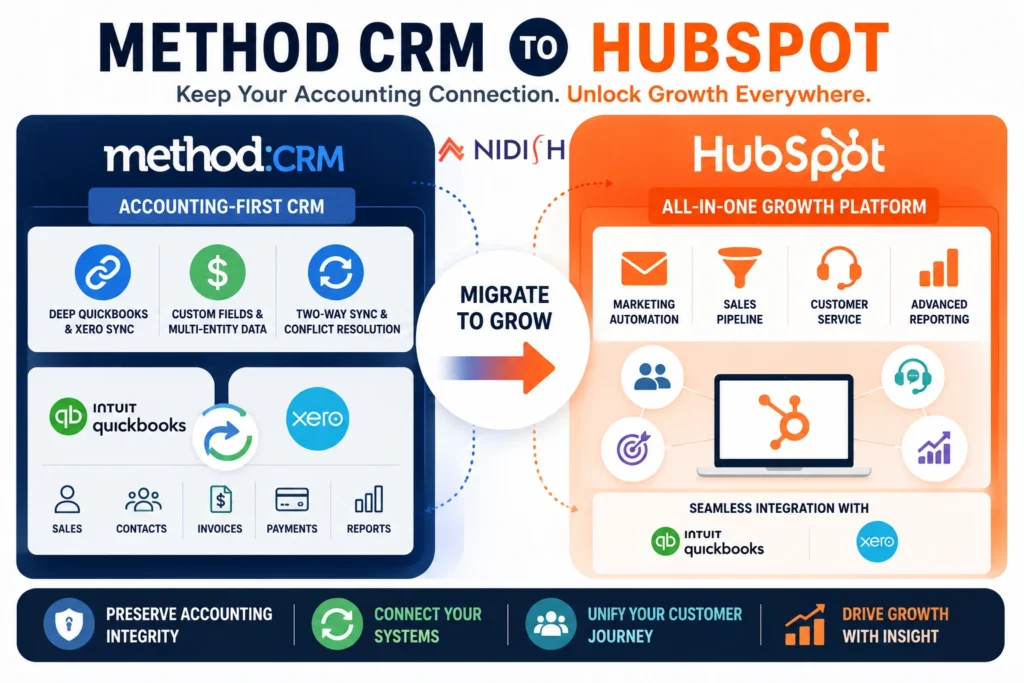
A Method CRM to HubSpot migration is a slightly different conversation than most CRM switches, because Method wasn’t built to be a general-purpose CRM in the first place. It was built to be the CRM version of your QuickBooks or Xero account, deeply, natively synced to your accounting data in a way most CRMs never bother with. That’s exactly why businesses choose it, and it’s exactly the thing that needs a real plan before you move away from it.
This guide walks through why businesses make this move, what you actually give up on the accounting-sync side when you do, and how to structure the migration so you gain HubSpot’s marketing and sales depth without quietly losing the QuickBooks or Xero visibility that made Method valuable in the first place.
Quick Answer
A Method CRM to HubSpot migration makes sense for businesses that have outgrown Method’s narrow CRM feature set and need real marketing automation, a connected service function, or broader reporting. The honest trade-off is accounting sync depth: Method offers deep, two-way QuickBooks and Xero sync including custom fields and multi-entity data, while HubSpot’s native QuickBooks integration only handles basic contact, invoice, and product syncing. Businesses that need to keep that deeper financial visibility after migrating typically need a custom-built integration layer rather than relying on HubSpot’s out-of-the-box QuickBooks app alone.
What Method CRM Is Actually Built For
Method CRM, often written as Method:CRM, was built around a specific premise: your accounting software already holds most of your customer and transaction data, so your CRM should sync to it natively rather than treating it as a separate system to be connected later.
Method is positioned explicitly as QuickBooks-first, not just QuickBooks-compatible, meaning it’s built around the accounting software rather than bolted onto it after the fact. That shows up in the depth of what actually syncs: custom fields, multi-entity structures like classes and terms, and built-in conflict resolution that lets a business configure exactly how field-level conflicts between systems get handled.
The platform is also highly customizable, letting businesses tailor workflows, screens, and reports without extensive coding, which has made it a natural fit for small to mid-sized businesses in manufacturing, wholesale, field services, and professional services, industries where the accounting relationship matters as much as the sales pipeline itself.
What Method doesn’t do is try to be a marketing platform. It’s missing functionality like social media integration and team communication features that broader CRMs include, because that was never the job it was built for.
Why Do Businesses Consider a Method CRM to HubSpot Migration?
The businesses that eventually look at HubSpot have usually hit one of a few specific ceilings, not general dissatisfaction with Method itself.
No native marketing automation
Method’s strength is deep accounting sync, not lead nurturing, email campaigns, or behavioral scoring. Businesses that need to run real marketing alongside sales end up needing a separate tool, which reintroduces the exact data fragmentation problem a unified CRM is supposed to solve.
Limited customer service functionality
Method wasn’t built with a connected support or ticketing function, so businesses whose post-sale service needs have grown often find themselves stitching together a separate helpdesk tool that doesn’t share data with the CRM.
Reporting scoped to CRM and accounting data only
Method’s reporting is strong within its own lane, but businesses that need marketing attribution, campaign performance, or broader funnel analysis alongside their accounting data hit a wall Method wasn’t designed to solve.
Growth beyond a QuickBooks-centric operating model
As businesses scale, add sales and marketing headcount, or expand beyond a tightly QuickBooks-centered workflow, a platform built around the full customer journey, not just the accounting relationship, tends to fit the next stage of growth better.
What Do You Actually Lose Moving From Method CRM to HubSpot?
This is the part most comparison content glosses over, and it’s the one thing worth being completely upfront about before you commit to this migration.
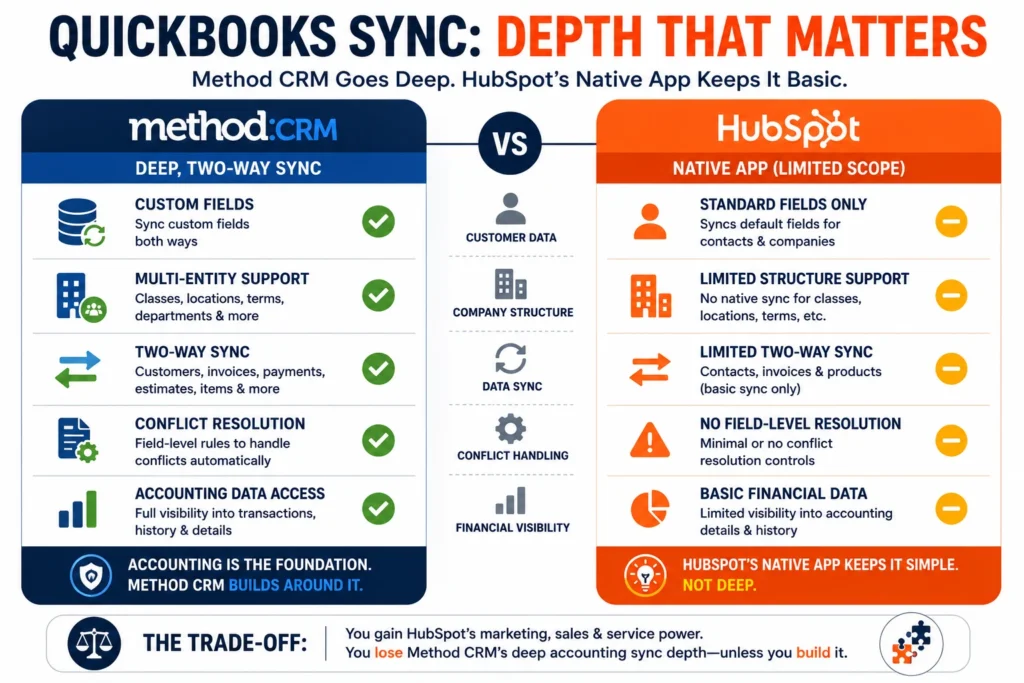
HubSpot’s official QuickBooks Online integration offers a limited two-way sync, covering contacts, invoices, and products, and lets you create and view invoices and see payment status. What it doesn’t do is fully sync detailed payment records or broader accounting objects the way Method does. There’s also no support for QuickBooks Desktop, HubSpot’s integration is scoped specifically to QuickBooks Online.
Method’s sync, by contrast, includes custom fields and multi-entity support, things like classes and terms that reflect real accounting structure, along with configurable conflict resolution for exactly how field-level disagreements between systems get handled. That’s a meaningfully deeper level of accounting integration than HubSpot’s native app is built to provide, because HubSpot’s core strength is inbound marketing, with finance integrations positioned as a secondary feature rather than the platform’s central design principle.
If your business relies on that depth, multi-entity accounting structures, granular conflict handling, QuickBooks Desktop support, migrating to HubSpot and stopping at its native QuickBooks app will genuinely feel like a downgrade on the finance side, even while it’s a significant upgrade on the marketing and sales side.
How to Keep That Depth Instead of Losing It
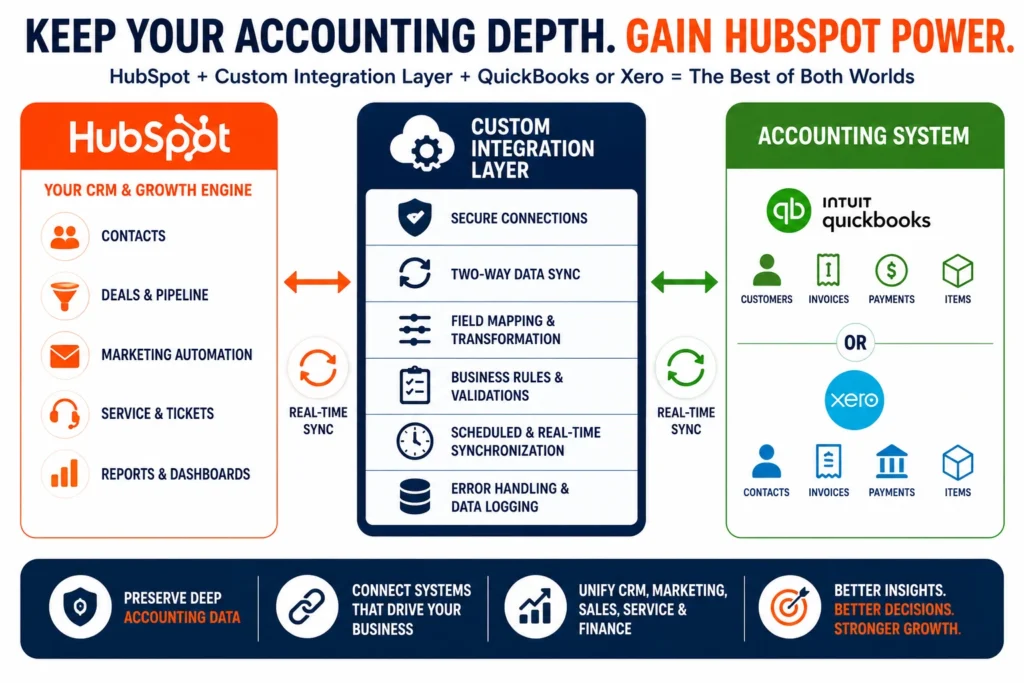
The good news is that this trade-off isn’t inevitable, it’s just not solved by HubSpot’s native app alone. The businesses that migrate successfully typically pair HubSpot with a properly built integration layer connecting it to QuickBooks or Xero directly, rather than relying on the basic native connection.
This is close to the exact kind of project we’ve built before. Our HubSpot and QuickBooks multi-account integration case study covers a business that needed accounting data flowing accurately across multiple accounts, well beyond what a standard native integration handles. Similarly, our HubSpot and Xero integration case study walks through building that same kind of depth for a business on Xero rather than QuickBooks. For businesses running a larger ERP rather than QuickBooks or Xero specifically, our HubSpot and NetSuite lead-to-cash case study covers the same underlying principle at a larger scale.
The pattern across all three is the same: HubSpot handles marketing, sales, and service natively and well, while a properly architected integration layer, not the out-of-the-box app, carries the accounting depth that Method users are used to having built in from day one.
What Actually Happens During This Migration
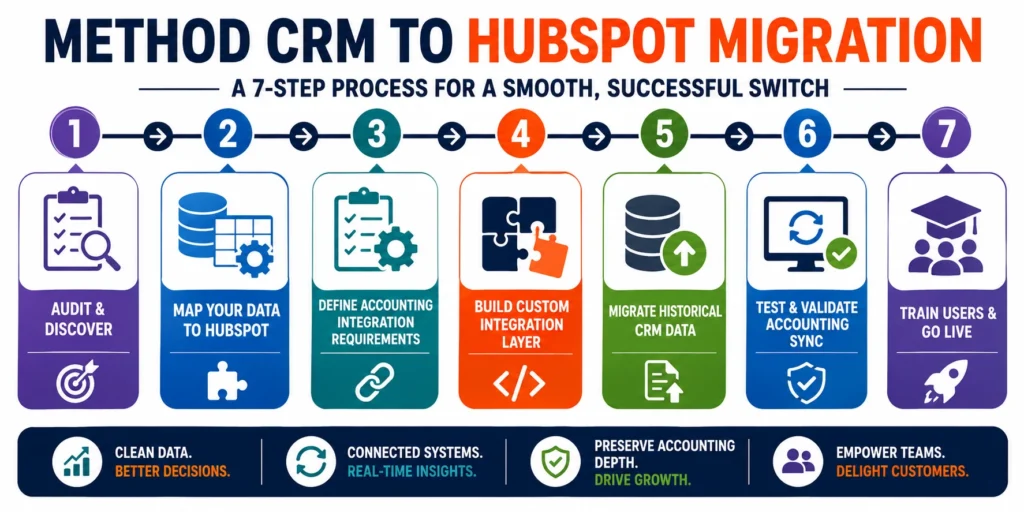
Step 1: Audit your Method setup fully
Document every custom field, workflow, and accounting sync rule currently running, including anything tied to multi-entity structures like classes or terms.
Step 2: Map CRM data to HubSpot’s object model
Contacts, companies, and deals need clear destinations in HubSpot’s structure, separate from the accounting sync question entirely.
Step 3: Scope your accounting integration needs honestly
Decide upfront whether HubSpot’s native QuickBooks or Xero app covers what you need, or whether a custom integration is required to preserve the depth Method currently provides.
Step 4: Build or configure the integration layer
If custom integration work is needed, this typically runs in parallel with the core CRM migration rather than as an afterthought bolted on later.
Step 5: Migrate historical CRM data
Contacts, past deals, and activity history move into HubSpot, preserving context rather than starting sales history from zero.
Step 6: Test accounting sync thoroughly before cutover
This is the highest-risk part of this specific migration, financial data errors are far more costly to catch late than a CRM field mismatch.
Step 7: Train the team on the new structure
Method’s workflow-centric interface and HubSpot’s CRM-record structure work differently enough that a real onboarding period matters.
What Transfers Cleanly and What Doesn’t
Contacts, companies, and standard deal data generally migrate without much friction, since these map reasonably well to HubSpot’s CRM objects. Basic workflow logic built in Method also tends to translate conceptually into HubSpot’s workflow engine, though it needs to be rebuilt rather than exported directly.
Custom fields tied to accounting structures, Method’s classes, terms, and multi-entity data, are the part that don’t transfer automatically and need deliberate handling, either mapped into HubSpot’s custom properties or preserved through the integration layer described above.
Conflict resolution rules, how Method decides which system wins when data disagrees, don’t have a direct HubSpot equivalent and need to be rebuilt as part of whatever integration approach replaces the native sync.
Common Mistakes to Avoid
- Assuming HubSpot’s native QuickBooks app matches Method’s depth: It doesn’t, and businesses that discover this after migrating are stuck retrofitting an integration under pressure instead of planning for it upfront.
- Migrating CRM data before scoping the accounting integration: These two workstreams need to be planned together, not sequentially, since the accounting sync decision affects how the CRM migration itself gets structured.
- Underestimating multi-entity complexity: Businesses using Method’s classes, terms, or multi-entity structures often don’t realize how specific that setup is until they try to replicate it elsewhere.
- Skipping a parallel testing period for financial data: Errors in accounting sync are far more consequential than typical CRM migration issues, and deserve more rigorous testing before cutover, not less.
Who Should Actually Make This Move?
A Method CRM to HubSpot migration tends to make sense when:
- You need real marketing automation and a connected service function alongside your CRM
- Your business has grown beyond a tightly QuickBooks-centered operating model
- You’re prepared to invest in a proper integration layer to preserve accounting sync depth, rather than relying on HubSpot’s native app alone
Staying on Method still makes sense when:
- Deep, native QuickBooks or Xero sync is the single most important function your CRM performs
- Your business doesn’t currently need marketing automation or a connected service function
- You’re not prepared to invest in additional integration work to replace Method’s built-in accounting depth
How Nidish Can Help
We’ve built the exact kind of integration work this migration actually depends on, connecting HubSpot to QuickBooks, Xero, and NetSuite with the depth that a native app alone doesn’t provide. If you’re weighing a Method CRM to HubSpot migration and want to keep your accounting visibility intact rather than quietly losing it, that’s precisely the project we handle end to end. Our HubSpot implementation services page covers what a full rollout looks like, and if you want the broader case for making this kind of move at all, our guide on why your business needs a CRM covers that decision in more depth.
Frequently Asked Questions
Does HubSpot integrate with QuickBooks as well as Method CRM does?
Not natively. HubSpot’s official QuickBooks Online app handles basic two-way sync for contacts, invoices, and products, but doesn’t support QuickBooks Desktop or sync detailed accounting objects the way Method’s QuickBooks-first architecture does. Matching that depth after migrating usually requires a custom-built integration.
What do I lose migrating from Method CRM to HubSpot?
Primarily accounting sync depth, custom fields, multi-entity structures like classes and terms, and configurable conflict resolution between your CRM and accounting system. HubSpot gains you marketing automation, service tools, and broader reporting in exchange.
Can I keep deep QuickBooks or Xero sync after migrating to HubSpot?
Yes, but it typically requires a custom integration layer built specifically for that purpose, rather than relying on HubSpot’s native QuickBooks or Xero app alone.
Is Method CRM or HubSpot better?
Neither is universally better. Method CRM is the stronger choice for businesses whose primary need is deep, native accounting sync. HubSpot is the stronger choice for businesses that need marketing automation, service tools, and broader CRM functionality beyond the accounting relationship.
How long does a Method CRM to HubSpot migration take?
This varies significantly based on how much custom integration work is needed to replace Method’s accounting sync depth, but most migrations run between four and ten weeks depending on that scope.


 Blog
Blog Case Studies
 Career