
Table of Contents
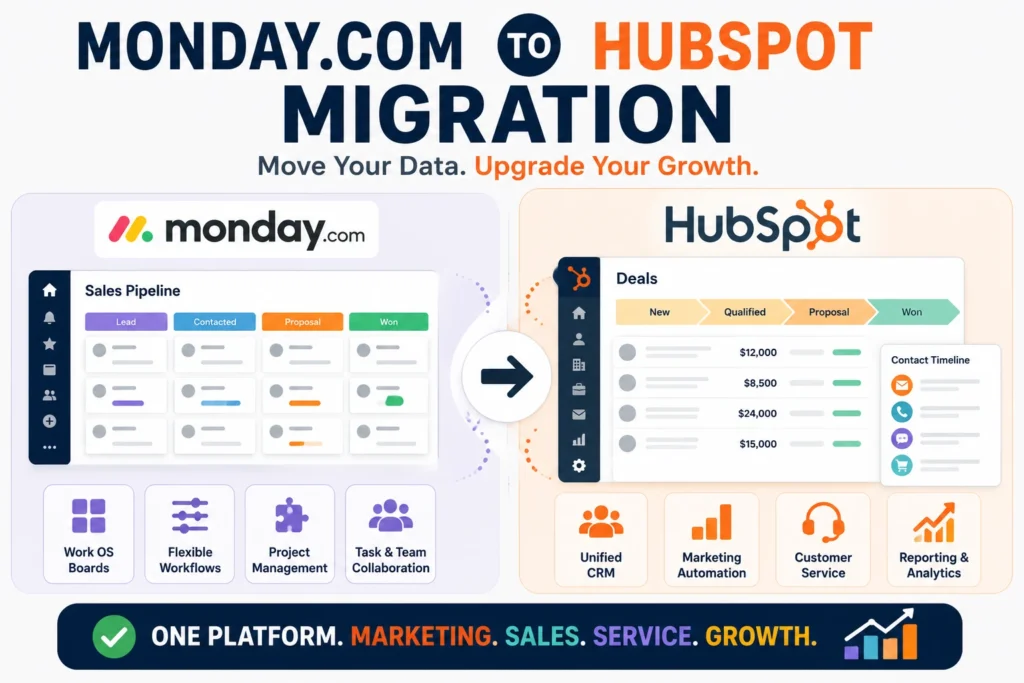
A Monday.com to HubSpot migration usually starts the same way. A sales team that adopted Monday for its flexible boards and easy setup starts running into the same wall: the platform was built to manage work, not to manage a revenue engine. The boards that felt refreshingly simple at ten deals a month start straining at two hundred, and the gap between “project management tool with a CRM layer” and “CRM built to run marketing, sales, and service together” becomes impossible to ignore.
This guide walks through what actually happens during that switch, honestly, including what transfers cleanly, what doesn’t, and what tends to surprise teams a few weeks after go-live.
Quick Answer
A Monday.com to HubSpot migration involves moving contacts, deal boards, and pipeline data out of Monday’s Work OS structure into HubSpot’s purpose-built CRM, along with rebuilding automations and connecting marketing, sales, and service into one unified system. The switch tends to make sense once a business needs native marketing automation, a real customer service function, or deeper reporting than Monday’s board-based structure supports. For teams whose primary need is flexible project tracking rather than end-to-end revenue management, Monday may still be the better fit, and it’s worth being honest about that before committing to a migration.
What Monday.com and HubSpot Are Actually Built For
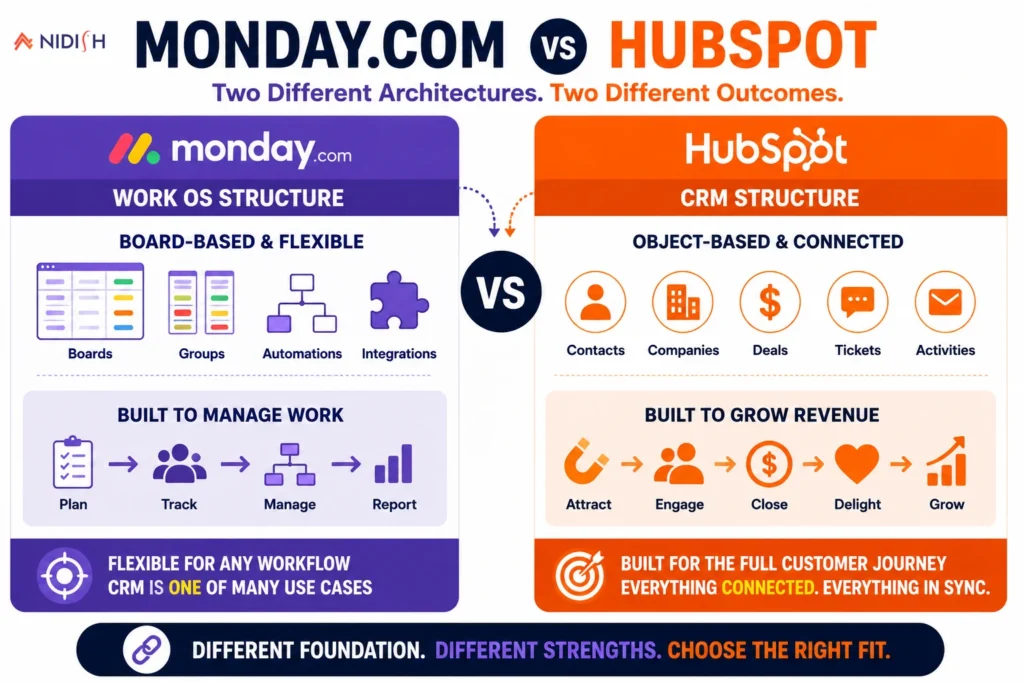
The core difference between these two platforms isn’t features, it’s architecture, and understanding that difference explains almost everything else in this guide.
Monday.com started as a work management tool, boards, groups, and customizable workflows designed for tracking any kind of work, not specifically sales. Its CRM functionality was layered on top of that foundation later. That heritage still shows: Monday CRM is, at its core, a flexible planner with sales-specific templates applied to it, which is exactly why teams that value customization and visual flexibility tend to love it early on.
HubSpot was built the other direction. The CRM came first, and marketing, sales, and service tools were built around it as a connected system from the ground up. That structural difference is the reason HubSpot handles the full customer journey, from first website visit through post-sale support, as one continuous data flow, while Monday treats each of those as a separate concern layered onto the same underlying board structure.
Neither approach is wrong. They’re built for different jobs, and the migration decision really comes down to which job your business actually needs done.
Why Do Businesses Move From Monday.com to HubSpot?
A few specific gaps tend to be what actually triggers this migration, more than general dissatisfaction with Monday.
No native marketing automation
Monday CRM doesn’t include built-in marketing automation the way HubSpot does. Businesses that need to nurture leads through email sequences, score leads based on behavior, or run multi-step campaigns typically end up bolting on a separate marketing tool, which immediately creates the same data fragmentation problem the CRM was supposed to solve.
No native customer service function
Monday has no built-in helpdesk product connected to the same CRM data, Monday Service exists as a separate paid product rather than a natively integrated part of the CRM. HubSpot’s Service Hub, by contrast, gives a support agent instant access to purchase history and past conversations from the same record a sales rep uses, without switching tools or reconciling two separate systems.
A smaller integration ecosystem
Monday.com’s ecosystem includes roughly 200 integrations and a smaller partner network, compared to HubSpot’s marketplace of well over a thousand native integrations. For businesses running a broader tech stack, that gap becomes a real constraint on what can connect cleanly without custom API work.
Reporting that doesn’t scale with complexity
Monday’s dashboards are genuinely strong for visual, board-level reporting. But as a sales organization’s data gets more complex, multi-touch attribution, custom reporting objects, and deeper funnel analysis, HubSpot’s reporting depth tends to pull ahead noticeably.
Automation gated behind higher tiers
Monday CRM’s paid plans start around $12 per seat monthly, but key features like automation and deeper integrations are locked behind higher-tier plans, which means the real cost of a fully functional setup is often higher than the entry price suggests.
What Actually Happens During a Monday.com to HubSpot Migration
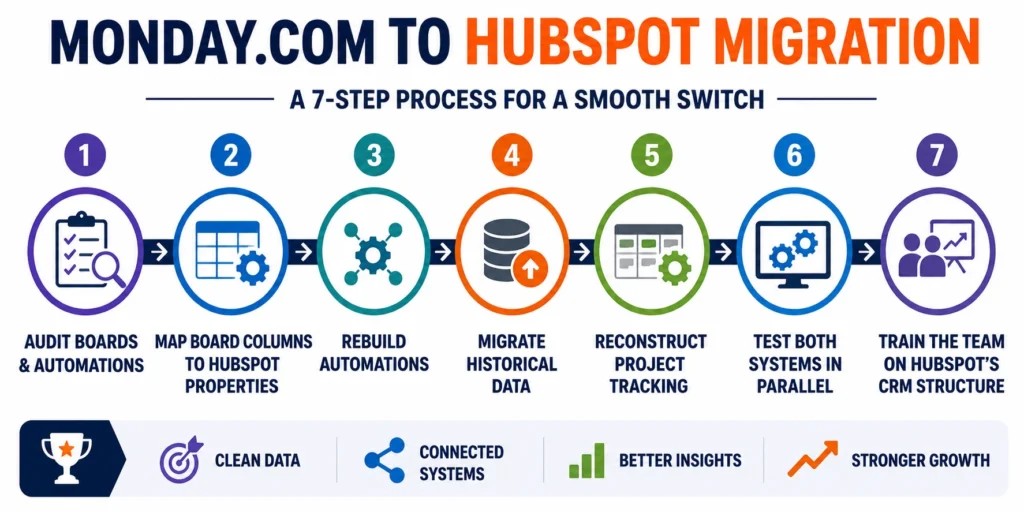
Because Monday’s board structure is fundamentally different from HubSpot’s object-based CRM model, this migration involves real translation work, not a simple export and import.
Step 1: Audit your Monday boards and automations
Document every board, group, column, and automation rule currently in use, including any board that’s evolved into an informal system nobody’s fully documented.
Step 2: Map board columns to HubSpot properties
Monday’s flexible columns need a clear destination in HubSpot’s structured contact, company, and deal properties, this mapping step determines how clean your data looks on the other side.
Step 3: Rebuild automations in HubSpot’s workflow engine
Monday’s automation recipes don’t transfer directly. Each one needs to be reviewed and rebuilt using HubSpot’s workflow tools, which is also a good opportunity to simplify automations that had become overly complex inside Monday’s board system.
Step 4: Migrate historical deal and activity data
Past deals, notes, and activity history move into HubSpot’s CRM records, preserving context rather than starting sales history from zero.
Step 5: Reconstruct project tracking where needed
If your team used Monday boards for project management alongside sales tracking, HubSpot’s newer project object and Gantt chart view inside its Smart CRM can often replace that functionality directly, worth evaluating before assuming you’ll need to keep a second tool running.
Step 6: Test in parallel before full cutover
Run both systems side by side briefly to confirm data accuracy and automation behavior before retiring Monday completely.
Step 7: Train the team on a genuinely different structure
Monday’s visual board interface and HubSpot’s CRM record structure work differently enough that a real onboarding period matters here, not just a quick walkthrough.
What Transfers Cleanly and What Doesn’t
Contacts, companies, and basic deal data generally migrate without much friction, since these map fairly directly to HubSpot’s standard CRM objects. Deal values, stages, and close dates typically carry over cleanly with proper column mapping.
Custom columns and board-specific fields are the part that need real attention. Monday’s flexibility means boards often accumulate highly specific custom columns over time, status labels, formula columns, connected board references, that don’t have an automatic HubSpot equivalent and need to be deliberately mapped or rebuilt as custom properties.
Automations and workflow recipes don’t transfer directly, as noted above. Monday’s automation logic is built around board and column triggers, while HubSpot’s workflow engine is built around CRM object and property triggers, similar in concept but different enough in structure that a straight port isn’t possible.
Common Mistakes to Avoid
- Migrating board sprawl instead of cleaning it up first: Businesses that have accumulated a dozen loosely related boards over time often just recreate that sprawl inside HubSpot instead of using the migration as a chance to consolidate.
- Underestimating the automation rebuild: Assuming Monday’s automation recipes will simply carry over leads to a launch where half the team’s day-to-day triggers quietly stop working.
- Not accounting for the pricing model shift: Moving from Monday’s per-seat structure to HubSpot’s per-seat plus contact-tier pricing can change the cost picture as your database grows, this is worth modeling out before committing, not discovering afterward.
- Assuming HubSpot replaces every use case Monday covered: If your team relied heavily on Monday for general project and task management well beyond sales, it’s worth confirming HubSpot’s project tools actually cover that need before retiring Monday entirely.
- Skipping a real training period: Monday’s visual, board-based interface and HubSpot’s CRM-record interface are different enough that reps used to one will genuinely struggle without proper onboarding into the other.
Should You Actually Make This Switch?
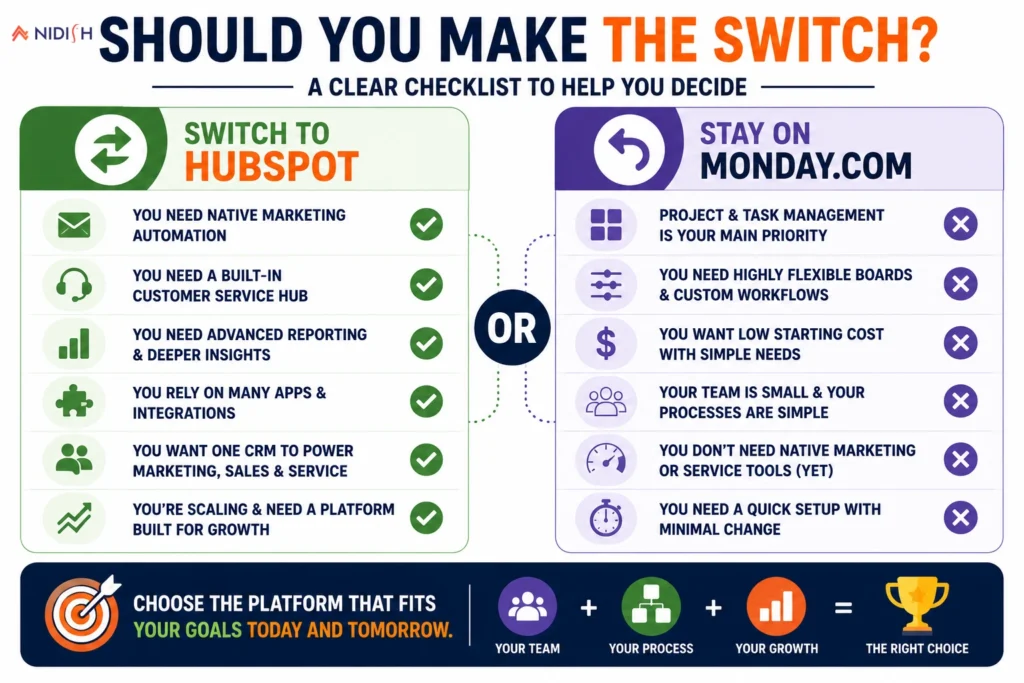
Given how differently these two platforms are built, the honest answer depends on what’s actually driving the conversation.
A Monday.com to HubSpot migration tends to make sense when:
- You need native marketing automation instead of bolting on a separate tool
- Customer support needs to be connected to the same CRM data your sales team uses
- Your reporting needs have outgrown board-level dashboards
- You’re integrating with a broader tech stack that Monday’s smaller ecosystem doesn’t cover well
- Revenue management, not general work tracking, is the primary job the system needs to do
Staying on Monday.com still makes sense when:
- Your core need is flexible, visual project and task management across teams, not just sales
- Your sales process is simple enough that Monday’s board structure handles it without strain
- Cost sensitivity matters more than deeper marketing and service capabilities right now
For most businesses that have genuinely outgrown Monday as a sales system rather than a work management tool, HubSpot’s connected structure tends to solve the actual underlying problem, disconnected data between marketing, sales, and service, in a way that adding more Monday boards or bolt-on tools generally doesn’t.
How Nidish Can Help
We handle the full technical scope of a Monday.com to HubSpot migration, board and column mapping, automation rebuilds, and historical data migration, so your team isn’t left rebuilding half their daily workflows from scratch after go-live. If you’re still weighing whether this move is the right one for your business, our guide on why your business needs a CRM covers the broader decision, and our HubSpot implementation services page covers what a full rollout looks like end to end. If your team is coming from an even earlier stage, tracking deals in spreadsheets rather than Monday, our spreadsheet to CRM migration guide covers that starting point directly.
Is HubSpot better than Monday.com for CRM?
It depends on the job. HubSpot is generally the stronger choice for businesses that need native marketing automation, connected customer service, and deeper reporting. Monday.com remains a strong choice for teams that primarily need flexible, visual project and task management with lighter CRM needs layered on top.
What data transfers when migrating from Monday.com to HubSpot?
Contacts, companies, deal values, stages, and close dates generally transfer cleanly with proper mapping. Custom columns, formula fields, and board-specific automations need to be deliberately mapped or rebuilt rather than transferring automatically.
Do Monday.com automations transfer to HubSpot?
No, not directly. Monday’s automation recipes are built around board and column triggers, while HubSpot’s workflow engine uses CRM object and property triggers. Each automation needs to be reviewed and rebuilt in HubSpot rather than exported as-is.
Can HubSpot replace Monday.com’s project management features?
For many teams, yes. HubSpot’s newer project object and Gantt chart view inside its Smart CRM can cover a meaningful amount of what teams previously used Monday boards for, though teams with heavy general work management needs beyond sales should confirm this covers their specific use case before retiring Monday.
How long does a Monday.com to HubSpot migration take?
Timelines vary based on how many boards and automations are in active use, but most migrations run somewhere between three and eight weeks from audit through full team adoption.


 Blog
Blog Case Studies
 Career