
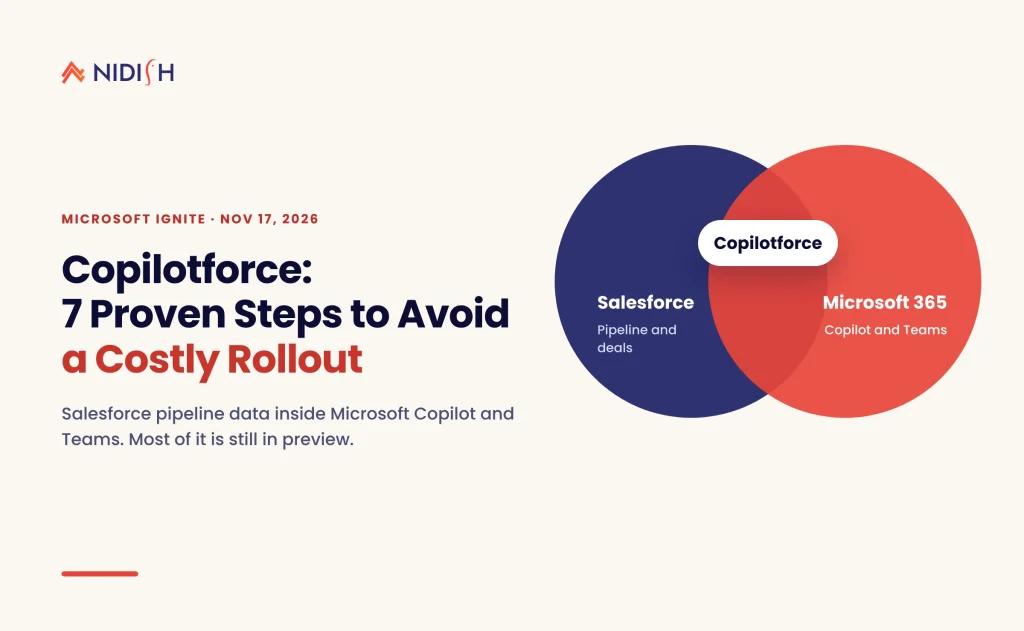
Your sellers already live in Teams and Outlook. Your pipeline lives in Salesforce. Copilotforce is the first time both vendors have officially agreed to close that gap, and most teams will switch it on before they have decided what it should be allowed to touch.
On November 17, 2026, at Microsoft Ignite, Salesforce and Microsoft announced Copilotforce. It brings Salesforce customer data and sales workflows into Microsoft Copilot and Teams, and it connects Salesforce Data 360 with Microsoft Fabric through zero-copy data sharing. Some parts are generally available today. Others are in public preview or pilot. This guide explains what Copilotforce actually includes, who should pilot it now, what it costs to roll out, and the seven steps we would follow before letting it near a live pipeline.
Key takeaways
- Copilotforce was announced on November 17, 2026 at Microsoft Ignite. It is a partnership, not a single product, made of four pieces with different release stages.
- Salesforce in Microsoft Copilot is in public preview (beta). Microsoft says it ships with 38+ prebuilt sales skills and uses authenticated Salesforce MCP access.
- Sales Cloud in Teams is in pilot with enterprise customers. Microsoft says an open beta is coming later this year.
- OneLake-to-Data 360 federation is generally available, while Data 360 sharing into OneLake is in public preview.
- Neither vendor has published pricing or licence prerequisites. Treat it as a pilot, and confirm licensing with both account teams before you commit budget.
Table of Contents
What is Copilotforce?
Copilotforce is a Salesforce and Microsoft partnership that lets sellers query and update Salesforce from inside Microsoft Copilot and Teams. It also lets data move between Salesforce Data 360 and Microsoft Fabric’s OneLake without copying it. Both companies announced it on November 17, 2026, at Microsoft Ignite.
The official Salesforce announcement frames it as bringing “Salesforce customer context and sales workflows to Microsoft Copilot.” Miguel Milano, Salesforce’s President and Chief Operating Officer, put it more bluntly: “Through Copilotforce, we’re bringing Salesforce to the largest surface in enterprise software today.”
Microsoft’s side of the story focuses on grounding. In the Microsoft announcement, Judson Althoff, CEO of Microsoft’s commercial business, said: “AI is only as powerful as the data and context that grounds it.” That line is the real pitch. Copilot already knows your emails, meetings and documents through Microsoft Work IQ. Copilotforce adds the account, opportunity and pipeline data that sits in Salesforce.
It is also the second “force” partnership Salesforce has signed this year. Salesforce Ben reports that it follows Claudeforce, the Salesforce and Anthropic tie-up announced in August.
Salesforce in Microsoft Copilot, Teams and Fabric: what is actually live
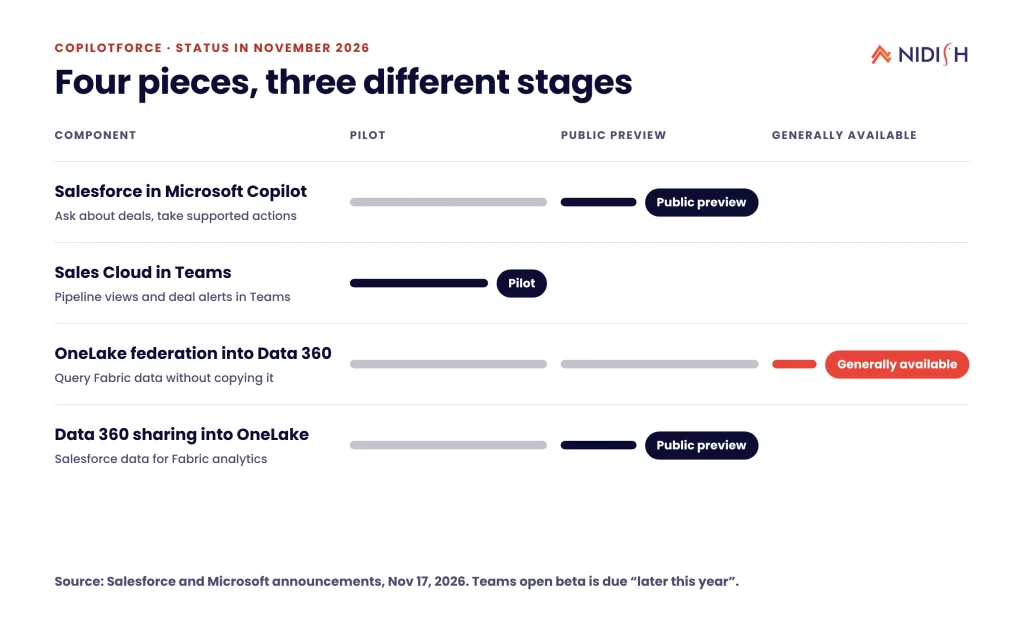
The four components are at very different stages. This is the single most important thing to understand before you plan anything, because “announced” and “available” are not the same.
| Component | What it does | Status (Nov 2026) | Who should touch it now |
|---|---|---|---|
| Salesforce in Microsoft Copilot | Ask Copilot about accounts, deals and pipeline; take supported actions in Salesforce | Public preview (beta) | Sales ops teams willing to run a sandboxed pilot |
| Sales Cloud in Teams | Pipeline and quota views, deal alerts and AI briefings inside Teams, synced back to Salesforce | Pilot with enterprise customers; open beta “later this year” | Large enterprises already in the pilot |
| Data federation: OneLake into Data 360 | Query Fabric data from Salesforce Data 360 without copying it | Generally available | Teams with a live Fabric and Data 360 footprint |
| Data 360 sharing into OneLake | Make Data 360 data available in Fabric for analytics | Public preview | Data teams testing cross-platform reporting |
Source: Salesforce and Microsoft announcements, November 17, 2026. Status may change; check vendor documentation before planning.
Salesforce in Microsoft Copilot
This is the piece most sellers will notice. Microsoft describes it as a plugin “available in public preview with 38+ prebuilt sales skills.” Named skills include Pipeline Review and Close Planning, Deal Review, Customer Health, Renewal Radar and Call Follow-Up.
Under the hood, Microsoft says Copilot reaches Salesforce “through authenticated Salesforce MCP access.” In plain terms, Copilot calls Salesforce as the signed-in user, so Salesforce sharing rules and field-level security should still decide what that user can see. Salesforce lists the plugin as available in AgentExchange and the Microsoft Copilot plugin directory.
Sales Cloud in Teams
Salesforce first showed this at Dreamforce 2026. It puts pipeline and quota views, deal notifications and AI briefings inside Teams, and syncs updates back to Salesforce. It is still a pilot. Unless your account team has already invited you, plan for it in 2027, not this quarter.
Zero-copy data between Data 360 and Fabric
The data layer is the quietest part of the announcement and possibly the most useful. Federation from OneLake into Data 360 is generally available now. Sharing from Data 360 back into OneLake is in public preview. If you want the background on how this works, Salesforce’s zero copy data federation module on Trailhead is the best starting point.
Salesforce also announced a separate Informatica plugin for Copilot that brings governed enterprise data into Copilot, Foundry and Fabric. It is related, but it is a separate product with its own setup.
Who the Salesforce and Microsoft partnership helps, and who should wait
The partnership helps most when your company already pays for both stacks and your sellers spend more time in Outlook and Teams than in Salesforce. That describes a lot of enterprise sales teams. It helps far less if your Salesforce data is a mess.
It suits you if
- You run Salesforce Sales Cloud and Microsoft 365 at scale, and adoption of the Salesforce UI is a known problem.
- Your reps already use Copilot daily, and managers want pipeline reviews without opening five dashboards.
- You have, or are building, a Fabric data estate and want Salesforce data in it without nightly ETL jobs.
You should wait if
- Your opportunity stages, close dates and amounts are not trusted today. Copilot will summarize bad data confidently and at speed.
- You are mid-migration or mid-reimplementation. Adding a new AI surface on top of a moving data model creates two problems.
- You run Google Workspace, or your sellers live in a different CRM. Copilotforce is specific to Salesforce and Microsoft.
The mistake we see constantly with AI assistants in CRM is treating them as an adoption fix. They are not. They are a data-quality amplifier. If your data is clean, Copilotforce makes it far more useful. If it is not, it spreads the mess into every meeting prep and email.
Copilotforce vs Agentforce vs Dynamics 365 Copilot
Copilotforce does not replace Agentforce. Salesforce’s own announcement still positions Agentforce agents, including Agentforce Coworker, as the way Salesforce runs autonomous work. Copilotforce is about where the seller works: inside Microsoft 365.
It also does not make Salesforce and Dynamics 365 interchangeable. Microsoft continues to push its own CRM into Copilot, which we covered in our guide to Dynamics 365 in Copilot.
| Question | Copilotforce | Agentforce | Dynamics 365 in Copilot |
|---|---|---|---|
| Where does the seller work? | Microsoft Copilot and Teams | Salesforce, Slack and Agentforce surfaces | Microsoft Copilot and Teams |
| System of record | Salesforce | Salesforce | Dynamics 365 |
| Main job | Context and supported actions from Salesforce inside Microsoft 365 | Autonomous and assisted agents on Salesforce data | Microsoft-native CRM inside Copilot |
| Best fit | Salesforce shops standardised on Microsoft 365 | Salesforce shops automating service and sales work | Microsoft-first companies on Dynamics |
If you are a HubSpot or Pipedrive customer reading this, the takeaway is simpler. The big vendors are racing to put CRM data inside the assistant your team already uses. Our HubSpot vs Salesforce comparison covers how that changes the platform choice.
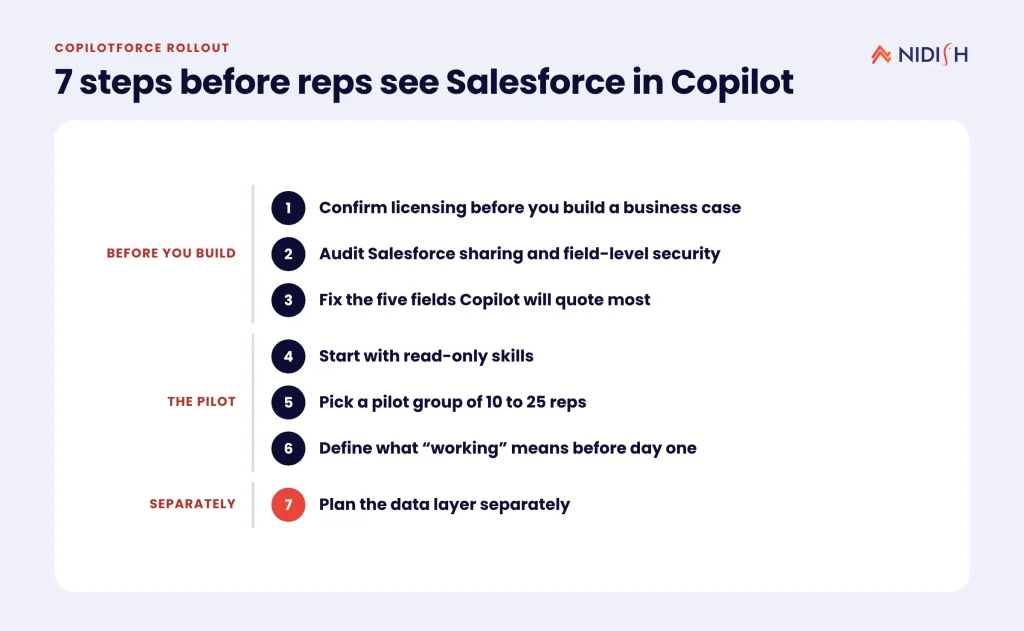
7 proven steps for a Salesforce in Microsoft Copilot rollout
These are the steps we would follow before any rep sees Salesforce data in Copilot. They come from rolling out AI assistants and CRM integrations, not from Copilotforce-specific experience, because nobody outside the pilot has that yet.
1. Confirm licensing before you build a business case
Neither announcement lists the Salesforce editions or Microsoft licences required. Salesforce’s footnote says “Pricing and packaging are subject to change” and tells customers to “base purchasing decisions on capabilities that are commercially available today.” Ask both account teams, in writing, which licences each user needs for the preview and for general availability.
2. Audit Salesforce sharing and field-level security
Both vendors say existing Salesforce permissions carry over, so your Salesforce permissions become Copilot’s permissions. Review profiles, permission sets and sharing rules first. Look hard at sensitive fields like discounts, margin, compensation notes and health or legal data. If a rep can technically see a field today, assume Copilot can surface it tomorrow.
3. Fix the five fields Copilot will quote most
Copilot summaries lean on a small set of fields: stage, amount, close date, next step and owner. Run a quick data-quality pass on those five before the pilot. Stale close dates are the usual offender. Our CRM data migration checklist has a cleanup section that works here too.
4. Start with read-only skills
Microsoft and Salesforce both say that “supported writeback actions to the CRM require explicit user confirmation and respect existing validation rules.” That is good. Still, start the pilot with read-only use cases such as meeting prep, deal summaries and pipeline review. Add write-back only after reps trust the answers.
5. Pick a pilot group of 10 to 25 reps
Choose reps who use Copilot daily and keep their Salesforce records current. Give them two or three named skills, such as Deal Review and Call Follow-Up, rather than all 38+. Narrow pilots produce clearer feedback.
6. Define what “working” means before day one
Agree on two or three measures, such as time spent on meeting prep, percentage of opportunities with a current next step, or manager time spent on pipeline review. Measure them for two weeks before the pilot. Without a baseline, the pilot ends in opinions.
7. Plan the data layer separately
The Fabric and Data 360 pieces are a data-architecture decision, not a sales-tools decision. Bring in whoever owns your data platform. Data 360 is consumption-priced, so ask how federated queries and shared data count against your credits before you point dashboards at it.
If you are weighing this for your own Salesforce and Microsoft 365 stack, we help teams audit CRM data and permissions before AI rollouts. Talk to our CRM integration team about a readiness check.
Questions to ask your Salesforce and Microsoft account teams
Most of what you need to plan a pilot is not in either announcement. Get these answers in writing before you commit time or budget. A vague answer to any of them is a reason to keep the pilot small.
- Licences. Which Salesforce edition and which Microsoft 365 or Copilot licence does each pilot user need, both in preview and at general availability?
- Preview terms. Does the public preview carry an SLA, data-processing terms or usage limits? Can preview features be withdrawn?
- Skills. Which of the 38+ prebuilt sales skills can write to Salesforce, and which are read-only?
- Data residency. Where are prompts, responses and Salesforce data processed and logged? Both vendors say regional availability is governed by your customer agreements.
- Audit. Where do Copilot-initiated actions show up in Salesforce field history and Microsoft audit logs?
- Data 360 credits. How do federated queries and data shared into OneLake count against Data 360 consumption?
- Teams roadmap. When does Sales Cloud in Teams move from pilot to open beta for your region and edition?
These questions also protect you in the renewal conversation. Vendors often bundle new AI features into enterprise renewals. Knowing what you actually need, and what is still in preview, keeps you from paying for capacity your team will not use for months.
What a Salesforce Copilot pilot actually costs and takes
Nobody can give you a price yet, because neither vendor has published one. What you can estimate is the internal effort. These are typical ranges from CRM and AI-assistant projects of similar shape, not vendor figures.
| Workstream | Typical effort | Owner |
|---|---|---|
| Licensing and contract review | 1–3 weeks, mostly waiting on vendors | RevOps and procurement |
| Permissions and sharing audit | 3–10 days, depending on org complexity | Salesforce admin |
| Data cleanup on core opportunity fields | 1–4 weeks | Sales ops with reps |
| Pilot setup and enablement | 1–2 weeks | Salesforce admin and IT |
| Pilot run and review | 4–6 weeks | Sales leadership |
| Fabric and Data 360 integration | Scoped separately | Data platform team |
The hidden cost is usually the data cleanup, not the setup. A sandbox pilot can be configured quickly. Getting reps to trust what Copilot says about their own deals takes longer.
Common Salesforce Copilot integration mistakes to avoid
Turning it on for everyone because it is “just a plugin”
Preview features change. Keep the pilot small and documented.
Skipping security review because “permissions carry over”
They do, which is exactly the problem if your Salesforce permissions are too loose today.
Treating the Teams app as available
Sales Cloud in Teams is a pilot. Don’t promise it to sales leadership for this quarter.
Confusing federation with migration
Zero-copy federation queries data in place. It does not clean, merge or deduplicate it.
Ignoring the Microsoft outage risk
The announcement landed during a week of widespread Microsoft service disruption, according to Salesforce Ben’s coverage. If sellers move their daily workflow into Teams and Copilot, keep a fallback path to Salesforce itself.
Measuring adoption instead of outcomes
Prompt counts look good in a slide. Better pipeline hygiene and faster deal reviews are what matter.
How Nidish approaches CRM AI rollouts
We are a RevOps and integration team, not a Salesforce or Microsoft reseller. Our view of this partnership is the same as our view of any AI layer on a CRM: the assistant is only as good as the data model, permissions and integrations underneath it. On most builds we inherit, the real work is fixing pipeline fields, sharing rules and the integrations that feed the CRM, often across Salesforce, HubSpot, NetSuite and Microsoft 365 at once. Our work on unifying CRM, ERP and marketing automation and our HubSpot–Salesforce SSO case study show how we handle multi-platform stacks.
Frequently asked questions about Copilotforce
What is Copilotforce?
Copilotforce is a partnership between Salesforce and Microsoft, announced on November 17, 2026, at Microsoft Ignite. It brings Salesforce customer data and sales workflows into Microsoft Copilot and Teams, and it connects Salesforce Data 360 with Microsoft Fabric through zero-copy data federation and sharing.
Is Copilotforce generally available?
Only part of it is. Federation from Microsoft OneLake into Salesforce Data 360 is generally available. Salesforce in Microsoft Copilot is in public preview (beta), Data 360 sharing into OneLake is in public preview, and Sales Cloud in Teams is in pilot, with an open beta expected later this year.
How much does Copilotforce cost?
Salesforce and Microsoft have not published Copilotforce pricing or licence requirements. Salesforce says pricing and packaging are subject to change. Ask both account teams which Salesforce and Microsoft licences each user needs before you build a business case or budget.
Does Copilotforce replace Agentforce?
No. Copilotforce brings Salesforce context and supported actions into Microsoft Copilot and Teams. Agentforce remains Salesforce’s platform for AI agents that work on Salesforce data. Salesforce’s announcement describes the two working together, including Agentforce Coworker in Teams.
Can Copilot change records in Salesforce?
Yes, for supported actions. Both vendors say supported write-back actions to the CRM require explicit user confirmation and respect existing validation rules. We recommend starting a pilot with read-only uses, such as meeting prep and deal summaries, before enabling write-back.
Is Copilotforce secure for sensitive CRM data?
Both vendors say existing Salesforce permissions and audit trails carry over into Copilot. That is only as safe as your current permissions. Audit sharing rules, permission sets and sensitive fields before any rep uses Copilotforce with live data.
Where to start
Copilotforce is a real signal. Salesforce and Microsoft now agree that sellers should get CRM context where they already work. For most teams, though, the right move this quarter is a small, read-only pilot backed by a permissions audit and clean opportunity data. The Teams app and the full data layer can wait until they leave preview.
Book a 30 minute call. We’ll tell you honestly whether you need a Copilotforce pilot, a CRM data cleanup first, or nothing at all yet.
Related reading
- Agentforce Coworker pricing explained
- Dynamics 365 in Copilot: what changes for CRM teams
- Microsoft Sales Development Agent: a safe pilot plan
- Composable CRM for AI-ready stacks
FAQ schema (JSON-LD) is in the Claude Doc, ready to paste.


 Blog
 Case Studies
 Career