
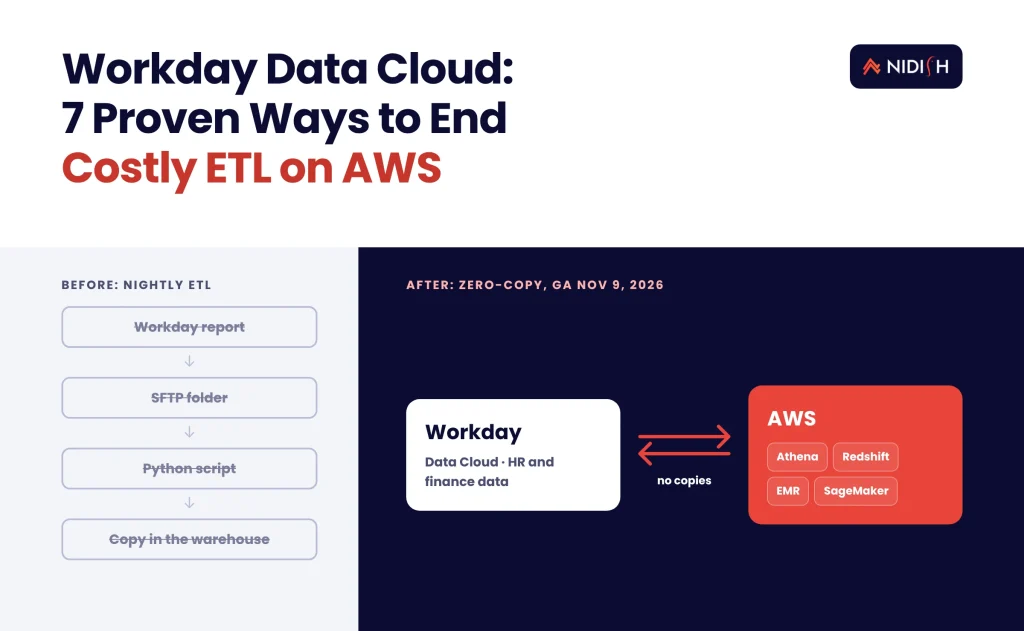
Most companies on Workday pay for their people and money data twice. They store it in Workday, then pay again to copy it out every night into a warehouse that is always a little stale. On November 9, 2026, AWS announced a bi-directional, zero-copy link between its analytics services and Workday Data Cloud, and that second bill just became optional.
If you run Workday HCM or Financials next to a CRM such as HubSpot, Salesforce or NetSuite, this matters. You can now query Workday data from Athena, Redshift, EMR or SageMaker without building a pipeline. This guide explains what changed, who it suits, what it costs to adopt, and seven steps to roll out Workday Data Cloud on AWS without creating a security or budget problem.
Key takeaways
- What changed: AWS made a Workday AWS integration generally available on November 9, 2026. It is bi-directional and zero-copy, built on Apache Iceberg and Workday Live Data Query.
- Who gets it: Only tenants that license Workday Data Cloud, which Workday sells as a separate SKU, on public-cloud-hosted tenants.
- What it replaces: Nightly extracts and custom ETL jobs that copy Workday data into S3 or a warehouse.
- The catch: The Glue Live Data Query connector is read-only, works through an Integration System User, and exposes a curated set of tables.
- Where to start: Pick one report your CFO or CHRO already argues about, and rebuild it on the new connection first.
Table of Contents
What is Workday Data Cloud?
Workday Data Cloud is Workday’s product for sharing data in and out of Workday without ETL. Workday’s admin guide describes it as a way to support “bidirectional data exchange between the Workday platform and external enterprise data environments,” using open standards such as Apache Iceberg and Trino.
Workday first introduced it on September 16, 2025. According to the Workday Data Cloud admin guide, it has three parts:
- Live Data Query (data out). SQL access to selected Workday business objects through JDBC, Python or Power BI. It suits targeted questions that need current data.
- Workday Data Lake (data out). Apache Iceberg tables that refresh daily. It suits large-scale analytics where a periodic refresh is fine.
- Zero-Copy Data In (data in). A Prism Data Catalog connection that lets Workday read external data directly.
Two licensing facts shape every decision that follows. Workday states that Data Cloud “is a separate product (SKU)” and is “only available in public-cloud-hosted tenants.” Usage is tracked in Workday’s Platform Consumption Console against entitlements and Flex Credits.
What AWS announced on November 9, 2026
AWS announced a Workday AWS integration that lets you query Workday data in place from AWS, and lets Workday query your AWS tables in place. Nothing is copied in either direction. The AWS What’s New post puts it plainly. Customers “can now query across their AWS and Workday datasets in place, without moving or copying data.”
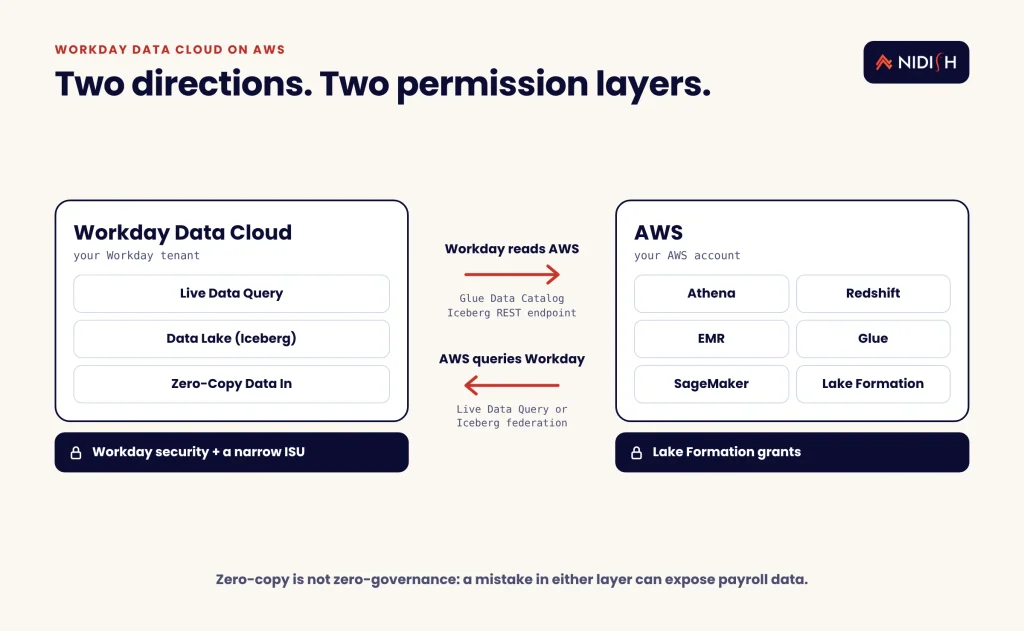
The AWS Big Data Blog confirms the integration is generally available. It works in two directions:
- AWS to Workday. You query Workday data through Live Data Query, or you federate to the Iceberg tables in Workday Data Cloud through AWS Glue Data Catalog federation.
- Workday to AWS. Workday registers your Glue Data Catalog Iceberg REST endpoint as an external catalog, so Workday Analytics can read your AWS Iceberg tables directly.
The named AWS services are SageMaker Unified Studio, AWS Glue, Lake Formation, Athena, Redshift and EMR. AWS says the integration is available in all commercial regions where AWS Glue runs. You configure a connection in the SageMaker Unified Studio, Glue or Lake Formation console.
How the zero-copy integration handles security
The zero-copy integration keeps both permission models in charge. On the AWS side, Lake Formation decides which databases and tables the Workday connection can read. On the Workday side, Workday’s Configurable Security controls which Workday principals can access federated tables. Federation to the Glue Data Catalog uses OAuth 2.0.
That two-sided model is good news for auditors. It also means you now have two places where a permission mistake can expose payroll data.
Why the Workday AWS integration matters for CRM and ERP teams
The Workday AWS integration matters because the hardest revenue questions need people data and money data in the same query. Think quota capacity against actual headcount, commission accruals against closed deals, or cost per hire against pipeline created.
Today, most teams answer those questions with a chain of extracts. Workday sends a report to an SFTP folder. A script loads it into S3. A transform job joins it to CRM exports. Someone fixes the job when a Workday field changes. We see this pattern constantly on integration audits, and the pipeline usually breaks quietly before anyone notices the numbers are wrong.
With the new connection, the join can happen at query time:
- RevOps can compare ramped reps in Workday with quota attainment pulled from HubSpot or Salesforce into the same lake.
- Finance can reconcile Workday Financials journals against NetSuite or CRM revenue tables without a nightly copy.
- HR analytics can model attrition risk in SageMaker on governed data instead of a spreadsheet export.
- AI agents can read near real-time Workday data through Live Data Query, within ISU permissions.
If you are already working to unify CRM, ERP and marketing automation data, this removes one of the most fragile links in that chain.
Live Data Query vs Iceberg federation: which access pattern fits?
Use Live Data Query for small, current, targeted reads, and Iceberg federation for large historical analytics. That is the short answer, and AWS’s own documentation draws the same line.
The AWS Glue Workday Live Data Query connector guide describes the purpose clearly. It lets you “run SQL queries against the current data in your Workday tenant, without copying or moving that data.” It also points large historical reads to the Iceberg tables Workday maintains.
| Criteria | Live Data Query | Iceberg federation (Data Lake) | Legacy ETL extracts |
|---|---|---|---|
| Data freshness | Near real-time | Daily refresh | Whatever your schedule runs |
| Where compute runs | Workday’s environment | Your AWS account (Athena, Redshift, EMR, SageMaker) | Your pipeline and warehouse |
| Best for | Lookups, agents, operational checks | Dashboards, models, warehousing | Systems with no Data Cloud license |
| Write back to Workday | No, read-only in Glue | No | Depends on custom build |
| Guardrails | Workday limits on run time, concurrency and memory | AWS service limits and cost | Your own monitoring |
| Copies of payroll data | None | None | One or more |
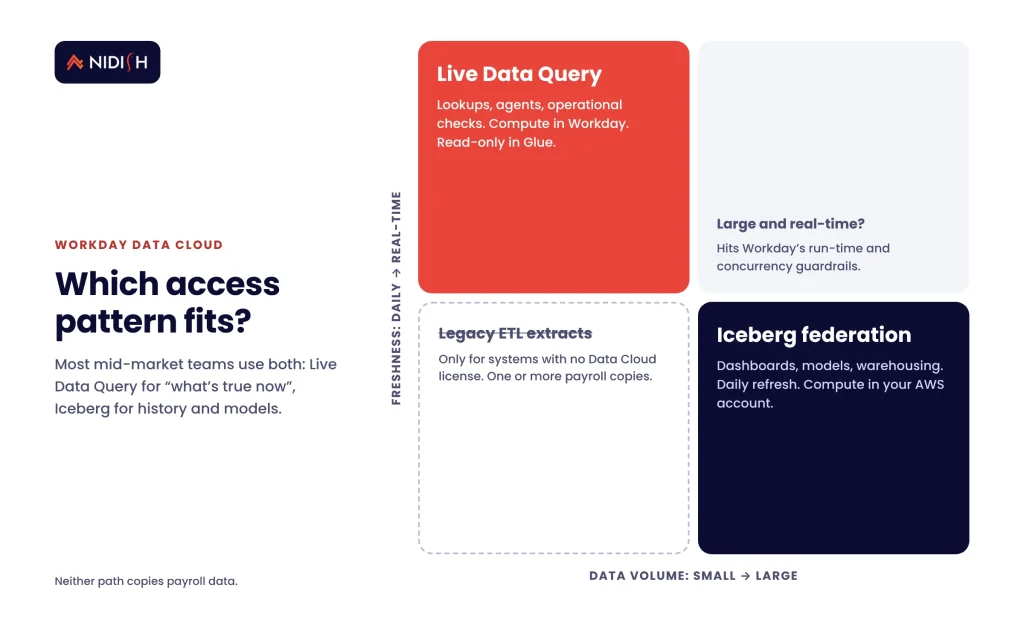
Most mid-market teams on Workday Data Cloud will use both: Live Data Query for “what is true right now?” and Iceberg federation for “what has been true for three years?”
7 proven steps to roll out Workday Data Cloud on AWS
These seven steps follow the order we would use on a client build. Each one exists to stop a specific, expensive mistake.
1. Confirm your Workday Data Cloud license and tenant type
Check two things before anyone touches AWS. First, confirm your contract includes the Workday Data Cloud SKU. Second, confirm your tenant is hosted in Workday’s public cloud. Workday notes you “might need to take additional steps to enable” Live Data Query depending on your subscription agreement. Ask your Workday account team in writing, and ask how Flex Credit consumption will be measured.
2. Pick one painful report, not a platform migration
Start with a single report that two teams already argue about. A good candidate is headcount-adjusted quota capacity, or commission accruals against booked revenue. A narrow first use case shows value in weeks. A “move everything to zero-copy” program shows value in quarters, if ever.
3. Create a least-privilege Integration System User
The Glue connector authenticates as a Workday Integration System User (ISU), not as a named employee. The ISU needs View Only access to the domains you want to expose, and those domain permissions decide which tables and columns AWS can read. Keep the ISU narrow. Exclude compensation and personal data domains unless the first use case truly needs them.
4. Store credentials properly in AWS Secrets Manager
The connector uses an OAuth 2.0 JWT bearer flow. AWS Glue signs a token with your private key and exchanges it for a short-lived access token. The secret must hold four reserved keys: client ID, ISU name, token endpoint and private key. Grant secretsmanager:GetSecretValue only to the roles that run the connection, and rotate the key on a schedule.
5. Map Lake Formation permissions to Workday security
Write down, in one table, who can see which objects inside Workday and who can see the same Workday Data Cloud tables in AWS. Then make Lake Formation match. The most common failure we expect here is an analyst role in AWS that can read a table the same person could never open inside Workday. Remember that ISU permission changes can take up to 15 minutes to apply.
6. Model the cost before you open the gates
Neither AWS page lists separate pricing for the integration. Expect your normal Athena, Redshift, Glue or SageMaker usage charges on the AWS side, plus Flex Credit consumption on the Workday side. Run a two-week pilot with query logging switched on. Then project the monthly cost of the dashboards and agents you plan to run, and confirm the numbers with both vendors.
7. Retire the old pipeline in stages
Do not switch off the nightly extract on the day Workday Data Cloud goes live. Run the old and new paths in parallel for one close cycle. Compare row counts and totals, then decommission the extract and its SFTP folder. Document the change so the next admin knows where Workday data now comes from.
Planning this alongside a CRM or ERP integration? Our HubSpot integration team can map the data flows and security model with you before you spend on licenses.
Workday Live Data Query limits to plan around
Workday Live Data Query is powerful, but the AWS Glue connector has hard limits you should design around from day one. The AWS Glue documentation lists them:
- Read-only. The Glue connector cannot write back to Workday. Updates still need Workday APIs or an iPaaS.
- Fully qualified table names. Queries must use
catalog.schema.tablenames. - No field-based partitioning. Large reads belong on the Iceberg path instead.
- ISU only. Workday “User As Self” authentication is not supported in Glue.
- Curated tables. Only the objects listed in Workday’s Data Cloud Catalog are available.
- Workday guardrails. Workday applies its own limits on query run time, concurrency and memory.
The read-only limit is the one that surprises people. If your plan involves an agent that updates a Workday record, you still need a write path. For many teams that is an iPaaS. Boomi, for example, launched Enterprise Connectors for Workday in 2026 with Report as a Service and Workday Query Language support.
What a Workday zero-copy integration costs and takes
A first Workday zero-copy integration is usually a weeks-long project, not a quarter-long one, if the license is already in place. The work is mostly security design and data modeling, not pipeline code.
Here is a realistic shape for a mid-market rollout, based on how similar integration projects tend to run. Treat these as planning ranges, not quotes:
- Discovery and license check: one to two weeks, mostly waiting on vendor answers.
- ISU, OAuth and Secrets Manager setup: a few days for an experienced admin.
- Lake Formation and Workday security mapping: one to two weeks, longer with many legal entities.
- First report or model: two to four weeks, including a parallel run.
- Retiring the legacy extract: one close cycle.
The bigger cost question is the Workday Data Cloud license itself. It is sold separately, so the business case has to beat what you pay today for extracts, warehouse storage and the hours spent fixing broken jobs. All pricing should be confirmed with Workday and AWS at the time you buy.
Common mistakes to avoid
Treating zero-copy as zero-governance
No copies means fewer leaks, but a wide ISU or a loose Lake Formation grant still exposes sensitive data. Review both sides together.
Using Live Data Query for history
Live Data Query is built for current data. Point dashboards that scan years of history at the Iceberg tables instead.
Forgetting the CRM side
Workday data alone rarely answers a revenue question. Plan how CRM data lands in the same lake, whether through native exports, an iPaaS, or a custom sync. Our guide to real-time vs batch sync strategy covers that trade-off.
Killing the old pipeline too early
Run both paths for a full close cycle so finance can sign off on the numbers.
Skipping cost monitoring
Query-based billing rewards good habits and punishes careless ones. Set budgets and alerts before you open access to every analyst.
How Nidish approaches Workday Data Cloud projects
We start with the question the business is trying to answer, not with the connector. On most integration builds we inherit, the expensive problem is not missing data. It is three versions of the same number. So we map where each Workday, CRM and ERP figure should live, design least-privilege access on both platforms, and only then build.
For Workday Data Cloud work, our team draws on experience across HR and ERP integrations such as UKG, HubSpot and NetSuite, iPaaS tools, and custom Node.js services. That means we can tell you honestly when Workday Data Cloud is the right move and when a simpler API sync is enough. If you want a second opinion on your current setup, our RevOps audit for lead-to-cash leakage is a good place to begin.
Frequently asked questions
Is the Workday Data Cloud integration with AWS generally available?
Yes. AWS announced the integration on November 9, 2026, and its Big Data Blog states it is generally available. AWS says it works in all commercial AWS regions where AWS Glue is available. You still need a Workday Data Cloud license and a public-cloud-hosted Workday tenant to use it.
Do I need a separate license for Workday Data Cloud?
Yes. Workday’s admin guide says Workday Data Cloud is a separate product with its own SKU, and you need the right license to enable it. Usage is tracked against entitlements and Flex Credits in the Platform Consumption Console. Confirm current pricing and terms with your Workday account team before you plan a rollout.
Can AWS write data back into Workday through this connection?
No, not through the Glue Live Data Query connector, which AWS documents as read-only. Workday can read your AWS Iceberg tables through a registered Glue catalog, but updating Workday records still needs Workday APIs or an integration platform. Plan a separate write path if your use case changes Workday data.
What is the difference between Live Data Query and the Workday Data Lake?
Live Data Query gives near real-time SQL access to selected Workday objects, with compute in Workday’s environment. The Workday Data Lake provides Apache Iceberg tables that refresh daily, and you query them with your own AWS compute. Use Live Data Query for current lookups and the Data Lake for large historical analysis.
Which AWS services can query Workday data?
AWS names Amazon Athena, Amazon Redshift, Amazon EMR, AWS Glue, SageMaker Unified Studio and AWS Lake Formation in its announcement. Glue Data Catalog federation connects to Workday’s Iceberg catalog, and Lake Formation controls permissions. Athena can also reuse the same Workday Live Data Query connection that you create in AWS Glue.
Does zero-copy mean my Workday data is automatically secure?
No. Zero-copy removes extra copies, but access still depends on two permission layers. Lake Formation controls what the connection can read in AWS, and Workday security controls what the Integration System User can see. A broad grant on either side can expose payroll or personal data, so review both together.
Where to start
Workday Data Cloud on AWS is one of the more practical data announcements of the year. It removes the most fragile part of many HR and finance pipelines and puts people data next to revenue data. It will not fix a messy data model, loose permissions or an unclear business question.
Start small. Confirm the license, pick one report, build a narrow ISU, and run it in parallel for one close cycle. If you want help deciding whether this fits your stack, book a 30 minute call. We’ll tell you honestly whether you need Workday Data Cloud, a simpler API integration, or no change at all.


 Blog
 Case Studies
 Career