
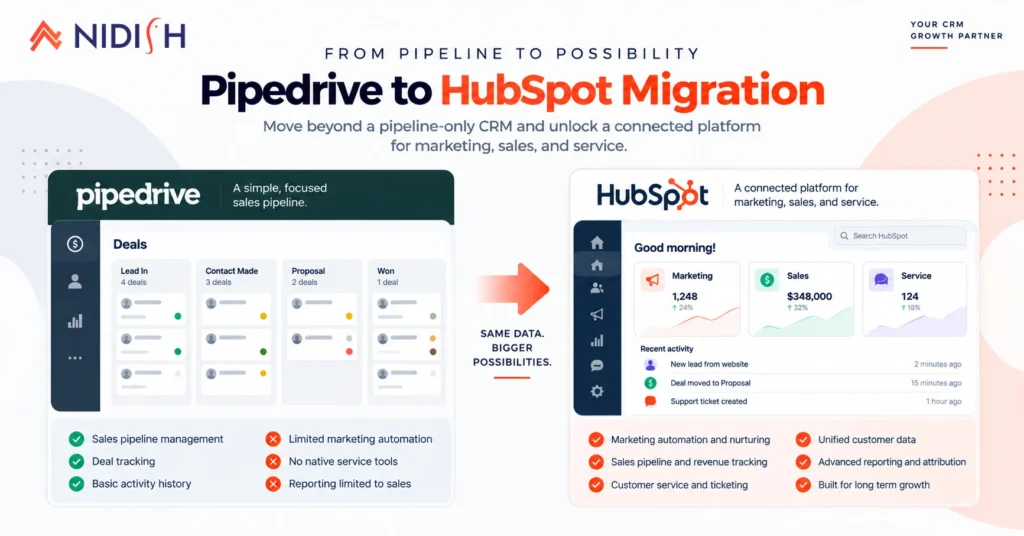
A Pipedrive to HubSpot migration usually starts the same way. A sales team that’s used Pipedrive’s simple, visual pipeline for years hits a wall, marketing needs real automation, leadership wants reporting that goes beyond the deal board, and the business has outgrown a tool built almost entirely around one function. The pipeline itself was never the problem. Everything Pipedrive doesn’t do natively is.
This guide covers what actually happens during a Pipedrive to HubSpot migration: what HubSpot’s own tooling handles for you, what doesn’t transfer no matter which tool you use, and the two specific failure points, a lift-and-shove migration and silent ownership mapping errors, that account for most of the “why does this feel worse than Pipedrive” complaints we hear after a rushed cutover.
Quick Answer
A Pipedrive to HubSpot migration moves contacts, deals, historical activity, and notes into HubSpot’s CRM, using HubSpot’s native Smart Transfer tool to handle the raw data movement. What Smart Transfer does not do is the strategic work: remapping Pipedrive’s pipeline stages and custom fields to a structure that actually fits how your team sells, and rebuilding automations and reports, neither of which transfers automatically. Most migrations run four to eight weeks depending on data volume and how many custom automations need rebuilding, and the single biggest mistake is recreating Pipedrive’s exact stages and habits inside HubSpot instead of using the migration to fix what wasn’t working in the first place.
Table of Contents
Why Businesses Choose a Pipedrive to HubSpot Migration
Pipedrive earns loyalty for good reason, it’s simple, visual, and easy for a sales team to adopt without much training. The businesses that eventually move away from it have usually hit one of a few specific ceilings, not general dissatisfaction with the pipeline itself.
No native marketing automation depth: Pipedrive’s marketing tools are functional but limited. Businesses that need real lead nurturing, behavioral email sequences, and campaign attribution tied directly to deal data typically end up running a separate marketing platform, which reintroduces the exact data fragmentation problem a CRM is supposed to solve.
Thin customer service functionality: Pipedrive wasn’t built with a deeply connected support or ticketing function. As post-sale service needs grow, teams often bolt on a separate helpdesk tool with no shared data back to the CRM.
Reporting that plateaus: Pipedrive’s dashboards are genuinely strong for pipeline visibility, but businesses that need multi-touch attribution, custom reporting objects, or reporting that spans marketing, sales, and service together hit a structural limit Pipedrive wasn’t designed to solve.
Growth beyond a pure sales-pipeline tool: As a business scales past a lean sales team into a full go-to-market operation, marketing, sales, and service all needing to see the same customer record, HubSpot’s connected hub structure tends to fit that next stage better than a tool built primarily around the deal board.
What Actually Happens During a Pipedrive to HubSpot Migration, Step by Step
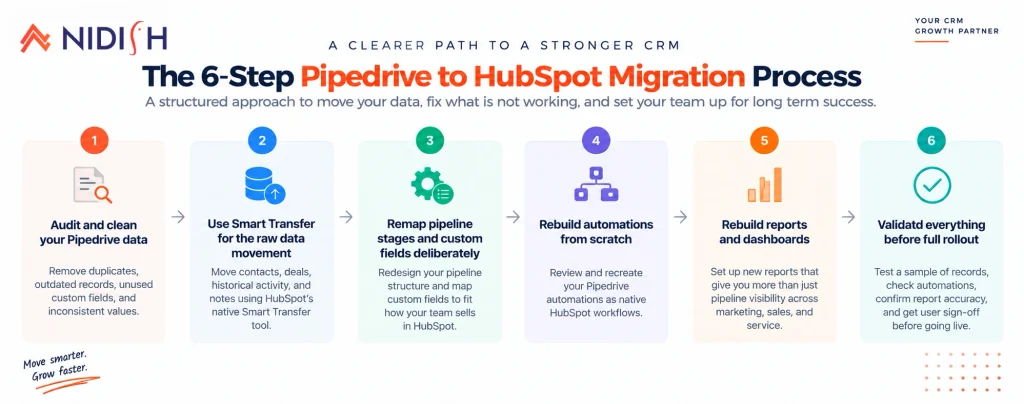
Unlike some CRM migrations that require entirely custom tooling, HubSpot has invested specifically in this migration path, which changes the mechanics in a useful way.
Step 1: Audit and clean your Pipedrive data first
Removing duplicates, outdated records, unused custom fields, and inconsistent values before migration meaningfully improves both migration accuracy and the quality of the CRM you end up with. Cleaning after the fact is always harder than cleaning before.
Step 2: Use Smart Transfer for the raw data movement
HubSpot’s native Smart Transfer tool is built specifically for migrating from Pipedrive, and it genuinely earns its place here. It moves contacts, historical activity, and notes directly, handling the raw data-transfer step with far less manual export and import work than older migration approaches required.
Step 3: Remap pipeline stages and custom fields deliberately
This is the step every Pipedrive to HubSpot migration lives or dies on. This is the step Smart Transfer explicitly does not handle for you. Pipedrive’s stage names, custom field structures, and existing habits get moved faithfully by design, which means a clean data transfer just relocates any underlying process problems into a more expensive system if nobody stops to redesign the structure first.
Step 4: Rebuild automations from scratch
No shortcut exists here for a Pipedrive to HubSpot migration. Pipedrive automations do not transfer to HubSpot in any form. Every automation needs to be reviewed and rebuilt as a native HubSpot workflow, which is also the right moment to cut automations that existed only as workarounds for something Pipedrive couldn’t do natively.
Step 5: Rebuild reports and dashboards
Pipedrive insights, saved filters, and dashboards are configuration, not data, and none of it moves automatically. These need to be manually recreated inside HubSpot’s reporting tools using the same underlying metrics.
Step 6: Test relationships, not just record counts
Confirming contacts and deals both arrived successfully doesn’t confirm they’re still correctly linked to each other, to companies, or to their original owners. Validating a data sample and checking that relationships and field values survived the transfer, before committing to a full migration, catches most of the problems that otherwise surface weeks later.
The “Lift and Shove” Mistake That Sinks a Pipedrive to HubSpot Migration
This is worth calling out on its own, because it’s the single most common way a Pipedrive to HubSpot migration quietly underdelivers. The mistake is recreating Pipedrive’s exact stages, field structures, and daily habits inside HubSpot instead of using the migration as the natural moment to fix what wasn’t working.
It’s an understandable instinct in any Pipedrive to HubSpot migration, changing a live sales process feels riskier than changing software, so teams often default to replicating the familiar structure exactly. But a stage structure that existed in Pipedrive because “that’s how we’ve always done it” doesn’t become more correct just because it’s now sitting inside a more powerful platform. HubSpot’s added capability, its automation depth, its reporting objects, its marketing connection, only pays off if the underlying process it’s automating actually reflects how the team should be selling, not just how they happened to be tracking things before.
What Transfers Cleanly in a Pipedrive to HubSpot Migration, and What Doesn’t
Contacts, deals, historical activity, and notes generally transfer well through Smart Transfer, since HubSpot built that tool specifically around Pipedrive’s data model. Associations between records, deals linked to contacts, contacts linked to organizations, and their original owners, are maintained as part of a properly executed migration, which matters enormously for reporting accuracy after cutover.
What doesn’t transfer, under any migration approach: Pipedrive automations, which need to be rebuilt as HubSpot workflows entirely; and Pipedrive insights, reports, and saved filters, which are configuration rather than data and need to be manually recreated using your actual metrics rather than exported.
One gap worth flagging specifically in a Pipedrive to HubSpot migration: Pipedrive’s native export often doesn’t include notes, call logs, or email attachments linked to deals in full, this is consistently the most common source of “where did our history go” complaints after a migration, and closing that gap typically requires direct API extraction and transformation into HubSpot’s engagement records rather than relying on a basic export file.
The Technical Reality Behind a Pipedrive to HubSpot Migration: API Limits and Activity History
For businesses with larger Pipedrive accounts, or datasets involving custom objects, the technical mechanics matter more than most migration guides acknowledge.
Pipedrive moved to token-based rate limiting, fully rolled out across existing accounts by mid-2025, and each API endpoint carries a different token cost depending on its complexity, a simple single-record read is cheap, while a search or complex update costs significantly more. That token budget is shared across every integration and user active on the account, which means a migration extraction running at the same time sales reps are actively working in Pipedrive competes for the same limited pool. HubSpot’s own newer v2 API endpoints consume roughly half the tokens of their v1 equivalents, which is a meaningful consideration for any migration built around direct API extraction rather than a simple CSV export, though it’s worth noting Pipedrive’s Leads object specifically remained v1-only as of early 2026.
For straightforward Pipedrive to HubSpot migration setups under roughly 10,000 records with no custom objects, a simpler export-and-import approach generally works fine. For anything beyond that, a proper API-based extraction that preserves associations, activities, and files becomes necessary, since a flat CSV export breaks the relationships between records rather than preserving them.
Ownership Mapping: The Silent Failure Point in Any Pipedrive to HubSpot Migration
This is the technical detail most guides skip entirely, and it’s one of the more common causes of a Pipedrive to HubSpot migration going wrong after launch, of automation misfires after go-live.
Every record in Pipedrive is assigned to a specific user. Pipedrive user accounts don’t automatically match HubSpot user accounts, they’re separate systems with separate identity structures. If explicit user mapping isn’t built into the migration process, records can land in HubSpot without a clear owner, and any workflow trigger that depends on record ownership, task assignment, notification rules, rep-specific reporting, either fires incorrectly or doesn’t fire at all. This tends to surface as a confusing, hard-to-diagnose problem weeks after launch rather than an obvious error during migration itself, which is exactly why it needs to be planned for explicitly rather than assumed to work itself out.
Common Mistakes to Avoid in a Pipedrive to HubSpot Migration
- Treating Smart Transfer as the whole migration: It handles the data movement well, but stage remapping, automation rebuilding, and report recreation are separate work it was never designed to do.
- Skipping the lift-and-shove check. Recreating Pipedrive’s exact structure inside HubSpot wastes the platform’s actual advantages.
- Assuming notes and call history moved completely: Missing activity history is common enough that it’s worth explicitly verifying, not just assuming, before considering migration complete.
- Ignoring user mapping. This is the quiet failure point that causes ownership-dependent automation to misfire without an obvious error message pointing at the cause.
- Migrating at full volume without a test sample first: Every well-run Pipedrive to HubSpot migration validates a sample before committing to the full dataset. Migrating a small, representative sample and validating relationships, field formatting, and ownership before the full-scale migration catches mapping errors while they’re still cheap to fix.
A Realistic Timeline for a Pipedrive to HubSpot Migration
Beyond the step-by-step process, it helps to see roughly how those steps map to actual weeks, since “four to eight weeks” hides a lot of variation depending on team size and data volume.
Weeks 1-2: Audit and cleanup
Full review of Pipedrive data, deduplication, and a decision on which custom fields and stages actually reflect how the team should be selling going forward, not just how they’ve been tracking things historically.
Week 3: Smart Transfer and validation
Run the native transfer for contacts, deals, activity, and notes, then validate a data sample against the original Pipedrive records before trusting the full transfer, checking relationships, ownership, and field formatting specifically.
Weeks 4-5: Stage remapping and automation rebuild
This is the largest block of real work, translating Pipedrive’s pipeline logic into a HubSpot structure that’s been deliberately redesigned rather than copied, and rebuilding every automation natively in HubSpot’s workflow engine.
Week 6: Report and dashboard recreation
Pipedrive’s saved filters and dashboards get manually rebuilt in HubSpot’s reporting tools using the same underlying metrics, since none of this configuration transfers automatically.
Weeks 7-8: Parallel testing and team training
Running both systems briefly for validation, then training the team on HubSpot’s different structure before fully retiring Pipedrive.
Smaller teams with simpler pipelines and fewer custom automations can often compress this into four weeks. Larger teams with multiple pipelines, heavy automation, and larger datasets should expect the fuller eight-week version, sometimes longer if the migration also involves connecting HubSpot to other systems like an ERP.
Should You Actually Make a Pipedrive to HubSpot Migration?
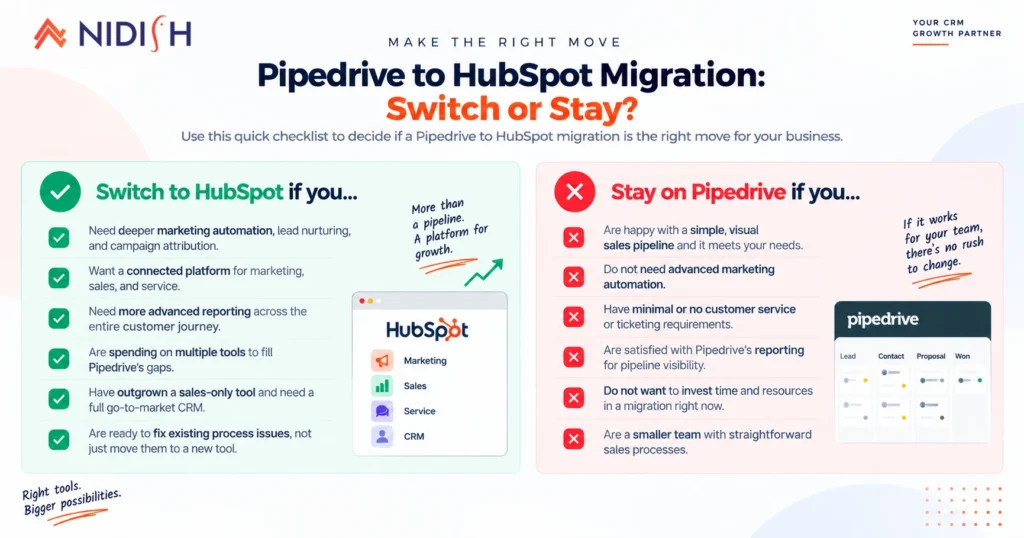
A Pipedrive to HubSpot migration tends to make sense when:
- Marketing automation and lead nurturing have become a real, ongoing need, not just an occasional campaign
- Customer service needs to be connected to the same CRM data your sales team already uses
- Your reporting needs have outgrown pipeline-level dashboards
- The business is scaling into a full go-to-market operation rather than staying a lean, sales-only team
Staying on Pipedrive still makes sense when:
- Your core need is a clean, visual sales pipeline without much marketing or service complexity layered on top
- Your team is small enough that Pipedrive’s simplicity is still an asset rather than a limitation
- Cost sensitivity favors Pipedrive’s more predictable, sales-focused pricing over HubSpot’s broader, per-seat structure
How Nidish Can Help With Your Pipedrive to HubSpot Migration
We’ve recently implemented Pipedrive for businesses in both law firm and manufacturing settings, so we understand this platform from both directions, not just as the system you’re migrating away from. That matters here specifically, because a good Pipedrive to HubSpot migration depends on understanding what Pipedrive was actually doing well before you rebuild it inside a bigger system, not just moving data and hoping the process improves on its own. If you’re weighing this move, our guide on why your business needs a CRM covers the broader decision, and our CRM data migration checklist covers the data quality and validation steps that apply regardless of which platform you’re moving to. Our HubSpot implementation services page covers what a full rollout looks like end to end.
Frequently Asked Questions
Does HubSpot have a native tool for migrating from Pipedrive?
Yes. HubSpot’s Smart Transfer tool is built specifically for Pipedrive migrations and handles moving contacts, historical activity, and notes directly. It does not handle pipeline stage remapping, automation rebuilding, or report recreation, those remain manual, strategic work.
Do Pipedrive automations transfer to HubSpot?
No. Pipedrive automations do not transfer in any form and need to be reviewed and rebuilt as native HubSpot workflows after migration.
What data commonly gets lost in a Pipedrive to HubSpot migration?
Notes, call logs, and email attachments linked to deals are the most common gap, since Pipedrive’s native export often doesn’t include them in full. Closing this gap typically requires direct API extraction rather than a standard export file.
How long does a Pipedrive to HubSpot migration take?
Most migrations run four to eight weeks depending on data volume, how many custom fields and automations exist, and whether the business is also using the migration to redesign its pipeline structure rather than replicate it exactly.
What is the biggest mistake businesses make during this migration?
Recreating Pipedrive’s exact pipeline stages and habits inside HubSpot instead of using the migration as an opportunity to fix an underlying process that wasn’t fully working. This is common enough that it has a name in migration circles: lift and shove.
Can I run Pipedrive and HubSpot in parallel during the transition?
Yes, and it’s the safer approach for most teams. Running both systems briefly while validating that data, relationships, and automations behave correctly in HubSpot lets you catch problems before fully retiring Pipedrive, rather than discovering issues after there’s no fallback left.





 Blog
Blog Case Studies
 Career