
Everyone is talking about what HubSpot Breeze AI can do for your website. Almost nobody is talking about what your website has to do for Breeze AI first. Here’s the part that gets left out of every overview.
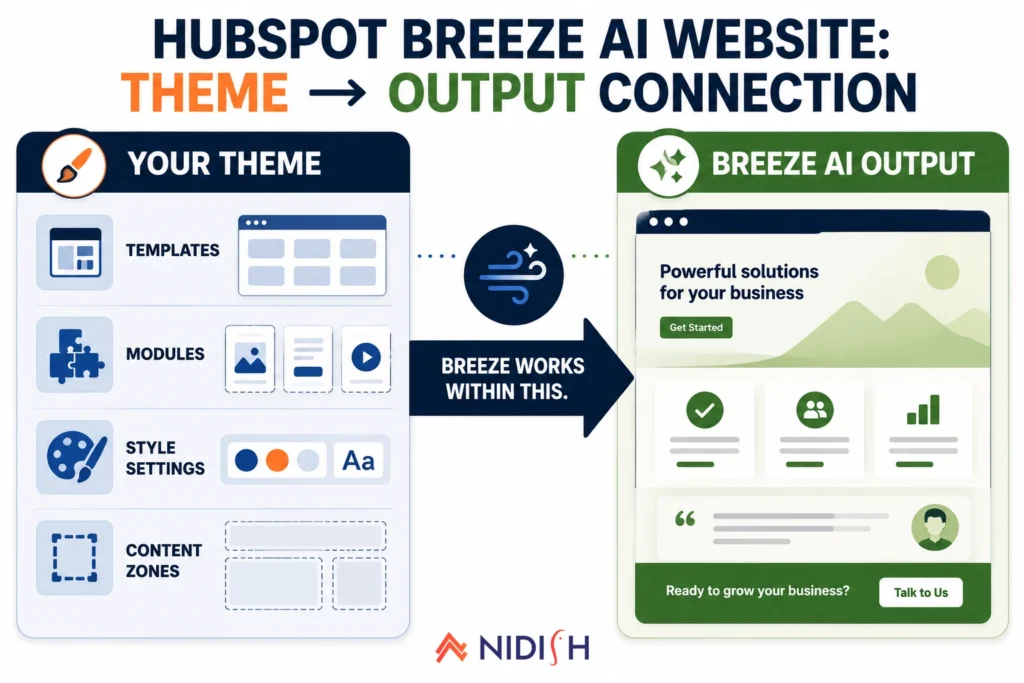
Breeze AI is now generating website pages, editing landing page sections, remixing existing content into new pages, and publishing, all from inside HubSpot. It is a genuinely useful set of tools, and adoption is accelerating fast. But there’s a foundational dependency buried in how all of it actually works, and it shows up in the HubSpot Breeze AI website documentation in plain language: the editing options available in the Breeze page editor depend on the page’s template type and the modules used within it.
In other words, Breeze does not work in a vacuum. It works within your theme. And the quality of your theme determines the quality ceiling for everything Breeze produces on your website.
Table of Contents
Quick Answer
Yes, your HubSpot theme directly affects what HubSpot Breeze AI website tools can produce. Breeze generates and edits content inside the modules and templates your active theme defines, it cannot invent new module types, fix inconsistent styling, or restructure a poorly built template. A theme with a deep, well-structured module library gives Breeze rich, clearly defined content zones to work with. A thin, loosely structured theme gives it very little, and the AI output reflects that gap directly, regardless of how good the underlying prompt was.
How HubSpot Breeze AI Website Tools Actually Work
Before the theme connection makes sense, the actual mechanics of HubSpot Breeze AI website features are worth understanding clearly, because “Breeze” refers to a collection of tools, not a single one.
Breeze Content Agent generates full pieces of content, landing pages, blog posts, case studies, from prompts, pulling your brand voice and CRM context to make output relevant. For website pages, it drafts entire page layouts from a brief.
HubSpot’s AI page generator, accessible via the page editor, creates or populates individual page sections from a text prompt. You describe the purpose, goal, audience, and tone, Breeze fills in the page. HubSpot’s own knowledge base now also documents that pages can be generated directly from Claude and opened in the HubSpot editor, making the AI-to-website workflow even more direct.
HubSpot Content Remix is the most structurally connected to your theme. It takes an existing piece of content and generates new pages, landing pages, website pages, using your existing page templates as the structural foundation. The reason HubSpot built it this way is stated explicitly in its documentation: selecting from your existing templates ensures that new pages match your brand’s layout and appearance.
All three of these Breeze AI website tools run on top of, and are bounded by, whatever theme and templates are active in your portal.
How Does Your HubSpot Theme Actually Affect Breeze AI Output?
Here is the specific way the dependency works in practice.
When Breeze AI generates or edits website pages, it operates within the drag-and-drop content editor. The modules and content zones available in that editor are defined by your active theme’s templates. Breeze can populate content inside those zones, swap copy, adjust sections, and generate page variants, but it cannot create new module types that don’t exist in your theme, and it cannot edit structural elements outside what the template makes editable.
This has a direct output quality implication. A theme with 40 to 50 well-structured modules, distinct zones for hero sections, service descriptions, social proof blocks, CTA sections, pricing tables, FAQ layouts, gives Breeze a rich set of surfaces to work with. When Breeze drafts or edits a page, it has clearly defined content zones to fill, and the output stays visually consistent with the rest of the site.
A theme with fewer modules, loosely structured templates, or overlapping layout logic gives Breeze less to work with, and produces output that either ignores available zones or fills them inconsistently. The AI doesn’t fix a poorly built template. It works within it.
A Simple Way to See the Difference
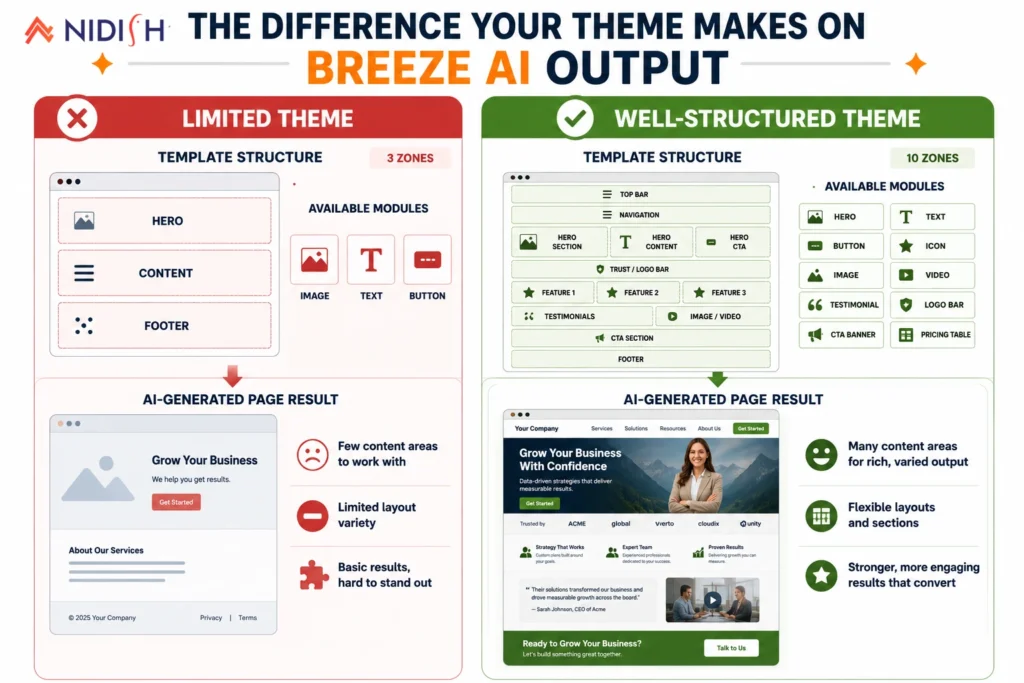
Picture the same prompt, “generate a services page for a commercial HVAC company,” run through two different HubSpot accounts.
On a theme with only a hero, body, and CTA template, Breeze fills those three zones and stops. The output is a page, technically, but it’s thin: a headline, a paragraph of body copy, and a button. There’s nowhere for Breeze to place a services breakdown, a trust section, or a pricing table, because those zones simply don’t exist in the template.
On a theme with ten defined zones, hero, value props, service breakdown, process steps, team, testimonials, pricing, FAQ, secondary CTA, and footer CTA, the same prompt produces a page that actually looks and functions like a finished services page, because Breeze has somewhere specific to put every piece of that content. Same AI, same prompt, dramatically different result, entirely because of what the theme made available to work with.
Four Specific Ways a Weak Theme Limits HubSpot Breeze AI Page Generation
1. Fewer content zones means less useful AI output
Breeze populates content into the sections and modules your template defines. A template with three sections, hero, body, CTA, gives Breeze three zones. A well-built template with ten defined zones gives Breeze ten. The output in the second case is a dramatically more complete and usable page.
2. Loose module boundaries create inconsistency across AI-generated pages
One of the main advantages of using HubSpot Content Remix for page generation is consistency, new pages should look and feel like the rest of your site. That consistency comes from your template structure, not from Breeze itself. If your theme’s templates are inconsistently built, some pages using raw rich text fields where others use structured modules, Breeze-generated pages will inherit that inconsistency and amplify it across everything it touches.
3. Global styles that conflict with module-level edits produce visual drift
Well-built HubSpot themes use clearly separated global style settings (primary color, heading font, body font) and module-level overrides. When Breeze adjusts a section’s content or layout, it works within those style definitions. Themes that use hardcoded styles, !important overrides, or inconsistent CSS inheritance make Breeze edits visually unpredictable, the AI changes the content correctly, but the visual output doesn’t match the rest of the site.
4. Poorly structured blog templates produce weak AI blog output
Breeze’s AI Blog Writer and Content Agent generate blog drafts that land in your blog editor and publish through your active blog template. A blog template optimized for readability, heading structure, and content depth, with proper H1/H2/H3 nesting, featured image zones, and author blocks, makes Breeze blog output far more usable. A flat, minimally structured blog template produces output that looks the same regardless of how good the AI draft actually is.
What a Well-Built Theme Gives HubSpot Breeze AI to Work With
The HubSpot Breeze AI website generation pipeline works best when your theme provides three things.
Defined, distinct module types: Modules with clear names, specific purposes, and no structural overlap give Breeze clean signals for where to place which content. A testimonials module and a stats module are different things, a theme that conflates them into one generic content block forces Breeze to make that distinction itself, which it does inconsistently.
Separated global and local style control: The standard HubSpot theme requirements specify primary_color, secondary_color, heading_font, and body_font as mandatory named settings precisely so that tools, including AI tools, can reference and respect them. A theme that implements these correctly means Breeze-generated content inherits brand styling automatically, without requiring manual style correction after generation.
Content-type-specific templates: A theme that ships with distinct templates for service pages, case study pages, comparison pages, and campaign landing pages gives Content Remix the right structure to remix into. If your theme only has one generic landing page template, Content Remix has one option for every type of page it generates, and they all come out looking the same.
How to Audit Your Current Theme Before Turning On Breeze
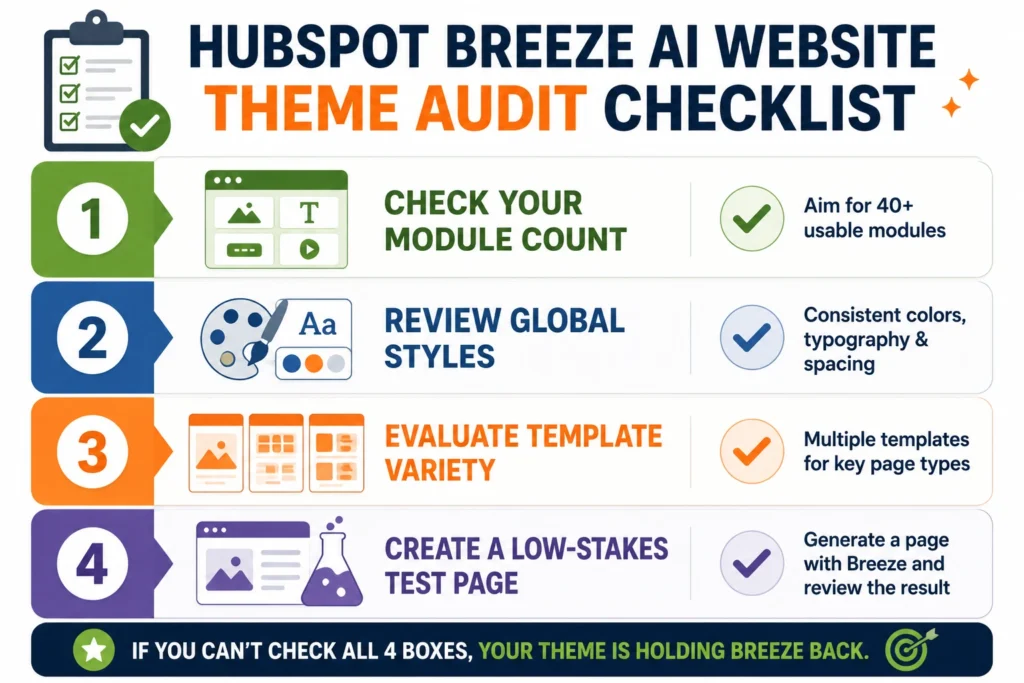
Before flipping on Breeze’s full page generation features, it’s worth spending twenty minutes checking what your current theme can actually support.
Count your distinct module types: Open your theme’s module library and count how many genuinely different modules exist, not variations of the same layout with different colors, but structurally distinct zones like testimonials, pricing, FAQ, and team sections.
Check your global style settings: Confirm your theme defines named settings for primary color, secondary color, heading font, and body font, rather than hardcoding these values inside individual modules or templates.
Review your template variety: Look at how many distinct page templates exist for different content types. One generic template used for every page type is a strong signal that Breeze-generated pages will all look the same, regardless of what they’re actually for.
Test on a low-stakes page first: Before generating anything customer-facing, run a Breeze prompt on an internal or low-traffic page to see exactly what your current theme produces, rather than finding out on a page that matters.
Which Breeze Features Need Which HubSpot Plan
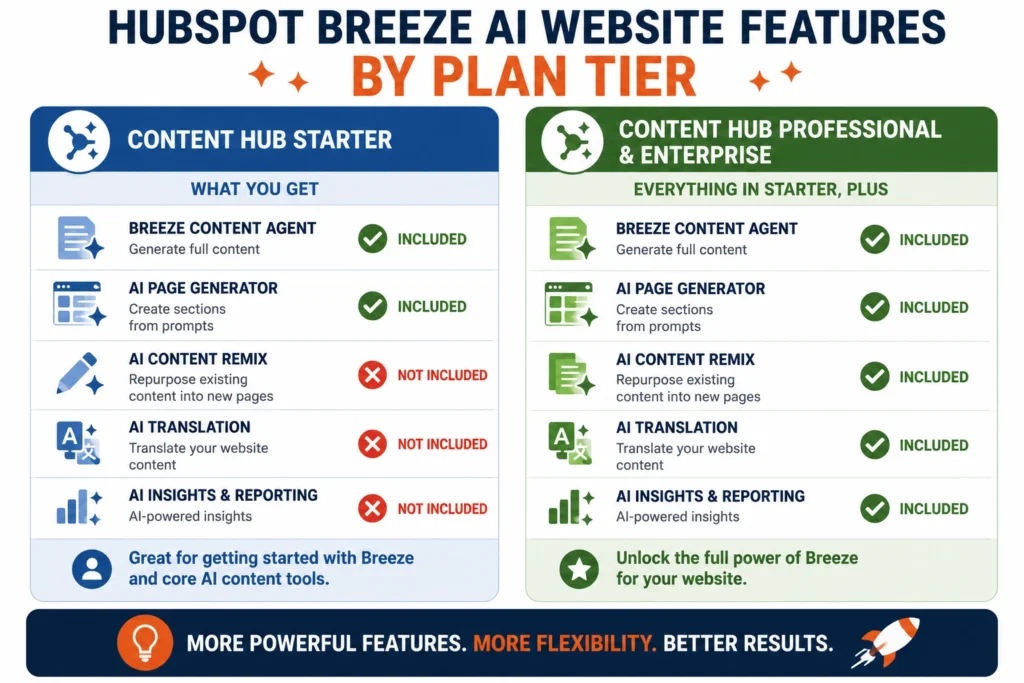
This is worth mapping clearly because it affects how relevant the theme dependency is at your current plan level.
Content Hub Starter: Basic AI content tools, AI writing assistance for copy, meta description generation, AI image generation. The Breeze Content Agent and Content Remix are not available. Basic inline AI editing in the page editor is available. The theme connection is relevant but in a narrower scope.
Content Hub Professional and Enterprise: Full Breeze Content Agent for page and content generation, Content Remix for AI page remixing from templates, the AI Website Generator, Breeze Copilot across all editors, and access to the Claude-powered page generation workflow. This is where the theme dependency has its full effect, every AI-generated page runs through your theme’s templates.
If you’re on Starter and planning to grow into Professional, the theme you choose now becomes the template foundation Breeze will use at that point. It’s worth choosing it correctly before you hit Professional-tier features, not after.
Common Mistakes Businesses Make When Turning On Breeze AI
A handful of avoidable mistakes show up repeatedly as businesses adopt these tools.
- Turning on Content Remix before auditing the theme it will run on: Businesses expect a quality jump the moment Breeze is enabled, without realizing the templates underneath haven’t changed at all.
- Assuming AI output problems are prompt problems: A vague or thin page is often a template limitation, not a prompting failure, no amount of prompt refinement adds a pricing module that doesn’t exist in the theme.
- Ignoring style architecture until after generation: Businesses notice Breeze output looks visually inconsistent and try to fix it page by page, instead of correcting the underlying global style settings once.
- Upgrading to Professional without revisiting the theme: Teams that jump straight into Content Remix and the AI Website Generator on a theme built years earlier, before AI tools existed, get output bounded by decisions made long before Breeze was part of the picture.
What This Means for Theme Selection
The practical takeaway: if you’re evaluating HubSpot themes and intend to use HubSpot Breeze AI website tools, now or when you scale, the evaluation criteria should include the theme’s module library depth, template variety, and style architecture, not just how it looks in the preview.
Both Siloh Pro and Commerce Craft are built on HubSpot’s current theme architecture standards, primary and secondary color settings, named font controls, separated global and module-level styles, and a module set specifically designed around the content types B2B and e-commerce sites actually need. Siloh Pro ships with 39 templates and 49 modules. Commerce Craft is structured around e-commerce page patterns. Both are actively maintained at a version cadence that tracks HubSpot’s platform updates, including AI feature additions.
If you want to understand whether either theme’s structure aligns with how you intend to use Breeze AI on your specific site, book a 30-minute call and we’ll walk through the module map against your use case.
For broader theme evaluation context, Is Your HubSpot Theme Still Maintained? covers the update cadence question, HubSpot default theme explains why the built-in starter theme in particular tends to fall short of what Breeze needs to work well, and HubSpot Theme Customization Limits explains where the structural editing boundaries sit. The HubSpot Breeze AI website tools are only as good as the foundation they operate on, and that foundation is your theme.
Frequently Asked Questions
Do HubSpot Breeze AI website tools work with any theme?
Technically, yes, Breeze operates within whatever theme is active on your HubSpot account. Practically, output quality varies significantly. A theme with a richer module set and well-structured templates gives Breeze more defined content zones to work within, producing more consistent and usable output. A theme with fewer modules or loose template structure limits what Breeze can generate cleanly.
What is HubSpot Content Remix and how does it use my theme?
Content Remix is a Breeze AI feature available on Professional and Enterprise plans that generates new landing pages and website pages from existing content. It uses your existing page templates as the structural foundation for every page it creates, meaning the template and module quality of your active theme directly shapes what Content Remix produces. A theme with purpose-built templates for different page types gives Content Remix more to work with.
Does the HubSpot Breeze AI website generator work on the Starter plan?
Basic AI page editing and content suggestions are available on Starter. The full Breeze Content Agent, Content Remix, and AI Website Generator are available on Professional and Enterprise plans. If you’re on Starter and planning to upgrade, the theme you choose now becomes the template foundation those features will use when you move up.
Will Breeze AI fix a poorly built HubSpot theme?
No. Breeze generates and edits content within your theme’s existing templates and modules. It cannot create new module types, resolve conflicting styles, or restructure templates that were poorly built. A weak theme produces weak AI output consistently, Breeze amplifies what’s already there, in both directions.
Can I use Claude AI to generate pages on my HubSpot website?
Yes, HubSpot’s own documentation now covers a workflow where Claude generates a landing page from a prompt and opens it directly in HubSpot’s content editor. Once opened, the editing options and structure of that page are defined by your active theme’s templates. The same principle applies: the quality of the theme determines the quality of the editable output.





 Blog
Blog Case Studies
 Career