
If you’re on HubSpot’s Starter plan and wondering whether you can purchase a premium theme from the marketplace, or whether the good ones are locked behind a Professional plan, this post gives you the direct answer. A HubSpot Starter theme from the Asset Marketplace works, and below you’ll find exactly what it includes, what it doesn’t, and what to check before you spend anything.
Table of Contents
Quick Answer
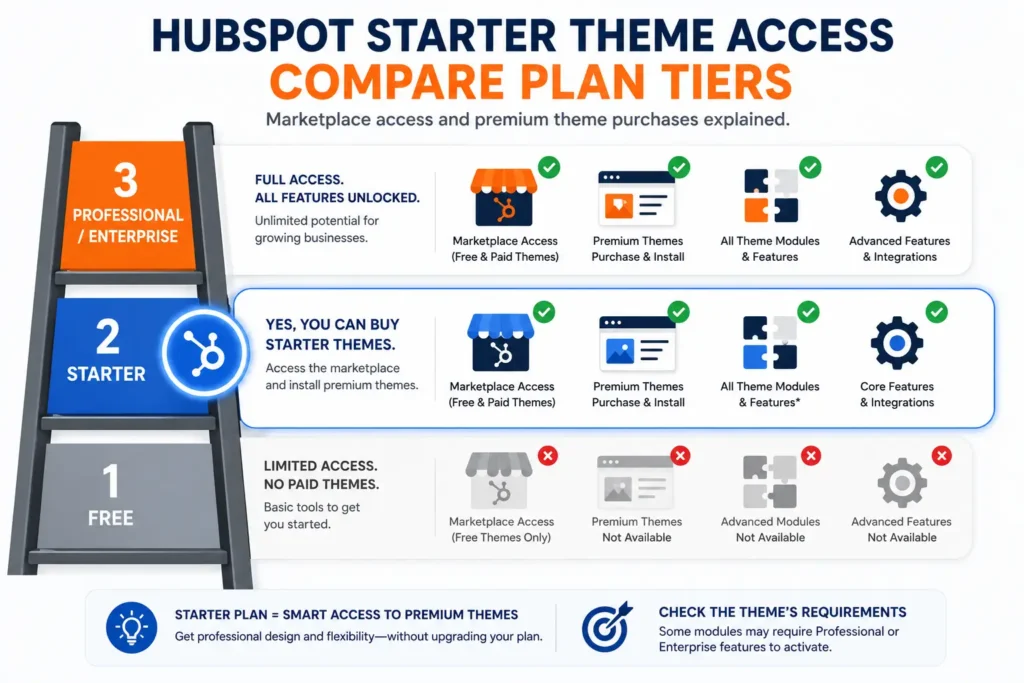
Yes, you can buy a HubSpot Starter theme from the Asset Marketplace. HubSpot’s own knowledge base confirms marketplace theme installation is available on Content Hub Starter, Professional, and Enterprise plans. The Starter plan does not lock you out of paid themes. The one thing to watch for: some individual modules inside a theme may require a higher plan tier to activate, so check the listing’s Requirements section before checkout.
There’s a version of this question showing up in HubSpot forums, Reddit threads, and community Slack groups with surprising frequency. Someone on the Starter plan sees a premium theme they like, assumes it must require a higher-tier subscription, and either buys up to a plan they don’t need yet or gives up on the theme entirely. That’s a real purchase barrier built on a misconception, and the answer is simpler than most people think.
You can buy a paid theme on Content Hub Starter. HubSpot’s own documentation confirms that a HubSpot Starter theme can be purchased and installed the same way it works on higher tiers. The plan does not restrict marketplace access.
What Does a HubSpot Starter Theme Actually Give You?
When you install a HubSpot Starter theme from the marketplace, free or paid, you get the full theme package: all templates, all modules, all global style settings, and the drag-and-drop editing experience. The theme installs the same way it does on a Professional or Enterprise account. Navigation, branding, color systems, typography settings, blog templates, and landing page layouts are all accessible and editable.
What the Content Hub Starter plan does have are page and feature limits that exist independently of whichever theme you’re using:
- Up to 50 website pages
- Up to 30 landing pages
- 1 blog
- 1 custom domain (subdomain plus one country-code TLD)
- No A/B testing on pages
- No dynamic personalization
- No content membership areas
- Basic AI content tools (meta descriptions, copy assistance, image generation)
These are plan-level limits, according to HubSpot’s official CMS Starter page. They apply regardless of whether you’re using the default theme, a free marketplace theme, or an $800 premium theme. The theme doesn’t change them, and they don’t change the theme.
The Part Nobody Tells You: Feature-Level Requirements Inside Themes
Here’s where a HubSpot Starter theme purchase gets more nuanced. HubSpot itself notes in its marketplace developer documentation that certain features within a theme may only function on specific subscription tiers. This isn’t a theme-level restriction, it’s a module-level one.
A theme built for Professional-tier users might include modules that rely on smart content rules, dynamic personalization, or membership gating, features that require Professional or Enterprise to activate. The theme installs on your Starter plan without issue, but those specific modules will either display as inactive or won’t render the content variation they were built to show.
The practical takeaway: before you buy any HubSpot Starter theme, check the Requirements section on the listing page. Every marketplace listing has one. It tells you whether specific modules within the theme require a plan above Starter. For most well-built themes, the ones designed with broad plan compatibility in mind, this won’t be a problem. But it’s worth verifying before checkout, not after.
Can Free Plan Users Buy a HubSpot Starter Theme?
This is worth clarifying because it’s where the real confusion often starts. On HubSpot’s Free plan:
- You can browse the full HubSpot Asset Marketplace
- You can install free themes
- You cannot purchase paid marketplace themes
Buying a premium theme on Starter requires at minimum a Content Hub Starter subscription, since that’s when paid marketplace themes become available. If you’re still on the Free plan and wondering why a paid theme won’t install, this is why.
Content Hub Starter currently starts at $15 per seat per month. For most small to mid-sized businesses running a primary website on HubSpot, Starter is the entry point where a premium theme actually makes financial sense. The plan itself is affordable enough that a one-time theme purchase at $400 to $800 remains a reasonable investment relative to monthly costs.
What to Check on a Theme Listing Before Buying on Starter
Once you know the plan allows it, the evaluation shifts to the theme itself. A few things worth checking on any HubSpot Starter theme before purchasing:
Requirements tab
As noted above, confirm no modules you intend to use are Professional or Enterprise-only. This takes under a minute.
Module count and type
A theme with 30 to 50 modules built specifically for standard page types, service pages, about pages, contact sections, CTAs, pricing layouts, gives you more flexibility without needing plan upgrades. A theme heavy on personalization or A/B testing modules gives you less value on Starter.
Update history
Check the “last updated” date and version number on the listing. We covered why this matters in detail in Is Your HubSpot Theme Still Maintained? — the short version is that a maintained theme is a more reliable investment on any plan, but especially on Starter, where you’re less likely to have a developer available to patch gaps yourself.
Preview on your content types
Before buying, use the theme preview to check templates for the pages you actually need: homepage, services, blog, contact. Not just the hero visual.
Does It Make Sense to Buy a Premium HubSpot Starter Theme?
Yes, and arguably more so than on Professional, where the case is easier to make because the platform itself is more powerful.
On Starter, your website is doing more of the heavy lifting. You don’t have A/B testing to optimize page performance, you don’t have smart content to personalize experiences, and you have page limits that mean every page on your site needs to be well-built from the start. A premium HubSpot Starter theme addresses all of those constraints directly: it gives you better-structured templates, more conversion-ready module layouts, and a professional visual result that doesn’t require a developer to maintain.
A well-built theme from a maintained marketplace provider is one of the highest-leverage investments available at this plan tier. The platform gives you the infrastructure; the theme determines what you do with it. For general best practices on evaluating theme quality signals, Moz’s guide to on-page ranking factors is a useful reference point, since a well-structured theme directly supports the technical and content signals search engines look for.
What Nidish Offers on Starter
Both Siloh Pro and Commerce Craft are available to Content Hub Starter accounts with no plan-level restrictions on the core module set. Siloh Pro is structured for B2B and professional services websites: 39 templates, 49 modules, built specifically for the page types and conversion patterns those businesses need. Commerce Craft is structured for e-commerce use cases on HubSpot.
Both are actively maintained. Siloh Pro is currently at version 61 with updates shipping this month, which matters specifically for Starter users who want the theme to stay current without requiring ongoing developer input.
For a full comparison of what’s available across the HubSpot marketplace, Best HubSpot Themes 2026 is a good starting point. If you want to know whether a specific module in either theme requires a plan above Starter for your use case, book a 30-minute call and we’ll check it against your setup before you spend anything.
Frequently Asked Questions
Can I use a HubSpot Starter theme from the paid marketplace?
Yes. HubSpot explicitly confirms that marketplace theme installation, including paid themes, is available on Content Hub Starter, Professional, and Enterprise plans. The Starter plan does not restrict marketplace theme purchases.
What is the difference between a free and paid HubSpot Starter theme?
Free themes give you a functional starting point: basic templates, standard modules, and drag-and-drop editing. A paid HubSpot Starter theme from an active publisher adds a wider module library, purpose-built layouts for specific business types, and, from maintained providers, an ongoing update cadence that keeps the theme current as HubSpot’s platform evolves.
Will all modules in a premium theme work on my Starter plan?
Most will. Certain feature-specific modules, particularly those built around smart content, dynamic personalization, or membership gating, require Professional or Enterprise to activate. Every theme listing includes a Requirements section that identifies these. Check it before purchasing.
Can I upgrade my HubSpot Starter theme to Professional later without changing themes?
Yes. Upgrading your Content Hub plan does not affect your installed theme. The same theme continues to work on Professional, and any modules that were inactive due to plan restrictions become available automatically once your plan supports them.
Why doesn’t the HubSpot free plan let me buy marketplace themes?
Paid marketplace theme purchases require at minimum a Content Hub Starter subscription. Free plan users can install free themes from the marketplace but cannot complete a paid theme purchase. This is a payment and subscription eligibility requirement, not a technical one.
What happens if I buy a HubSpot Starter theme and later downgrade my plan?
The theme remains installed and accessible. Your purchased themes are tied to your account, not your subscription tier. However, any modules that relied on Professional or Enterprise features will become inactive if your plan no longer supports them.


 Blog
Blog Case Studies
 Career