
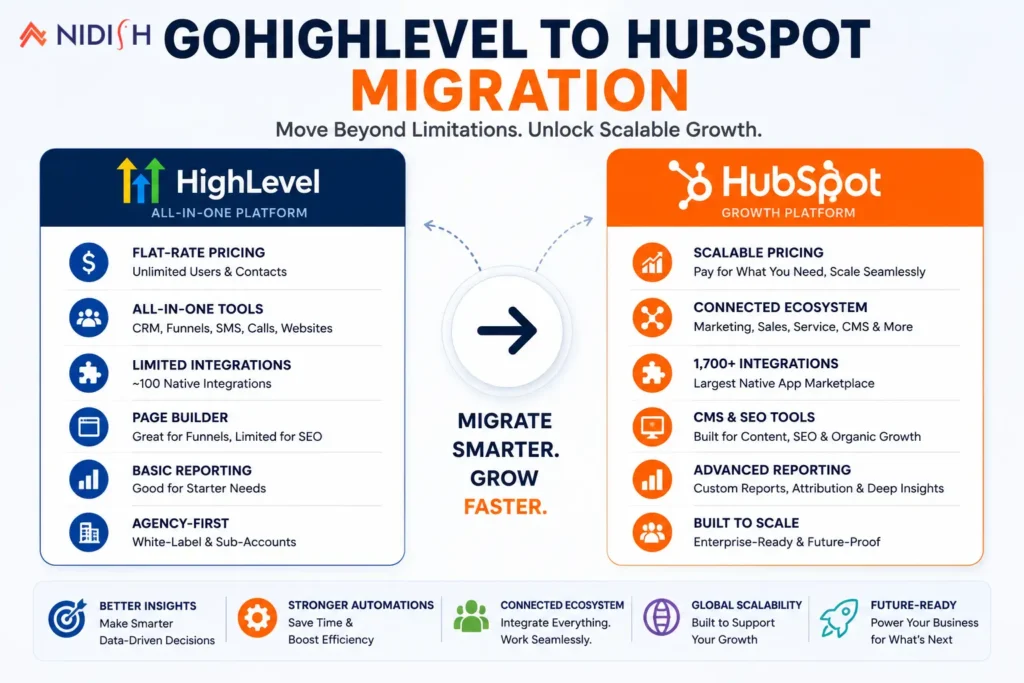
GoHighLevel built its reputation on being the all-in-one platform agencies could resell under their own brand at a flat monthly rate. It’s a genuinely good starting point, low cost, fast setup, everything bundled in one dashboard. But that same simplicity is what eventually becomes the limitation. Most GoHighLevel users hit a point where the platform’s flat-rate design starts feeling like a ceiling instead of a feature, usually right around the moment they need deeper reporting, a real content marketing engine, or integrations that go beyond what the native library supports.
This guide breaks down a GoHighLevel to HubSpot migration in practical terms: what you gain by making the move, what actually transfers and what needs to be rebuilt, and how to plan the switch so it strengthens your operation instead of just adding a new tool to learn.
Table of Contents
Quick Answer
A GoHighLevel to HubSpot migration tends to pay off once a business has outgrown flat-rate simplicity and actually needs enterprise-grade reporting, a mature integration ecosystem, or a real CMS with built-in SEO tooling rather than a basic page builder. GoHighLevel can still work well for a small agency just getting started, but that flat rate comes with a ceiling, thinner reporting, a smaller integration library, and a page builder instead of a true content platform, and most growing teams eventually run into it. The migration itself, moving contacts, pipelines, and automation logic, typically takes two to six weeks depending on how much custom automation GoHighLevel is currently running.
What GoHighLevel and HubSpot Are Actually Built For
It helps to be specific about this before comparing features line by line, because these platforms weren’t built to compete for the same buyer.
GoHighLevel is built primarily for agencies, consultants, and service-based businesses that want one consolidated tool covering CRM, email, SMS, funnels, appointment scheduling, and reputation management, priced flat regardless of contact volume or number of users. Its white-label and sub-account structure makes it especially popular with marketing agencies managing several client accounts under one roof.
HubSpot is organized differently, as a modular CRM ecosystem split into Marketing Hub, Sales Hub, Service Hub, Content Hub, Operations Hub, and Commerce Hub, each purchasable independently or bundled together, anchored by a free CRM tier. It’s built for businesses that expect to scale their marketing and sales operations over time and want each function to grow in depth alongside the business.
Neither description is a knock on the other platform. They’re simply solving different problems for different-sized operations.
GoHighLevel vs HubSpot: Where They Actually Differ
Pricing structure
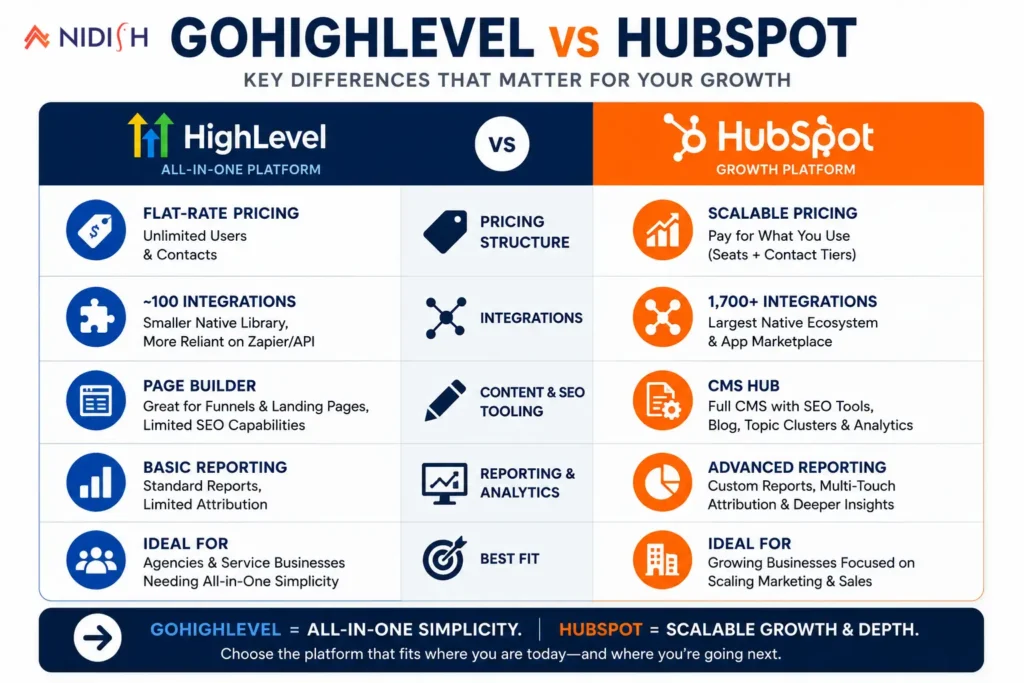
This is the most significant difference between the two platforms. GoHighLevel uses flat-rate pricing with unlimited contacts and users, typically landing somewhere between roughly $97 and $497 a month depending on tier. HubSpot uses per-seat pricing layered with contact-tier fees, which means costs scale directly with team size and database growth rather than staying fixed.
Integrations
GoHighLevel’s integration ecosystem is smaller, built around roughly 100 or so native integrations, with more reliance on Zapier or custom API work to connect tools outside its native library. HubSpot’s ecosystem is considerably larger, with over 1,700 native integrations and a mature app marketplace, which matters a great deal for businesses running a broader tech stack that needs to stay connected.
Content and SEO tooling
HubSpot’s CMS Hub includes a genuine content management system with built-in SEO recommendations, topic cluster strategy tools, and organic traffic analytics. GoHighLevel’s website builder is functional for landing pages and funnels but is a page builder rather than a full CMS, without dedicated blog management or SEO-specific tooling built in.
Agency-specific features
GoHighLevel’s white-labeling, sub-account structure, and multi-channel communication (SMS, calls, chat, all natively built in) remain a genuine advantage for agencies managing multiple client accounts under one roof. HubSpot doesn’t offer this same sub-account model, its structure is built around a single organization scaling internally, not an agency reselling access to many separate clients.
Reporting depth
HubSpot’s reporting and analytics tend to be considerably more advanced, particularly around multi-touch attribution and custom reporting objects, which matters more as a business’s marketing and sales data gets more complex.
The Real Cost Comparison: What You’re Actually Paying For
On paper, GoHighLevel looks like the clear budget winner. A flat $97 to $497 a month with unlimited contacts is hard to argue with next to HubSpot’s per-seat, contact-tiered pricing, which can climb well beyond that for a growing team. But the sticker price only tells part of the story.
Consider a five-person team. On GoHighLevel, that team pays the same flat rate whether it’s one person or ten using the platform, which genuinely is a strong value while the team stays small and the feature set stays basic. On HubSpot, that same team pays more upfront, but gains enterprise-grade reporting, a CMS built for organic growth, and an integration ecosystem over 1,700 tools deep, capabilities GoHighLevel simply isn’t built to match at any price.
The real question isn’t which platform costs less per month. It’s which platform costs less once you factor in what a business gives up by staying on the cheaper option: weaker attribution data that makes ad spend harder to optimize, a page builder instead of a real SEO-driven content engine, and an integration ceiling that eventually means workarounds, custom API work, or tools that never quite talk to each other cleanly.
For a small agency with a handful of clients and simple needs, GoHighLevel’s flat rate is still hard to beat. But for a business whose growth increasingly depends on content marketing, clean attribution, or a broader connected tech stack, the extra cost of HubSpot tends to pay for itself well before the first year is out, not through the platform itself, but through the revenue and efficiency it unlocks that a flat-rate tool was never designed to provide.
Who Should Actually Make This Switch
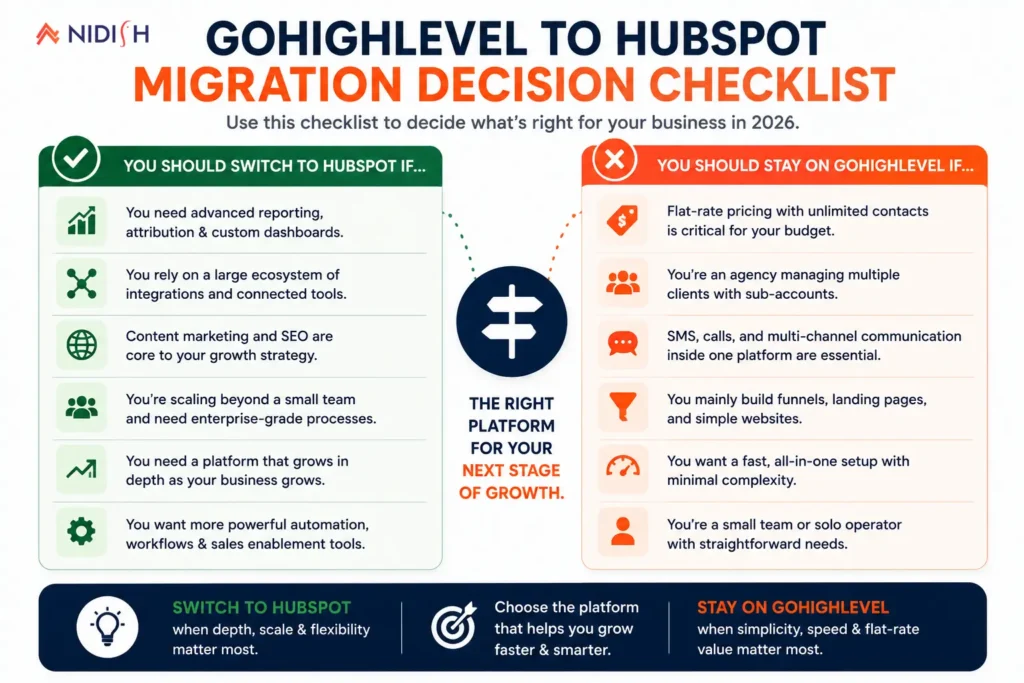
Given how differently these platforms are built, the decision really comes down to what’s actually causing friction in your current setup.
A GoHighLevel to HubSpot migration tends to make sense when:
- You’re consistently hitting the limits of GoHighLevel’s reporting and need more sophisticated attribution or custom reporting
- Content marketing and SEO have become a real growth channel, and a basic page builder isn’t cutting it anymore
- You need integrations with a broader tech stack that GoHighLevel’s native library doesn’t cover well
- Your business has moved past reselling the platform to multiple clients and needs one deep, scalable internal system instead
- You’re a growing in-house team, not primarily an agency managing external client accounts
GoHighLevel can still be the right call for now when:
- You’re a small agency managing multiple client sub-accounts and flat-rate, unlimited-contact pricing is what keeps early margins healthy
- Multi-channel communication (SMS, calls, chat) built natively into one platform matters more right now than deeper CRM reporting
- Your team is still small enough that the cost gap to HubSpot’s per-seat pricing hasn’t been offset yet by the reporting and content capabilities you’d gain
- White-label reselling to your own clients is still the core of your business model, at least for the stage you’re at today
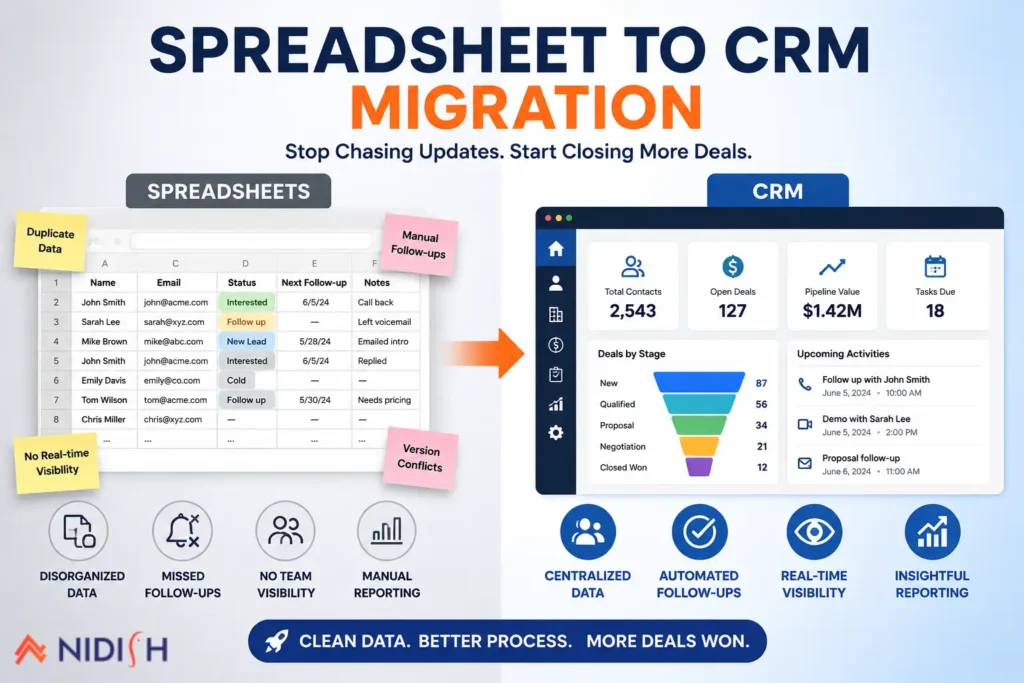
There’s no universally correct answer here, but the pattern is a familiar one: the businesses who regret switching are usually the ones who moved because HubSpot is the more recognized name, while the ones who switch because they’ve genuinely hit GoHighLevel’s reporting or content ceiling tend to see the investment pay for itself quickly. If you’re weighing this move from an even earlier starting point, like spreadsheets rather than another CRM, our guide on migrating from spreadsheets to a real CRM covers that transition in more depth.
What Actually Happens During a GoHighLevel to HubSpot Migration
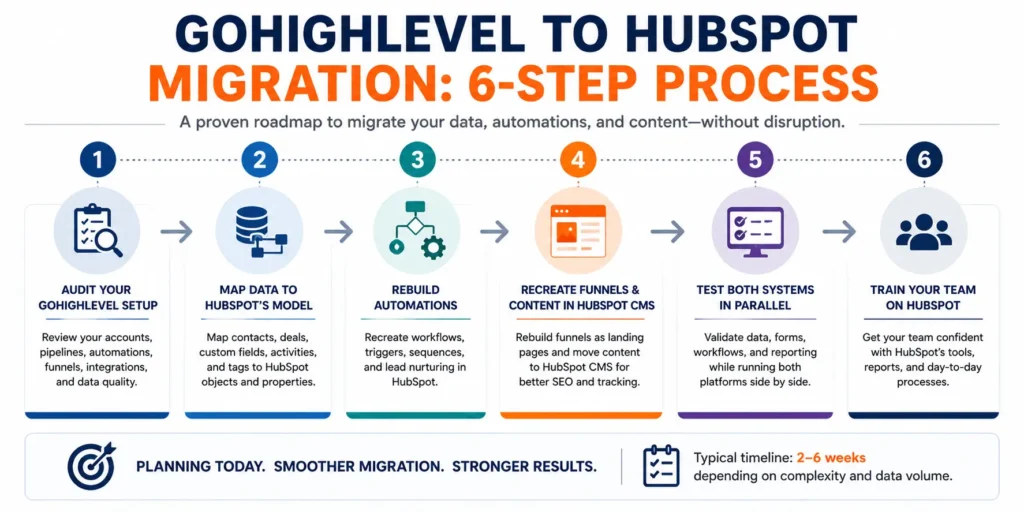
Unlike migrating between two similarly structured CRMs, moving from GoHighLevel to HubSpot involves translating a flat, agency-oriented tool into HubSpot’s more modular hub structure, so a few things need deliberate planning rather than a straight export and import.
Step 1: Audit your GoHighLevel setup: Document every pipeline, automation, funnel, and sub-account structure currently in use, including anything built informally over time that isn’t well documented.
Step 2: Map your data to HubSpot’s object model: Contacts, companies, deals, and custom fields all need a clear destination in HubSpot’s structure before migration begins, since the two platforms organize data differently.
Step 3: Rebuild your automations, don’t just export them: GoHighLevel’s workflow and funnel automation doesn’t translate directly into HubSpot’s workflow engine. Each automation needs to be reviewed and rebuilt with intention, which is also a good opportunity to cut automations that were built as workarounds rather than because they were the right tool for the job.
Step 4: Migrate content separately from data: If GoHighLevel has been hosting your funnels or landing pages, that content needs to be rebuilt in HubSpot’s CMS rather than imported directly, since the two platforms don’t share a compatible page format.
Step 5: Test in parallel before full cutover: Run both systems side by side for a short period, particularly for any active campaigns, to confirm data accuracy and automation behavior before fully retiring GoHighLevel.
Step 6: Train the team on HubSpot’s structure: HubSpot’s hub-based organization works differently from GoHighLevel’s single-dashboard approach, so a short onboarding period matters more here than it might for a simpler platform switch.
What Transfers Cleanly and What Doesn’t
Contacts, basic deal and pipeline data, and appointment history generally transfer without much friction. Custom fields usually need remapping rather than a direct 1:1 import, since the two platforms structure custom data differently.
Automations and workflows are the part that doesn’t transfer cleanly, and shouldn’t be expected to. GoHighLevel’s automation logic is built around its own trigger and action system, and HubSpot’s workflow engine works differently enough that automations need to be rebuilt rather than ported over as-is.
Funnels and landing pages built in GoHighLevel need to be recreated in HubSpot’s CMS. There’s no direct migration path for this content, which is often the single most time-consuming part of the whole project if a business has built a large number of funnels over time.
SMS and call history tied to GoHighLevel’s native communication features generally stay behind, since HubSpot handles these functions differently, often through separate integrations rather than the same natively built-in tools GoHighLevel offers.
Common Mistakes to Avoid
- Migrating because of brand perception rather than a real limitation: HubSpot is the more recognized name in the broader CRM conversation, but that alone isn’t a reason to leave a platform that’s genuinely working for your business model.
- Underestimating the automation rebuild: Assuming GoHighLevel workflows will “just move over” leads to a launch where half the automation quietly doesn’t work the way it used to.
- Ignoring the cost structure shift: Moving from flat-rate to per-seat, contact-tiered pricing can meaningfully change your monthly costs as your team or database grows, this needs to be modeled out before committing, not discovered after the fact.
- Skipping content migration planning: Funnels and landing pages get treated as an afterthought, then become the thing holding up launch once the team realizes there’s no direct import path.
- Not accounting for the loss of native SMS and calling: Businesses that relied heavily on GoHighLevel’s built-in multi-channel communication need a plan for replacing that functionality, not just assuming HubSpot handles it the same way out of the box.
How Nidish Can Help
We work with businesses across both platforms, and we’d rather tell you honestly whether a GoHighLevel to HubSpot migration solves a real problem for your business or just moves you to a more expensive tool with features you won’t fully use. If you’ve genuinely outgrown GoHighLevel’s reporting or content capabilities, we handle the full migration, data cleanup, automation rebuild, and content recreation, so nothing quietly breaks in the transition. You can see more of how we approach CRM and platform migrations on our HubSpot implementation services page.
Frequently Asked Questions
Is HubSpot better than GoHighLevel?
Neither is universally better. GoHighLevel tends to be the stronger choice for agencies managing multiple client accounts on flat-rate pricing. HubSpot tends to be the better fit for businesses that need deeper reporting, a mature integration ecosystem, or real content marketing and SEO tooling.
How much does it cost to switch from GoHighLevel to HubSpot?
Costs shift from GoHighLevel’s flat monthly rate to HubSpot’s per-seat, contact-tiered pricing, which can increase total cost as your team or contact database grows. It’s worth modeling your specific usage against both pricing structures before committing to a migration.
Do GoHighLevel automations transfer to HubSpot?
Not directly. GoHighLevel’s workflow and funnel automation logic needs to be reviewed and rebuilt inside HubSpot’s workflow engine, since the two platforms use fundamentally different automation structures.
What happens to my GoHighLevel funnels and landing pages if I migrate?
They need to be recreated in HubSpot’s CMS rather than imported directly, since there’s no compatible page format between the two platforms. This is often the most time-consuming part of a GoHighLevel to HubSpot migration.
How long does a GoHighLevel to HubSpot migration take?
Typically two to six weeks, depending on how much custom automation and content currently exists in GoHighLevel, and how much of it needs to be rebuilt rather than simply exported.


 Blog
Blog Case Studies
 Career