
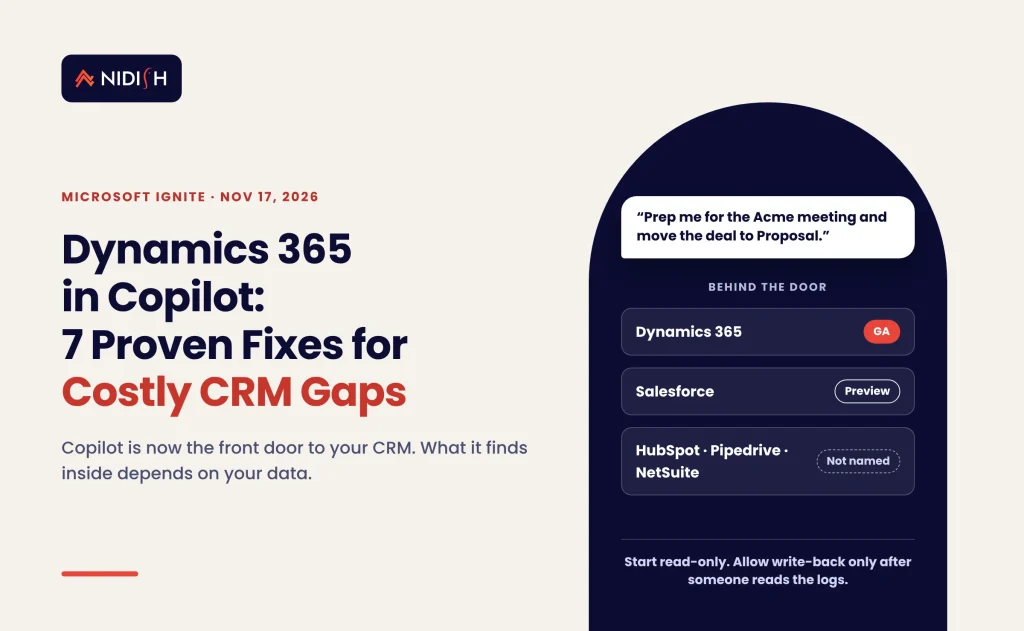
Microsoft just made Copilot the front door to your CRM. That sounds like a feature launch. It is really a data-quality test, and most revenue teams will fail it in the first month.
At Microsoft Ignite on November 17, 2026, Microsoft announced Dynamics 365 in Copilot: generally available plugins that let Copilot work inside Dynamics 365 Sales, Customer Service and the finance and operations apps. It also previewed Salesforce in Copilot. If your team lives in Microsoft 365, the assistant your reps open every morning can now read and update customer records.
This guide explains what shipped, who it affects, and the seven fixes that decide whether Dynamics 365 in Copilot saves time or creates expensive mess. Then it covers the question Microsoft skipped: what about HubSpot, Pipedrive and NetSuite?
Key takeaways
- Dynamics 365 in Copilot is GA for the Sales, Customer Service and ERP apps plugins, per Microsoft’s November 17, 2026 announcement.
- Salesforce in Copilot is in preview, with more than 38 prebuilt sales skills covering accounts, opportunities and pipeline.
- HubSpot, Pipedrive and NetSuite were not named. They reach Copilot through connectors, custom plugins or MCP servers instead.
- Pricing for the Dynamics plugins was not published. Microsoft describes Dynamics 365 agents as usage-based, so budget for consumption.
- Data quality decides the result. Copilot answers from your records. Duplicates, stale stages and loose permissions get amplified, not fixed.
Table of Contents
What Dynamics 365 in Copilot actually is
Dynamics 365 in Copilot is a set of Microsoft-built plugins that let Microsoft 365 Copilot act on Dynamics 365 data and processes. Microsoft calls Copilot “the new front door to Dynamics 365.” Each plugin packages the know-how for a specific job, plus the secure access and tools needed to do it.
The Dynamics 365 Ignite announcement lists three plugins as generally available:
- Sales plugin. Prepares meetings, researches accounts and updates opportunities from the Copilot chat.
- Customer Service plugin. Creates, updates, follows up and closes cases.
- ERP apps plugin. Covers finance and operations work, with expanded connectivity to Excel.
Microsoft says the Sales and Service plugins carry more than 57 business skills, and the ERP plugin more than 39 finance and operations skills. Its Copilot Ignite post gives slightly different per-plugin counts. Treat the exact numbers as moving targets. The direction is not moving: the CRM screen is becoming optional for many daily tasks.
Microsoft also said Dynamics 365 data is now natively integrated with Work IQ. That means a user can ask, in plain language, to update a customer record or prepare a journal entry. The work happens in Copilot, Cowork or Excel instead of the Dynamics interface.
What changed at Microsoft Ignite 2026 for CRM and ERP teams
Microsoft Ignite 2026 runs November 17–20 in San Francisco. Four announcements matter most for revenue and finance teams. Here they are, with their status as of November 18, 2026.
| Announcement | What it does | Status (Nov 18, 2026) |
|---|---|---|
| Dynamics 365 in Copilot (Sales, Service, ERP plugins) | Work on Dynamics records and processes from Copilot | Generally available |
| Salesforce in Copilot | 38+ prebuilt sales skills on accounts, opportunities, pipeline | Public preview (per Office Watch) |
| Agent 365 expansion | Governance for agents, including MCP servers, plugins and skills; connected platforms include Salesforce, OpenAI and Anthropic | Rolling out; Agent Accounts preview in December 2026 |
| Dynamics 365 Activate | Migration help: Activate for CRM (from Salesforce) is GA; Activate for ERP starts with SAP ECC | CRM GA; SAP ECC in private preview |
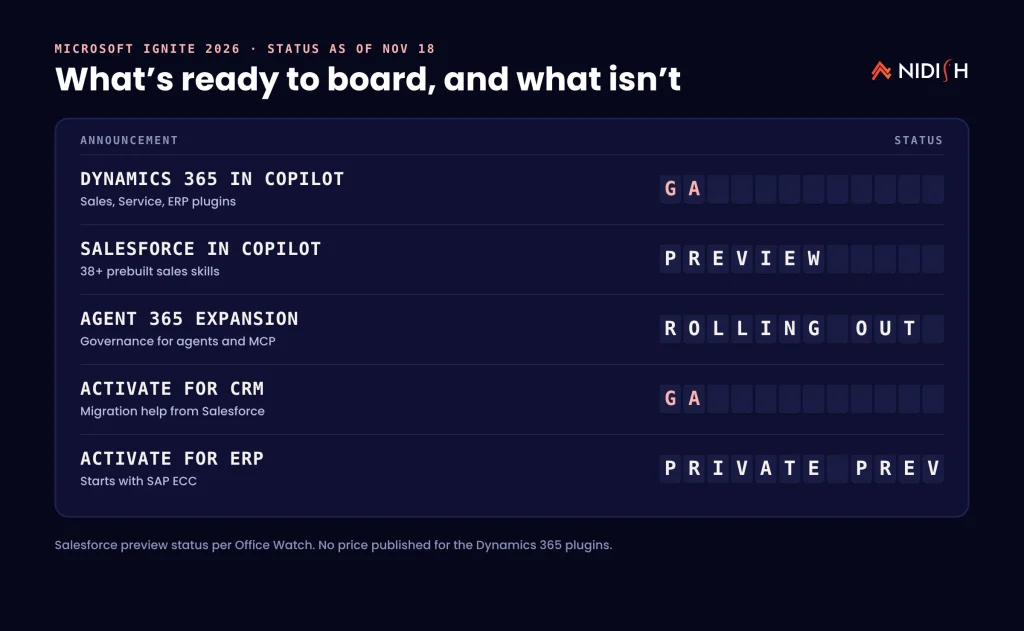
Not everything announced is usable today. Office Watch counted 215 separate features inside Microsoft’s 59 Ignite announcements and found only 76 of them generally available on day one. Read every Ignite headline with a status column next to it, as above.
The Salesforce piece goes further than a chat plugin. Office Watch lists Salesforce Data Federation with Microsoft Fabric as available now for customers with both Salesforce Data 360 and Fabric. SiliconANGLE describes it as two-way, zero-copy integration between the two platforms.
Who the new Copilot CRM plugins help, and who they don’t
The new Copilot CRM plugins help most if Dynamics 365 is already your system of record and your team works in Outlook, Teams and Excel all day. Those teams get the shortest path from “what’s happening with this account?” to an answer, with no context switching.
They help Salesforce shops second. Salesforce in Copilot is in preview, and the Fabric data federation gives analysts a cleaner route to combine CRM and Microsoft data. Expect gaps until the preview reaches general availability.
They help HubSpot, Pipedrive and NetSuite users least, at least for now. Microsoft’s Ignite posts did not name them. Their path into Copilot runs through Copilot connectors, a custom plugin built in Copilot Studio, or a vendor MCP server governed through Agent 365. That works, but someone has to build, secure and maintain it.
The mistake we see constantly is assuming the AI layer will tidy the CRM underneath it. It won’t. An assistant that summarises a pipeline full of stale deals just produces confident summaries of stale deals, faster.
Copilot CRM plugins vs connectors vs MCP: which route fits your stack
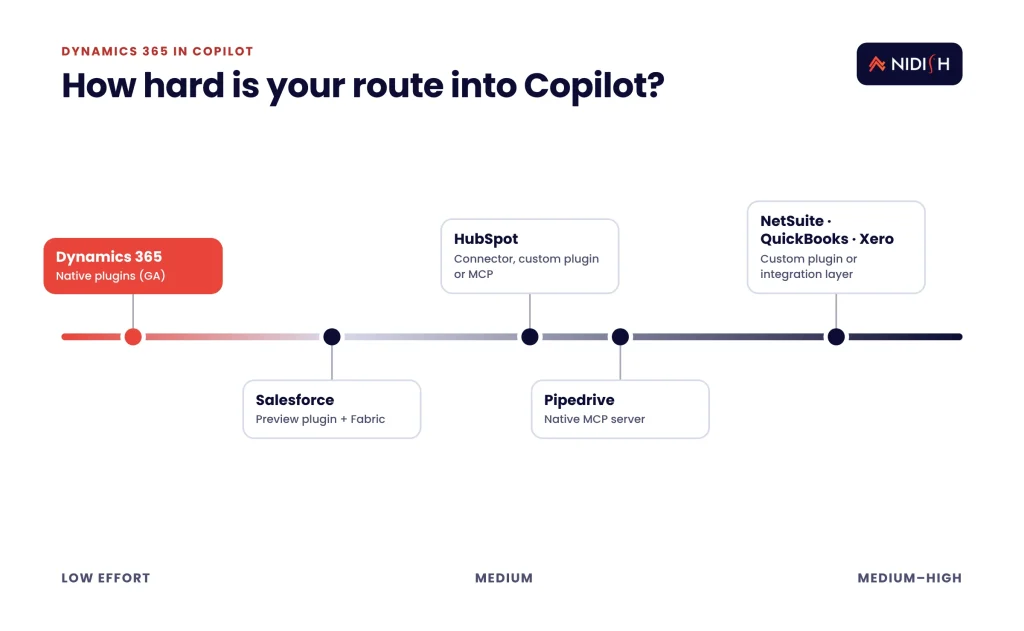
The right route depends on where your customer data lives. Native plugins are the lowest-effort option, but only for the systems Microsoft supports. Everyone else chooses between a connector, a custom plugin and an MCP server.
| Your CRM or ERP | Best route into Copilot today | Effort | Watch out for |
|---|---|---|---|
| Dynamics 365 Sales / Service / F&O | Dynamics 365 in Copilot plugins (GA) | Low | Usage-based agent costs; permission sprawl |
| Salesforce | Salesforce in Copilot (preview) plus Fabric data federation | Low–medium | Preview gaps; Data 360 and Fabric prerequisites |
| HubSpot | Copilot connector, custom Copilot Studio plugin, or MCP server | Medium | Field mapping, auth scopes, ownership of upkeep |
| Pipedrive | Pipedrive’s native MCP server (all plans, launched June 30, 2026) | Medium | Client support for MCP inside your Microsoft tenant |
| NetSuite / QuickBooks / Xero | Custom plugin or integration layer feeding Fabric | Medium–high | Financial data permissions and audit trails |
Pipedrive is a useful example of where the market is heading. Its native MCP server launch says it lets AI assistants such as ChatGPT and Claude search, create and update CRM records while respecting existing user permissions. Agent 365 now adds controls for MCP servers, so this route is becoming governable inside Microsoft tenants too.
7 proven fixes before you switch on Dynamics 365 in Copilot
These seven fixes come from the pattern we see on almost every CRM and ERP integration we inherit. Do them in order. Each one is cheaper before the rollout than after it.
1. Name one system of record per object
Decide which system owns accounts, contacts, deals, invoices and products. Copilot will happily read two conflicting versions and pick one. If HubSpot owns contacts and NetSuite owns customers, write that down and enforce it in the sync.
The fix: produce a one-page ownership map before any plugin or connector goes live. Our guide to REST API vs native integration for HubSpot and NetSuite shows how ownership drives sync design.
2. Clean duplicates and dead pipeline
Copilot’s answers are only as good as the records behind them. Duplicate companies split activity history. Deals that died six months ago still inflate pipeline summaries.
The fix: merge duplicates, close stale deals and archive inactive contacts. Run it as a project with an owner, not a weekend task. The CRM data migration checklist nobody follows applies here almost line for line.
3. Audit permissions before the AI does
Microsoft says Copilot works with secure access, and Pipedrive’s MCP server respects existing user permissions. That is good news and a warning. If your permissions are too loose today, an AI assistant makes that looseness searchable in plain English.
The fix: review roles, teams and field-level security. Remove “everyone sees everything” defaults, especially on compensation, pricing and finance objects.
4. Pick the route per system, not per vendor pitch
Use the table above. Dynamics gets the native plugins. Salesforce gets the preview plugin, with caution. Everything else needs a deliberate choice between a connector, a custom plugin and an MCP server.
The fix: score each system on data volume, write-back needs and how often its schema changes. Write-back is where custom work earns its cost.
5. Budget for usage, not just seats
Microsoft did not publish a price for the Dynamics 365 plugins. It describes a per-user subscription alongside a usage-based model, and lists Dynamics 365 agents among the usage-based services that Agent 365 Cost Management will track from December 2026.
The fix: set a monthly consumption ceiling during the pilot and confirm licensing with your Microsoft partner. Prices and inclusions can change, so treat any figure as “at time of writing.”
6. Pilot one job, measured against a baseline
Microsoft reports, from its own internal sales team, a greater than 25% reduction in seller effort on account planning, meeting prep and proposals. That is Microsoft’s Customer Zero data, not a promise for your team.
The fix: pick one job, such as meeting prep for enterprise accounts. Measure time per task for two weeks before and after. Expand only if your numbers move.
7. Log and govern every agent action
Agents that update records need an audit trail you can actually read. Agent 365 is expanding governance to MCP servers, plugins and skills, and Agent Accounts enter public preview in December 2026.
The fix: decide who can approve write actions, where logs live and how often someone reviews them. Make it part of your RevOps audit for lead-to-cash leakage, not a separate project.
If you’re weighing a Copilot route for HubSpot rather than Dynamics, we build and maintain these connections for revenue teams every week. See how we handle HubSpot integration
A 30-day pilot plan for Microsoft’s Copilot CRM plugins
A pilot should prove one measurable gain in a month, or stop. Here is the plan we use as a starting point with revenue teams. Adjust the weeks to your data volume.
- Week 1: baseline and scope. Pick one job, one team of five to ten users and one metric, such as minutes spent on meeting prep per enterprise account. Record two weeks of baseline data if you can.
- Week 2: read-only access. Turn on Dynamics 365 in Copilot (or your chosen route) with read access only. Collect every wrong or stale answer in a shared log. Each one usually points to a data problem, not an AI problem.
- Week 3: fix what the log shows. Merge the duplicates, correct the stage definitions and patch the sync delays that caused bad answers. This is where most of the value appears.
- Week 4: limited write-back and a decision. Allow write actions for a small set of fields, such as next steps and meeting notes. Compare the metric against baseline, then expand, adjust or stop.
Two rules keep the pilot honest. First, the people measuring the result should not be the people who bought the licence. Second, if the Copilot CRM plugins only save time because the team skipped a step they used to do, count that as a risk, not a win.
For HubSpot teams the same plan works with a custom route. The extra week usually goes on field mapping and auth scopes, which is why we scope Copilot CRM plugins and connector work together.
What Dynamics 365 in Copilot costs and takes to roll out
The licence price for the Dynamics 365 plugins was not published at Ignite. Expect a mix of per-user Copilot subscriptions and usage-based charges for agents. Confirm both with Microsoft or your licensing partner before you sign.
The real cost sits in the work around the licence. Based on the CRM and ERP projects we run, these are typical effort ranges, not quotes:
| Work item | Typical effort | Who usually owns it |
|---|---|---|
| System-of-record map and permissions review | 1–2 weeks | RevOps + IT |
| Duplicate cleanup and pipeline hygiene | 2–6 weeks, depending on volume | RevOps |
| Native plugin pilot (Dynamics only) | 2–4 weeks | Sales ops + Microsoft partner |
| Custom plugin or MCP route for HubSpot / NetSuite | 3–8 weeks | Integration partner |
| Governance setup and log review cadence | 1 week, then ongoing | IT + RevOps |
Microsoft Ignite 2026 did not change this part of the maths. The pattern holds across stacks. Teams that skip the first two rows spend the next quarter explaining why Copilot gave a rep the wrong renewal date.
Common Copilot rollout mistakes to avoid
Treating preview as production
Salesforce in Copilot and several Agent 365 features are previews. Build pilots on them, not processes.
Letting Copilot write before anyone reads the logs
Start read-only. Turn on write actions only after a named owner reviews what the agent would have changed.
Buying for the demo, not the data
The Ignite demos run on clean tenants. Yours has twelve years of imports, three lead-source fields and a “misc” pipeline.
Forgetting the ERP side
Sales asks Copilot about an account; finance owns the invoice status. If the CRM–ERP sync is a day behind, the answer is wrong. A clean lead-to-cash sync between HubSpot and NetSuite matters more than the AI on top of it.
Assuming one AI layer for everything
Many teams will run Copilot for Microsoft 365 work and a separate assistant elsewhere. Design the CRM so any AI can read it, which is the idea behind a composable, AI-ready CRM stack.
How Nidish approaches Copilot and CRM integration
We start with the data, not the assistant. On most builds we inherit, the CRM is the weakest link, so we map ownership, fix sync timing and tighten permissions before any AI touches a record.
For HubSpot, Salesforce and Pipedrive teams on Microsoft 365, we design the route into Copilot (connector, custom plugin or MCP) and keep it maintained as vendors change their APIs. We also tell you when the honest answer is to wait for a preview to reach general availability. If you’re still deciding on the CRM itself, our HubSpot vs Salesforce comparison is a good place to start.
Frequently asked questions
What is Dynamics 365 in Copilot?
Dynamics 365 in Copilot is a set of Microsoft plugins that let Microsoft 365 Copilot work directly with Dynamics 365 Sales, Customer Service and finance and operations apps. Announced at Ignite on November 17, 2026, the plugins package job-specific skills so users can update records, prep meetings or handle cases from Copilot.
Is Dynamics 365 in Copilot generally available?
Yes. Microsoft lists the Sales plugin, the Customer Service plugin and the ERP apps plugin as generally available as of November 17, 2026. Some related features, such as Salesforce in Copilot and Agent Accounts, are still in preview, so check the status of each feature before you plan a rollout around it.
How much does Dynamics 365 in Copilot cost?
Microsoft did not publish a price for the Dynamics 365 plugins at Ignite 2026. It describes a per-user Copilot subscription alongside usage-based charges, and lists Dynamics 365 agents among usage-based services. Confirm current licensing with Microsoft or your partner, because inclusions can change.
Does Copilot work with HubSpot?
Not through a native Microsoft plugin announced at Ignite 2026. HubSpot teams can connect Copilot through a Copilot connector, a custom plugin built in Copilot Studio, or an MCP server governed with Agent 365. Each route needs field mapping, permission scoping and ongoing maintenance.
What is Salesforce in Copilot?
Salesforce in Copilot is a Microsoft plugin with more than 38 prebuilt sales skills covering Salesforce accounts, opportunities and pipeline data. Office Watch lists it as a public preview. Microsoft also announced Salesforce Data Federation with Fabric for customers who have both Salesforce Data 360 and Microsoft Fabric.
Do I need to clean my CRM data before using Copilot?
Yes. Copilot answers from your records, so duplicates, stale deals and loose permissions show up directly in its answers. Merging duplicates, closing dead pipeline and reviewing access before rollout is the cheapest way to make the assistant useful and trusted.
Can Copilot update CRM records automatically?
Yes, within limits. Microsoft says Dynamics 365 data in Work IQ lets users update customer records in plain language, and Pipedrive’s MCP server supports creating and updating records. Start read-only, then allow write actions on a few fields once someone reviews the agent logs.
Where to start
Start with the boring part. Dynamics 365 in Copilot rewards teams whose data is already in order.
Map which system owns each record, clean the pipeline and lock down permissions. Then pilot one job against a baseline. The AI layer will keep changing every quarter; clean, well-governed CRM data keeps paying off no matter which assistant your team opens.
Book a 30 minute call. We’ll tell you honestly whether you need a native plugin, a custom Copilot route for HubSpot, or nothing at all yet.


 Blog
 Case Studies
 Career